
Indledning
The Symcode MJ-6706DA Handheld Barcode Scanner is a versatile and reliable device designed for efficient data capture. It supports multiple connection methods, including 2.4G wireless, Bluetooth, and USB wired, making it suitable for various business environments. Its ergonomic design ensures comfortable use, while robust construction provides durability for demanding applications.
Nøglefunktioner
- CMOS Optical Imaging Scanning Technology: Independently developed technology capable of identifying screen codes, incomplete codes, and fuzzy codes, effectively compensating for limitations of laser scanners.
- Wire-Free Communication: Offers 2.4G wireless communication with an effective range of 200 meters and Bluetooth 6.0 communication with an effective range of 30 meters.
- Alsidig scanning: Easily captures 1D and 2D codes from labels, paper, and digital displays (mobile phones, computers).
- Multiple Read Modes: Includes Manual trigger mode, Auto-sense mode, and Continuous mode. Capable of reading QR codes as small as 1x1 cm.
- Stor lagerkapacitet: Handheld scanner can save up to 10,000 codes, ideal for inventory management in businesses, shops, and warehouses.
- Bred kompatibilitet: Compatible with Windows, Mac, and Linux operating systems, and works seamlessly with software such as Quickbook, Word, Excel, and Novell.
- Overlegen holdbarhed: Constructed with strong ABS material, providing excellent shockproof functionality. Designed to withstand drops of 2.4 meters (8 ft) onto concrete floors. Integrated housing protects against heavy dust, ensuring performance in harsh working conditions.
Pakkens indhold
The Symcode MJ-6706DA Barcode Scanner package includes the following items:
- Barcode Scanner (Model: MJ-6706DA-Green)
- Opladningssnor
- Brugermanual

Image: Contents of the Symcode Barcode Scanner package, including the scanner, USB dongle for 2.4G wireless, and charging cable for wired connection.
Opsætning og tilslutning
Kablet tilslutning
To use the scanner in wired mode, connect the provided USB cable directly to your computer's USB port and the scanner's charging port. The cable serves as both a charging cable and a data transmission cable simultaneously. This mode does not require driver installation and supports fast charging for mobile phone chargers.

Image: The scanner can be used in wired mode by connecting it directly to a computer via USB cable.
2.4G trådløs forbindelse
For 2.4G wireless operation, insert the USB dongle into an available USB port on your computer. The scanner will automatically pair with the dongle, providing a stable wireless connection. This mode offers a long transmission distance, ideal for larger workspaces.
Bluetooth-forbindelse
To connect via Bluetooth, ensure your device (mobile phone, tablet, or computer) has Bluetooth enabled. The scanner can be paired directly with your mobile device without the need for additional drivers. This provides flexibility for on-the-go scanning.
Image: The scanner supports both 2.4G wireless via USB dongle and Bluetooth for mobile devices, offering flexible connectivity options.
Opladning
The scanner is equipped with a rechargeable Lithium Ion battery. A full charge takes approximately 2.5 hours and provides up to 30 hours of battery life. Use the provided charging cord to connect the scanner to a USB power source.
Driftstilstande
Instant Upload Mode
In Instant Upload Mode, scanned data is immediately transmitted to the connected device. This mode is suitable for real-time inventory updates or direct data entry into applications.
Offline lagringstilstand
The scanner can store up to 10,000 codes internally when operating in Offline Storage Mode. This is useful when working out of range of a connected device. Data can be uploaded later by scanning a specific setup code.

Image: Visual representation of the two primary operating modes: Instant Upload for immediate data transfer and Offline Storage for batch uploading.
Scanningsfunktioner
The Symcode scanner features advanced CMOS optical imaging technology, enabling it to decode a wide array of 1D and 2D barcodes, even if they are blurred, incomplete, or displayed on screens. It supports over 180 configuration options, including adding prefixes/suffixes or deleting characters.
Supported Barcode Types:
- 1D stregkoder: UPC/EAN, UPC/EAN with Supplemental, UCC/EAN 128, Code 39, Code 39 Full ASCII, Trioptic Code 39, Code 128 Full ASCII, Codabar, Interleaved 2 of 5, Discrete 2 of 5, Code 93, MSI, Code 11, RSS variants, Chinese 2 of 5, and extended ASCII support for Code 128 barcodes.
- 2D stregkoder: PDF417, QR Code, Data Matrix.
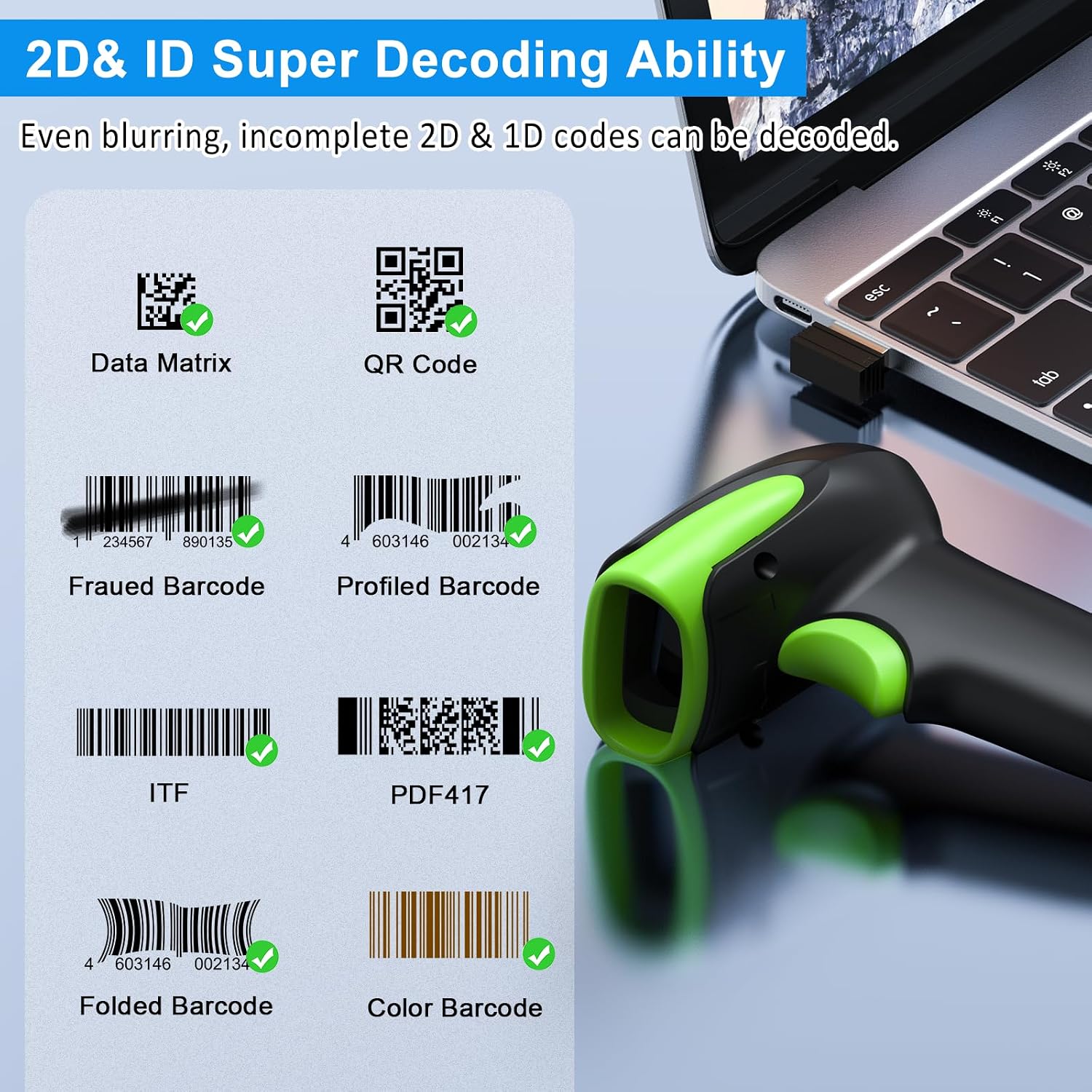
Image: The scanner's super decoding ability is demonstrated with various barcode types, including damaged or unconventional ones. Examples include: Data Matrix, QR Code, Frauded Barcode (e.g., 1234567890135), Profiled Barcode (e.g., 4603146002134), ITF, PDF417, Folded Barcode (e.g., 20123456789), and Color Barcode (e.g., 00614141999996).
Ydeevne og holdbarhed
Transmissionsafstand
The 2.4G wireless connection provides an impressive transmission distance of up to 200 meters in open air and 60 meters indoors, allowing for flexible movement within your workspace.

Image: The scanner boasts a long transmission distance, reaching up to 200 meters in open environments.
Holdbarhed
Built with strong ABS material, the Symcode barcode reader is designed for superior durability. It features an anti-drop grade IP67 rating, allowing it to withstand multiple drops from 2.5 meters (8 ft) onto concrete floors. Its integrated housing also provides dustproof protection, ensuring reliable operation in challenging conditions.

Image: The scanner's robust construction ensures it is rugged and durable, designed to withstand significant impacts and drops.
Kompatibilitet
The Symcode barcode scanner offers broad compatibility with various operating systems and software applications, making it a versatile tool for different setups.
- Operativsystemer: Windows, Mac OS, Linux, iOS, Android.
- Software: Works with common applications such as Quickbook, Word, Excel, and Novell.

Image: The scanner is compatible with a wide range of operating systems, including iOS, Android, Windows, Mac OS, and Linux.
Specifikationer
| Feature | Detalje |
|---|---|
| Produktdimensioner | 6.89 x 4.49 x 3.31 tommer |
| Varens vægt | 8.8 ounce |
| Modelnummer | MJ-4000-B |
| Batterier | 1 lithium-ion batteri (medfølger) |
| Input bindtage | DC5V±0.25v |
| Strøm | 25 mA (work); 95 mA (instantaneous) |
| Decoding Speed | 100 gange / sek |
| Wireless Range | 40m (void) - Note: Product description states 200m for 2.4G, 30m for Bluetooth. 'void' likely means open space. |
| Opladningstid | 2.5 timer |
| Batterilevetid | 30 timer |
| Forbindelsesteknologi | 2.4G Wireless; Bluetooth; USB Wired |
| Fabrikant | symbolkode |
Opretholdelse
To ensure the longevity and optimal performance of your Symcode Barcode Scanner, follow these maintenance guidelines:
- Rensning: Regularly wipe the scanner's exterior with a soft, dry, lint-free cloth. For stubborn dirt, a slightly damp cloth can be used, but ensure no moisture enters the scanning window or ports. Do not use abrasive cleaners or solvents.
- Opbevaring: Store the scanner in a cool, dry place away from direct sunlight and extreme temperatures. When not in use for extended periods, ensure it is fully charged before storage and periodically recharged to maintain battery health.
- Håndtering: Although the scanner is designed to be durable, avoid unnecessary drops or impacts. Handle the USB cable and dongle carefully to prevent damage to connectors.
Fejlfinding
If you encounter issues with your Symcode Barcode Scanner, try the following common troubleshooting steps:
- Scanneren svarer ikke: Ensure the scanner is charged. If using wireless mode, check that the USB dongle is properly inserted or that Bluetooth is paired correctly. Try restarting the scanner and the host device.
- Kan ikke scanne stregkoder: Verify that the barcode is not damaged or excessively blurred. Ensure the scanner's window is clean. Check if the scanner is in the correct operating mode (e.g., not in sleep mode).
- Data overføres ikke: In wireless modes, check the connection range. For wired mode, ensure the USB cable is securely connected. Confirm that the host software is ready to receive input.
- Bluetooth afbrydelse: Re-pair the scanner with your device. Ensure no other Bluetooth devices are causing interference.
- Forkert dataoutput: If the scanner is adding extra characters or missing some, refer to the full user manual (PDF) for configuration options to adjust prefix/suffix settings.
Garanti og support
For detailed warranty information and further technical support, please refer to the official Symcode documentation. A comprehensive User Manual in PDF format is available for download, providing in-depth instructions and advanced configuration options.
You can access the official PDF User Manual her.
For additional product information or to explore other Symcode products, visit the official Symcode Store on Amazon: Symcode Store.