
SHARP LC-40U45
SHARP AQUOS LC-40U45 40-inch 4K HDR LCD TV User Manual
Model: LC-40U45 | Brand: SHARP
1. Introduktion
This manual provides essential information for the safe and efficient operation of your SHARP AQUOS LC-40U45 40-inch 4K HDR LCD TV. Please read these instructions thoroughly before using the product and retain them for future reference.
The LC-40U45 features a 4K low-reflection panel to minimize glare, 120-speed backlight technology for smooth motion, and the AQUOS 4K-Master Engine PRO II for high-definition image processing. Experience enhanced audio with the bass-reflex speaker box, Sound by ONKYO collaboration, and Eilex PRISM technology. The TV also includes a swivel stand for flexible viewing vinkler.
2. Sikkerhedsoplysninger
Følg altid grundlæggende sikkerhedsforanstaltninger, når du bruger dette fjernsyn, for at mindske risikoen for brand, elektrisk stød og personskade.
- Udsæt ikke TV'et for regn eller fugt.
- Bloker ikke ventilationsåbninger.
- Sørg for korrekt jordforbindelse af strømstikket.
- Tag stikket ud af tv'et under tordenvejr eller når det ikke bruges i længere perioder.
- Hold små dele og batterier utilgængeligt for børn.
3. Hvad er der i æsken
Kontroller, at alle følgende dele følger med dit fjernsyn:
- SHARP AQUOS LC-40U45 4K HDR LCD TV
- Fjernbetjening (med 2 AAA-batterier)
- Strømledning
- Bordstativ (hvis relevant)
- AV Terminal Conversion Cable
- Brugervejledning (dette dokument)
4. Opsætning
4.1 Physical Placement and Dimensions
Ensure the TV is placed on a stable surface or mounted securely. The dimensions of the TV with the stand are approximately 90.1 cm (width) x 27.1 cm (depth) x 55.8 cm (height). The weight is approximately 20.5 kg.

Figure 4.1: TV dimensions (Width: 90.1cm, Height: 55.8cm, Depth: 27.1cm) and recommended viewing distance of approximately 150cm.
4.2 Tilslutning af eksterne enheder
Your TV offers various connection ports on the rear panel for external devices.

Figure 4.2: Rear panel connections including HDMI inputs, USB ports, headphone jack, AV input, LAN port, and antenna inputs.
- HDMI-indgange (x4): Connect Blu-ray players, game consoles, or other HDMI-compatible devices. Input 1 supports HDR.
- USB-porte (x2): Connect USB storage devices for media playback or external HDD for recording.
- PC Input (x1): Tilslut en computer.
- LAN Port (10BASE-T/100BASE-TX): Til kablet internetforbindelse.
- Headphone Jack (3.5mm stereo mini-jack): Til privat lytning.
- AV-indgang: Use the provided AV terminal conversion cable for older devices.
- Antenne indgange: Connect terrestrial digital and BS/CS digital antennas.
- B-CAS Card Slot: Insert the B-CAS card to decrypt digital broadcasts.
4.3 Netværksforbindelse
The TV supports both wired and wireless (Wi-Fi) network connections. Built-in Wi-Fi allows for easy connection to your home network.
4.4 Swivel Stand
The TV features a swivel stand that allows you to adjust the screen angle left and right by 30 degrees. This provides flexibility for optimal viewing from various positions in the room and makes accessing rear ports easier for cleaning or connecting devices.

Figure 4.3: The swivel stand allows for 30-degree left/right adjustment, simplifying cleaning and access to rear connections.
5. Betjening af dit TV
5.1 Fjernbetjeningsfunktioner
Use the provided remote control to navigate menus, change channels, adjust volume, and access smart TV features. The remote includes dedicated buttons for popular streaming services.
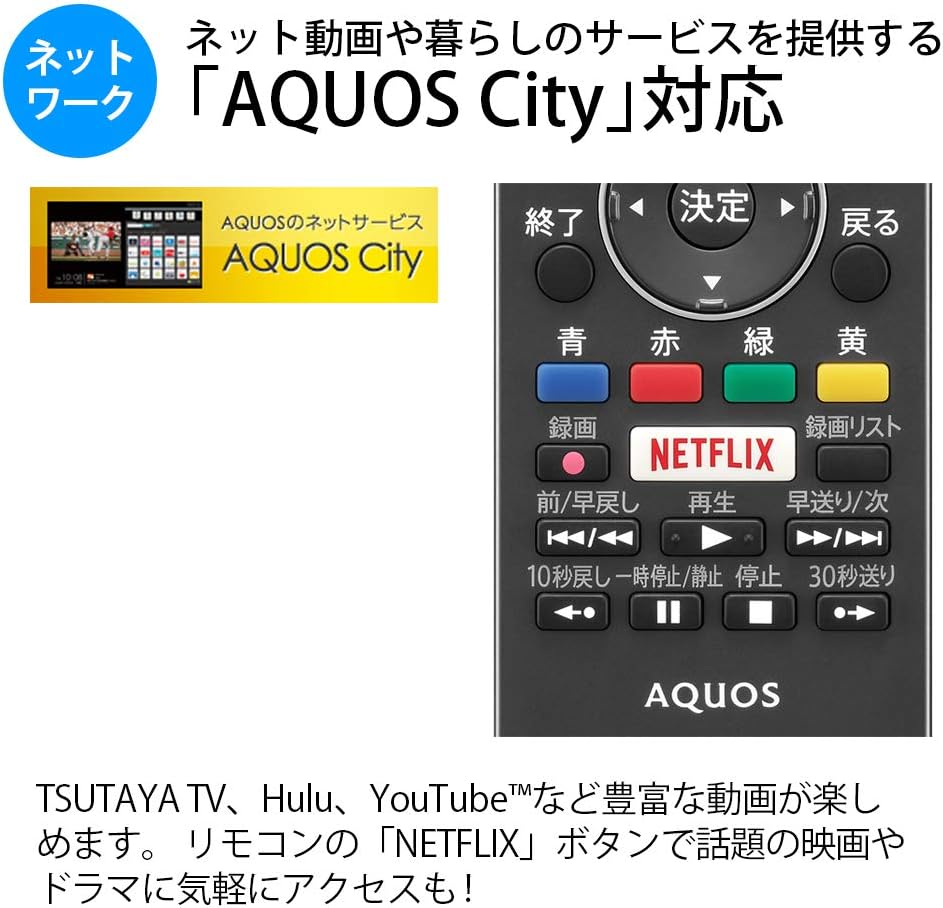
Figure 5.1: Remote control with a dedicated Netflix button and a view of the AQUOS City interface.
5.2 Smart TV Features (AQUOS City)
Your AQUOS TV supports "AQUOS City," providing access to various internet video services and lifestyle applications. Enjoy streaming content from platforms like NETFLIX, YouTube, Hulu, and TSUTAYA TV. Simply press the dedicated "NETFLIX" button on your remote for quick access.
5.3 4K Image Processing
The AQUOS 4K-Master Engine PRO II is a high-definition image processing circuit specifically designed for 4K LCD panels. It reduces noise and enhances contrast for a more immersive 4K viewoplevelse.

Figure 5.2: The AQUOS 4K-Master Engine PRO II enhances 4K images by reducing noise and improving contrast.
5.4 Lydfunktioner
The TV is equipped with a bass-reflex type speaker box, developed in collaboration with ONKYO, to deliver high-quality sound with enhanced high-frequency pressure and rich bass. Eilex PRISM technology expands the listening position and creates a sense of audio depth.

Figure 5.3: Illustration of the bass-reflex speaker box, designed for superior sound quality.
5.5 Low-Reflection Panel
The 4K low-reflection panel minimizes reflections from room lighting and external light sources, ensuring clear and comfortable viewing even in bright environments.

Figure 5.4: Visual comparison demonstrating how the low-reflection panel reduces glare compared to a conventional LCD panel.
5.6 Video Mirroring (Fire TV)
You can mirror your smartphone screen to the TV using Fire TV mirroring. This allows you to display photos, videos, or smartphone apps on the large TV screen. To use this feature, connect a Fire TV device to one of the TV's HDMI ports and ensure both devices are on the same Wi-Fi network. Refer to your Fire TV device's manual for specific mirroring instructions.
6. Vedligeholdelse
For at sikre dit TV's levetid og optimale ydeevne skal du følge disse vedligeholdelsesretningslinjer:
- Rengøring af skærmen: Tør forsigtigt skærmen af med en blød, fnugfri klud. Ved genstridige mærker, tør let afampRengør kluden med vand eller en specialiseret skærmrens. Sprøjt ikke væske direkte på skærmen.
- Rengøring af kabinettet: Brug en blød, tør klud til at tørre tv-kabinettet af. Undgå at bruge slibende rengøringsmidler eller opløsningsmidler.
- Ventilation: Sørg for, at ventilationsåbningerne på tv'et ikke er blokerede for at forhindre overophedning.
- Strømledning: Kontrollér regelmæssigt strømkablet for skader. Kontakt kvalificeret servicepersonale, hvis det er beskadiget.
7. Fejlfinding
Hvis du støder på problemer med dit tv, kan du se følgende almindelige problemer og løsninger:
| Problem | Mulig årsag/løsning |
|---|---|
| Ingen strøm | Check if the power cord is securely plugged into the TV and the wall outlet. Press the power button on the remote or TV. |
| Intet billede, men der er lyd | Sørg for, at den korrekte inputkilde er valgt. Kontroller kabelforbindelserne til eksterne enheder. |
| Ingen lyd, men der er billede | Check volume level and mute status. Ensure audio cables are correctly connected. |
| Fjernbetjening virker ikke | Udskift batterierne. Sørg for, at der ikke er nogen forhindringer mellem fjernbetjeningen og tv'ets IR-sensor. |
| Kan ikke oprette forbindelse til Wi-Fi | Check your Wi-Fi router and network settings. Ensure the TV is within range of the router. |
8. Specifikationer
| Feature | Specifikation |
|---|---|
| Skærmstørrelse | 40 tommer |
| Displayteknologi | LCD |
| Opløsning | 3840 x 2160 (4K) |
| HDR-understøttelse | HDR compatible (HDMI Input 1) |
| Opdateringshastighed | 120 Hz (120 Speed backlight technology) |
| Tunere | Terrestrial Digital x3, BS/CS Digital x3 |
| Lydudgang | 20W (10W + 10W) |
| Højttalerfunktioner | Bass-reflex type, Sound by ONKYO, Eilex PRISM |
| HDMI porte | 4 |
| USB-porte | 2 (USB-HDD recording compatible) |
| PC-indgang | 1 |
| Netværksforbindelse | Wi-Fi built-in, LAN port |
| Trådløs type | Bluetooth, Wi-Fi, Miracast |
| Strømforbrug | Approx. 106W (Annual: 96Kwh/year) |
| Dimensioner (B x D x H) | 90.1 x 27.1 x 55.8 cm (med stativ) |
| Vægt | 20.5 kg |
| VESA-monteringsstandard | 600 x 400 mm |
| Recommended Network Services | NETFLIX, YouTube, Hikari TV 4K, Hulu, TSUTAYA TV |
9. Garanti og support
For warranty information, please refer to the warranty card included with your product or visit the official SHARP website. For technical support, troubleshooting assistance, or service requests, please contact SHARP customer service. Contact details can be found on the official SHARP webwebstedet eller i din produktdokumentation.
Ask a question about this manual
Ask about setup, troubleshooting, compatibility, parts, safety, or missing instructions. Manuals+ will review the question and use this page’s manual context to help answer it.