
Indledning
The Bosch Smart Home Controller serves as the central hub for your Bosch Smart Home system. It facilitates communication between all connected Bosch Smart Home devices and consolidates all system information. This manual provides essential information for setting up, operating, and maintaining your controller, ensuring optimal performance and security for your smart home environment.
Hvad er inkluderet
Kontroller venligst, at alle komponenter er til stede i pakken:
- 1x Bosch Smart Home Controller
- 1x strømforsyningsenhed
- 1x Network Cable (RJ45)
- 1x Wall Mount with Fastening Material
- 1x Installation Manual (this document)
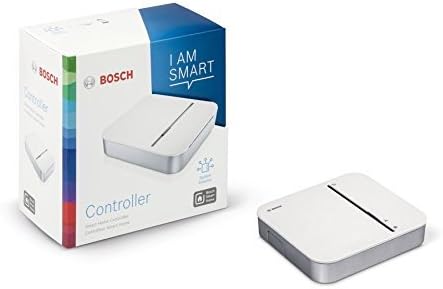

Video: This short video demonstrates the Bosch Smart Home Controller and its included components, highlighting its compact design and essential accessories for setup.
Opsætning
1. Første tilslutning
Connect the Bosch Smart Home Controller to your internet router using the provided network cable (RJ45). Plug the power supply unit into the controller and then into a standard power outlet. The controller will power on automatically.

2. Appinstallation og parring
Download the Bosch Smart Home app from your device's app store (available for iOS and Android). Follow the in-app instructions to pair your controller and integrate your smart home devices. The app provides a user-friendly interface for managing your system, creating routines, and monitoring device status.

Betjeningsvejledning
Systemet er slutview
The controller organizes communication between all linked Bosch Smart Home devices. It ensures guaranteed system operation even during sudden internet outages at home, thanks to standard local data storage. This means your essential smart home functions can continue to operate without an active internet connection.
App kontrol
Control your Smart Home system easily with a tap of your finger in the Bosch Smart Home app. The app allows you to manage individual devices, create customized scenarios, set schedules, and monitor your home's status from anywhere.

Nøglefunktioner
- Central Hub: Acts as the heart of the Bosch Smart Home system, coordinating all connected devices.
- Automatic Communication: Organizes communication between all paired Bosch Smart Home devices and bundles all information.
- Offline-funktionalitet: Ensures system functionality even with temporary internet outages derhjemme.
- Datasikkerhed: Features standard local data storage for enhanced data security and privacy.
- Intuitiv kontrol: Offers simple operation via the user-friendly Bosch Smart Home app.


Fejlfinding
Fælles problemer og løsninger
Enheden forbinder ikke
Ensure the controller is powered on and securely connected to your internet router. Check your Wi-Fi network status and ensure it is operational. Restart the controller by unplugging it for 10 seconds and then plugging it back in. Attempt the pairing process again through the Bosch Smart Home app. For specific device pairing instructions, refer to the app's help section.
Internet Outage Indvirkning
The Bosch Smart Home system is designed to function locally for basic operations during internet outages. This means devices can still communicate within your home network. However, remote access via the app and certain cloud-dependent features will be unavailable until internet connectivity is restored. Ensure your local network is functioning correctly.
App problemer
If the Bosch Smart Home app is unresponsive or experiencing glitches, try restarting the app or your smartphone. Ensure the app is updated to the latest version from your device's app store. For persistent issues, visit the Bosch Smart Home support webwebstedet eller kontakt deres kundeservice for yderligere assistance.
Specifikationer
| Ejendom | Værdi |
|---|---|
| Farve | Hvid |
| Mærke | Bosch |
| Voltage | 230 volt |
| Produktmål (L x B x H) | 35L x 135B x 120H millimeters |
| Materiale | Akryl |
| UPC | 783320405174 |
| Varetypenavn | Smart Home Controller |
| Inkluderede komponenter | Controller, Power Supply, Network Cable (RJ45), Wall Mount with Fastening Material, Installation Manual |
| Antal enheder | 1 |

Garanti og support
For detailed warranty information, technical support, or service requests, please visit the official Bosch Smart Home website or contact their customer service directly. It is recommended to keep your purchase receipt and the product serial number handy for faster assistance.
Official Bosch Smart Home Webwebsted: www.bosch-smarthome.com