
1. Introduktion
This manual provides detailed instructions for the installation, operation, and maintenance of your A-ZONE POE Security Camera Kit, model AZJ-015. This system is designed to provide reliable surveillance with high-resolution imaging and advanced features for enhanced security.
Key features include 5MP ultra-high-definition cameras, integrated audio recording, efficient H.265 video compression, and IP67 weather resistance for outdoor use. The kit includes an NVR (Network Video Recorder) with a 2TB hard disk drive for continuous recording.
2. Produktet er slutview
The A-ZONE POE Security Camera Kit AZJ-015 consists of multiple 5MP POE cameras and a central Network Video Recorder (NVR) with a pre-installed 2TB hard drive. The Power over Ethernet (POE) technology simplifies installation by allowing both power and data transmission over a single Ethernet cable.
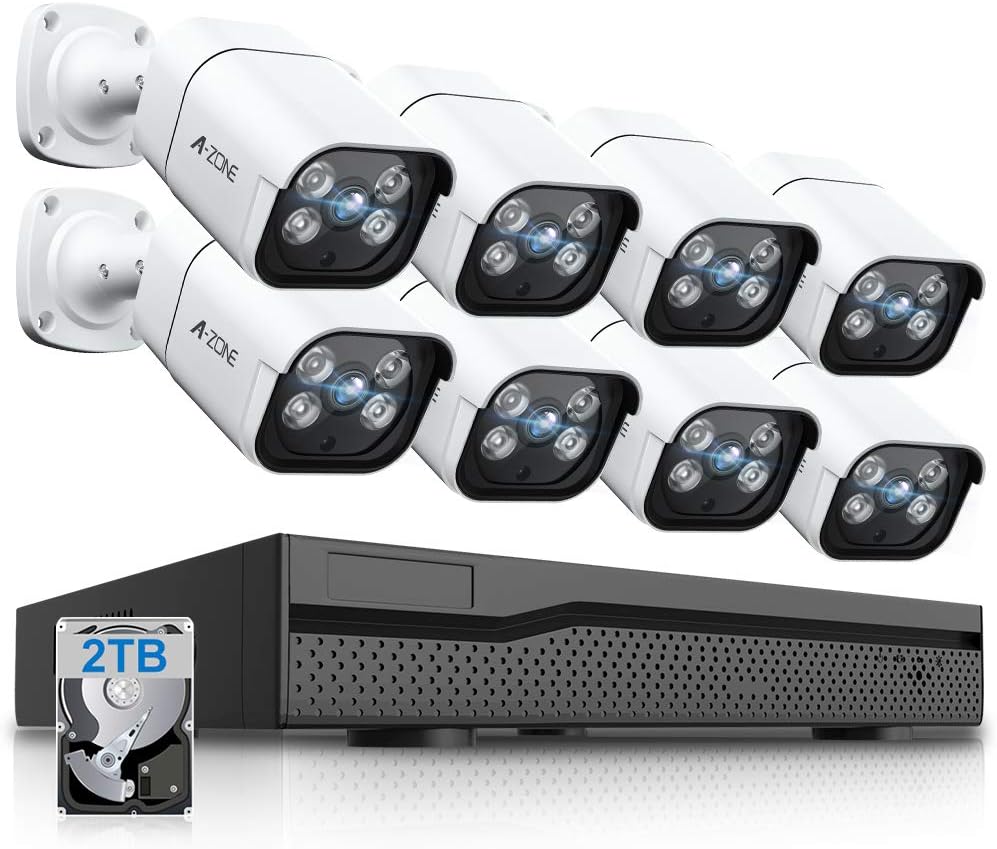
Figure 2.1: A-ZONE POE Security Camera Kit showing 8 cameras, NVR, and 2TB HDD.
3. Opsætningsvejledning
Follow these steps to set up your A-ZONE POE Security Camera Kit:
- Udpak komponenter: Carefully remove all cameras, the NVR, power adapter, and accessories from the packaging.
- Tilslut kameraer: Connect each POE camera to the POE ports on the back of the NVR using standard Ethernet (LAN) cables. The POE technology will provide both power and video signal.
- Tilslut NVR til skærm: Tilslut NVR'en til en skærm ved hjælp af et HDMI- eller VGA-kabel.
- Connect NVR to Network (Optional): Til fjernbetjening viewing, connect the NVR to your router using an Ethernet cable.
- Tænd: Connect the NVR power adapter to the NVR and then to a power outlet. The system will boot up automatically.
- Indledende konfiguration: Follow the on-screen prompts to complete the initial setup, including setting a password and configuring network settings if connected to the internet.
4. Betjeningsvejledning
4.1 Optagelse i høj opløsning
The cameras in this kit feature 5-megapixel (5MP) resolution, providing images that surpass Full HD quality. The F=3.6MM lens ensures a wide field of view and captures clear, detailed footage.

Figur 4.1: Nærbillede view of an A-ZONE 5MP camera, highlighting its high-resolution capability.
4.2 Audio Recording and Two-Way Audio
Each camera is equipped with a built-in audio pickup, eliminating the need for separate audio recording devices. This allows for simultaneous video and audio recording within a 10-meter range. When connected to a monitor via HDMI or VGA, you can experience real-time audio and playback recorded footage with sound, providing comprehensive surveillance evidence.

Figure 4.2: Illustration of the two-way audio function, enabling communication through the camera system.
4.3 Bevægelsesdetektion og advarsler
The system features smart AI human detection. When motion is detected within the surveillance area, the device triggers an alarm and simultaneously begins audio recording. This function helps in monitoring your property and can send alert notifications to your mobile application, allowing you to check the status of your home even when you are away. The AI detection minimizes false alarms from non-human movements like rain, snow, light changes, or swaying curtains.

Figure 4.3: Smart AI human detection feature, identifying human movement and sending alerts to a connected smartphone.
4.4 Dag- og nattesyn
Equipped with IR-CUT technology and infrared LEDs, the cameras automatically switch between day and night modes based on ambient light conditions. This ensures clear imaging even in complete darkness, with an effective night vision range of approximately 30 meters. This feature provides reliable security monitoring around the clock.

Figure 4.4: Day and night vision comparison, demonstrating the camera's ability to capture clear images in varying light conditions.
4.5 Fjernadgang
The system supports remote operation and viewing via smartphone or PC. By installing the dedicated application and logging in with your account, you can monitor live feeds and playback recorded footage from anywhere, allowing for shared access among family members or colleagues.

Figure 4.5: Remote access capabilities, enabling users to monitor their property from various locations using smart devices.
4.6 Videokomprimering (H.265)
The system utilizes advanced H.265 video compression technology, which offers approximately twice the compression performance of traditional H.264. This significantly reduces storage requirements and network bandwidth usage, allowing for stable operation even with ultra-high-resolution images. It also improves processing speed by 80%, enabling smoother viewing even with slower internet connections. The included 2TB hard drive can record approximately 20 days (480 hours) of 5MP footage from 8 cameras simultaneously, with an overwrite function for continuous 24/7 recording.

Figure 4.6: Explanation of H.265 video compression, demonstrating its efficiency in saving storage space compared to H.264.
5. Vedligeholdelse
The cameras are designed with an IP67 waterproof and dustproof rating, making them suitable for all-weather outdoor use in temperatures ranging from -20°C to 60°C. This robust construction ensures durability and reliable performance in various environmental conditions.
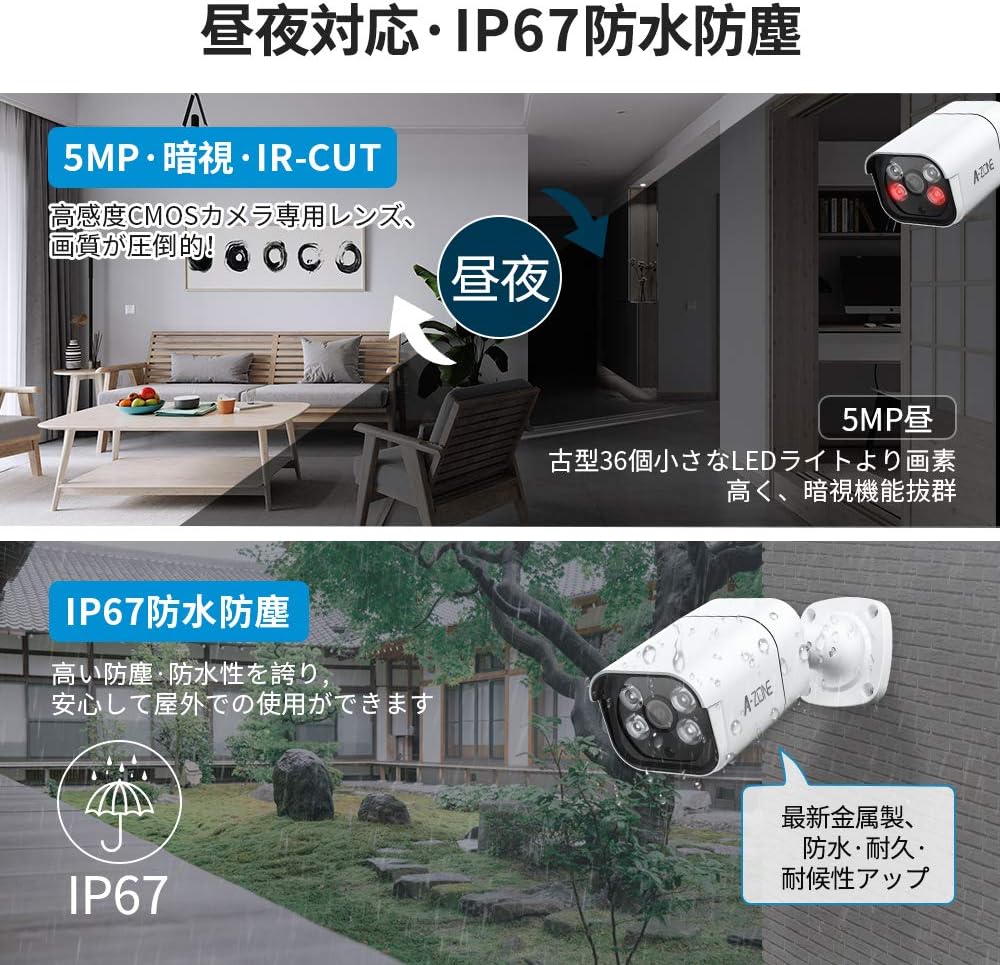
Figure 5.1: IP67 weather resistance for outdoor camera placement, ensuring protection against elements.
For at opretholde optimal ydeevne:
- Rengør kameralinserne regelmæssigt med en blød kludamp klud til at fjerne støv og snavs.
- Sørg for, at alle kabelforbindelser er sikre og fri for skader.
- Periodically check the NVR's ventilation to prevent overheating.
6. Fejlfinding
If you encounter issues with your A-ZONE POE Security Camera Kit, refer to the following common troubleshooting tips:
- Ingen billedvisning:
- Check all power connections to the NVR and ensure the power adapter is functioning.
- Verify that the HDMI/VGA cable connecting the NVR to the monitor is securely attached.
- Ensure LAN cables connecting cameras to the NVR are properly seated.
- Dårlig billedkvalitet:
- Rengør kameralinsen for eventuelle pletter eller snavs.
- Adjust camera position to avoid direct light sources or reflections.
- Check NVR display settings for resolution output.
- Problemer med fjernadgang:
- Ensure the NVR is connected to your network router via an Ethernet cable.
- Verify your smartphone or PC has a stable internet connection.
- Check firewall settings on your router; port forwarding may be required (consult your router manual or ISP).
- Recorder Bugs or UI Language:
- Ensure the NVR firmware is up to date. Check the manufacturer's webwebsted for opdateringer.
- While the UI may have some translation quirks, most functions are intuitive. Refer to this manual for clarification on specific features.
- Problemer med strømforsyning:
- If the NVR experiences intermittent power loss or fails to power on, contact customer support.
For further assistance, please contact A-ZONE customer support.
7. Specifikationer
| Feature | Specifikation |
|---|---|
| Mærke | A-ZONE |
| Modelnummer | AZJ-015 |
| Videooptagelsesopløsning | 5MP (5 Million Pixels) |
| Linse | F=3.6MM |
| Billedkomprimering | H.265+, H.265, H.264+, H.264 |
| Forbindelsesteknologi | Kablet (POE) |
| Vandtæt vurdering | IP67 |
| Driftstemperatur | -20°C til 60°C |
| Night Vision Range | Approx. 30m (Infrared) |
| Harddiskkapacitet | 2TB (Expandable up to 8TB) |
| Optagefunktioner | Audio Recording, Motion Detection, IR-CUT, Night Vision |
| Systemkonfiguration | 8-Channel NVR + 8 Cameras |
| Pakkedimensioner | 43.2 x 32.4 x 30.8 cm |
| Pakkevægt | 10.48 kg |
8. Garanti og support
The A-ZONE POE Security Camera Kit AZJ-015 comes with a 2 års garanti. We are committed to providing reliable products and excellent customer service.
For any inquiries, technical assistance, or support during use, please do not hesitate to contact our professional technical support team:
- Japanese Domestic Phone: 050-4561-2930
- Email (24-hour reception): service@azone-tech.com
- LINJE ID: azone1234
Our team is available to assist you with any questions or issues you may encounter.