
1. Introduktion
This manual provides essential instructions for the safe and efficient operation of your beFree Sound BFS-6445 Projection Party Light Dome Subwoofer Bluetooth Portable Speaker. Please read this manual thoroughly before using the product and retain it for future reference.
The beFree Sound BFS-6445 is a versatile portable speaker system featuring a 10-inch subwoofer, Bluetooth connectivity, USB/SD input, FM radio, and a unique projection light dome. It includes a wireless microphone and a remote control for enhanced functionality.
2. Produktet er slutview
2.1 Nøglefunktioner
- 800 watt peak-effekt
- 10-inch Subwoofer for deep bass
- 7" x 4.5" LED Light Projection Dome
- Trådløs Bluetooth-forbindelse
- USB and SD Card Input for media playback
- FM radio tuner
- Microphone and Guitar Inputs with priority switch
- Bass, Treble, Echo, Mic Volume, and Guitar Volume Controls
- Built-in Side Handles, Rolling Handle, and Wheels for portability
- Includes Wireless Microphone and Remote Control
2.2 Højttalerkomponenter og betjeningselementer
Refer to the image below for a visual guide to the speaker's main components and control panel.

Figur 1: Front view of the beFree Sound BFS-6445 speaker, showing the projection light dome, control panel, 10-inch subwoofer grille, and included wireless microphone and remote control. The inset images highlight the light dome's color variations (green, blue, red), USB/SD card slots, Bluetooth logo, and FM radio icon.
The control panel, located on the top front of the speaker, provides access to various functions including volume, input selection, equalization, and light dome control.
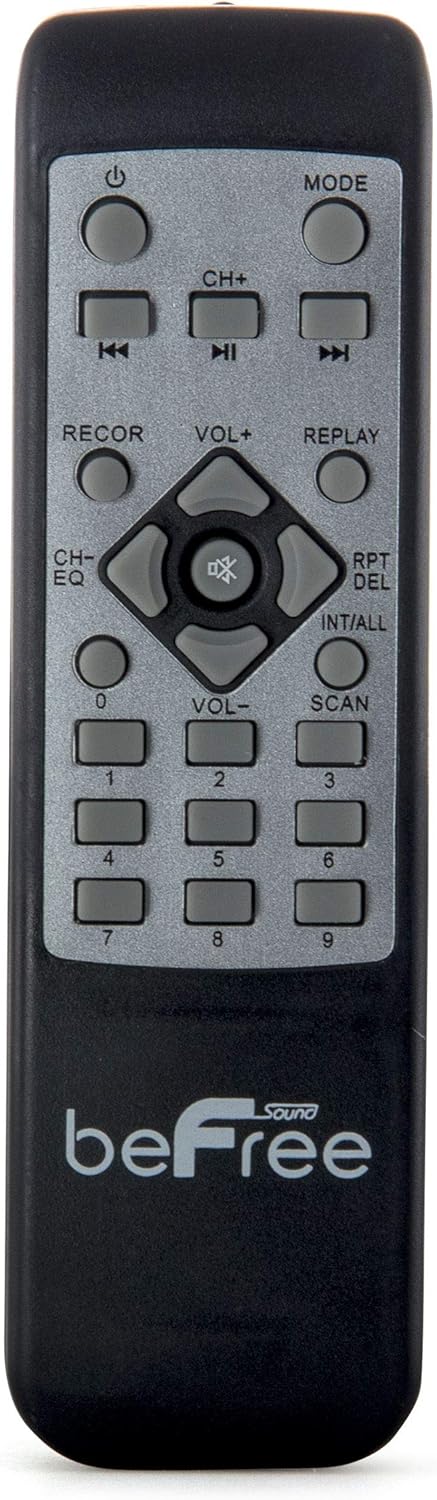
Figur 2: Nærbillede view of the beFree Sound BFS-6445 remote control. It features buttons for power, mode selection, track navigation, volume adjustment, EQ, record, replay, scan, and numerical input.
The remote control allows for convenient operation of the speaker from a distance.
3. Opsætning
3.1 Udpakning og placering
- Tag forsigtigt højttaleren og alt tilbehør ud af emballagen.
- Placer højttaleren på en stabil, plan overflade. Sørg for tilstrækkelig ventilation omkring enheden.
- The speaker is equipped with rolling wheels and an extendable handle for easy transport.
3.2 Strømtilslutning
- Connect the provided AC power cord to the speaker's AC input port (AC 100-240V, 50/60Hz).
- Sæt den anden ende af netledningen i en passende stikkontakt.
- The speaker can operate on AC power.
3.3 Battery Installation (Remote Control & Wireless Microphone)
- Fjernbetjening: Open the battery compartment on the back of the remote control. Insert 2 x AAA batteries, ensuring correct polarity (+/-). Close the compartment.
- Trådløs mikrofon: Open the battery compartment on the microphone. Insert 2 x AA batteries, ensuring correct polarity (+/-). Close the compartment.
4. Betjeningsvejledning
4.1 Tænd/sluk
Tryk på MAGT knappen på kontrolpanelet eller fjernbetjeningen for at tænde eller slukke højttaleren.
4.2 Valg af inputtilstand
Tryk på MODE button on the control panel or remote control to cycle through available input modes: Bluetooth, USB, SD, FM Radio, and AUX (if an external device is connected via audio input).
4.3 Bluetooth -parring
- Tænd højttaleren, og vælg Bluetooth mode using the MODE button. The display will indicate Bluetooth mode, and a pairing tone may sound.
- Aktiver Bluetooth på din mobile enhed (smartphone, tablet osv.).
- Søg efter available Bluetooth devices. The speaker will appear as "beFree Sound BFS-6445" or similar.
- Select the speaker from the list to pair. Once paired, a confirmation tone will sound.
- Du kan nu afspille lyd fra din enhed via højttaleren.
4.4 USB/SD-kortafspilning
- Indsæt et USB-flashdrev eller SD-kort i den respektive stik på kontrolpanelet.
- Højttaleren skifter automatisk til USB- eller SD-tilstand og begynder at afspille kompatibel lyd. files. Hvis ikke, tryk på MODE knappen for at vælge den korrekte indgang.
- Brug AFSPIL/PAUSE, TIDLIGERE, og NÆSTE buttons on the control panel or remote to control playback.
4.5 FM-radiofunktion
- Vælge FM radio tilstand ved hjælp af MODE-knappen.
- Tryk og hold på SCAN button (often the PLAY/PAUSE button) to automatically scan and save available FM stations.
- Brug TIDLIGERE og NÆSTE knapperne til at navigere gennem de gemte stationer.
4.6 Mikrofon- og guitarindgange
- Tilslut en kablet mikrofon til MIC-INDGANG stik.
- Tilslut en guitar til GUITARINPUT stik.
- Juster MIC LYDSTYRKE og GUITARVOLUME knobs on the control panel to set desired levels.
- Brug MIC PRIORITY SWITCH to enable or disable microphone priority. When enabled, the music volume will automatically lower when the microphone is in use.
- Juster EKKO knob for microphone echo effects.
4.7 Light Projection Dome
The speaker features an integrated LED light projection dome. Use the LIGHT POWER SWITCH on the control panel to turn the light dome on or off. The dome projects various colored patterns to enhance the ambiance.
4.8 Lydjustering
Brug BASS og DISKANT knobs on the control panel to adjust the low and high frequencies of the audio output.
Det vigtigste BIND knob controls the overall output level of the speaker.
4.9 Using as Main or Passive Speaker
This speaker supports dual audio input/output, allowing it to be used in conjunction with another unit. Connect the audio output of one speaker to the audio input of another using an AV cable to amplify sound or create a stereo setup.
5. Vedligeholdelse
5.1 Rengøring
- Tag altid stikket ud af stikkontakten før rengøring.
- Brug en blød, tør klud til at tørre højttalerens yderside af.
- Brug ikke slibende rengøringsmidler, voks eller opløsningsmidler, da de kan beskadige finishen.
- Hold højttalergitrene fri for støv og snavs.
5.2 Opbevaring
When not in use for extended periods, store the speaker in a cool, dry place, away from direct sunlight and extreme temperatures. If possible, use the original packaging for protection.
6. Fejlfinding
| Problem | Mulig årsag | Løsning |
|---|---|---|
| Ingen strøm | Power cord not connected; outlet not active; power switch off. | Ensure power cord is securely connected. Check wall outlet with another device. Turn the speaker's power switch on. |
| Ingen lyd | Volume too low; incorrect input mode; device not paired (Bluetooth); media error (USB/SD). | Increase master volume. Select the correct input mode. Re-pair Bluetooth device. Check USB/SD card for compatible files and proper insertion. |
| Bluetooth forbinder ikke | Speaker not in Bluetooth mode; device too far; interference; speaker already paired to another device. | Ensure speaker is in Bluetooth mode. Move device closer to speaker. Turn off other Bluetooth devices. Disconnect from previous device. |
| Mikrofon virker ikke | Microphone not powered; volume too low; incorrect input. | Check microphone batteries (if wireless) or connection (if wired). Increase MIC VOLUME. Ensure MIC PRIORITY switch is set correctly. |
| Light dome not working | Light power switch off. | Ensure the LIGHT POWER SWITCH is in the ON position. |
7. Specifikationer
- Højttalertype: Subwoofer
- Højttalerstørrelse: 10 tommer
- Højttalers maksimale udgangseffekt: 800 watt
- Forbindelse teknologi: Bluetooth, USB
- Særlige funktioner: Portable, Projection Light Dome, FM Radio, USB/SD Input, Microphone/Guitar Input
- Kontrolmetode: Fjernbetjening, Betjening på enheden
- Strømkilde: AC 100-240V, 50/60Hz
- Produktmål (D x B x H): 13.5 cm x 12.5 cm x 29.75 cm
- Varens vægt: 30.3 pund
- Batterier til fjernbetjening: 2 x AAA (inkluderet)
- Wireless Microphone Batteries: 2 x AA (inkluderet)
- Modelnummer: BFS-6445
- UPC: 602573151884
8. Garanti og support
beFree Sound products are designed for reliability and performance. For warranty information, technical support, or service inquiries, please refer to the warranty card included with your purchase or contact beFree Sound customer service directly.
Gem venligst dit købsbevis for garantikrav.