
Instapark PWT-07
Instapark PWT-07 Digital Programmable Water Timer User Manual
Model: PWT-07
Indledning
This manual provides detailed instructions for the setup, operation, maintenance, and troubleshooting of your Instapark PWT-07 Digital Programmable Water Timer. Please read this manual thoroughly before using the device to ensure proper function and longevity.
Sikkerhedsoplysninger
- Use only 1.5V AA alkaline batteries. Do not mix old and new batteries, or different battery types.
- Sørg for, at batterirummet er forsvarligt lukket for at opretholde IP66-vandtæthedsklassificeringen.
- Do not expose the timer to extreme temperatures or direct sunlight for prolonged periods, which may affect battery life and device performance.
- Disconnect the timer from the faucet and drain it before freezing temperatures to prevent damage.
- This device is designed for outdoor use with standard ¾” (GHS) threaded faucets.
Pakkens indhold
Bekræft at alle varer er til stede i pakken:
- Instapark PWT-07 Water Timer
- Brugervejledning (dette dokument)
- Garantikort
Note: 2 AA alkaline batteries are required and not included.
Produktegenskaber
- Single-station digital programmable faucet water timer.
- Impulse solenoid valve for reliable operation.
- Compatible with standard ¾” (GHS) threaded outdoor hose faucets.
- User-friendly interface with a single oversized rotary dial and 4 pushbuttons.
- Large, easy-to-read LCD display (2.1” x 1”).
- Vandtæthed: IP66.
- Built-in rain delay function (24, 48, or 72 hours).
- Manual watering option without interrupting programmed schedules.
- Detachable battery compartment for easy battery replacement.
- Low power consumption, up to 4,000 on/off cycles per battery set.
Opsætning
1. Batteriinstallation
The Instapark PWT-07 requires two (2) 1.5V AA alkaline batteries (not included).
- Find batterirummet på bagsiden af timeren.
- Skub batteridækslet nedad for at åbne det.
- Isæt to nye AA alkaline-batterier, og sørg for at polariteten (+/-) vender korrekt.
- Skub batteridækslet tilbage på plads, indtil det klikker sikkert.
- The LCD display should illuminate, indicating successful battery installation. If the display shows a low battery indicator, remove the batteries, wait for the screen to go completely dark, then reinsert them.
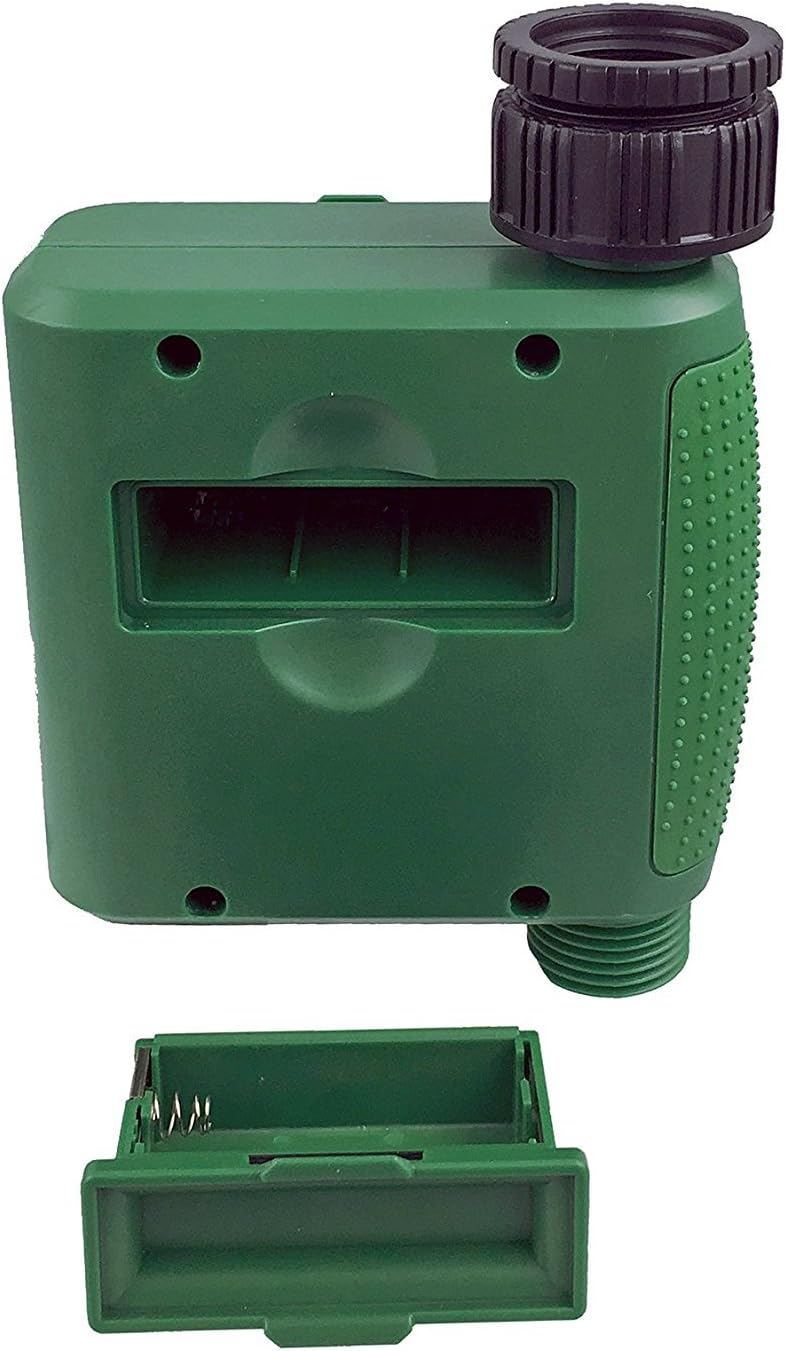
Figur 1: Batterirum med afmonteret dæksel.
2. Montering af timeren
Attach the timer to your outdoor faucet:
- Sørg for, at vandhanen er ren og fri for snavs.
- Screw the timer's inlet (top connector) onto a standard ¾” (GHS) outdoor hose faucet. Hand-tighten only to prevent damage. Do not overtighten.
- Connect your garden hose or irrigation system to the timer's outlet (bottom connector). Hand-tighten securely.
- Turn on the faucet fully. The timer is designed to operate under pressure.

Figure 2: Instapark PWT-07 mounted on a faucet.
Betjeningsvejledning
The timer features a large rotary dial and four buttons: SÆT, +, -, og MANUEL.

Figure 3: Control panel and LCD display.
1. Indstilling af aktuel tid
- Drej drejeknappen til SÆT UR.
- Brug + og - buttons to adjust the current hour. Press SÆT for at bekræfte.
- Brug + og - buttons to adjust the current minute. Press SÆT for at bekræfte.
2. Programming Watering Schedule
The timer allows you to set a start time, duration, and frequency for watering.
Indstil starttid:
- Drej drejeknappen til STARTTID.
- Brug + og - buttons to set the desired watering start hour. Press SÆT for at bekræfte.
- Brug + og - buttons to set the desired watering start minute. Press SÆT for at bekræfte.
Indstil hvor længe (varighed):
- Drej drejeknappen til HVOR LÆNGE.
- Brug + og - buttons to set the watering duration (from 5 seconds to 360 minutes). Press SÆT for at bekræfte.
Indstil Hvor Ofte (Hyppighed):
- Drej drejeknappen til HVOR OFTE.
- Brug + og - buttons to select the watering frequency (e.g., every 10 seconds, 30 seconds, 1 minute, 3 minutes, 5 minutes, 1 hour, 2 hours, 4 hours, 12 hours, 1 day, 2 days, 3 days, 4 days, 5 days, 6 days, 7 days). Press SÆT for at bekræfte.
After setting all parameters, turn the rotary dial to LØBE for at aktivere den programmerede tidsplan.
3. Manuel vanding
Sådan vander du manuelt uden at påvirke din programmerede tidsplan:
- Sørg for, at drejeknappen er indstillet til LØBE or SLUKKET.
- Tryk på MANUEL knappen. Displayet viser en standardvarighed for manuel vanding.
- Brug + og - buttons to adjust the desired manual watering duration.
- Trykke SÆT to start manual watering. The timer will run for the selected duration and then automatically shut off.
- For at stoppe manuel vanding før tid, tryk på MANUEL knappen igen.
4. Regnforsinkelsesfunktion
The rain delay function allows you to pause your watering schedule for a set period without losing your program settings.
- Sørg for, at drejeknappen er indstillet til LØBE.
- Tryk og hold på - button for 3 seconds. The display will show "DELAY" and a default delay duration.
- Brug + og - buttons to select a delay duration of 24, 48, or 72 hours.
- Trykke SÆT to activate the rain delay. The timer will resume its programmed schedule after the delay period ends.
- For at annullere regnforsinkelsen skal du trykke på og holde - knappen igen i 3 sekunder.
Opretholdelse
- Udskiftning af batteri: Replace batteries when the low battery indicator appears on the LCD. Always use new AA alkaline batteries.
- Rensning: Tør timeren med annonceamp klæde. Brug ikke slibende rengøringsmidler eller opløsningsmidler.
- Vinterisering: Before the first frost, disconnect the timer from the faucet. Remove the batteries and store the timer indoors in a dry, frost-free location. Failure to do so may result in damage from freezing water.
- Filterskærm: Periodically check the filter screen inside the inlet connector for debris. Clean if necessary to ensure proper water flow.
Fejlfinding
| Problem | Mulig årsag | Løsning |
|---|---|---|
| Timeren tænder ikke / LCD-skærmen er tom. | Døde eller forkert installerede batterier. | Replace with new AA alkaline batteries, ensuring correct polarity. If still blank, remove batteries, wait for screen to fully clear, then reinsert. |
| Water does not turn on at scheduled time. |
|
|
| Water does not turn off. |
|
|
| Vandlækage fra tilslutninger. |
|
|
| Low battery indicator flashes even with new batteries. | Firmware not booting correctly after battery change. | Remove batteries, wait for the LCD screen to go completely dark (may take a few minutes), then reinsert new batteries. |
Specifikationer
| Model | PWT-07 |
| Strømkilde | 2 x 1.5V AA alkaliske batterier (medfølger ikke) |
| Ventil type | Impuls magnetventil |
| Arbejdsvandstryk | 14.5 til 116 psi |
| Standby-strøm | <100 µA |
| Watering Frequency Settings | 10s, 30s, 1m, 3m, 5m, 1h, 2h, 4h, 12h, 1d, 2d, 3d, 4d, 5d, 6d, 7d (16 settings) |
| Watering Duration Settings | 5s, 10s, 15s, 20s, 25s, 30s, 35s, 40s, 45s, 50s, 55s, 1-360m |
| Tidsvisningsformat | 24 timer |
| Vandtæt vurdering | IP66 |
| Materiale | ABS plast |
| Produktdimensioner | 4.25" D x 6" B x 2.6" H |
| Varens vægt | 14.2 ounce |
Garanti og support
The Instapark PWT-07 Digital Programmable Water Timer is backed by a standard 1-year manufacturer's warranty from the date of purchase. This warranty covers defects in materials and workmanship under normal use.
For warranty claims, technical support, or any questions regarding your product, please contact Instapark customer service. Please have your purchase receipt and product model number (PWT-07) available when contacting support.
Contact information for Instapark customer service can typically be found on the manufacturer's webwebstedet eller din købsdokumentation.
Ask a question about this manual
Ask about setup, troubleshooting, compatibility, parts, safety, or missing instructions. Manuals+ will review the question and use this page’s manual context to help answer it.