
1. Introduktion
This manual provides essential instructions for the installation, operation, maintenance, and troubleshooting of your APC Smart-UPS SRT 3000VA RM 230V (SRT3000RMXLI). This Uninterruptible Power Supply (UPS) is designed to provide high-density, true double-conversion online power protection for critical electronic equipment, including servers, voice/data networks, medical labs, and light industrial applications. Please read this manual thoroughly before installing or operating the UPS to ensure proper and safe usage.
2. Sikkerhedsoplysninger
Observe all warnings and operating instructions in this manual. Failure to do so may result in injury or equipment damage. This UPS contains hazardous voltagForsøg ikke at skille enheden ad. Der er ingen dele indeni, som kan repareres af brugeren.
Generel sikkerhed
- Denne UPS er kun beregnet til indendørs brug.
- Brug ikke denne UPS i direkte sollys, i kontakt med væsker, eller hvor der er meget støv eller fugt.
- Ensure the ventilation openings on the UPS are not blocked. Maintain adequate clearance around the unit for proper airflow.
- Connect the UPS power cable directly to a grounded wall outlet. Do not use extension cords or surge suppressors.
Batterisikkerhed
- Batteries are heavy. Remove the battery module before installing the UPS in a rack or tower configuration.
- Battery service should be performed or supervised by personnel knowledgeable of batteries and the required precautions.
- Bortskaf ikke batterier i åben ild. Batterierne kan eksplodere.
- Batterier må ikke åbnes eller ødelægges. Frigivet elektrolyt er skadelig for hud og øjne. Det kan være giftigt.
- Udskift batterierne med samme type og antal batterier som oprindeligt installeret.
3. Pakkens indhold
Pak forsigtigt enheden ud, og kontroller den for transportskader. Hvis der konstateres skader, skal du underrette transportøren og forhandleren. Pakken skal indeholde følgende:
- APC Smart-UPS SRT 3000VA RM 230V (SRT3000RMXLI) unit
- Battery module (may be pre-installed or separate)
- Rack-mounting hardware (rails, brackets)
- Tower stand (for tower configuration)
- USB-kommunikationskabel
- Seriel kommunikationskabel
- Dokumentations-cd
- Safety information and warranty guide
4. Produktet er slutview
The APC Smart-UPS SRT 3000VA RM 230V is a high-performance Uninterruptible Power Supply designed to protect your critical equipment from power disturbances. It features a rack/tower convertible form factor for flexible deployment.
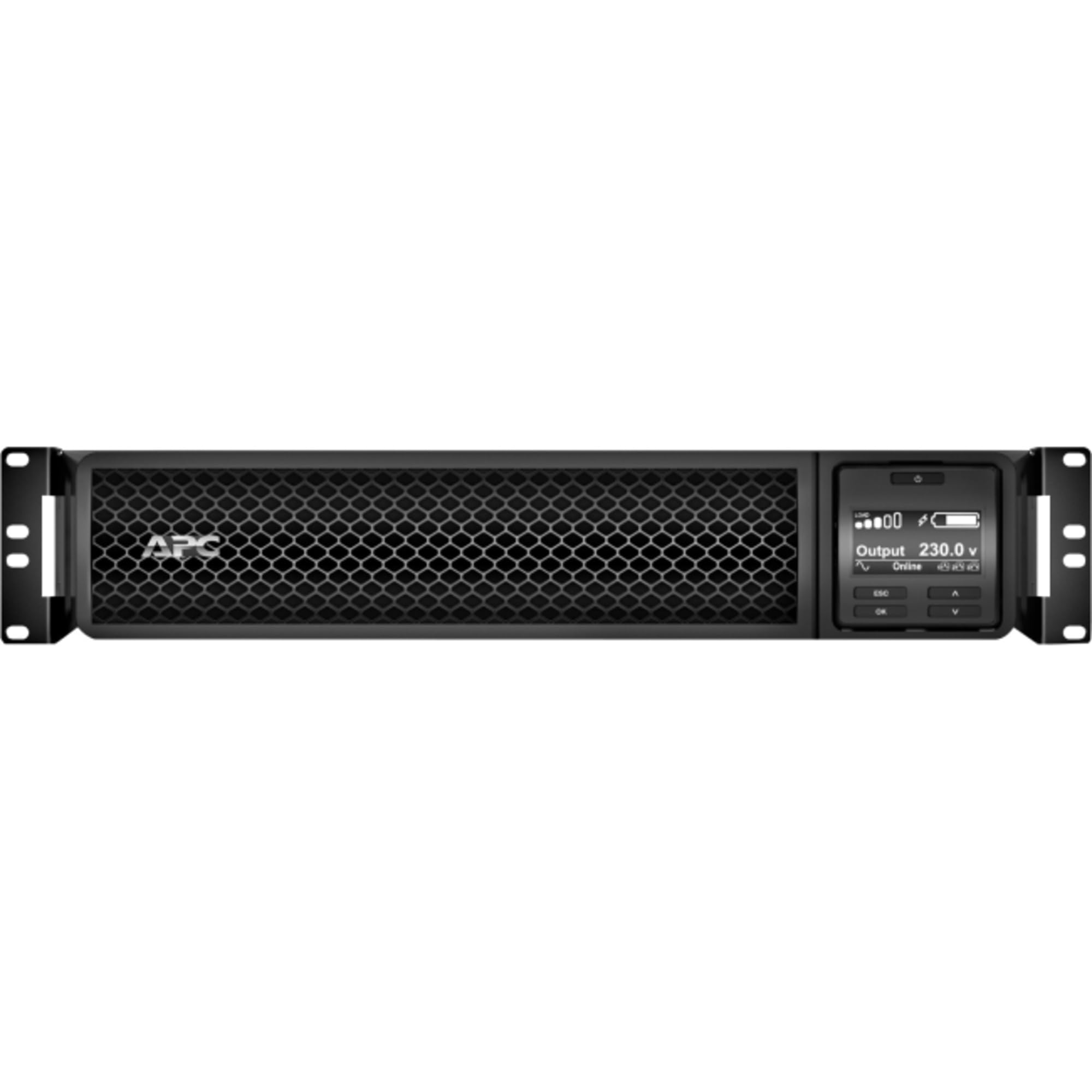
Figur 1: Forside view of the APC Smart-UPS SRT 3000VA RM 230V. This image displays the front panel with the LCD display, control buttons, and ventilation grilles.
Nøglekomponenter
- Front Panel LCD Display: Provides real-time status information, configuration options, and alarm notifications.
- Kontrolknapper: Used to navigate the LCD menu, power on/off the UPS, and perform self-tests.
- Batterimodul: Provides backup power during outages. Hot-swappable for easy replacement.
- Indgangsstrømstik: Tilslutter UPS'en til strømforsyningen.
- Output Receptacles (IEC 320): Provide protected power to connected equipment.
- Communication Ports (USB, Serial): For connecting to a computer or network management card for monitoring and control.
- EPO-port (nødafbrydelse): Muliggør fjernbetjent nødnedlukning af UPS'en.
5. Opsætning
Follow these steps for initial setup of your UPS.
Trin 1: Vælg en placering
- Place the UPS on a sturdy, level surface or install it in a standard 19-inch rack.
- Sørg for, at den omgivende temperatur er mellem 0 °C og 40 °C (32 °F og 104 °F).
- Maintain at least 10 cm (4 inches) of clearance at the front and rear of the unit for proper ventilation.
Step 2: Install the Battery Module
If the battery module is not pre-installed, slide it into the battery bay until it clicks into place. Connect the battery cables as indicated by the labels.
Step 3: Connect to Utility Power
- Connect the UPS input power cord to a grounded 230V AC outlet.
- The UPS will perform a self-test and the LCD display will illuminate.
Trin 4: Tilslut udstyr
- Connect your critical equipment (servers, network devices, etc.) to the output receptacles on the rear of the UPS.
- Ensure the total load does not exceed the UPS capacity (3000VA / 2700W).
Step 5: Connect Communication Cables (Optional)
- Connect the USB or serial cable from the UPS to your computer or server for monitoring and graceful shutdown capabilities.
- Install the PowerChute software (available from APC website) on your computer for advanced management.
6. Betjening af UPS'en
Tænd for UPS'en
Press and hold the power button on the front panel until you hear a beep. The UPS will start up and provide power to connected equipment.
Powering Off the UPS
Press and hold the power button until the UPS shuts down. Ensure all connected equipment is safely shut down before powering off the UPS.
LCD-skærm og navigation
The LCD display provides detailed information about the UPS status, battery charge, load level, and various settings. Use the navigation buttons (up, down, enter, escape) to browse through the menus and adjust settings.
Selvtest
Regularly perform a self-test to ensure the UPS battery and internal components are functioning correctly. This can typically be initiated via the LCD menu or PowerChute software.
7. Vedligeholdelse
Udskiftning af batteri
The UPS batteries have a typical lifespan of 3-5 years. The UPS will indicate when the batteries need replacement. Refer to the safety information before attempting battery replacement. Use only APC-approved replacement battery modules (APCRBC152).
Rensning
Clean the exterior of the UPS with a soft, damp cloth. Do not use solvents or abrasive cleaners. Ensure ventilation openings are free from dust and debris.
Miljøhensyn
Store the UPS in a cool, dry place when not in use. Avoid extreme temperatures and humidity, which can shorten battery life.
8. Fejlfinding
This section provides solutions to common issues you may encounter with your UPS.
| Problem | Mulig årsag | Løsning |
|---|---|---|
| UPS'en tænder ikke | No utility power; Battery not connected; UPS fault | Check power outlet; Ensure battery cables are connected; Contact APC support if fault persists. |
| UPS'en bipper konstant | På batteristrøm; Overbelastning; Lavt batteri | Check utility power; Reduce connected load; Allow battery to recharge. |
| Batteriet oplades ikke | Battery disconnected; Battery fault; Internal fault | Verify battery connection; Replace battery if faulty; Contact APC support. |
| Tilsluttet udstyr mister strøm | UPS overload; Battery depleted; UPS fault | Reduce load; Allow battery to recharge; Contact APC support. |
9. Specifikationer
Detailed technical specifications for the APC Smart-UPS SRT 3000VA RM 230V (SRT3000RMXLI).
| Feature | Detalje |
|---|---|
| Modelnummer | SRT3000RMXLI |
| Mærke | APC |
| Kapacitet | 3000 VA / 2700 Watt |
| Input bindtage | 230 volt |
| Udgang Voltage | 230 volt |
| Formfaktor | Rack/Tower Convertible (2U) |
| Batteritype | Blysyre |
| Typisk driftstid (fuld belastning) | Cirka 4 minutter |
| Antal udsalgssteder | 8 x IEC 320 C13, 2 x IEC 320 C19 |
| Kommunikationsporte | USB, Serial (RJ45), SmartSlot |
| Dimensioner (H x B x D) | 8.5 cm x 43.2 cm x 63.5 cm (3.35 tommer x 17.0 tommer x 25.0 tommer) |
| Vægt | 31.3 kg (69 lbs) |
| Farve | Sort |
10. Garanti og support
Garantioplysninger
APC provides a standard warranty for this product. Please refer to the warranty card included in your package or visit the official APC webwebstedet for detaljerede garantivilkår og -betingelser, der er specifikke for din region. Gem din købsbevis til garantikrav.
Teknisk support
For technical assistance, troubleshooting beyond this manual, or to inquire about replacement parts, please contact APC customer support. Support contact information can typically be found on the APC website or in the documentation provided with your unit. When contacting support, please have your model number (SRT3000RMXLI) and serial number ready.