
1. Opsætning
1.1 Udpakning
Tag forsigtigt tv'et ud af emballagen. Sørg for, at alle komponenter er til stede:
- Hitachi 65R8 65-Inch 4K Ultra HD Roku Smart LED TV
- Fjernbetjening
- TV-bord (2 stk.)
- Skruer til stativ
- Strømledning
1.2 Montering af stativet
Place the TV screen-down on a soft, flat surface to prevent damage. Align the stand pieces with the designated slots on the bottom of the TV. Secure the stand using the provided screws. Ensure the stand is firmly attached before proceeding.

Billede: Forside view of the Hitachi 65R8 TV with its stand.
1.3 Tilslutning af eksterne enheder
Locate the input ports on the back of the TV. Connect your external devices such as cable boxes, gaming consoles, or Blu-ray players to the HDMI ports. For antenna or cable TV, connect the coaxial cable to the ANT/CABLE input.

Billede: Side view of the Hitachi 65R8 TV, illustrating its profile and port area.
1.4 Strømtilslutning og første opsætning
Plug the power cord into the TV and then into a wall outlet. Press the power button on the remote control or on the TV. Follow the on-screen instructions to complete the initial setup, which includes selecting your language, connecting to a Wi-Fi network, and scanning for channels.
2. Betjening
2.1 Fjernbetjeningsfunktioner
The included remote control provides access to all TV functions. Familiarize yourself with the button layout:
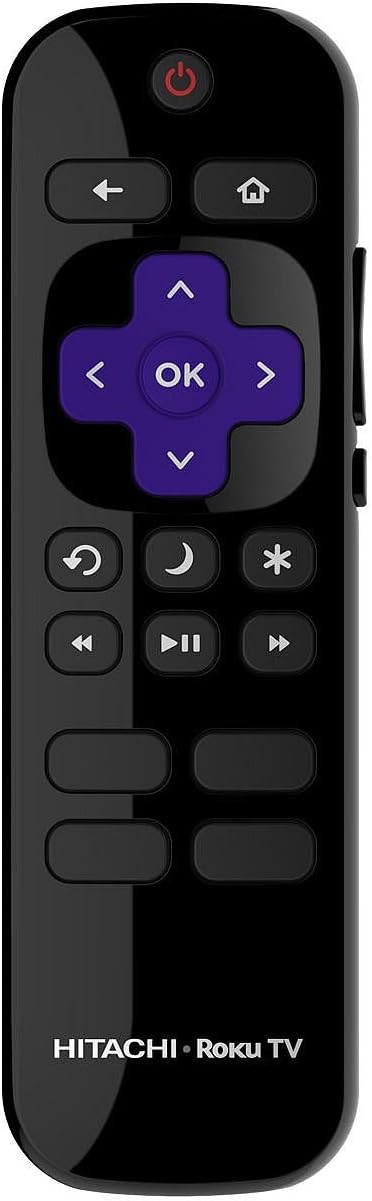
Image: Hitachi Roku TV Remote Control.
- Power knap: Tænder eller slukker for tv'et.
- Retningstast (D-Pad) og OK-knap: Naviger i menuer og vælg muligheder.
- Hjemknappen: Vender tilbage til Roku-startskærmen.
- Tilbage knap: Vender tilbage til den forrige skærm eller menu.
- Valgmulighedsknap (*): Giver adgang til kontekstafhængige indstillinger.
- Voice Search Button: Activates voice control for searching content.
- Afspilningskontroller: Afspil, pause, spol frem, spol tilbage.
- Lydstyrke op/ned: Justerer tv-lydstyrken.
2.2 Roku OS Navigation
The Hitachi 65R8 features the Roku OS. From the Home screen, you can access installed streaming channels, input selections, and settings. Use the D-Pad to highlight an item and the OK button to select it.
2.3 Streaming af indhold
Access a wide range of streaming services like Netflix, Amazon Video, and Hulu directly from the Roku Home screen. Ensure your TV is connected to the internet for streaming functionality.
2.4 Indgangsvalg
To switch between connected devices (e.g., HDMI 1, HDMI 2, Antenna), navigate to the 'Inputs' section on the Roku Home screen and select the desired source.
3. Vedligeholdelse
3.1 Rengøring af tv'et
For at rengøre skærmen skal du forsigtigt tørre den af med en blød, tør og fnugfri klud. Ved genstridige mærker skal du gnide den let.ampen the cloth with water. Avoid using harsh chemicals or abrasive cleaners. Clean the TV body with a soft, dry cloth.
3.2 Softwareopdateringer
The Roku OS automatically checks for and installs software updates when connected to the internet. Ensure your TV remains connected to Wi-Fi for optimal performance and access to the latest features.
3.3 Fjernudskiftning af batteri
If the remote control becomes unresponsive, replace the batteries. Open the battery compartment on the back of the remote and insert two new AAA batteries, ensuring correct polarity.
4. Fejlfinding
4.1 Ingen strøm
- Kontroller, om netledningen er korrekt tilsluttet både tv'et og stikkontakten.
- Sørg for, at stikkontakten fungerer ved at teste den med en anden enhed.
- Tryk på tænd/sluk-knappen på selve tv'et, ikke kun på fjernbetjeningen.
4.2 Intet billede eller lyd
- Bekræft, at den korrekte inputkilde er valgt (f.eks. HDMI 1, antenne).
- Kontrollér alle kabelforbindelser mellem tv'et og eksterne enheder.
- Sørg for, at lydstyrken ikke er slået fra eller indstillet til minimum.
- Genstart tv'et ved at tage stikket ud af stikkontakten i 30 sekunder og derefter sætte det i igen.
4.3 Fjernbetjening virker ikke
- Udskift batterierne med nye.
- Sørg for, at der ikke er nogen forhindringer mellem fjernbetjeningen og tv'ets IR-sensor.
- Ret fjernbetjeningen direkte mod tv'et.
4.4 Problemer med Wi-Fi-forbindelse
- Genstart din Wi-Fi-router og dit modem.
- Gå til tv'ets netværksindstillinger, og prøv at genoprette forbindelsen til dit Wi-Fi-netværk.
- Sørg for, at tv'et er inden for rækkevidde af din Wi-Fi-router.
5. Specifikationer
| Feature | Specifikation |
|---|---|
| Modelnavn | 65R8 |
| Skærmstørrelse | 65 tommer |
| Opløsning | 4K Ultra HD (3840 x 2160p) |
| Displayteknologi | LED |
| Operativsystem | Roku OS |
| Forbindelsesteknologi | Wi-Fi |
| Understøttede internettjenester | Roku TV |
| Inkluderede komponenter | Fjernbetjening, stativ, TV |
| Varens vægt | 47.4 pund |
| Kontrolmetode | Stemme |
| Fabrikant | Hitachi |
6. Garantioplysninger
For detailed warranty information regarding your Hitachi 65R8 TV, please refer to the warranty card included with your product or visit the official Hitachi webGarantibetingelserne kan variere afhængigt af region og købsdato.
7. Support
If you require further assistance or encounter issues not covered in this manual, please contact Hitachi customer support. Contact details can typically be found on the official Hitachi webwebstedet eller i den dokumentation, der fulgte med dit tv.