
1. Introduktion
This manual provides detailed instructions for the safe installation, operation, and maintenance of your Vento Clover N-00027 54-inch Indoor Ceiling Fan. Please read this manual thoroughly before attempting to assemble, install, operate, or maintain the product. Keep these instructions for future reference.
The Vento Clover N-00027 is a 54-inch indoor ceiling fan featuring 3 blades, a chrome finish, and remote control functionality, designed for use in bedrooms and living rooms.
2. Sikkerhedsinstruktioner
WARNING: To reduce the risk of fire, electric shock, or personal injury, always follow these safety guidelines.
- Sørg for, at strømmen er afbrudt ved afbryderen før installation eller service.
- Al ledningsføring skal være i overensstemmelse med nationale og lokale el-forskrifter. Kontakt en kvalificeret elektriker, hvis du er i tvivl.
- The mounting structure must be capable of supporting a minimum of 35 lbs (15.9 kg).
- Brug ikke ventilatoren med beskadigede vinger eller kabinet.
- Undgå at placere genstande i vejen for blæserbladene.
- This fan is for indoor use only. Do not expose to water or excessive humidity.
3. Pakkens indhold
Verify that all components listed below are present and undamaged before beginning installation. If any parts are missing or damaged, do not proceed with installation and contact customer support.
- Loftsventilatormotorsamling
- Ventilatorblade (3)
- Monteringsbeslag
- Downrod-samling
- Fjernbetjening med vægmontering
- Hardwarepakke (skruer, skiver, trådmøtrikker)
- Instruktionsmanual
4. Opsætning og installation
Professional installation is recommended. Ensure all power is disconnected at the circuit breaker before proceeding.
4.1 Montering af ventilatoren
- Attach the mounting bracket to the ceiling junction box. Ensure the junction box is securely fastened to the building structure and can support the fan's weight.
- Carefully lift the fan motor assembly and hang it from the mounting bracket using the provided hook or safety cable.
4.2 Ledningsforbindelser
Connect the fan's electrical wires to the household wiring according to the wiring diagram provided in the hardware pack. Typically, this involves connecting:
- Black (Live) wire from fan to Black (Live) wire from ceiling.
- White (Neutral) wire from fan to White (Neutral) wire from ceiling.
- Green/Bare Copper (Ground) wire from fan to Green/Bare Copper (Ground) wire from ceiling.
Secure all connections with wire nuts and ensure no loose strands of wire are exposed.
4.3 Montering af knivene
Attach the three fan blades to the motor housing using the screws and washers provided. Ensure all screws are tightened securely to prevent wobbling during operation.
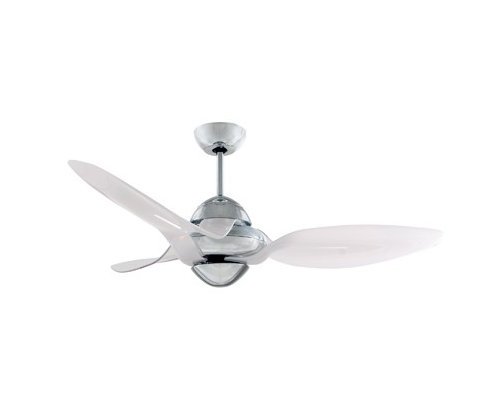
Figure 1: Vento Clover N-00027 54-inch Indoor Ceiling Fan. This image shows the assembled fan with its three white blades and chrome motor housing.
5. Betjening
The Vento Clover N-00027 ceiling fan is operated using the included remote control.
5.1 Fjernbetjeningsfunktioner
- ON/OFF knap: Tryk for at tænde eller slukke for blæseren.
- Hastighedskontrolknapper: The fan has 3 speed settings. Press the speed buttons to cycle through Low, Medium, and High speeds.
- Fan Direction (Reverse) Button: (If applicable) This button changes the direction of the fan blades. In warm weather, the fan should rotate counter-clockwise to create a downdraft. In cool weather, it should rotate clockwise to create an updraft, circulating warm air without creating a direct breeze.
Ensure the remote control has fresh batteries installed for optimal performance.
6. Vedligeholdelse
Regelmæssig vedligeholdelse er med til at sikre din loftsventilators levetid og effektive drift.
- Rensning: Støv ventilatorblade og motorhus af med jævne mellemrum med en blød, tør klud.amp klud. Brug ikke slibende rengøringsmidler eller opløsningsmidler, da disse kan beskadige overfladen.
- Tilspændingsskruer: Check all screws on the fan blades and mounting hardware annually. Tighten any loose screws to prevent wobbling and noise.
- Knivbalance: If the fan wobbles excessively, ensure all blades are securely attached and consider using a blade balancing kit (sold separately) if necessary.
CAUTION: Always turn off the power at the circuit breaker before cleaning or performing any maintenance on the fan.
7. Fejlfinding
| Problem | Mulig årsag | Løsning |
|---|---|---|
| Ventilatoren starter ikke. | No power to the fan; remote control battery low or dead; incorrect wiring. | Check circuit breaker; replace remote control batteries; verify wiring connections. |
| Ventilator vakler. | Løse knivskruer; ubalancerede knive; løst monteringsbeslag. | Spænd alle knivskruer; brug et knivbalanceringssæt; sørg for, at monteringsbeslaget er sikkert fastgjort. |
| Fjernbetjening virker ikke. | Afladede batterier; fjernbetjening ikke parret (hvis relevant); blokering. | Replace batteries; refer to remote pairing instructions (if provided separately); ensure clear line of sight to fan receiver. |
| Blæseren larmer. | Loose screws; motor issues; blades hitting an obstruction. | Check and tighten all screws; ensure no obstructions; contact customer support if motor noise persists. |
8. Specifikationer
| Feature | Detalje |
|---|---|
| Mærke | Vento |
| Modelnavn | N-00027 |
| Størrelse | 54 tommer |
| Farve | White (Blades), Chrome (Housing) |
| Antal blade | 3 |
| Antal hastigheder | 3 |
| Kontrolmetode | Fjernbetjening |
| Monteringstype | Loftmontering |
| Indendørs/Udendørs brug | Kun indendørs |
| Strømkilde | Elektrisk med ledning |
| Værelsestype | Soveværelse, Stue |
9. Garanti og support
Vento products are manufactured to high-quality standards. For specific warranty information, please refer to the warranty card included with your product or visit the official Vento webwebstedet. Behold din købskvittering som købsbevis.
For technical assistance, replacement parts, or general inquiries, please contact Vento customer support. Contact details can typically be found on the product packaging or the official Vento webwebsted.