
Indledning
Thank you for choosing the Gosasa Solar Power LED Digital Watch, Model 1405. This watch is designed for outdoor sports enthusiasts, offering multiple functions and reliable performance. Its solar power feature ensures long-lasting operation, while its 50M water resistance makes it suitable for various activities. Please read this manual carefully to understand the features and proper operation of your new watch.

Billede: Forside view of the Gosasa Solar Power LED Digital Watch, Model 1405, displaying the time and date.
Produkt overview
The Gosasa Model 1405 watch combines solar power with a robust digital display and multiple functions, making it ideal for daily wear and outdoor activities. Key features include:
- Solenergi: Environmentally friendly solar charging for extended battery life.
- Multifunktionalitet: Auto date, alarm, 12/24h format, water resistant, LED display, shock resistant, stopwatch, and backlight.
- Holdbarhed: Shock-resistant design with 50M water resistance.
- Ryd skærm: Large, easy-to-read digital display with LED backlight for low-light conditions.
Urkomponenter
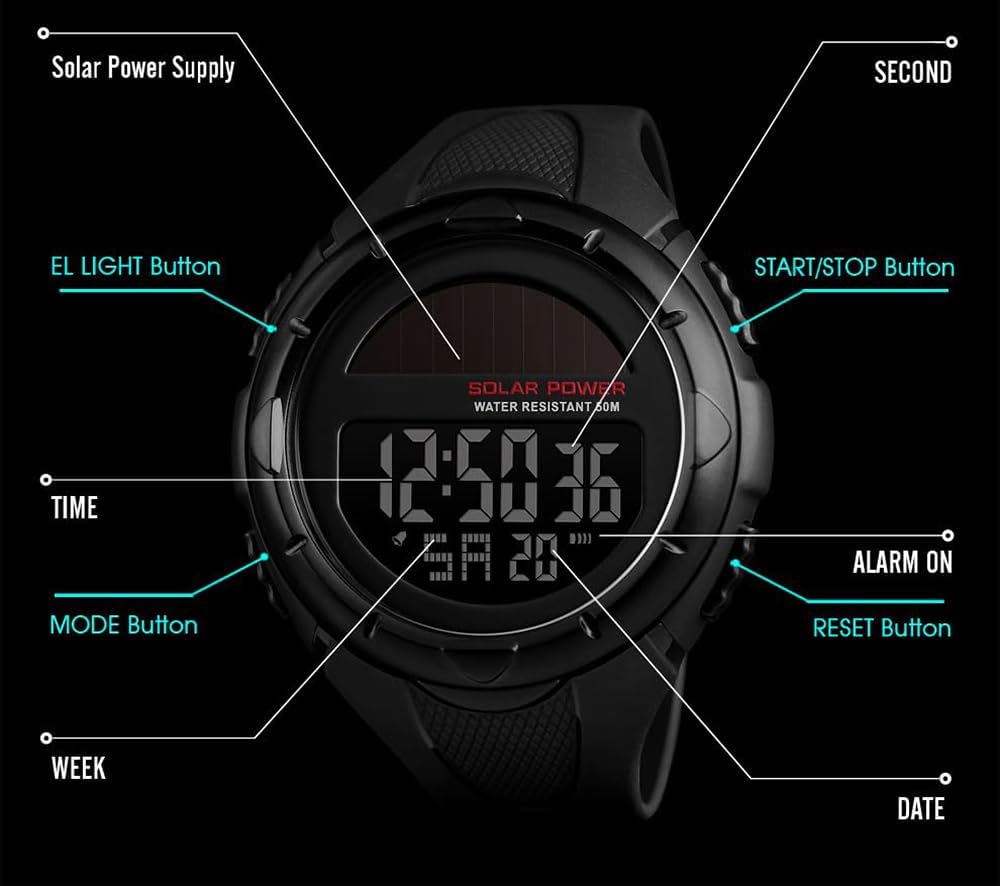
Image: Diagram illustrating the watch's buttons and display features, including Solar Power Supply, EL LIGHT Button, MODE Button, TIME, WEEK, DATE, SECOND, START/STOP Button, ALARM ON, and RESET Button.
- EL LIGHT-knap: Aktiverer LED-baggrundsbelysningen
- MODE knap: Skifter mellem forskellige urtilstande (tid, stopur, alarm).
- START/STOP knap: Used to start and stop functions like the stopwatch.
- Genstarts knap: Bruges til at nulstille funktioner eller justere indstillinger.
Video: An official product video from Gosasa showcasing the features and design of the Multifunction Solar Power LED Digital Watch.
Opsætning
Indledende opladning
Your Gosasa watch is equipped with solar power. For optimal performance, expose the watch face to light (natural sunlight or strong artificial light) for several hours before initial use. This will ensure the built-in battery is sufficiently charged.

Image: A close-up of the watch face, highlighting the solar panel, indicating its solar charging capability.
Indstilling af tid og dato
Sådan indstilles tid og dato:
- I normal tidsvisningstilstand skal du trykke på MODE knappen gentagne gange, indtil sekunderne begynder at blinke. Dette indikerer, at du er i indstillingstilstand.
- Tryk på NULSTIL button to cycle through the setting options: seconds, hours, minutes, year, month, day.
- Brug START/STOP knappen for at justere den blinkende værdi.
- Når alle indstillinger er korrekte, skal du trykke på MODE knappen for at forlade indstillingstilstanden.
To switch between 12-hour and 24-hour format, while in time setting mode, adjust the hour using the START/STOP button. The 'A' (AM) or 'P' (PM) indicator will appear for 12-hour format, or no indicator for 24-hour format.
Betjeningsfunktioner
Valg af tilstand
Tryk på MODE knap til at gennemgå følgende funktioner:
- Normal tidsvisning
- Stopur
- Alarm
Stopur funktion
- Fra normal tidsvisning, tryk på MODE Tryk én gang på knappen for at gå i stopurstilstand. Displayet viser '00:00:00'.
- Tryk på START/STOP knappen for at starte stopuret.
- Tryk på START/STOP knappen igen for at sætte stopuret på pause.
- Tryk på NULSTIL knappen for at nulstille stopuret til '00:00:00'.
Alarm funktion
- Fra normal tidsvisning, tryk på MODE button twice to enter alarm setting mode. The alarm time will flash.
- Tryk på NULSTIL knappen for at vælge timer eller minutter.
- Brug START/STOP knappen for at justere den blinkende værdi.
- Tryk på MODE knappen for at bekræfte og afslutte alarmindstillingen.
For at tænde eller slukke for alarmen skal du trykke på knappen i alarmtilstand START/STOP knappen. Et alarmikon vil vises eller forsvinde på displayet.
LED-baggrundslys
Tryk på EL-LYS knappen (øverst til venstre) for at oplyse displayet i et par sekunder, så du kan aflæse tiden under dårlige lysforhold.

Image: The watch display illuminated by its LED backlight, showing clear visibility in the dark.
Opretholdelse
Vandmodstand
This watch is 50M (5ATM) water resistant, suitable for daily use, hand washing, rain, sweating, and swimming. However, Tryk ikke på nogen knapper, mens uret er nedsænket i vand, da dette kan kompromittere vandlåsen og forårsage skade.

Image: The watch partially submerged in water, illustrating its 50M water-resistant capability.
Rengøring og pleje
- Tør uret regelmæssigt af med en blød, tør klud for at fjerne snavs og fugt.
- Avoid exposing the watch to extreme temperatures or direct sunlight for prolonged periods when not in use, as this can affect battery life and display.
- Hold uret væk fra stærke magnetfelter.
Tips til opladning af solceller
To maintain optimal battery charge, ensure the watch is regularly exposed to light. If stored in darkness for extended periods, the battery may deplete, requiring a longer exposure to light to fully recharge.
Fejlfinding
Fælles problemer og løsninger
| Problem | Mulig årsag | Løsning |
|---|---|---|
| Skærmen er tom eller svag. | Lav batteriopladning. | Expose the watch face to strong light for several hours to recharge the solar battery. |
| Tidspunktet er forkert. | Time settings need adjustment. | Refer to the "Setting Time and Date" section to reset the time. |
| Alarmen lyder ikke. | Alarmen er slukket eller indstillet forkert. | Sørg for, at alarmen er aktiveret (alarmikonet er synligt), og at tiden er indstillet korrekt. |
| Vand inde i uret. | Buttons pressed underwater or exceeding water resistance limits. | Immediately stop using the watch and seek professional repair. Avoid pressing buttons underwater. |
Specifikationer
Detailed technical specifications for the Gosasa Solar Power LED Digital Watch, Model 1405:
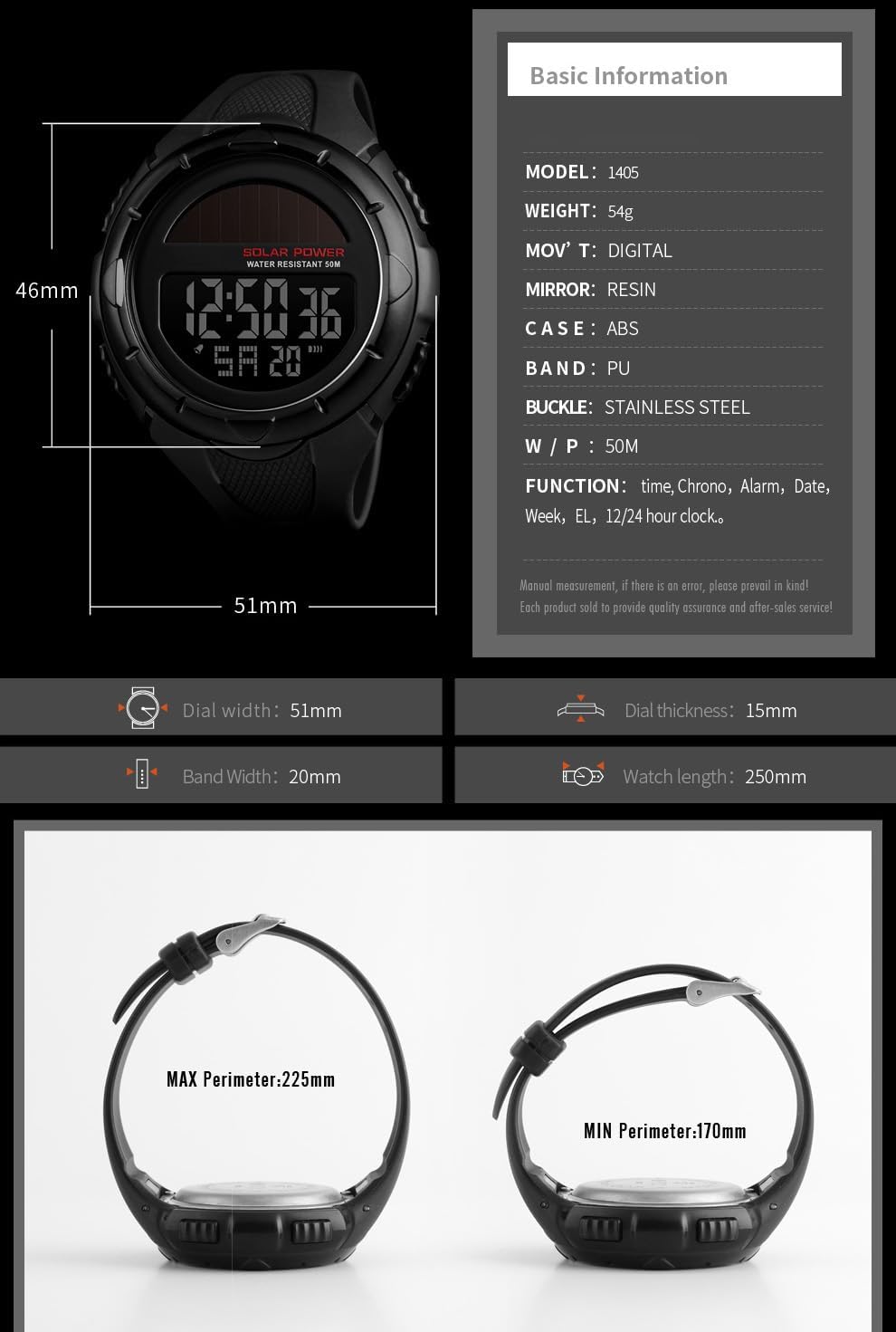
Image: Infographic detailing the watch's basic information and dimensions, including model, weight, movement type, mirror material, case material, band material, buckle type, water resistance, and functions.
| Feature | Detalje |
|---|---|
| Modelnummer | 1405 |
| Mærke | Gosasa |
| Display Type | Digital |
| Bevægelsestype | Digital |
| Etui materiale | Harpiks |
| Båndmateriale | Harpiks |
| Vandmodstandsdybde | 50 meter (5 ATM) |
| Særlige funktioner | Chronograph, Shock resistant, Stopwatch, LED backlight, Alarm, Auto Date, 12/24h format |
| Varens vægt | 2.4 ounces (ca. 68 g) |
| Båndlængde | 250 millimeter |
| Spændetype | Spænde |
Garanti og support
Garantioplysninger
The Gosasa Solar Power LED Digital Watch, Model 1405, comes with a 12-month (1 year) warranty fra købsdatoen. Denne garanti dækker fabrikationsfejl ved normal brug. Den dækker ikke skader forårsaget af misbrug, ulykker, uautoriserede reparationer eller normal slitage.
Kundesupport
For any product issues, questions, or warranty claims, please contact Gosasa customer support. We are committed to providing a satisfactory solution and will respond to all inquiries within 24 hours.
Please refer to the seller's contact information on the platform where you purchased the watch for direct support channels.