
1. Introduktion
Thank you for choosing the Senso ActivBuds S-230 Wireless Bluetooth Noise Cancelling Headphones. These headphones are designed to provide high-fidelity audio and a secure, comfortable fit for an active lifestyle. This manual provides essential information on how to set up, operate, maintain, and troubleshoot your device.

Image 1.1: Senso ActivBuds S-230 Wireless Bluetooth Noise Cancelling Headphones.
2. Hvad er der i æsken
Kontroller venligst pakkens indhold for at sikre, at alle varer er til stede:
- Senso ActivBuds S-230 Bluetooth Headphones
- Bæretaske
- Short Micro USB Charging Cable
- 3 Sets of Ear Tips (Small, Medium, Large)
- Cable Management Clip
- Brugermanual
- Dual Port USB Car Charger (Bonus Item)
- 3ft Charging Cable for Apple (Lightning connector) and Android (Micro USB connector) Devices (Bonus Item)
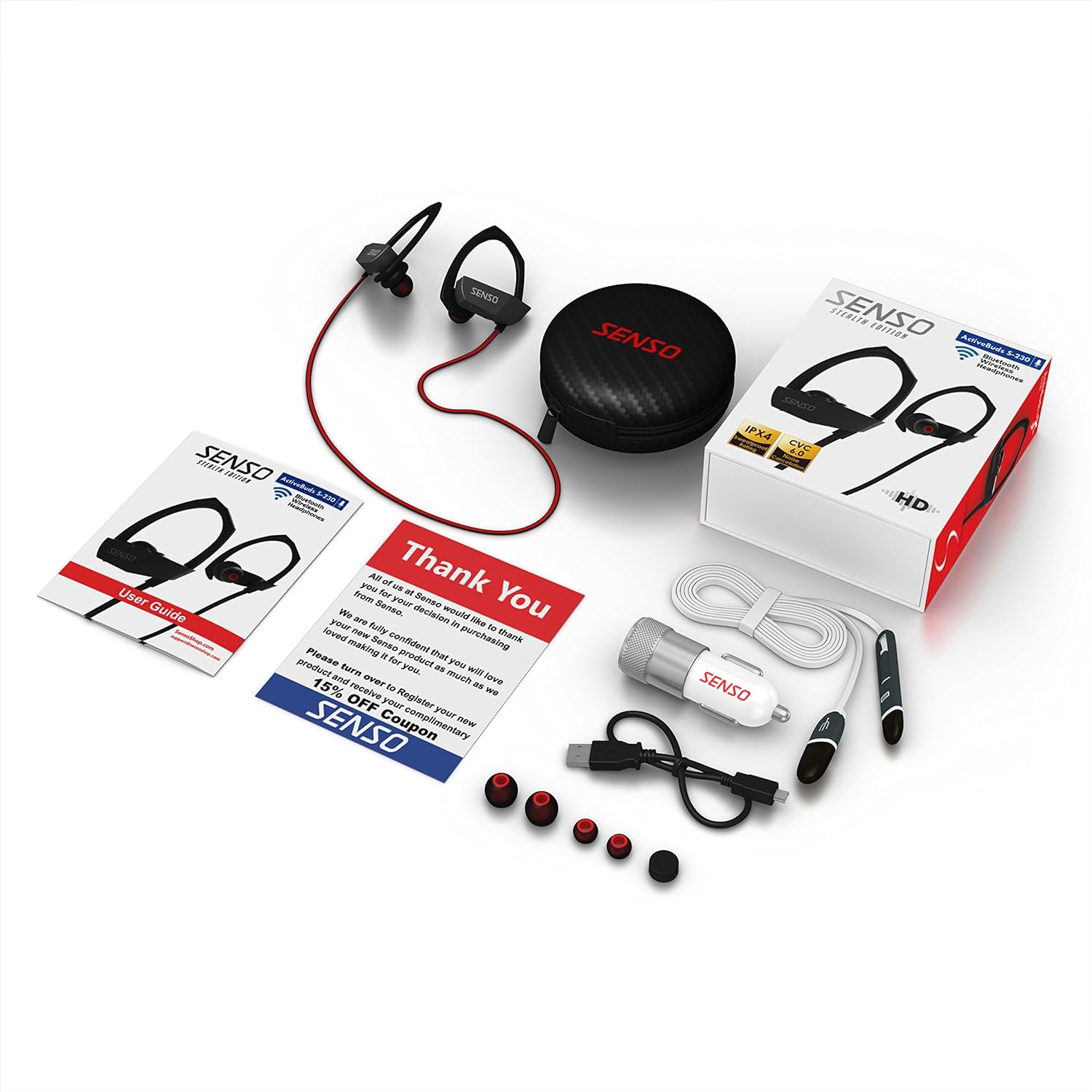
Image 2.1: All items included in the Senso ActivBuds S-230 package.
3. Opsætning
3.1 Opladning af hovedtelefonerne
- Connect the short Micro USB charging cable to the charging port on the headphones.
- Connect the other end of the cable to a USB power source (e.g., computer USB port, wall adapter, or the included car charger).
- The LED indicator on the headphones will illuminate during charging.
- Charging typically takes approximately 1.5 hours. The LED indicator will change or turn off once charging is complete.
Sørg for, at hovedtelefonerne er fuldt opladet inden første brug for at opnå optimal batterilevetid.
3.2 Parring med en Bluetooth-enhed
- Sørg for, at hovedtelefonerne er slukket.
- Press and hold the Multi-function button (usually the center button on the control panel) for approximately 5-7 seconds until the LED indicator flashes red and blue alternately. This indicates pairing mode.
- Gå til Bluetooth-indstillingerne på din Bluetooth-aktiverede enhed (smartphone, tablet, computer) og aktiver Bluetooth.
- Søg efter available devices. You should see "Senso ActivBuds S-230" or a similar name appear in the list.
- Select the headphones from the list to connect. If prompted for a password, enter "0000".
- Once successfully paired, the LED indicator on the headphones will flash blue slowly, and you may hear an audible confirmation.
The headphones will automatically attempt to reconnect to the last paired device when turned on.
3.3 Adjusting for a Secure Fit
The ActivBuds S-230 feature an in-ear design with secure over-ear hooks for stability during activity. Experiment with the three included sizes of ear tips (Small, Medium, Large) to find the most comfortable and secure fit that also provides optimal sound isolation.
- Indsæt forsigtigt øretelefonen i din øregang.
- Position the over-ear hook comfortably around the back of your ear.
- Adjust the cable management clip to secure the cable behind your neck, preventing it from bouncing during movement.

Image 3.1: Proper fit and use of the cable management clip.
4. Betjeningsvejledning
4.1 Tænd/sluk
- Tænd: Press and hold the Multi-function button for approximately 3 seconds until the LED flashes blue and you hear an audible prompt.
- Sluk: Press and hold the Multi-function button for approximately 3 seconds until the LED flashes red and you hear an audible prompt.
4.2 Kontrol af musikafspilning

Image 4.1: Control panel on the Senso ActivBuds S-230.
- Afspil/pause: Tryk én gang på multifunktionsknappen.
- Næste nummer: Tryk på knappen Lydstyrke op (+), og hold den nede.
- Forrige nummer: Tryk og hold nede på lydstyrke ned-knappen (-).
- Lydstyrke op: Tryk kortvarigt på knappen Lydstyrke op (+).
- Skrue ned for lyden: Tryk kortvarigt på lydstyrke ned-knappen (-).
4.3 Opkaldshåndtering
- Besvar/afslut opkald: Tryk én gang på multifunktionsknappen.
- Afvis opkald: Tryk og hold multifunktionsknappen nede i cirka 2 sekunder.
- Genopkald sidste nummer: Tryk to gange på multifunktionsknappen.
4.4 Tilslutning til to enheder samtidigt
The ActivBuds S-230 support connecting to two Bluetooth devices at once. Follow these steps:
- Par hovedtelefonerne med den første enhed som beskrevet i afsnit 3.2.
- Turn off the Bluetooth function on the first device.
- Put the headphones back into pairing mode (red and blue flashing LED).
- Par hovedtelefonerne med den anden enhed.
- Once the second device is paired, re-enable Bluetooth on the first device. The headphones should automatically connect to both devices.
5. Vedligeholdelse
5.1 Rengøring
- Rengør regelmæssigt ørepropperne med en blød, tør klud. For en grundigere rengøring skal du fjerne ørepropperne og vaske dem med mild sæbe og vand. Sørg for, at de er helt tørre, inden du sætter dem på igen.
- Wipe the headphone body and cable with a soft, slightly damp klæde. Undgå at bruge skrappe kemikalier eller slibende materialer.
- Sørg for, at opladningsporten er fri for støv og snavs.
5.2 Opbevaring
- When not in use, store the headphones in the provided carrying case to protect them from dust, moisture, and physical damage.
- Opbevares køligt og tørt, væk fra ekstreme temperaturer.
5.3 Pleje af batterier
- Avoid fully discharging the battery frequently. Charge the headphones when the low battery indicator appears.
- If storing for an extended period, charge the headphones to about 50% every few months to preserve battery health.
6. Fejlfinding
If you encounter issues with your Senso ActivBuds S-230, please refer to the following common problems and solutions:
| Problem | Mulig løsning |
|---|---|
| Hovedtelefonerne tændes ikke. | Sørg for, at hovedtelefonerne er fuldt opladet. Tilslut dem til en strømkilde, og prøv igen. |
| Kan ikke parres med en Bluetooth-enhed. |
|
| Ingen lyd eller lav lyd. |
|
| Intermittent connection or static. |
|
| Mikrofon virker ikke. |
|
7. Specifikationer
Technical specifications for the Senso ActivBuds S-230:
| Feature | Specifikation |
|---|---|
| Modelnavn | ActivBuds S-230 |
| Bluetooth-specifikation | 4.1+EDR |
| Wireless Range | Op til 30 fod (10 meter) |
| Vandmodstandsvurdering | IPX4 (svedtæt) |
| Støjreduktion | CVC6.0 |
| Batteritype | Lithium-ion polymer 85mAh |
| Opladningsport | Micro USB |
| Opladningstid | Cirka 1.5 timer |
| Afspilningstid | Op til 8 timer |
| Standby tid | Op til 240 timer |
| Frekvensrespons | 20 - 22 kHz |
| Varens vægt | Cirka 0.001 ounce (0.02 gram) |
| Produktdimensioner | 1.93 x 0.51 x 1.85 tommer |
| Særlige funktioner | Integrated Microphone, Noise Cancellation |
8. Garanti og support
8.1 Garantioplysninger
The Senso ActivBuds S-230 headphones come with a 1-year limited warranty from the date of purchase. This warranty covers manufacturing defects. Additionally, a 30-day hassle-free return policy is offered. Please retain your proof of purchase for warranty claims.
8.2 Kundesupport
For any questions, technical assistance, or warranty claims, please contact Senso customer support. Refer to the contact information provided on the product packaging or the official Senso webwebsted for de mest opdaterede supportkanaler.