
1. Introduktion
Thank you for choosing the Urmet 1750/4 Mirro Color Monitor. This manual provides essential information for the safe and efficient installation, operation, and maintenance of your new monitor. Please read this manual thoroughly before use and retain it for future reference.
The Urmet 1750/4 Mirro Color Monitor is designed to provide clear video and audio communication for your intercom system. It features intuitive controls for adjusting display settings and can be integrated with Yokis radio series products for enhanced home automation capabilities.
2. Sikkerhedsoplysninger
- Elektrisk sikkerhed: Installation and wiring must be performed by a qualified electrician in accordance with local electrical codes. Disconnect power before performing any installation or maintenance.
- Miljø: Do not expose the monitor to extreme temperatures, humidity, or direct sunlight. Avoid installing in areas with excessive dust or vibrations.
- Rensning: Brug en blød, tør klud til rengøring. Brug ikke slibende rengøringsmidler eller opløsningsmidler.
- Ændringer: Do not attempt to open or modify the monitor. Unauthorized modifications can void the warranty and pose safety risks.
3. Pakkens indhold
Kontroller venligst pakkens indhold for at sikre, at alle varer er til stede:
- Urmet 1750/4 Mirro Color Monitor
- Monteringsbeslag
- Skruer og vægpropper
- Brugervejledning (dette dokument)
- (Note: Additional accessories like power supply or specific wiring may be sold separately depending on your system configuration.)
4. Opsætning og installation
4.1 Montering af skærmen
- Choose a suitable location for the monitor, typically near the entrance or in a central living area, ensuring it is at an appropriate viewing højde.
- Secure the mounting bracket to the wall using the provided screws and wall plugs. Ensure the bracket is level and firmly attached.
- Refer to the wiring diagram provided with your intercom system for connecting the monitor. Connect all necessary cables (power, video, audio, data) to the terminals on the back of the monitor.
- Carefully attach the monitor to the mounting bracket, ensuring it clicks securely into place.
4.2 Indledende tænding
Once installation is complete and all connections are secure, restore power to the intercom system. The monitor should power on and display a standby screen or the video feed from the outdoor unit.
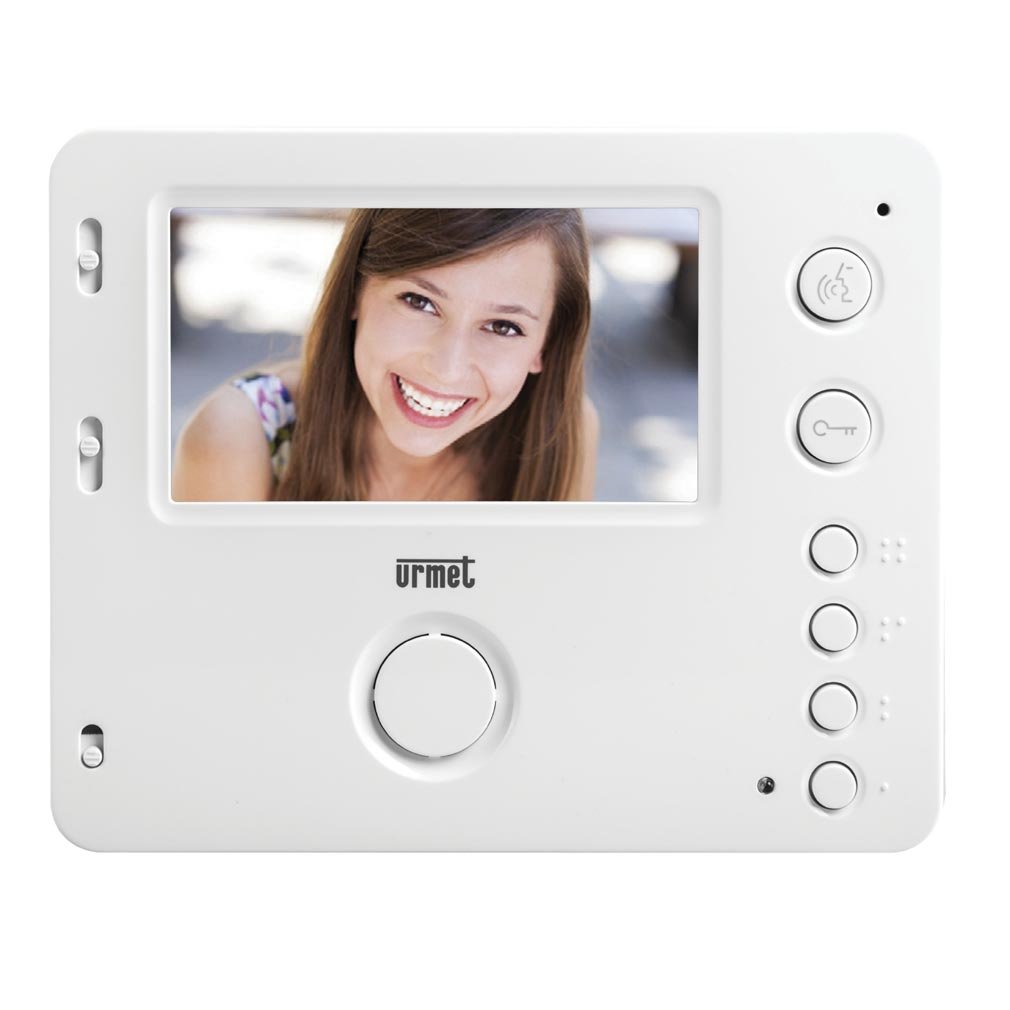
Figur 1: Forside view of the Urmet 1750/4 Mirro Color Monitor. This image shows the display screen and control buttons, illustrating the sleek design and user interface.
5. Betjeningsvejledning
The Urmet 1750/4 Mirro Color Monitor offers straightforward operation for daily use.
5.1 Grundlæggende funktioner
- Besvare et opkald: Når en besøgende trykker på opkaldsknappen på udendørsenheden, ringer skærmen og viser den besøgendes billede. Tryk på Svar button (typically marked with a telephone icon) to establish communication.
- Åbner døren: Under et opkald skal du trykke på Dørfrigivelse button (typically marked with a key icon) to unlock the entrance.
- Overvågning: Tryk på Overvåge button (typically marked with a camera icon) to view the outdoor camera feed without an incoming call.
5.2 Adjusting Display and Ringtones
The monitor features scroll wheels, usually located on the side or bottom edge, for adjusting settings:
- Ringetonelydstyrke: Use the dedicated scroll wheel to increase or decrease the ringtone volume.
- Kontrast: Adjust the contrast scroll wheel to modify the difference between light and dark areas on the screen.
- Lysstyrke: Adjust the brightness scroll wheel to control the overall luminance of the display.
5.3 Yokis Radio Series Integration (Optional)
The Urmet 1750/4 monitor is compatible with products from the Yokis radio series. By adding a wireless e4bpp transmitter (sold separately), you can initiate home automation commands directly from the monitor.
- e4bpp Transmitter: Connect the e4bpp transmitter according to its specific installation guide.
- Kommandoknapper: Once integrated, two separate buttons on the monitor can be configured to trigger specific Yokis scenarios, such as turning lights on/off or activating a central control for home entry/exit. Refer to the e4bpp transmitter manual for configuration details.
6. Vedligeholdelse
Regular maintenance ensures the longevity and optimal performance of your Urmet 1750/4 Mirro Color Monitor.
- Rengøring af skærmen: Tør forsigtigt skærmen af med en blød, fnugfri klud. Ved genstridige mærker, tør let afampSkyl kluden med vand. Sprøjt ikke rengøringsmidler direkte på skærmen.
- Rengøring af Casing: Brug en blød, tør klud til at rengøre skærmenasing. Undgå at bruge barske kemikalier eller slibende materialer.
- Ventilation: Ensure that the ventilation openings on the monitor (if any) are not blocked to prevent overheating.
7. Fejlfinding
Hvis du støder på problemer med din skærm, kan du se følgende almindelige problemer og løsninger:
| Problem | Mulig årsag | Løsning |
|---|---|---|
| Intet billede på skærmen | No power; loose video cable; outdoor unit not functioning. | Check power supply; ensure video cable is securely connected; check outdoor unit. |
| No sound during call | Loose audio cable; speaker/microphone issue; volume too low. | Check audio cable connections; adjust volume scroll wheel; contact support if issue persists. |
| Dårlig billedkvalitet | Incorrect brightness/contrast settings; dirty camera lens (outdoor unit); faulty cable. | Adjust brightness and contrast scroll wheels; clean outdoor camera lens; check video cable integrity. |
| Døråbneren virker ikke | Faulty wiring to door lock; door release mechanism issue. | Verify wiring to the door lock; test the door release mechanism independently; consult an electrician. |
If the problem persists after attempting these solutions, please contact Urmet technical support or a qualified service technician.
8. Specifikationer
Below are the technical specifications for the Urmet 1750/4 Mirro Color Monitor:
- Mærke: Urmet
- Modelnummer: 1750/4
- Skærmstørrelse: 4.3 tommer
- Display Surface Description: Blank
- Opdateringshastighed: 120 Hz
- Særlige funktioner: Home automation integration, high refresh rate
- Forbindelse teknologi: HDMI (Note: This might refer to internal components or specific system connections, not necessarily a user-facing HDMI port for external devices.)
- Antal HDMI-porte: 1
- Hardwaregrænseflade: HDMI
- Farveskærm: Ja
- Varens vægt: 330.69 Pounds (Note: This weight seems unusually high for a monitor. Please verify product specifications if this is critical. It might be a data entry error.)
9. Garanti og support
Urmet products are manufactured to high-quality standards and are covered by a limited warranty. For specific warranty terms and conditions, please refer to the warranty card included with your product or visit the official Urmet webwebsted.
For technical assistance, troubleshooting, or service inquiries, please contact Urmet customer support. Contact information can typically be found on the Urmet webwebstedet eller på din produktemballage.
Urmet Official Webwebsted: www.urmet.com