
1. Introduktion
This manual provides detailed instructions for the installation, operation, and maintenance of your Thomson 512331 720p WiFi IP Camera. This wireless security camera features 720p HD resolution, advanced night vision, motion detection, and remote viewing capabilities via a smartphone or tablet application. Designed for outdoor use, it boasts an IP66 weather-resistant rating and a durable metal construction.
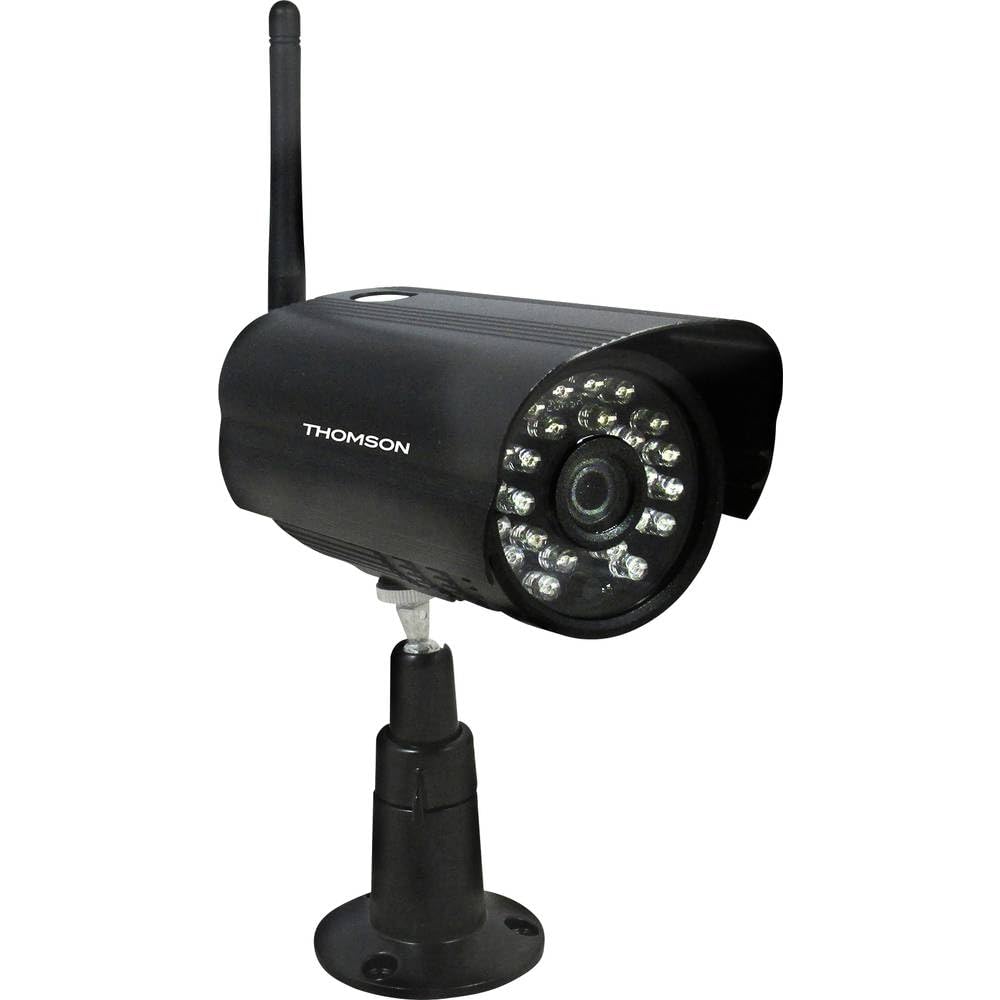
Figur 1: Front view of the Thomson 512331 720p WiFi IP Camera. This image shows the camera's main body, lens, and antenna connection point, highlighting its compact and robust design suitable for outdoor surveillance.
2. Pakkens indhold
Please verify that all items listed below are included in your package. If any items are missing or damaged, contact customer support.
- Thomson 512331 IP Camera
- Power Adapter (230VAC/12VDC 500mA)
- WiFi antenne
- Monteringssæt (skruer og vægdyvler)
- Brugervejledning (dette dokument)
3. Produktet er slutview
The Thomson 512331 camera is designed for reliable surveillance with the following key features:
- Linse: 3.6 mm fast linse til et bredt felt view.
- Opløsning: 1280x720 (720p) HD video capture.
- Nattesyn: Infrared night vision with 24 LEDs, providing a range of up to 20 meters. Features color night vision capability.
- Lyd: Integrated microphone for audio acquisition.
- Forbindelse: Wireless Wi-Fi connectivity for flexible placement.
- Vejrbestandighed: IP66 rated for outdoor use, protecting against dust and powerful water jets.
- Materiale: Durable metal housing.
- Magt: 12VDC 500mA power input, maximum consumption 5W.
- Videokomprimering: H.264 for efficient storage and streaming.
- Opbevaring: Supports SD card for local storage (SD card not included).
4. Opsætning
4.1 Fysisk installation
- Vælg en placering: Select a suitable outdoor location for the camera, ensuring it has a clear view af det område, du ønsker at overvåge, og som er inden for rækkevidde af dit Wi-Fi-netværk.
- Monter kameraet: Use the provided mounting kit to securely attach the camera to a wall or other stable surface. Drill pilot holes if necessary, insert wall plugs, and fasten the camera bracket with screws.
- Tilslut WiFi-antenne: Screw the WiFi antenna firmly onto the designated port on the camera.
- Tilslut strøm: Connect the power adapter to the camera's 12VDC input port and plug the adapter into a suitable power outlet. Ensure the power outlet is protected from weather if installed outdoors.
4.2 Network Configuration and App Setup
- Download appen: Søg efter the official Thomson IP Camera application on your smartphone's or tablet's app store (iOS or Android). Download and install the application.
- Opret en konto: Åbn appen, og følg instruktionerne på skærmen for at oprette en ny brugerkonto eller logge ind, hvis du allerede har en.
- Tilføj kamera: In the app, select the option to "Add Device" or "Add Camera." Follow the in-app wizard to connect your camera to your Wi-Fi network. This typically involves scanning a QR code on the camera or entering your Wi-Fi credentials.
- Konfigurer indstillinger: Once connected, you can configure various settings such as motion detection sensitivity, recording schedules, and alert notifications within the app.
5. Betjeningsvejledning
5.1 Live View
Open the Thomson IP Camera app on your smartphone or tablet. Select your camera from the device list to view the live video feed. You can typically switch between standard and HD resolution, and access controls for audio and recording.
5.2 Bevægelsesdetektion og advarsler
The camera is equipped with motion detection. When motion is detected, the camera can trigger recordings and send push notifications to your connected device. Adjust motion detection sensitivity and alert preferences in the app's settings.
5.3 Nattesyn
The camera automatically switches to infrared night vision in low-light conditions, providing clear black and white video. It also supports color night vision in certain conditions. The 24 built-in IR LEDs illuminate up to 20 meters.
5.4 Optagelse og afspilning
If an SD card is installed (not included), the camera can record video locally. Recordings can be triggered by motion or set on a schedule. Access recorded footage via appens afspilningsfunktion.
6. Vedligeholdelse
- Rensning: Rengør kameralinsen og huset med jævne mellemrum med en blød kludamp klud til at fjerne støv og snavs. Brug ikke skrappe kemikalier eller slibende rengøringsmidler.
- Firmwareopdateringer: Check the app regularly for firmware updates. Keeping your camera's firmware up-to-date ensures optimal performance and security.
- Strømforsyning: Sørg for, at strømadapteren og kablet er i god stand og ikke er beskadiget.
- Wi-Fi-forbindelse: Verify your Wi-Fi signal strength periodically to ensure a stable connection for continuous surveillance.
7. Fejlfinding
- Kameraet opretter ikke forbindelse til Wi-Fi:
- Sørg for, at kameraet er inden for rækkevidde af din Wi-Fi-router.
- Bekræft, at din Wi-Fi-adgangskode er indtastet korrekt i appen.
- Genstart din router og kameraet.
- Ensure your Wi-Fi network is 2.4GHz, as 5GHz networks may not be supported.
- Intet videofeed:
- Kontroller om kameraet er tændt.
- Confirm a stable internet connection on both the camera and your viewing enhed.
- Genstart kameraet og appen.
- Bevægelsesdetektion virker ikke:
- Check motion detection settings in the app; ensure it is enabled and sensitivity is adjusted correctly.
- Sørg for, at der ikke er nogen forhindringer, der blokerer kameraets view.
- Dårlig nattesynskvalitet:
- Rengør kameralinsen for at fjerne snavs eller pletter.
- Ensure there are no reflective surfaces close to the camera that might interfere with IR illumination.
8. Specifikationer
| Modelnavn | 512331 |
| Mærke | Thomson |
| Dimensioner (L x B x H) | 50 x 50 x 28 cm |
| Vægt | 500 gram |
| Forbindelsesteknologi | Trådløs, Wi-Fi |
| Speciel funktion | Nattesyn |
| Kompatible enheder | Tablet, smartphone |
| Strømkilde | AC Power (12VDC 500mA adapter) |
| Controller type | iOS (via application) |
| Monteringstype | Vægmontering |
| Produktegenskaber | Night Vision, Motion Detection |
| Materiale | Metal |
| Vandmodstandsniveau | IP66 (Vandtæt) |
| Alert Type | Kun bevægelse |
| Lyskildetype | LED |
| Kontrolmetode | Anvendelse |
| Strømforbrug | 5 watt |
| Batterier påkrævet | Ingen |
| Antal kanaler | 1 |
| Fokus Type | Autofokus |
| Optisk sensorteknologi | BSI CMOS |
| Video opløsning | 720p (1280x720 pixels) |
| Night Vision Range | 20 meter |
| Nattesyn type | Infrared with Color Night Vision capability |
| Flash-hukommelsestype | SD (for local storage) |
9. Garanti og support
For warranty information and technical support, please refer to the documentation provided with your purchase or visit the official Thomson webwebsted. Gem din købsbevis til garantikrav.
Online ressourcer: www.thomson.eu