
Indledning
This manual provides instructions for the proper setup, operation, maintenance, and troubleshooting of your Excalibur Deluxe Virtual Casino 5-in-1 Video Game. Please read this manual thoroughly before using the device to ensure optimal performance and longevity.
The Excalibur Deluxe Virtual Casino is a handheld electronic gaming device featuring five classic casino games: Poker, Blackjack, Slots, Craps, and Roulette. It is designed for portable entertainment.
Opsætning
1. Batteriinstallation
The Excalibur Deluxe Virtual Casino requires 3 AAA batteries (not included) for operation.
- Find batteridækslet på bagsiden af enheden.
- Skub dækslet åbent i pilens retning.
- Insert 3 AAA batteries, ensuring the correct polarity (+ and -) as marked inside the compartment.
- Sæt dækslet til batterirummet på igen, og sørg for, at det klikker sikkert på plads.
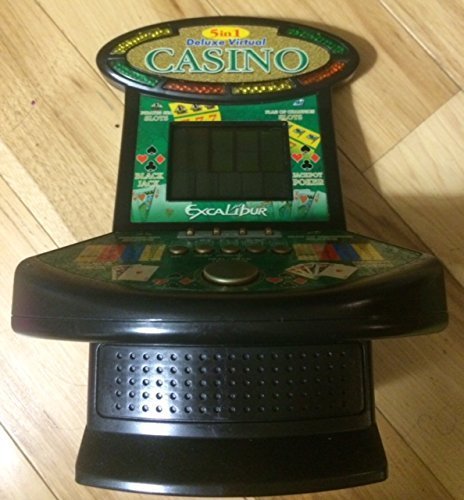
Figur 1: Excalibur Deluxe Virtual Casino handheld device. This image shows the front of the device, featuring the LED display and control buttons, which include a directional pad and action buttons.
2. Første opstart
After installing batteries, press the MAGT button, usually located on the top or front of the device, to turn it on. The screen should illuminate, displaying the main menu or game selection screen.
Betjeningsvejledning
Kontrol overview
- Retningstastatur (D-pad): Used for navigating menus and making selections within games.
- SELECT/MENU Button: Typically used to confirm selections or access in-game menus.
- ACTION Buttons (A, B, C, etc.): Used for specific game actions, such as dealing cards, spinning reels, or placing bets. Refer to individual game instructions for specific button functions.
- SOUND/VOLUME Button: Adjusts the device's sound level or mutes audio.
- POWER -knap: Tænder eller slukker for enheden.
Spilvalg
From the main menu, use the D-Pad to highlight your desired game (Poker, Blackjack, Slots, Craps, or Roulette). Press the VÆLGE button to confirm your choice and start the game.
Basic Gameplay (General)
- Placing Bets: Brug D-Pad to select bet amounts or areas on the table (for Craps/Roulette). Confirm with an HANDLING knap.
- Game Actions: Follow on-screen prompts. For example, in Poker/Blackjack, use HANDLING buttons to "Hit," "Stand," "Deal," or "Fold." In Slots, press an HANDLING button to "Spin."
- Viewing Rules: Some games may have an option to view rules within their respective menus. Access this via the MENU knappen, hvis den er tilgængelig.
Opretholdelse
Rensning
To clean the device, gently wipe the exterior with a soft, dry cloth. Do not use abrasive cleaners, solvents, or immerse the device in water. For the screen, use a soft, lint-free cloth specifically designed for electronics displays.
Batteripleje og opbevaring
- Fjern batterierne, hvis enheden ikke skal bruges i længere tid, for at forhindre lækage.
- Opbevar enheden et køligt, tørt sted, væk fra direkte sollys og ekstreme temperaturer.
- Bland ikke gamle og nye batterier eller forskellige typer batterier.
Fejlfinding
| Problem | Mulig årsag | Løsning |
|---|---|---|
| Enheden tændes ikke. | Døde eller forkert installerede batterier. | Kontroller batteripolariteten. Udskift med nye AAA-batterier. |
| Skærmen er blank eller flimrer. | Low batteries or a temporary software glitch. | Udskift batterierne. Sluk og tænd enheden igen. |
| Knapperne reagerer ikke. | Low batteries or a software issue. | Replace batteries. Turn the device off and on again. Ensure buttons are not stuck. |
| Ingen lyd. | Volume is muted or set too low. | Tryk på SOUND/VOLUME button to adjust volume or unmute. |
Specifikationer
- Model: B01GGZSPTA
- Mærke: Excalibur
- Skærmtype: LED
- Formfaktor: Håndholdt
- Strømkilde: 3 x AAA batterier (medfølger ikke)
- Inkluderede spil: Poker, Blackjack, Slots, Craps, Roulette
Garanti og support
Excalibur products are designed for quality and reliability. For information regarding warranty coverage, please refer to the warranty card included with your purchase or visit the official Excalibur webwebsted.
For technical support or customer service inquiries, please contact Excalibur customer support through their official channels. Contact details are typically available on the product packaging or the manufacturer's webwebsted.