
1. Introduktion
Thank you for choosing the Ivation Ozone Generator Air Purifier and Ionizer. This device is designed to improve indoor air quality by generating activated oxygen (ozone) for odor removal and negative ions for particle reduction. Please read this manual thoroughly before operation to ensure proper use, optimal performance, and safety.
2. Vigtige sikkerhedsoplysninger
WARNING: Ozone is a powerful oxidant. Prolonged exposure to high concentrations of ozone can be harmful to humans, pets, and plants. Always follow these safety guidelines:
- Indbyggere i Californien: This product does not meet California Air Cleaner Regulation requirements and cannot be shipped to California.
- Unoccupied Spaces: Use the ozone generation function only in unoccupied spaces. Ensure no people, pets, or plants are present in the room during ozone treatment.
- Ventilation: After ozone treatment, ventilate the area thoroughly before re-entry.
- Placering: Place the unit in a central location, approximately 4 feet above the ground, to ensure even distribution.
- Elektrisk sikkerhed: Do not operate with a damaged power cord or plug. Keep the unit away from water and moisture.
- Opretholdelse: Afbryd strømmen, før du udfører nogen form for vedligeholdelse.
- Børn og kæledyr: Hold enheden utilgængeligt for børn og kæledyr.
3. Pakkens indhold
Bekræft at alle varer er til stede i pakken:
- 1 Ivation Ozone Air Purifier and Ionizer Unit
- 1 AC strømadapter
- 1 Ceramic Ozone Plate
- 1 Brugervejledning
4. Produktet er slutview
Familiarize yourself with the components and controls of your Ivation Air Purifier.
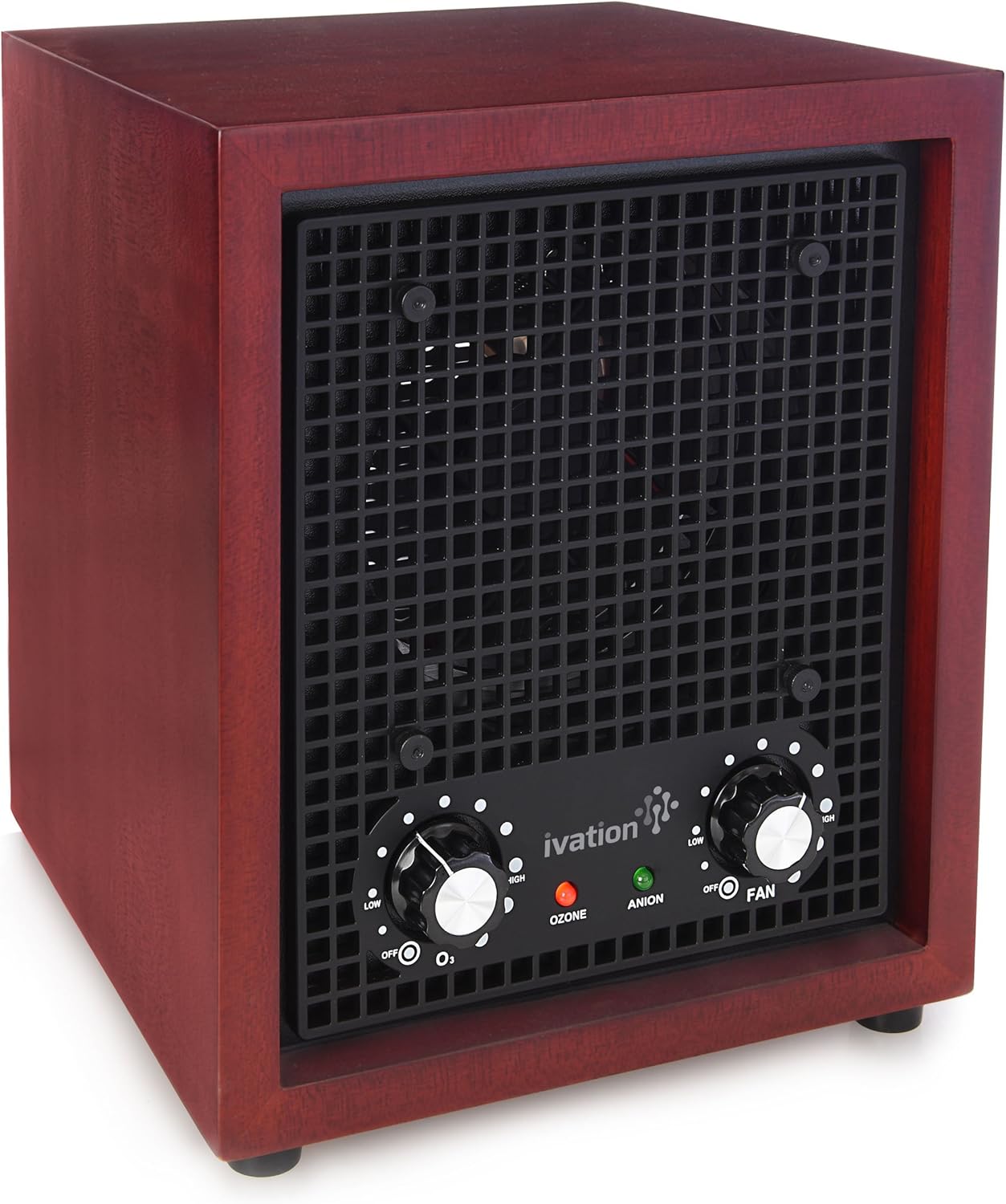
Figur 4.1: Forside View af enheden. This image displays the front of the Ivation Ozone Generator Air Purifier, highlighting the main control panel with two rotary dials for Ozone and Fan speed, and indicator lights for Ozone (red) and Anion (green).
4.1 Betjeningselementer på frontpanelet
- O3 (Ozone) Dial: Controls the ozone generation level from OFF to HIGH.
- OZONE Indicator Light (Red): Illuminates when the ozone function is active.
- ANION Indicator Light (Green): Illuminates when the ionizer function is active.
- FAN Dial: Controls the fan speed from OFF to HIGH.

Figur 4.2: Detaljer om kontrolpanelet. En detaljeret view of the control dials and indicator lights on the front panel, showing the 'O3' dial for ozone output and the 'FAN' dial for fan speed, along with the red 'OZONE' and green 'ANION' lights.
4.2 Bagpanel
- Ceramic Plate Slot: Location for inserting the ozone ceramic plate.
- Strømindgang: Tilslutter vekselstrømsadapteren.

Figur 4.3: Bagside View with Power Connected. This image shows the back of the air purifier, featuring the metal grille, the slot for the ceramic plate, and the power input jack with the AC adapter cable connected.
5. Opsætning
- Pak enheden ud: Carefully remove the air purifier and all accessories from its packaging.
- Insert Ceramic Ozone Plate: Locate the ceramic ozone plate. Slide it into the designated slot on the rear panel of the unit. Ensure it is fully inserted.
- Placering: Position the air purifier in a central location within the area you wish to treat. For optimal air circulation, place it approximately 4 feet (1.2 meters) above the ground.
- Tilslut strøm: Plug the AC power adapter into the power input jack on the rear of the unit, then plug the adapter into a standard electrical outlet.

Figure 5.1: Inserting the Ceramic Plate. This image illustrates the process of inserting the ceramic ozone plate into its slot on the rear of the unit, with an arrow indicating the direction of insertion.
6. Betjeningsvejledning
The Ivation Air Purifier offers two primary functions: Ionization and Ozone Generation.
6.1 Ionizer Function (Anion)
The ionizer releases negative ions to help reduce airborne particles such as dust, pollen, and pet dander. This function can be used continuously in occupied spaces.
- Sørg for O3 (Ozone) Dial er indstillet til FRA.
- Drej på FAN Dial to your desired speed (LOW to HIGH).
- Det grønne ANION indicator light will illuminate, indicating the ionizer is active.
- For continuous air purification, the ionizer can run 24/7.
6.2 Ozone Generation Function (O3)
IMPORTANT: Use the ozone function ONLY in unoccupied areas. Ensure all people, pets, and plants are removed from the room before activating ozone generation.
- Ensure the area to be treated is clear of occupants.
- Drej på FAN Dial to your desired speed (LOW to HIGH) to circulate the ozone.
- Drej på O3 (Ozone) Dial to a low setting initially. The red OZON indikatorlyset vil lyse.
- Gradually increase the ozone level as needed for odor removal. Start with shorter treatment times (e.g., 15-30 minutes) and adjust based on the size of the room and the severity of the odor.
- After the desired treatment time, turn the O3 (Ozone) Dial til FRA.
- Ventilation: After ozone treatment, open windows and doors to thoroughly ventilate the treated area for at least 30-60 minutes before re-entry. The distinct "clean" smell indicates the presence of ozone, which will dissipate with ventilation.
7. Vedligeholdelse
Regelmæssig vedligeholdelse sikrer din luftrensers levetid og effektivitet.
- Ceramic Ozone Plate Cleaning: The ceramic plate should be cleaned periodically, depending on usage and air quality.
- Afbryd strømmen til enheden.
- Carefully slide out the ceramic plate from the rear slot.
- Clean the plate with a soft, dry cloth or a brush to remove any dust or residue. Do not use water or liquid cleaners.
- Ensure the plate is completely dry before re-inserting.
- Udvendig rengøring: Tør ydersiden af enheden af med en blød, damp klæde. Brug ikke slibende rengøringsmidler eller opløsningsmidler.
- Luftindtag/-udløb: Periodically check the air intake and outlet grilles for dust accumulation. Use a vacuum cleaner with a brush attachment to gently remove dust.
8. Fejlfinding
If you encounter issues with your Ivation Air Purifier, refer to the following common problems and solutions:
- Enheden tænder ikke:
- Sørg for, at strømadapteren er korrekt tilsluttet både enheden og en fungerende stikkontakt.
- Kontroller om stikkontakten fungerer ved at tilslutte en anden enhed.
- No Ozone Output:
- Bekræft O3 (Ozone) Dial is turned ON and not set to OFF.
- Check if the ceramic ozone plate is correctly inserted and clean.
- Ensure the red OZON indikatorlyset er tændt.
- No Ionizer Output:
- Verify the green ANION indicator light is illuminated. If not, ensure the unit is powered on and the fan is running.
- Svag luftstrøm:
- Tjek om FAN Dial is set to a higher speed.
- Inspect the air intake and outlet grilles for blockages or excessive dust accumulation. Clean if necessary.
If the problem persists after trying these solutions, please contact Ivation customer support.
9. Specifikationer
| Feature | Specifikation |
|---|---|
| Modelnummer | IVAOZP001 |
| Mål (D x B x H) | 11" x 12.5" x 15" (27.9 cm x 31.75 cm x 38.1 cm) |
| Vægt | 7.33 lbs (3.32 kg) |
| Ozonoutput | 360 mg/time |
| Max dækningsområde | Up to 3,500 sq/ft (325 sq/m) |
| Udvendigt materiale | Kirsebærtræ |
| Skabsmateriale | Rustfrit stål |
| UPC | 840102155495 |

Figur 9.1: Produktmål. This image provides a visual representation of the air purifier's dimensions: 15 inches in height, 12.5 inches in width, and 11 inches in depth.
10. Garanti og support
Ivation products are designed for reliability and performance. For warranty information or technical support, please refer to the contact details provided with your purchase documentation or visit the official Ivation webwebsted.
For further assistance, you may contact Ivation customer service directly.