
1. Introduktion
Tak for købetasing the Axess SPBT1041 Portable Bluetooth Speaker. This device is designed to provide high-quality audio playback from various sources, including Bluetooth-enabled devices, USB drives, SD cards, and auxiliary input. It also features an FM radio function and a built-in microphone for hands-free calls. Its portable design with an adjustable strap makes it suitable for both indoor and outdoor use.
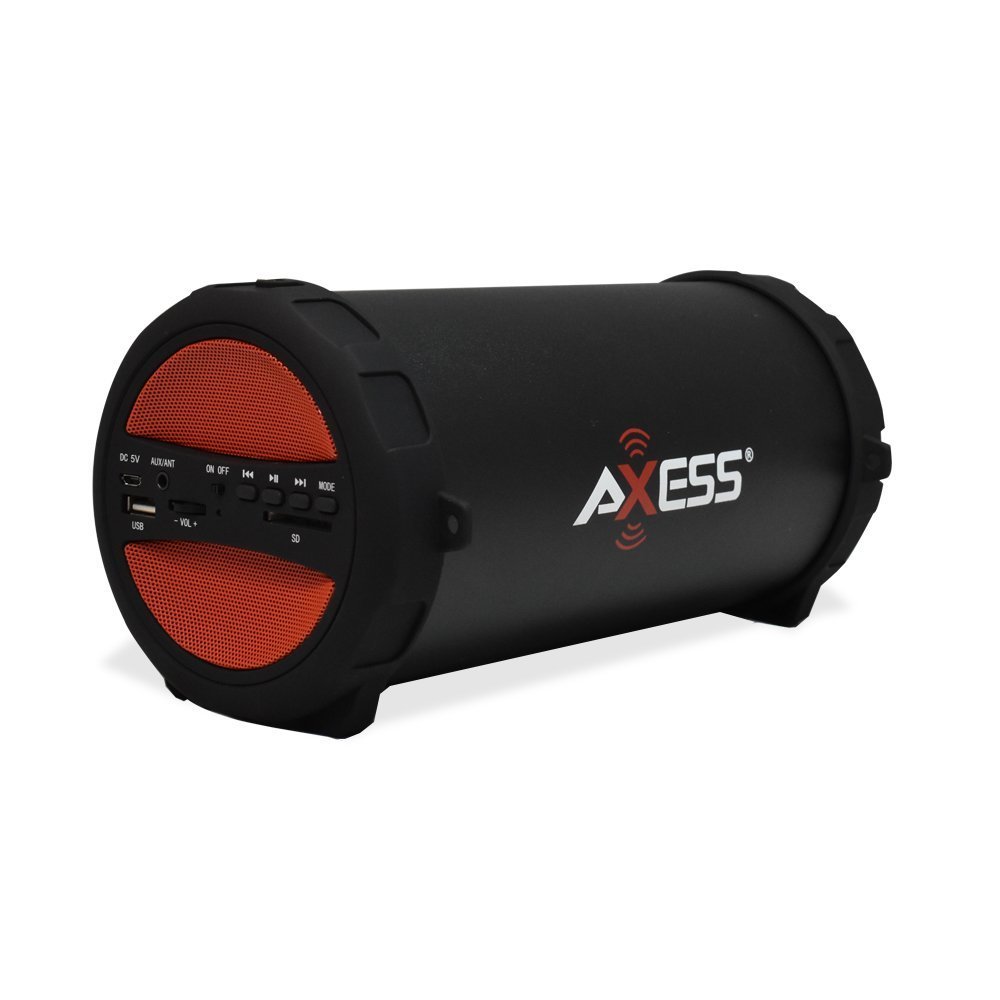
Figure 1: Axess SPBT1041 Portable Bluetooth Speaker (Red variant).

Figure 2: Key features of the SPBT1041 speaker, including FM Radio, USB Input, and AUX Input.
2. Pakkens indhold
Tjek venligst pakken for følgende varer:
- Axess SPBT1041 Portable Bluetooth Speaker
- USB opladningskabel
- Ekstra lydkabel
- Justerbar skulderrem
- Instruktionsmanual
3. Enhed overview
Gør dig bekendt med højttalerens betjeningselementer og porte.

Figure 3: Control panel and ports of the Axess SPBT1041 speaker.
- DC 5V port: Til opladning af højttaleren.
- AUX/ANT Port: For auxiliary audio input or connecting an external FM antenna.
- TÆND/SLUK -kontakt: Tænder eller slukker for højttaleren.
- USB-port: Til afspilning af lyd fra et USB-flashdrev.
- SD-kortplads: For playing audio from an SD memory card.
- Volume Control (-VOL +): Justerer højttalerens lydstyrke.
- Previous Track/Rewind Button: Springer til det forrige nummer eller spoler tilbage.
- Afspil/pause knap: Plays or pauses audio. Also answers/ends calls in Bluetooth mode.
- Næste nummer/spol frem-knap: Springer til næste nummer eller spoler hurtigt frem.
- MODE knap: Skifter mellem Bluetooth, FM-radio, USB, SD og AUX-indgangstilstande.
4. Opsætning
4.1 Opladning af højttaleren
Before first use, fully charge the speaker. Connect the provided USB charging cable to the DC 5V port on the speaker and the other end to a USB power source (e.g., computer USB port, USB wall adapter). The charging indicator light will illuminate during charging and turn off when fully charged.

Figure 4: The speaker can be played while charging, featuring a 1500 mAh battery.
4.2 Tænd/sluk
Skub til ON/OFF switch to the 'ON' position to power on the speaker. Slide it to 'OFF' to power off.
5. Betjeningsvejledning
5.1 Bluetooth-tilstand
- Tænd højttaleren. Den vil automatisk gå i Bluetooth-parringstilstand, hvilket indikeres af en hørbar meddelelse.
- Aktiver Bluetooth på din mobile enhed (smartphone, tablet osv.).
- Søg efter available Bluetooth devices and select "SPBT1041" from the list.
- Once paired, the speaker will confirm with an audible sound. You can now play audio from your device through the speaker.
- To disconnect, disable Bluetooth on your device or press the MODE button on the speaker to switch modes.
5.2 USB/SD Card Mode
- Sæt et USB-flashdrev i USB-porten eller et SD-kort i SD-kortstikket.
- Højttaleren registrerer automatisk lagerenheden og begynder at afspille lyd files. Hvis ikke, tryk på MODE knappen for at skifte til USB- eller SD-tilstand.
- Brug knapperne Forrige/Næste nummer til at navigere og knappen Afspil/Pause til at styre afspilningen.
5.3 FM-radiotilstand
- Tænd for højttaleren og tryk på MODE button until you hear the FM radio prompt.
- For better reception, connect the auxiliary audio cable to the AUX/ANT port; it acts as an external antenna.
- Tryk og hold på Afspil/pause knappen for automatisk at scanne og gemme tilgængelige FM-stationer.
- Brug knapperne Forrige/Næste spor til at skifte mellem gemte stationer.
5.4 AUX-indgangstilstand
- Connect one end of the auxiliary audio cable to the AUX/ANT port on the speaker and the other end to the audio output of your external device (e.g., MP3 player, laptop).
- Tryk på MODE knappen, indtil højttaleren skifter til AUX-tilstand.
- Styr afspilning og lydstyrke fra din eksterne enhed.
5.5 Call Function (Bluetooth Mode)
- When a call comes in during Bluetooth mode, press the Afspil/pause knappen for at svare.
- Tryk på Afspil/pause knappen igen for at afslutte opkaldet.
Video 1: Demonstration of the Axess Portable Bluetooth Speaker's portability and ease of use in an outdoor setting. This video showcases the speaker's design and how it can be carried with its strap, highlighting its suitability for various activities.
6. Vedligeholdelse
6.1 Rengøring
Wipe the speaker with a soft, dry cloth. Do not use abrasive cleaners or solvents. Avoid exposing the speaker to excessive moisture.
6.2 Pleje af batterier
To prolong battery life, avoid fully discharging the speaker frequently. Recharge the battery when the low battery indicator or audible prompt is heard. If storing the speaker for an extended period, charge it to approximately 50% every few months.
6.3 Opbevaring
Opbevar højttaleren et køligt, tørt sted væk fra direkte sollys og ekstreme temperaturer.
7. Fejlfinding
- Ingen strøm: Ensure the speaker is charged. Connect the USB charging cable and try again.
- Ingen lyd: Check the volume level on both the speaker and your connected device. Ensure the correct input mode is selected (Bluetooth, USB, SD, AUX).
- Bluetooth forbinder ikke: Ensure the speaker is in Bluetooth pairing mode. Disable and re-enable Bluetooth on your device, then search for "SPBT1041" again. Make sure the speaker is within the 30-foot operating range.
- Dårlig FM-modtagelse: Extend the auxiliary audio cable and position it for better signal reception. Try scanning for stations again.
- USB/SD Card Not Playing: Ensure the USB drive or SD card is inserted correctly and contains compatible audio files (f.eks. MP3-format).
8. Specifikationer
| Feature | Detalje |
|---|---|
| Modelnavn | SPBT1041 |
| Højttaler type | Udendørs, Bærbar |
| Forbindelsesteknologi | Bluetooth |
| Trådløs kommunikationsteknologi | Bluetooth |
| Højttaler Maksimal udgangseffekt | 10 watt |
| Subwoofer diameter | 3 tommer |
| Batterikapacitet | 1500 mioamp Timer (lithium-ion) |
| Strømkilde | Batteridrevet |
| Produktdimensioner | 7" D x 8" B x 12" H |
| Varens vægt | 2.1 pund |
| Materiale | Plast |
| Vandmodstandsniveau | Ikke vandafvisende |
| Inkluderede komponenter | Batteri |
9. Garanti
The Axess SPBT1041 Portable Bluetooth Speaker comes with a Full Warranty. Please refer to the warranty card included in your package or contact Axess customer support for details regarding warranty terms and conditions.
10. Support
For further assistance, technical support, or inquiries regarding your Axess SPBT1041 speaker, please visit the official Axess webwebstedet eller kontakt deres kundeserviceafdeling. Kontaktoplysninger kan typisk findes på produktemballagen eller i producentens webwebsted.