
1. Produktet er slutview
The Midiplus Studio M is a compact and high-performance USB audio interface designed for studio recording. It features one input and two outputs, supporting high-quality microphone input and 24-bit/192kHz high-precision sampling. The device is powered via PC USB and includes 48V phantom power for condenser microphones. Its small, exquisite design is compatible with both Mac and Windows operating systems, making it a versatile tool for musicians and producers.
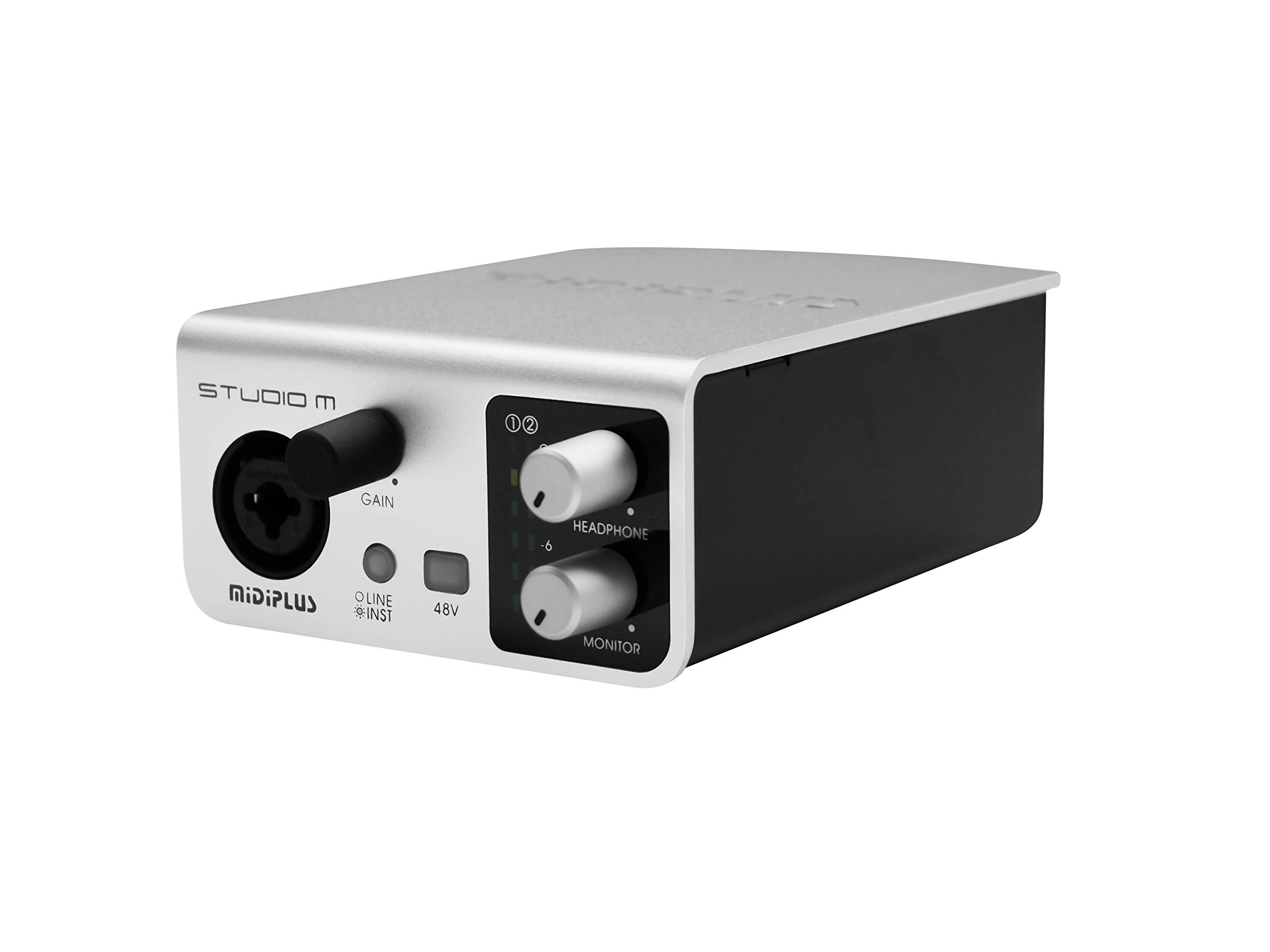
Figur 1: Foran og bagpå view of the Midiplus Studio M USB Audio Interface.
2. Opsætningsvejledning
2.1 Pakkens indhold
- Midiplus Studio M USB Audio Interface
- USB kabel
- Brugermanual (dette dokument)
- Informationskort
2.2 Systemkrav
- Operativsystem: Windows, macOS
- Compatible Devices: Personal Computer with USB port
2.3 Tilslutning af enheden
- Connect the Midiplus Studio M to your computer using the provided USB cable. The device is USB-powered.
- Ensure your operating system (Windows or macOS) recognizes the device. Drivers may be required for optimal performance; refer to the Midiplus webwebsted for de nyeste driverdownloads.
- Connect your microphone or instrument to the Input (MIC/Line/Hi-z) interface on the front panel.
- Connect your headphones to the headphone interface on the front panel, or your studio monitors to the Output interface (Left/Right) on the rear panel.

Figure 2: Midiplus Studio M connected to a computer, showing input and output cables.
3. Betjeningsvejledning
3.1 Betjeningselementer på frontpanelet
- Input Gain Control Knob: Adjusts the input level for the connected microphone or instrument.
- Skiftknap (mikrofon/instrument): Toggles between microphone and instrument input modes.
- 48V Phantom Power ON/OFF: Activates or deactivates 48V phantom power for condenser microphones.
- Headphone Volume Control Button: Adjusts the output volume for connected headphones.
- Output Volume Control Button: Adjusts the main output volume for connected studio monitors.

Figure 3: Midiplus Studio M in a studio setup, demonstrating its compact size and integration.
3.2 Bagpaneltilslutninger
- USB-grænseflade: USB2.0 port for connection to your computer and power supply.
- Output Interface (Left/Right): Connects to your studio monitors or other output devices.
- Extensible Device Interface: Provides additional connectivity options for other devices.
4. Vedligeholdelse
- Hold enheden ren ved at tørre den af med en blød, tør klud. Undgå at bruge skrappe kemikalier eller slibende materialer.
- Sørg for, at alle kabler er korrekt tilsluttet for at forhindre signaltab eller beskadigelse.
- Opbevar grænsefladen et køligt, tørt sted væk fra direkte sollys og ekstreme temperaturer.
- Undgå at placere tunge genstande oven på enheden.
5. Fejlfinding
5.1 Ingen lydudgang
- Check all cable connections (USB, input, output, headphones).
- Ensure the device is powered on and recognized by your computer.
- Verify that the output volume controls (headphone and main output) are turned up.
- Check your computer's sound settings to ensure the Midiplus Studio M is selected as the output device.
5.2 Problemer med indgangssignal
- Adjust the Input Gain Control Knob.
- Ensure the correct input mode (Mic/Instrument) is selected.
- If using a condenser microphone, verify that 48V Phantom Power is enabled.
- Check the microphone/instrument cable for damage.
5.3 Enhed genkendes ikke af computeren
- Prøv at tilslutte USB-kablet til en anden USB-port på din computer.
- Genstart din computer.
- Ensure the latest drivers for the Midiplus Studio M are installed from the official Midiplus webwebsted.
- Test med et andet USB-kabel, hvis det er muligt.
6. Tekniske specifikationer
| Feature | Detalje |
|---|---|
| Modelnummer | Studio M |
| Mærke | Midiplus |
| Forbindelsesteknologi | USB (USB2.0) |
| Lydopløsning | 24-bit/192 kHz |
| Indgange | 1 (MIC/Line/Hi-z) |
| Udgange | 2 (Left/Right) |
| Fantomkraft | 48V (omskiftelig) |
| Kompatible operativsystemer | Windows, macOS |
| Produktdimensioner | 5.28 x 3.54 x 1.89 tommer |
| Varens vægt | 14.1 ounce (0.4 kilo) |
7. Garanti og support
For garantioplysninger og teknisk support henvises til den officielle Midiplus-side. website or contact your local dealer. Keep your purchase receipt as proof of purchase for any warranty claims.