
1. Introduktion
This manual provides detailed instructions for the operation and maintenance of your Supersonic SC-1495BT Bluetooth AM/FM Boombox. Please read this manual thoroughly before using the device to ensure proper function and to maximize your listening experience.
2. Sikkerhedsoplysninger
- Udsæt ikke enheden for regn eller fugt for at forhindre brand eller elektrisk stød.
- Bloker ikke ventilationsåbningerne. Sørg for tilstrækkelig plads omkring enheden for korrekt luftgennemstrømning.
- Undgå at placere enheden i nærheden af varmekilder såsom radiatorer, varmeapparater, komfurer eller andre apparater (herunder ampløftere), der producerer varme.
- Brug kun tilbehør/tilbehør specificeret af producenten.
- Træk stikket ud af dette apparat under tordenvejr, eller når det ikke skal bruges i længere perioder.
- Overlad al service til kvalificeret servicepersonale. Service er påkrævet, når apparatet er blevet beskadiget på nogen måde.
3. Pakkens indhold
Sørg for, at alle nedenstående varer er til stede ved udpakning:
- Supersonic SC-1495BT Bluetooth AM/FM Boombox
- AC strømledning
4. Produktfunktioner
The Supersonic SC-1495BT Boombox offers a variety of features for versatile audio playback:
- Bluetooth Version 3.0 for wireless music streaming
- Built-in USB input for media playback
- Built-in SD card and Micro SD card slot for media playback
- 3.5 mm Line-in (AUX) jack for external audio devices
- Four-band radio: AM, FM, SW1, SW2
- Integrated rechargeable battery for portable use
- Klart LCD-display
- Fast forward and rewind functions for media playback
- 360-degree rod antenna for enhanced radio reception
- Roterende lydstyrkekontrol
- Høretelefonstik til privat lytning
- AC/DC operation for flexible power options
5. Kontrolelementer og forbindelser
Familiarize yourself with the various controls and connection ports on your boombox.
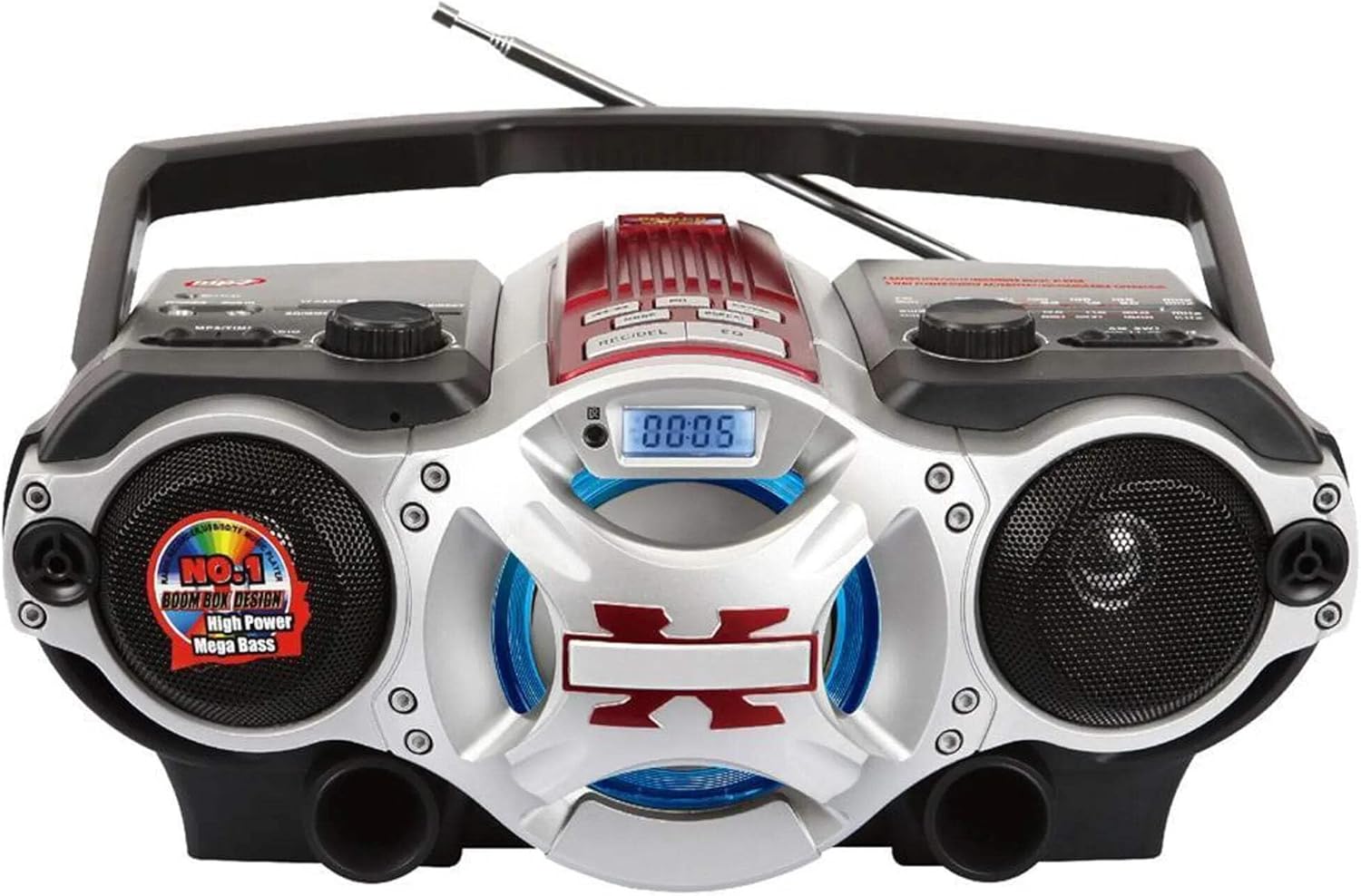
Figur 1: Front view of the Supersonic SC-1495BT Boombox, showing the speakers, central display, and main control area.

Figur 2: Left side controls, including USB input, SD/Micro SD card slot, AUX IN, PHONES jack, BT/MP3/RADIO mode switch, and Rotary Volume control.

Figur 3: Right side controls, featuring the AM/FM/SW1/SW2 band selector, TUNING knob, and playback control buttons (Play/Pause, Skip, Mode, Clock, EQ).
6. Opsætning
6.1 Strømtilslutning
- AC strøm: Connect the included AC power cord to the AC input on the back of the boombox and then plug it into a standard wall outlet. The internal rechargeable battery will begin charging.
- DC Power (Battery): The boombox has a built-in rechargeable battery. Ensure it is charged before portable use. The unit can also operate on DC power from the internal battery when not connected to AC.
6.2 Justering af antenne
Extend the 360-degree rod antenna for optimal radio reception, especially for FM and SW bands. Adjust its position for the clearest signal.
7. Betjeningsvejledning
7.1 Tænd/sluk og valg af tilstand
- To power on the unit, slide the BT/MP3/RADIO switch to the desired mode (BT, MP3, or RADIO).
- To power off, slide the switch to the OFF position.
7.2 Bluetooth-betjening
- Skub tilstandskontakten til BT (Bluetooth). The LCD display will indicate Bluetooth mode, and the unit will enter pairing mode.
- Aktiver Bluetooth på din Bluetooth-aktiverede enhed (smartphone, tablet osv.) og søg efter tilgængelige enheder.
- Select "SC-1495BT" from the list of devices. Once paired, the unit will emit a confirmation sound.
- You can now play audio from your device through the boombox. Use your device or the boombox's playback controls (Play/Pause, Skip) to manage music.
7.3 Radio Operation (AM/FM/SW1/SW2)
- Skub tilstandskontakten til RADIO.
- Select the desired band (AM, FM, SW1, or SW2) using the band selector switch.
- Extend and adjust the rod antenna for optimal reception.
- Drej på TUNING knob to scan for radio stations. The frequency will be displayed on the LCD.
7.4 USB/SD-kortafspilning
- Skub tilstandskontakten til MP3.
- Insert a USB flash drive into the USB input or an SD/Micro SD card into the corresponding slot. Ensure the card is inserted correctly.
- The unit will automatically detect and begin playing MP3 audio files fra det indsatte medie.
- Use the playback control buttons (Play/Pause, Skip, Fast Forward, Rewind) to navigate tracks.
7.5 Ekstraindgang (AUX)
- Skub tilstandskontakten til MP3.
- Tilslut en ekstern lydenhed (f.eks. MP3-afspiller, smartphone) til AUX IN stik ved hjælp af et 3.5 mm lydkabel (medfølger ikke).
- Play audio from your external device. The sound will be routed through the boombox speakers. Control playback from your external device.
7.6 Lydstyrkekontrol
Drej på BIND med uret for at øge lydstyrken og mod uret for at sænke den.
7.7 Stik til øretelefoner
For private listening, plug standard 3.5mm earphones (not included) into the TELEFON jack. The main speakers will be muted.
8. Vedligeholdelse
- Rensning: Brug en blød, tør klud til at rengøre enhedens yderside. Brug ikke slibende rengøringsmidler eller opløsningsmidler.
- Opbevaring: Når den ikke er i brug i længere perioder, skal den opbevares køligt og tørt, væk fra direkte sollys og ekstreme temperaturer.
- Batteripleje: To prolong the life of the built-in rechargeable battery, avoid fully discharging it frequently. Charge the unit regularly, even if not in use.
9. Fejlfinding
Hvis du støder på problemer med din ghettoblaster, kan du se følgende almindelige problemer og løsninger:
| Problem | Mulig årsag | Løsning |
|---|---|---|
| Ingen strøm | AC cord not connected; Battery discharged; Power switch off | Ensure AC cord is securely plugged in; Charge the battery; Slide power switch to ON/BT/MP3/RADIO. |
| Ingen lyd | Volume too low; Mute activated (if applicable); Incorrect mode selected; Earphones connected | Increase volume; Ensure correct mode (BT, MP3, RADIO) is selected; Disconnect earphones. |
| Bluetooth ikke parring | Boombox not in pairing mode; Device Bluetooth off; Too far from boombox | Ensure boombox is in BT mode; Enable Bluetooth on your device; Move device closer (within 30 feet/10 meters); Try re-pairing. |
| Dårlig radiomodtagelse | Antenna not extended/adjusted; Weak signal area | Fully extend and adjust the rod antenna; Try moving the unit to a different location. |
| USB/SD-kort afspiller ikke | Ukorrekt file formatering; Kort/drev ikke isat korrekt; Beskadiget files | Sikre files are MP3 format; Re-insert card/drive; Try a different USB drive or SD card. |
10. Specifikationer
- Model: SC-1495BT
- Mærke: Supersonisk
- Forbindelse: Bluetooth (Ver. 3.0), USB, SD/Micro SD, 3.5mm AUX
- Radiobånd: AM, FM, SW1, SW2
- Understøttede lydformater: MP3
- Strømkilde: AC 110-220V, Built-in Rechargeable Battery
- Højttalere: 2 (stereo)
- Dimensioner (L x B x H): 15 x 10 x 12 tommer
- Vægt: 4.3 pund
- Fabrikant: Capitol Salgsfirma
- UPC: 639131814950
11. Garanti
This product comes with a 1-year limited warranty. Please retain your proof of purchase for warranty claims. For specific warranty terms and conditions, refer to the documentation included with your purchase or contact Supersonic customer support.
12. Support
For further assistance, technical support, or inquiries regarding your Supersonic SC-1495BT Boombox, please visit the official Supersonic webwebstedet eller kontakt deres kundeserviceafdeling. Kontaktoplysninger kan typisk findes på producentens webwebsted eller produktemballage.