
Indledning
Tak for købetasing the Mitzu Kaiser PAK-8915 Dual Audio System. This system includes an amplified speaker and a passive speaker, designed to deliver powerful and clear sound. This manual provides essential information for the safe and efficient operation of your new audio system. Please read it thoroughly before use and retain it for future reference.
Sikkerhedsinstruktioner
- Strømkilde: Sørg for, at strømforsyningen matcher voltage angivet på enheden.
- Ventilation: Bloker ikke ventilationsåbningerne. Sørg for tilstrækkelig plads omkring enheden for korrekt luftgennemstrømning.
- Vand og fugt: Udsæt ikke enheden for regn, fugt eller væsker. Holdes væk fra vandkilder.
- Varme: Placer ikke enheden i nærheden af varmekilder såsom radiatorer, varmeregistre, komfurer eller andre varmeproducerende apparater.
- Rensning: Unplug the unit before cleaning. Use a dry cloth. Do not use liquid cleaners or aerosol cleaners.
- Service: Forsøg ikke selv at servicere dette produkt. Overlad al service til kvalificeret servicepersonale.
- Placering: Place the speakers on a stable, level surface. The amplified speaker features a rear knob for stand mounting.
- Kabler: Use only the provided cables and ensure they are not damaged or pinched.
Pakkens indhold
Kontroller venligst, at alle følgende varer er inkluderet i din pakke:
- 1 x Amplified Speaker (with 15-inch woofer)
- 1 x Passive Speaker (with 15-inch woofer)
- 1 x fjernbetjening
- Connection Cables (10 meters in length for speaker connection)
- Strømkabel
Produkt overview
Amplified Speaker Rear Panel
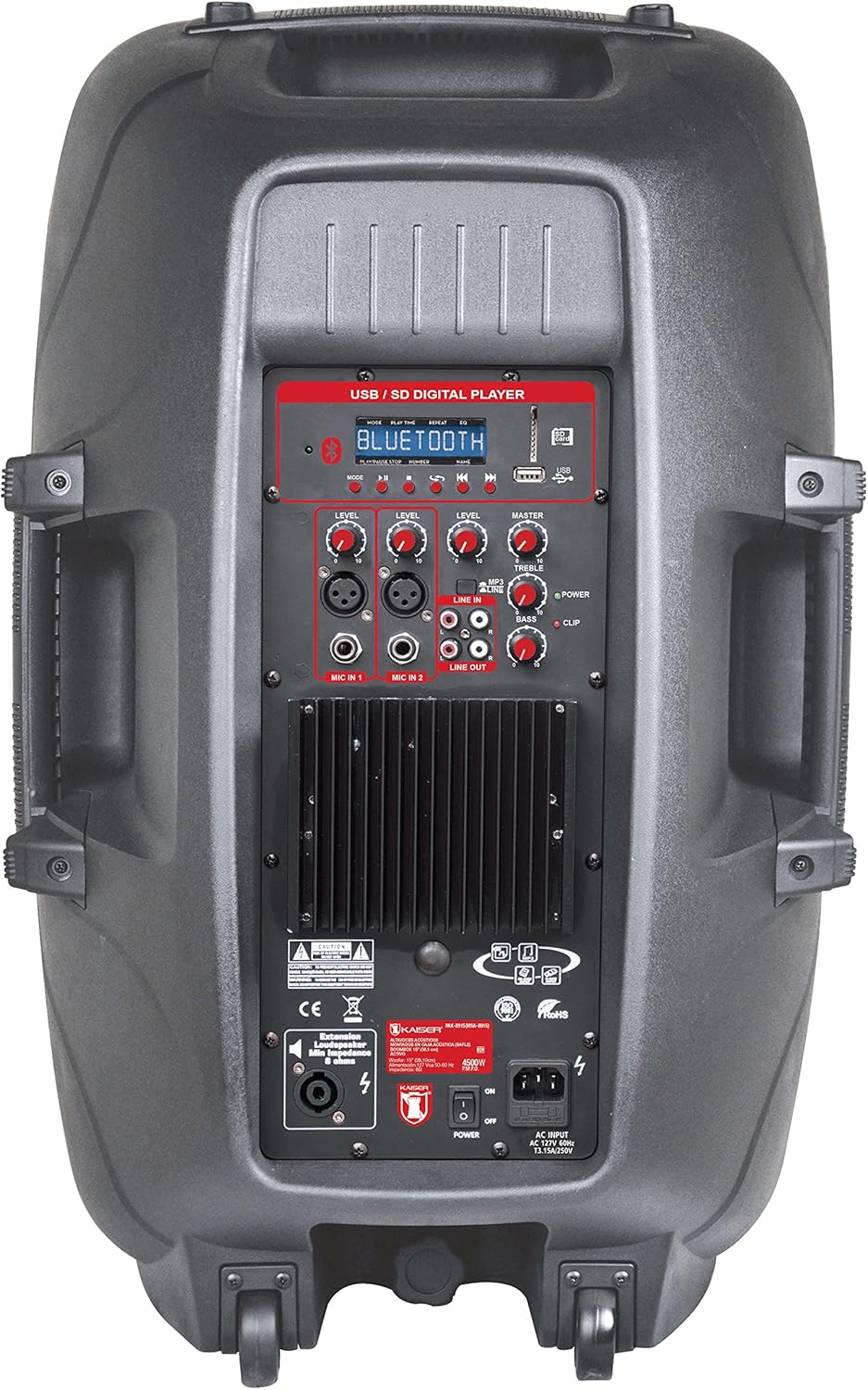
Figur 1: Amplified Speaker Rear Control Panel
De amplified speaker's rear panel houses all primary controls and connection ports:
- USB / SD Digital Player: Ports for USB drives and SD cards, along with a display and playback controls.
- Bluetooth-modul: Til trådløs lydstreaming.
- Niveauknapper: Adjust input levels for MIC 1, MIC 2, LINE IN, and MASTER volume.
- Tonekontrol: Knobs for TREBLE and BASS adjustment.
- Mikrofonindgange: Two inputs (Cannon and 6.3mm) for connecting microphones.
- Linjeindgang (RCA): Stereo RCA inputs for connecting external audio devices.
- Line Out: RCA output to connect to another amplified speaker or audio system.
- Højttaler output: Speakon connector for connecting the passive speaker.
- Afbryderen: Tænd/sluk-knap til enheden.
- AC-indgang: Til tilslutning af strømkablet.
- Klipindikator: Lights up when the audio signal is clipping (distorting).
Passive Speaker Rear Panel

Figur 2: Passive Speaker Rear Panel
The passive speaker features simple input and output connections:
- Input: Speakon input for connection from the amplified højttaler.
- Produktion: Speakon output for daisy-chaining to another passive speaker (if applicable).
Fjernbetjening
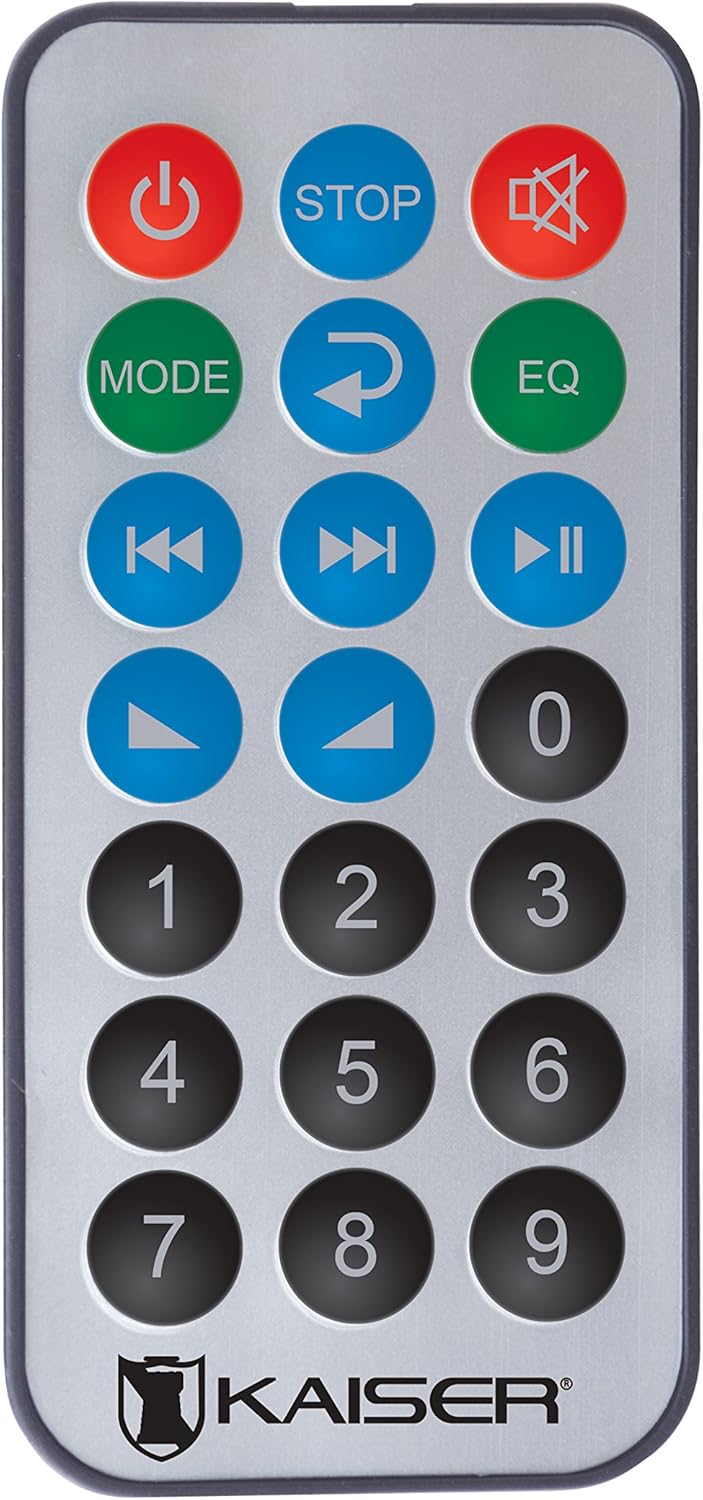
Figur 3: Fjernbetjening
Fjernbetjeningen giver nem adgang til forskellige funktioner:
- Power knap: Tænder/slukker enheden.
- STOP: Stopper afspilning.
- Stum: Slår lyden fra/til.
- KØRSELSVEJLEDNING: Switches between input modes (Bluetooth, USB, SD, FM, RCA).
- Gentage: Gentager det aktuelle nummer eller den aktuelle afspilningsliste.
- EQ: Vælger forudindstillinger for equalizer.
- Forrige/næste nummer: Springer til det forrige eller næste spor.
- Afspil/pause: Starter eller sætter afspilning på pause.
- Lydstyrke op/ned: Justerer masterlydstyrken.
- Numerisk tastatur: For direct track selection or FM station tuning.
Opsætning
- Placering: Placer amplified and passive speakers in your desired location. The amplified speaker has handles and wheels for transport. Both speakers can be mounted on a stand using the rear knob on the amplified højttaler.
- Tilslut passiv højttaler: Use the provided speaker cable to connect the "Speaker Output" on the amplified speaker's rear panel to the "Input" on the passive speaker's rear panel. Ensure a secure connection.
- Strømtilslutning: Connect the power cable to the AC input on the amplified speaker and then plug it into a suitable power outlet.
- Første gang tændt: Ensure all volume knobs are set to minimum before turning on the power switch.
Betjeningsvejledning
Tænd/sluk
Flip the "POWER" switch on the rear panel of the amplified speaker to turn the system on or off. You can also use the power button on the remote control.
Valg af inputtilstand
Press the "MODE" button on the control panel or remote control to cycle through available input sources: Bluetooth, USB, SD, FM Radio, and RCA Line In.
Bluetooth-forbindelse
- Switch the speaker system to Bluetooth mode using the "MODE" button. The display will show "Bluetooth" or a similar indicator.
- Aktiver Bluetooth på din mobilenhed (smartphone, tablet osv.) og søg efter tilgængelige enheder.
- Select "Kaiser PAK-8915" or a similar name from the list of devices.
- Once paired, you will hear a confirmation sound, and your device will show a connected status. You can now stream audio wirelessly from up to 30 meters away.
USB/SD-afspilning
- Indsæt et USB-flashdrev eller SD-kort, der indeholder lyd files into the respective port on the amplified speaker's rear panel.
- The system should automatically switch to USB or SD mode and begin playback. If not, press the "MODE" button to select the correct source.
- Use the playback controls (Play/Pause, Previous/Next, Stop) on the speaker panel or remote control to manage your music.
RCA Line In Connection
Connect an external audio device (e.g., DVD player, TV, computer) to the "LINE IN" RCA ports on the amplified speaker using an RCA cable. Select "LINE IN" mode using the "MODE" button.
Mikrofonbrug
Plug your microphone(s) into the "MIC IN 1" (Cannon) or "MIC IN 2" (6.3mm) ports. Adjust the individual "MIC LEVEL" knobs to control the microphone volume. Ensure the MASTER volume is also adjusted appropriately.
FM radio
Switch to FM Radio mode using the "MODE" button. The system will automatically scan and store available stations. Use the Previous/Next track buttons to navigate between stations or the numeric keypad on the remote for direct tuning.
Volume and Tone Adjustment
Use the "MASTER" volume knob to control the overall output volume. Adjust the "BASS" and "TREBLE" knobs to fine-tune the audio's low and high frequencies. Individual input levels (MIC 1, MIC 2, LINE IN) can also be adjusted.
Opretholdelse
- Rensning: Afbryd strømmen før rengøring. Brug en blød, tør klud til at tørre de udvendige overflader af. Brug ikke slibende rengøringsmidler, voks eller opløsningsmidler.
- Opbevaring: If not in use for an extended period, store the speakers in a cool, dry place, away from direct sunlight and extreme temperatures.
- Ventilation: Kontrollér regelmæssigt, at ventilationsgitterne er fri for støv og snavs for at forhindre overophedning.
Fejlfinding
| Problem | Mulig årsag | Løsning |
|---|---|---|
| Ingen strøm | Strømkabel ikke tilsluttet; Strømafbryder slukket; Strømstik defekt. | Sørg for, at strømkablet er korrekt tilsluttet. Tænd for strømafbryderen. Test stikkontakten med en anden enhed. |
| Ingen lydudgang | Volume too low; Incorrect input mode selected; Audio source not playing; Passive speaker not connected. | Increase MASTER volume. Select the correct input mode. Ensure the audio source is playing. Verify the passive speaker is correctly connected to the amplified højttaler. |
| Bluetooth forbinder ikke | Højttaleren er ikke i Bluetooth-tilstand; Enheden er for langt væk; Enheden er allerede forbundet til en anden højttaler. | Ensure the speaker is in Bluetooth mode. Move your device closer to the speaker (within 30m). Disconnect from other Bluetooth devices. |
| USB/SD afspiller ikke | Ukorrekt file format; USB/SD card corrupted; Speaker not in USB/SD mode. | Sørg for lyd files are in a compatible format. Try another USB/SD card. Select USB/SD mode. |
| Lydforvrængning | Volume too high (clipping); Input level too high. | Reduce MASTER volume. Adjust individual input levels (MIC, LINE IN) to prevent the CLIP indicator from lighting up. |
Specifikationer
| Mærke | Mitzu |
| Model | PAK-8915 |
| Amplified Speaker Power | 3500 W PMPO |
| Passive Speaker Power | 3000 W PMPO |
| Woofer størrelse | 15 tommer (38.1 cm) |
| Impedans | 8 Ω |
| Forbindelsesteknologi | Bluetooth, RCA, USB |
| Trådløs teknologi | Bluetooth |
| Bluetooth rækkevidde | Op til 30 meter |
| Lydudgangstilstand | Stereoanlæg |
| Frekvensrespons | 4 KHz |
| Kontrolmetode | Knapper, fjernbetjening |
| Strømkilde | El-kabel |
| Varens vægt | 34 kilo |
| Anbefalede anvendelser | Smartphones, Tablets, Computers, DVD Players, TVs, Surround Sound Systems, Microphones |
Garanti og support
Specific warranty information for the Mitzu Kaiser PAK-8915 is not provided in this manual. Please refer to the warranty card included with your purchase or contact your retailer for details regarding warranty coverage and terms.
For technical support or service inquiries, please contact the Mitzu customer service department or your authorized dealer. Keep your purchase receipt as proof of purchase.