
Vivolink VL120007
Vivolink HDBaseT VL120007 70m 4K HDMI Extender Kit Brugermanual
Model: VL120007
1. Introduktion
This user manual provides detailed instructions for the installation, operation, and maintenance of the Vivolink HDBaseT VL120007 70m 4K HDMI Extender Kit. This kit is designed to extend 4K HDMI signals up to 70 meters over a single Cat5e/6 cable, supporting bi-directional IR and CEC.
The Vivolink VL120007 is a premium quality product, ensuring reliable and high-performance signal transmission for various professional and home theater applications.
2. Produktet er slutview
The Vivolink VL120007 kit consists of a Transmitter unit and a Receiver unit. Both units are compact and designed for easy integration into existing setups.
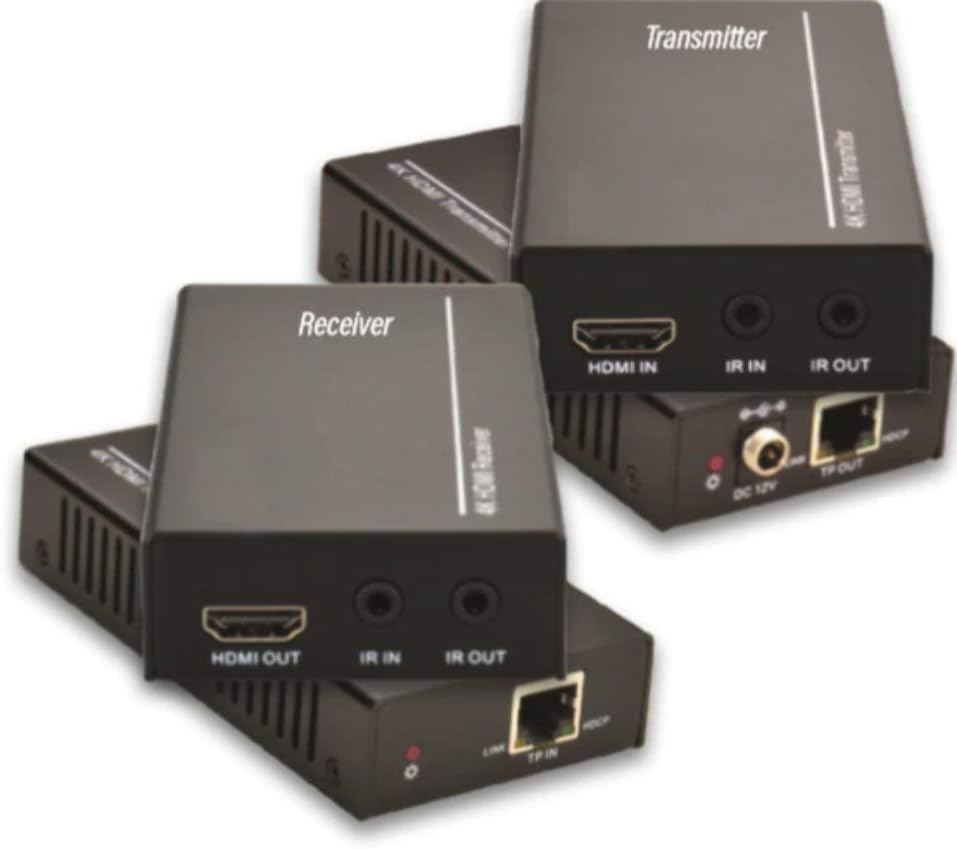
Figure 2.1: Vivolink HDBaseT VL120007 Transmitter (top) and Receiver (bottom) units. The Transmitter unit features HDMI IN, IR IN, IR OUT, DC 12V power input, and TP-OUT (HDBaseT) ports. The Receiver unit features HDMI OUT, IR IN, IR OUT, and TP-IN (HDBaseT) ports.
2.1. Nøglefunktioner
- Extends 4K HDMI signals up to 70 meters (230 feet) over a single Cat5e/6 cable.
- Supports HDMI 1.4 and HDCP 2.2 compliant.
- Bi-directional IR pass-through for controlling source or display devices.
- Supports CEC (Consumer Electronics Control) functionality.
- Kompakt design for nem installation.
- Includes one Power Supply Unit (PSU).
3. Pakkens indhold
Please verify that all items are present and in good condition upon opening the package. If any items are missing or damaged, please contact your vendor.
- 1x Vivolink HDBaseT Transmitter Unit (VL120007-TX)
- 1x Vivolink HDBaseT Receiver Unit (VL120007-RX)
- 1x 12V DC Power Supply Unit
- 1x IR Blaster kabel
- 1x IR-modtagerkabel
- 1x Brugermanual (dette dokument)
4. Opsætning og installation
Before beginning installation, ensure all devices are powered off and disconnected from their power sources.
4.1. Tilslutningsdiagram
The following diagram illustrates a typical connection setup for the Vivolink VL120007 extender kit.
(A detailed connection diagram would typically be placed here. For illustration, imagine a diagram showing Source -> Transmitter -> Cat Cable -> Receiver -> Display.)
4.2. Installationstrin
- Connect an HDMI cable from your source device (e.g., Blu-ray player, media streamer) to the HDMI-IN port på Sender enhed.
- Connect a single Cat5e/6 cable (recommended Cat6 for optimal performance) from the TP-OUT port på Sender enhed til TP-IN port på Modtager unit. Ensure the cable is properly terminated with RJ45 connectors following TIA/EIA-568B wiring standards.
- Tilslut et HDMI-kabel fra HDMI OUT port på Modtager unit to your display device (e.g., TV, projector).
- For IR control, connect the IR Blaster cable to the IR UD port on the unit that will send the IR signal (e.g., Transmitter for controlling source, Receiver for controlling display). Position the IR emitter head directly over the IR sensor of the device to be controlled.
- Tilslut IR-modtagerkablet til IR IN port on the unit that will receive the IR signal. Position the IR receiver head in a location where it can receive signals from your remote control.
- Connect the included 12V DC Power Supply Unit to the DC 12V port on either the Transmitter or Receiver unit. The system supports Power over Cable (PoC), meaning only one power supply is needed for both units.
- Power on all connected devices (source, display, and extender units).
5. Betjeningsvejledning
Once all connections are made and power is supplied, the Vivolink VL120007 extender kit should automatically establish a connection and transmit the HDMI signal.
5.1. LED-indikatorer
Both the Transmitter and Receiver units feature LED indicators to show their status:
- Power LED: Lyser, når enheden modtager strøm.
- Link LED: Illuminates when a stable HDBaseT link is established between the Transmitter and Receiver units.
- Data LED: May flash to indicate active HDMI data transmission.
5.2. IR kontrol
The bi-directional IR pass-through allows you to control your source device from the display location or your display device from the source location. Ensure the IR Blaster and IR Receiver cables are correctly positioned.
5.3. CEC Functionality
The extender kit supports CEC (Consumer Electronics Control), allowing compatible devices to communicate and control each other over the HDMI connection. This feature typically works automatically if supported by your source and display devices.
6. Vedligeholdelse
The Vivolink VL120007 extender kit requires minimal maintenance.
- Opbevar enhederne et køligt, tørt sted, væk fra direkte sollys, varmekilder og overdreven fugtighed.
- Rengør enhederne med en blød, tør klud. Brug ikke flydende rengøringsmidler eller rengøringsmidler på sprayform.
- Sørg for tilstrækkelig ventilation omkring enhederne for at forhindre overophedning.
- Kontrollér regelmæssigt kabelforbindelserne for at sikre, at de er sikre.
7. Fejlfinding
If you encounter issues with your Vivolink VL120007 extender kit, please refer to the following common troubleshooting steps:
| Problem | Mulig årsag | Løsning |
|---|---|---|
| Ingen video/lydudgang. |
|
|
| IR-styringen virker ikke. |
|
|
| Intermitterende signal eller flimren. |
|
|
If the problem persists after trying these steps, please contact Vivolink customer support for further assistance.
8. Specifikationer
| Feature | Detalje |
|---|---|
| Modelnummer | VL120007 |
| Mærke | Vivolink |
| HDMI overensstemmelse | HDMI 1.4 |
| HDCP-overholdelse | HDCP 2.2 |
| Understøttelse af maksimal opløsning | 4K (UHD) |
| Transmissionsafstand | Up to 70 meters (230 feet) for 4K over Cat5e/6 |
| Kabelkrav | Single Cat5e/6/7 cable |
| IR Pass-through | Tovejs |
| CEC support | Ja |
| Strømforsyning | 12V DC (PoC supported) |
| Varens vægt | 1.21 kilogram (ca. 2.67 lbs) |
| Fabrikant | Vivolink |
9. Garantioplysninger
Specific warranty details are not provided in the product information. Please refer to the warranty card included with your product or contact your point of purchase for detailed warranty terms and conditions.
10. Kundesupport
For technical support, troubleshooting assistance beyond this manual, or warranty inquiries, please contact Vivolink customer support or your authorized dealer.
Please have your model number (VL120007) and purchase information ready when contacting support.
Ask a question about this manual
Ask about setup, troubleshooting, compatibility, parts, safety, or missing instructions. Manuals+ will review the question and use this page’s manual context to help answer it.