
Indledning
The AVANTEK Non-Contact Digital Laser IR Infrared Thermometer is designed for safe and accurate surface temperature measurement. This device utilizes infrared radiation to measure temperatures from a distance, making it ideal for various applications including cooking, automotive diagnostics, and home maintenance. Its instant readout capability and wide temperature range ensure efficient and reliable performance.

Figur 1: The AVANTEK Infrared Thermometer is versatile, suitable for measuring temperatures in automotive engines, fireplaces, refrigerators, and during grilling.
Sikkerhedsoplysninger
Læs og forstå alle sikkerhedsinstruktioner, før du bruger dette produkt. Manglende overholdelse af disse instruktioner kan resultere i personskade eller beskadigelse af enheden.
- Lasersikkerhed: Do not look directly into the laser beam or point it at people or animals. The laser is used for targeting only and does not measure temperature.
- Non-Contact Use: This thermometer is designed for non-contact surface temperature measurement. Do not attempt to measure internal temperatures of objects or body temperature.
- Elektrisk sikkerhed: Do not expose the device to water or extreme temperatures. Do not attempt to disassemble or modify the device.
- Batterisikkerhed: Use only the specified 9V battery. Ensure correct polarity when installing. Remove the battery if the device will not be used for an extended period.
- Driftsmiljø: Use the thermometer in a clean, dry environment. Avoid areas with high humidity, dust, or corrosive gases.
Produkt overview
Pakkens indhold
Sørg for, at alle nedenstående varer er til stede ved udpakning:
- AVANTEK Non-Contact Digital Laser IR Infrared Thermometer
- 9V batteri
- Brugervejledning (dette dokument)

Figur 2: The product package includes the AVANTEK thermometer, a 9V battery, and the user manual.
Enhedskomponenter
Gør dig bekendt med hovedkomponenterne i dit termometer:

Figur 3: Key components of the thermometer, including the digital display, unit conversion button, backlight button, laser/IR switch, mode button, laser aperture, infrared lens, and trigger.
- Digital skærm: Viser temperaturaflæsninger og indstillinger.
- °C/°F Conversion Key: Switches between Celsius and Fahrenheit units.
- LCD Backlight Key: Slår displayets baggrundsbelysning til/fra
- Infrared/Laser Switch Key: Aktiverer eller deaktiverer laserpointeren.
- Mode Switch-tast: Cycles through different measurement modes (if applicable).
- Laserhul: Emits the laser for targeting.
- Infrarød linse: Detekterer infrarød stråling til temperaturmåling.
- Temperature Measurement Key (Trigger): Starter temperaturmåling.
Nøglefunktioner
- Bredt måleområde: Measures temperatures from -50°C to 550°C (-58°F to 1022°F).
- Hurtig responstid: Provides an immediate reading within 500 ms.
- Ikke-kontakt teknologi: Safely measures surface temperatures without direct contact.
- Afstand til punktforhold (D:S): 12:1, allowing accurate measurement from a distance.
- Fast emissivitet: 0.95, suitable for most common surfaces.
- LCD-baggrundsbelyst skærm: Ensures clear readings in various lighting conditions.
- Enhedskonvertering: Skift nemt mellem Celsius og Fahrenheit.
- Automatisk sluk: Automatically shuts off after 7 seconds of inactivity to conserve battery.
Opsætning
Installation af batteri
The thermometer requires one 9V battery (included). Follow these steps to install the battery:
- Find batteridækslet på termometerets håndtag.
- Gently pull down the cover to open the compartment.
- Insert the 9V battery, ensuring the correct polarity (+ and - terminals match the markings inside the compartment).
- Luk batteridækslet, indtil det klikker sikkert på plads.

Figur 4: Battery installation process for the AVANTEK thermometer.
Betjeningsvejledning
At tage en måling
- Point the infrared lens towards the surface of the object you wish to measure.
- Press and hold the Temperature Measurement Key (trigger). The laser pointer will activate (if enabled) to help you target the desired spot.
- The temperature reading will appear on the digital display within 500 milliseconds.
- Release the trigger to hold the last measured temperature on the display. The device will automatically power off after 7 seconds of inactivity.

Figur 5: Using the AVANTEK thermometer to take a non-contact temperature measurement.
Skiftende temperaturenheder (°C/°F)
Sådan skifter du mellem Celsius og Fahrenheit:
- Mens enheden er tændt, skal du trykke på °C/°F Conversion Key (refer to Figure 3) to toggle between the two units.
Activating/Deactivating Backlight
To turn the LCD backlight on or off:
- Mens enheden er tændt, skal du trykke på LCD Backlight Key (se figur 3).
Laser Pointer Control
To activate or deactivate the laser pointer:
- Mens enheden er tændt, skal du trykke på Infrared/Laser Switch Key (se figur 3).
Afstand til punktforhold (D:S)
The thermometer has a D:S ratio of 12:1. This means that at a distance of 12 inches, the measurement spot diameter will be 1 inch. To ensure accurate readings, make sure the target area is larger than the spot size at your chosen measurement distance.
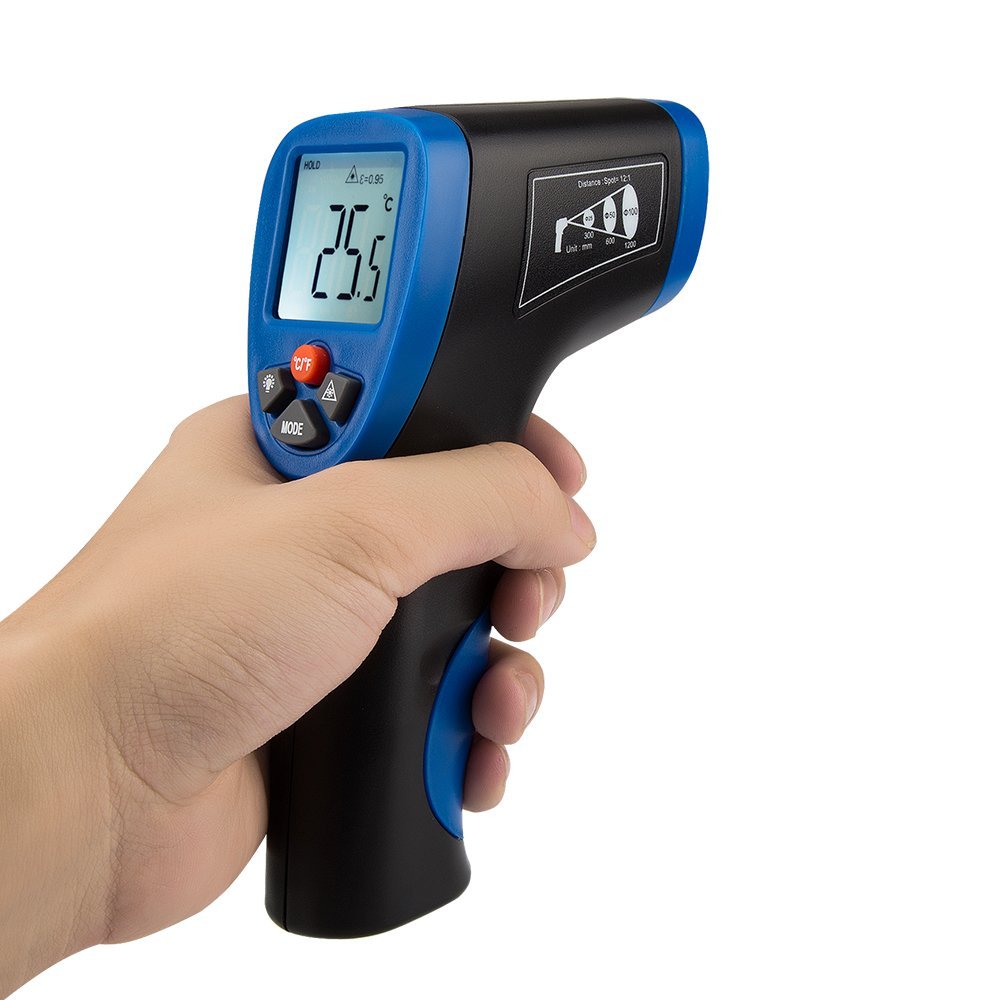
Figur 6: The thermometer display and D:S ratio guide on the side of the device.
Opretholdelse
- Rensning: Tør enheden ren med en blød,amp cloth. Do not use abrasive cleaners or solvents. Ensure the infrared lens is kept clean and free from dust or debris for accurate readings.
- Opbevaring: Store the thermometer in a cool, dry place, away from direct sunlight and extreme temperatures. Remove the battery if storing for extended periods to prevent leakage.
- Udskiftning af batteri: Udskift 9V-batteriet, når indikatoren for lavt batteriniveau vises på displayet.
Fejlfinding
| Problem | Mulig årsag | Løsning |
|---|---|---|
| Enheden tænder ikke. | Batteriet er dødt eller forkert installeret. | Kontroller batteriets polaritet. Udskift det med et nyt 9V-batteri. |
| Upræcise temperaturmålinger. |
|
|
| Laserpointeren virker ikke. | Laser is deactivated. | Press the Infrared/Laser Switch Key to activate the laser. |
| Skærmen er svag eller flimrer. | Lavt batteri. | Udskift 9V batteriet. |
Specifikationer
| Modelnummer | CECOMINOD046427 |
| Måleområde | -50°C til 550°C (-58°F til 1022°F) |
| Nøjagtighed | ±2% reading or ±2°C / 4°F (whichever is greater) |
| Svartid | 500 ms |
| Afstand til punktforhold (D:S) | 12:1 |
| emissivitet | Rettet til 0.95 |
| Strømkilde | 1 x 9V batteri |
| Auto sluk | 7 sekunder |
| Display Type | LCD med baggrundsbelysning |
| Materiale | Plast |
| Dimensioner (LxBxH) | 10.7 x 6.1 x 19.8 cm |
| Vægt | 259 g |
Garantioplysninger
This AVANTEK product is covered by a 12-month warranty from the date of purchase. In the unlikely event of a defect or malfunction during this period, AVANTEK will provide a replacement. Please retain your proof of purchase for warranty claims. This warranty does not cover damage caused by misuse, accident, unauthorized modification, or normal wear and tear.
Støtte
For any questions, technical assistance, or warranty claims, please contact AVANTEK customer support through the retailer's platform or the official AVANTEK website. Please have your model number (CECOMINOD046427) and purchase details ready when contacting support.