
1. Introduktion
The GAMDIAS Hermes GKB3000 is a mechanical gaming keyboard designed for enhanced durability and performance. It features GAMDIAS Certified Blue Switches with a 50 million actuation lifecycle, a 7-color spectrum backlight with 14 lighting effects, and various functional keys for an optimized gaming and typing experience. This manual provides instructions for setting up, operating, and maintaining your keyboard.
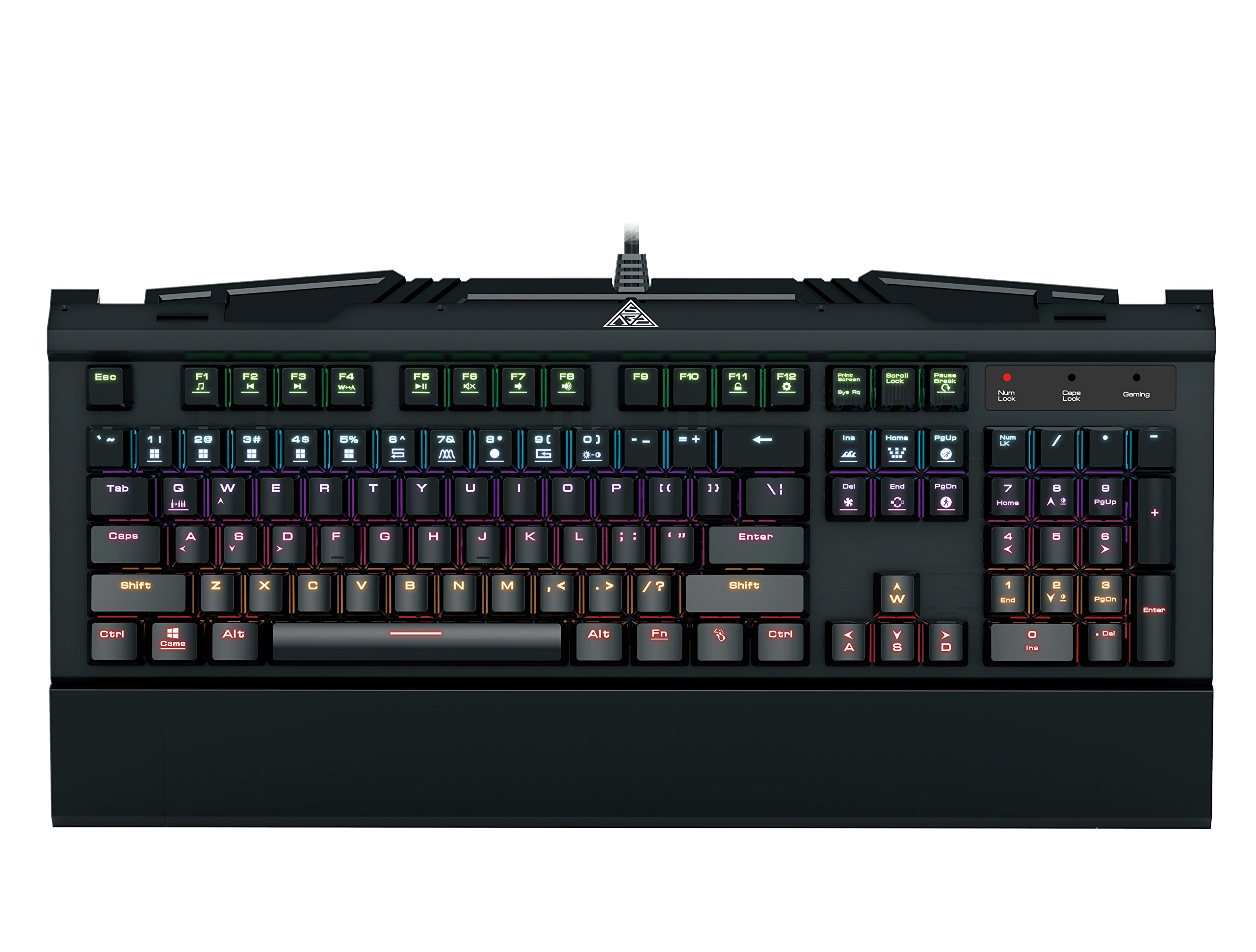
Image 1.1: The GAMDIAS Hermes GKB3000 Mechanical Gaming Keyboard. This image displays the full keyboard with its key layout and design, highlighting its compact yet robust build.
2. Pakkens indhold
Kontroller venligst pakkens indhold ved udpakning for at sikre, at alle varer er til stede og ubeskadigede.
- GAMDIAS Hermes GKB3000 Mechanical Gaming Keyboard
- Brugervejledning (dette dokument)
3. Opsætning
Follow these steps to set up your GAMDIAS Hermes GKB3000 keyboard:
- Pak tastaturet ud: Tag forsigtigt tastaturet ud af emballagen.
- Tilslut til computer: Plug the USB-A connector of the keyboard cable into an available USB port on your computer.
- Driver installation: The keyboard is plug-and-play. Your operating system (e.g., Windows) will automatically detect and install the necessary drivers. No additional software installation is typically required for basic functionality.
- Placering: Place the keyboard on a stable, flat surface for comfortable use.
4. Betjeningsvejledning
4.1. Lyseffekter
The Hermes GKB3000 features a 7-color spectrum backlight with 14 sets of lighting effects. These include 9 preset effects and 5 customizable patterns.
- Skifteeffekter: Use the dedicated function keys (often combined with the Fn key) to cycle through the preset lighting effects. Refer to the keyboard's keycap legends for specific combinations.
- Tilpasning af effekter: The keyboard supports 5 customizable lighting patterns. Instructions for programming these patterns are typically found in the full software suite available for download from the GAMDIAS webwebsted, hvis det er relevant.
- Justering af lysstyrke: Adjust backlight brightness using designated function key combinations.
4.2. Multimedia Control Keys
Access multimedia functions quickly using the dedicated multimedia control keys, often activated by holding the Fn key in combination with the F-keys (F1-F12).
- Lydstyrkekontrol: Øg, sænk eller slå lyden fra.
- Medieafspilning: Afspil/pause, stop, forrige nummer, næste nummer.
- Andre funktioner: May include opening default browser, email client, or calculator.
4.3. Special Gaming Functions
- WASD-Arrow Key Swap: This feature allows you to swap the functionality of the WASD keys with the arrow keys. This is useful for certain games or user preferences. Activate this function using a specific Fn key combination (e.g., Fn + W).
- Consecutive Attack Mode: This mode enhances rapid key input for gaming. Refer to the keyboard's specific documentation or GAMDIAS software for activation and configuration details.
- Tastaturlås: Temporarily disable the keyboard input to prevent accidental presses. Activate using a Fn tastkombination.
- Deaktivering af Windows-nøgle: Prevent accidental presses of the Windows key during gaming, which can minimize your game. Activate using a Fn key combination (e.g., Fn + Win key).
- N-Key Rollover: The GKB3000 supports N-key rollover, meaning multiple keys can be pressed simultaneously without ghosting or missed inputs. This ensures accurate and responsive commands during intense gaming sessions.
5. Vedligeholdelse
Korrekt vedligeholdelse sikrer dit tastaturs levetid og optimale ydeevne.
- Rensning:
- Frakobl tastaturet fra computeren, før du rengør det.
- Brug en blød, fnugfri klud lidt dampskylles med vand eller en mild rengøringsopløsning til at tørre overfladen af.
- Brug trykluft til støv og snavs mellem tasterne.
- Undgå at bruge skrappe kemikalier, slibende rengøringsmidler eller opløsningsmidler.
- Opbevaring: Opbevar tastaturet et køligt, tørt sted væk fra direkte sollys og ekstreme temperaturer, når det ikke er i brug i længere perioder.
- Håndtering: Avoid dropping the keyboard or exposing it to excessive force, as this can damage the mechanical switches or internal components.
6. Fejlfinding
If you encounter issues with your GAMDIAS Hermes GKB3000 keyboard, refer to the following common solutions:
| Problem | Mulig løsning |
|---|---|
| Tastaturet reagerer ikke. |
|
| Baggrundsbelysningen virker ikke eller er svag. |
|
| Visse taster virker ikke. |
|
| WASD keys are acting as arrow keys. |
|
If the problem persists after trying these solutions, please contact GAMDIAS customer support for further assistance.
7. Specifikationer
The following are the technical specifications for the GAMDIAS Hermes GKB3000 Mechanical Gaming Keyboard:
| Feature | Detalje |
|---|---|
| Mærke | GAMDIAS |
| Modelnummer | GKB3000 |
| Switch Type | GAMDIAS Certified Mechanical Blue Switches |
| Actuation Lifecycle | 50 millioner tastetryk |
| Baggrundsbelysning | 7-Color Spectrum, 14 Lighting Effects (9 preset, 5 customizable) |
| Anti-Ghosting | N-Key Rollover |
| Forbindelse | USB-A |
| Operativsystem | Windows |
| Varens vægt | 2.42 pund (ca. 1.1 kg) |
| Produktmål (LxBxH) | 18.8 x 10.5 x 2 tommer (ca. 47.75 x 26.67 x 5.08 cm) |
| Materiale | Plastic with Elegant Metal Plate Design |
8. Garanti og support
GAMDIAS products are manufactured to the highest quality standards. For information regarding warranty coverage, terms, and conditions, please refer to the warranty card included with your product or visit the official GAMDIAS webwebsted.
For technical support, troubleshooting assistance, or any product-related inquiries, please contact GAMDIAS customer support through their official webwebstedet eller kontaktoplysningerne på din produktemballage.
GAMDIAS Officiel Webwebsted: www.gamdias.com