
1. Introduktion
Tak for købetasing the Axess 2.1 HiFi Bluetooth Speaker SPBT1038BK. This portable speaker system is designed to provide clear audio and robust bass, suitable for various environments. It features Bluetooth connectivity, USB and SD card support, and a line-in function for versatile audio playback. This manual provides essential information for the safe and efficient use of your speaker.
Nøglefunktioner omfatter:
- 2.1 outdoor passive HIFI Bluetooth speaker with 3-inch subwoofer.
- Secure and simple Bluetooth pairing with an operating range of up to 32 feet (10 meters).
- Support for USB drives, SD cards, and a line-in function for compatibility with various audio devices.
- Integrated slide panel control for volume adjustment.
- Durable leather handle for convenient portability.
- Built-in 1000mAh Lithium rechargeable battery.
2. Sikkerhedsoplysninger
Læs venligst alle sikkerhedsinstruktioner omhyggeligt, inden du bruger dette produkt. Manglende overholdelse af disse instruktioner kan resultere i elektrisk stød, brand eller andre farer.
- Udsæt ikke højttaleren for ekstreme temperaturer, direkte sollys eller høj luftfugtighed.
- Undgå at tabe eller udsætte højttaleren for kraftige stød.
- Enheden må ikke skilles ad, repareres eller ændres. Overlad al service til kvalificeret personale.
- Hold højttaleren væk fra vand og andre væsker.
- Brug kun det medfølgende opladningskabel eller et tilsvarende certificeret kabel.
- Sørg for ordentlig ventilation, når du bruger højttaleren.
- Bortskaf batterier i henhold til lokale regler. Udsæt ikke batterier for overdreven varme.
3. Pakkens indhold
Bekræft at alle varer er til stede i din pakke:
- Axess SPBT1038BK Bluetooth Speaker
- USB opladningskabel
- 3.5mm Audio (AUX) Cable
- Brugermanual
4. Produktet er slutview
Gør dig bekendt med højttalerens komponenter og betjeningselementer.
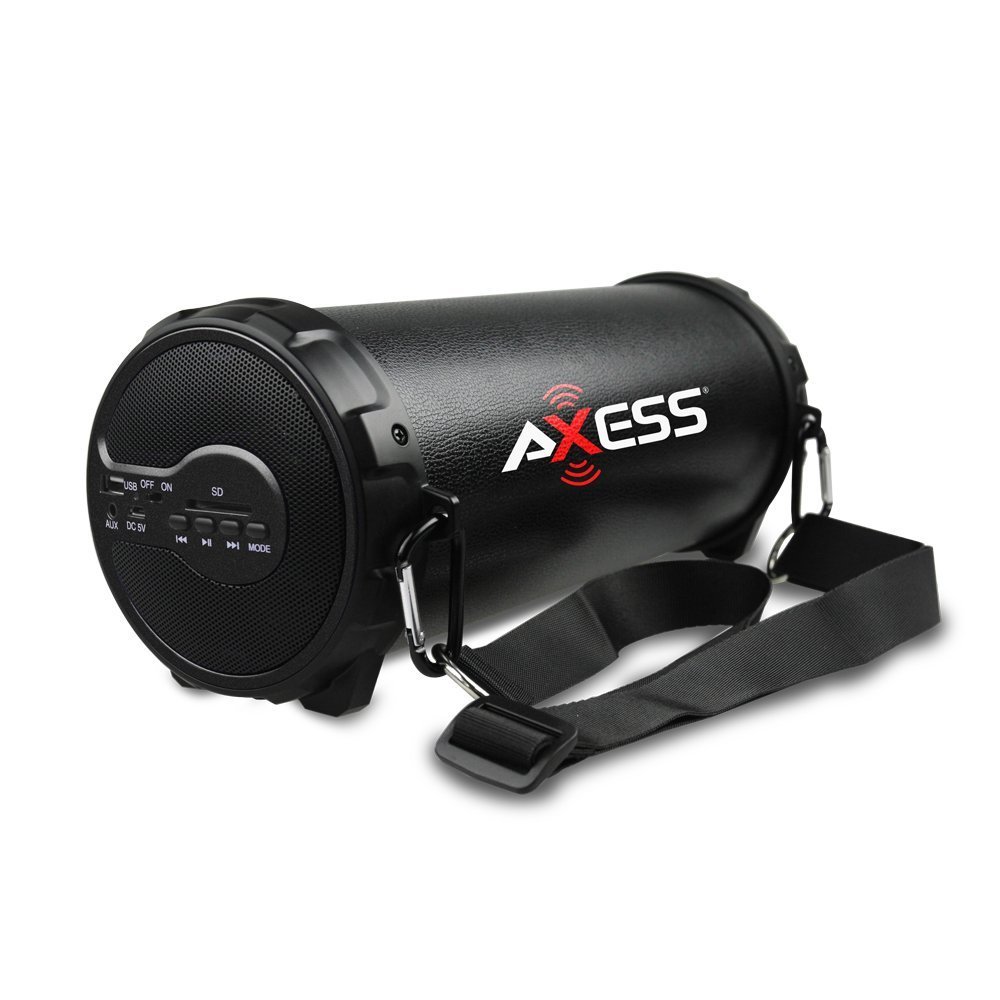
Figur 1: Forside view of the Axess SPBT1038BK Bluetooth Speaker, showcasing the speaker grille and overall design.

Figur 2: Side view of the Axess SPBT1038BK, illustrating the control panel and input ports.
Controls and Ports (Typical Layout)
- Power knap: Tryk og hold nede for at tænde/slukke højttaleren.
- Mode knap: Short press to switch between Bluetooth, AUX, USB, and SD card modes.
- Volume glider: Slide to adjust the master volume level.
- Afspil/pause knap: In Bluetooth/USB/SD mode, press to play or pause audio.
- Knapper til forrige/næste spor: In Bluetooth/USB/SD mode, press to skip tracks.
- USB-port: Til tilslutning af USB-flashdrev til lydafspilning.
- SD-kortplads: For inserting SD memory cards for audio playback.
- AUX-indgang (3.5 mm): For connecting external audio devices via the 3.5mm audio cable.
- DC 5V opladningsport: For connecting the USB charging cable to recharge the battery.
5. Opsætning
5.1 Opladning af batteriet
- Connect the small end of the USB charging cable to the DC 5V charging port on the speaker.
- Tilslut den større ende af USB-opladerkablet til en USB-strømadapter (medfølger ikke) eller en computers USB-port.
- The charging indicator light (if present) will illuminate, typically red, during charging.
- Once fully charged, the indicator light may change color (e.g., turn off or turn blue/green). A full charge takes approximately 3-4 hours.
Bemærk: For optimal batterilevetid skal højttaleren oplades helt inden første brug.
5.2 Tænd/sluk
- To turn ON: Press and hold the Power knap i et par sekunder, indtil du hører en lydmeddelelse eller ser en indikatorlampe.
- To turn OFF: Press and hold the Power knap igen i et par sekunder.
5.3 Bluetooth -parring
- Ensure the speaker is powered ON and in Bluetooth mode. If not, press the Mode knap until you hear a Bluetooth pairing prompt. The Bluetooth indicator light will typically flash.
- Aktiver Bluetooth på din mobile enhed (smartphone, tablet osv.).
- Søg efter available Bluetooth devices. You should see "SPBT1038BK" or a similar name in the list.
- Select "SPBT1038BK" to connect. Once paired, you will hear a confirmation tone, and the Bluetooth indicator light will stop flashing and remain solid.
- Du kan nu afspille lyd fra din enhed via højttaleren.
Note: The speaker will attempt to reconnect to the last paired device automatically when powered on.
5.4 Tilslutning via AUX-indgang
- Tilslut den ene ende af 3.5 mm lydkablet til AUX-indgangsporten på højttaleren.
- Connect the other end of the 3.5mm audio cable to the headphone jack or audio output of your external device (e.g., MP3 player, computer, TV).
- Tryk på Mode knap on the speaker until it enters AUX mode.
- Afspil lyd fra din eksterne enhed.
5.5 Brug af USB/SD-kort
- Indsæt et USB-flashdrev i USB-port eller et SD-kort i SD-kortplads. Ensure the card is inserted correctly.
- The speaker should automatically switch to USB or SD card mode and begin playing audio files. Hvis ikke, tryk på Mode knap for at vælge den korrekte tilstand.
- Brug knapperne Afspil/Pause og Forrige/Næste spor til at styre afspilningen.
6. Betjening af højttaleren
6.1 Lydstyrkekontrol
Adjust the overall volume by sliding the Volumen skyderen on the speaker. You can also control the volume from your connected Bluetooth device or external audio source.
6.2 Afspilningskontrol
- Afspil/pause: Tryk på Afspil/pause knap to toggle between playing and pausing audio.
- Næste nummer: Tryk på Knappen Næste spor for at springe til næste sang.
- Forrige nummer: Tryk på Forrige track-knap to go back to the beginning of the current song or to the previous song.
Note: Playback controls are primarily functional in Bluetooth, USB, and SD card modes. For AUX mode, control playback directly from your connected device.
7. Vedligeholdelse
7.1 Rengøring
- Always power off the speaker before cleaning.
- Brug en blød, tør klud til at tørre de udvendige overflader af.
- Brug ikke slibende rengøringsmidler, voks eller opløsningsmidler.
- Undgå at fugt kommer ind i åbninger.
7.2 Opbevaring
- Opbevar højttaleren et køligt, tørt sted væk fra direkte sollys og ekstreme temperaturer.
- Hvis batteriet opbevares i en længere periode, skal det oplades til cirka 50% hver par måneder for at opretholde batteriets tilstand.
7.3 Pleje af batterier
- Overoplade ikke batteriet. Frakobl opladeren, når batteriet er fuldt.
- Undgå at aflade batteriet helt ofte, da dette kan reducere dets levetid.
8. Fejlfinding
Hvis du støder på problemer med din højttaler, kan du se følgende almindelige problemer og løsninger:
| Problem | Mulig årsag | Løsning |
|---|---|---|
| Højttaleren tænder ikke. | Batteriet er afladet. | Oplad højttaleren ved hjælp af det medfølgende USB-kabel. |
| Ingen lyd. | Lydstyrken er for lav; forkert tilstand valgt; enheden er ikke tilsluttet korrekt. | Increase speaker volume and device volume. Ensure the correct mode (Bluetooth, AUX, USB, SD) is selected. Reconnect the device. |
| Bluetooth-parring mislykkes. | Højttaleren er ikke i parringstilstand; enhedens Bluetooth er slået fra; for langt fra højttaleren. | Ensure speaker is in Bluetooth pairing mode. Turn device Bluetooth ON. Move device closer to speaker (within 32 feet). Forget previous pairings on your device and try again. |
| USB/SD-kort afspiller ikke. | Forkert tilstand; ikke understøttet file format; beskadiget medie. | Ensure speaker is in USB or SD mode. Check if audio files are in a supported format (e.g., MP3). Try a different USB drive or SD card. |
| Dårlig lydkvalitet. | Low battery; device too far (Bluetooth); interference. | Charge the speaker. Move the Bluetooth device closer. Avoid sources of wireless interference. |
9. Specifikationer
| Feature | Specifikation |
|---|---|
| Model | SPBT1038BK |
| Højttaler type | 2.1 HiFi Outdoor Passive Bluetooth Speaker with 3-inch Subwoofer |
| Forbindelsesteknologi | Bluetooth |
| Bluetooth -driftsområde | Op til 32 fod (10 meter) |
| Strømkilde | Batteridrevet |
| Batteritype | Lithium Ion |
| Batterikapacitet | 1000 mAh |
| Varens vægt | 1.16 kg (2.56 lbs) |
| Produktmål (L x B x H) | 29.21 x 11.43 x 11.43 cm (11.5 x 4.5 x 4.5 tommer) |
| Særlige funktioner | Portable, USB/SD Card Support, Line-in Function |
10. Garanti og support
This product is covered by a limited warranty. For specific warranty terms and conditions, please refer to the documentation provided with your purchase or contact Axess customer support.
For technical assistance, troubleshooting not covered in this manual, or general inquiries, please visit the official Axess webwebstedet eller kontakt deres kundeserviceafdeling. Kontaktoplysninger kan typisk findes på produktemballagen eller i producentens webwebsted.