
Naztech N750
Naztech N750 Emerge Wireless Bluetooth Headset User Manual
Model: N750
Indledning
Thank you for choosing the Naztech N750 Emerge Wireless Bluetooth Headset. This manual provides detailed instructions on how to set up, operate, and maintain your headset to ensure optimal performance and longevity. The N750 Emerge is designed for clear communication and media playback, featuring advanced noise cancellation and versatile connectivity.
Pakkens indhold

Image: Contents of the Naztech N750 Emerge package.
- Naztech N750 Emerge Wireless Headset
- Bil oplader
- Ear Gels (S/M/L)
- Brugermanual
- Flat Micro USB Cable
Produkt overview
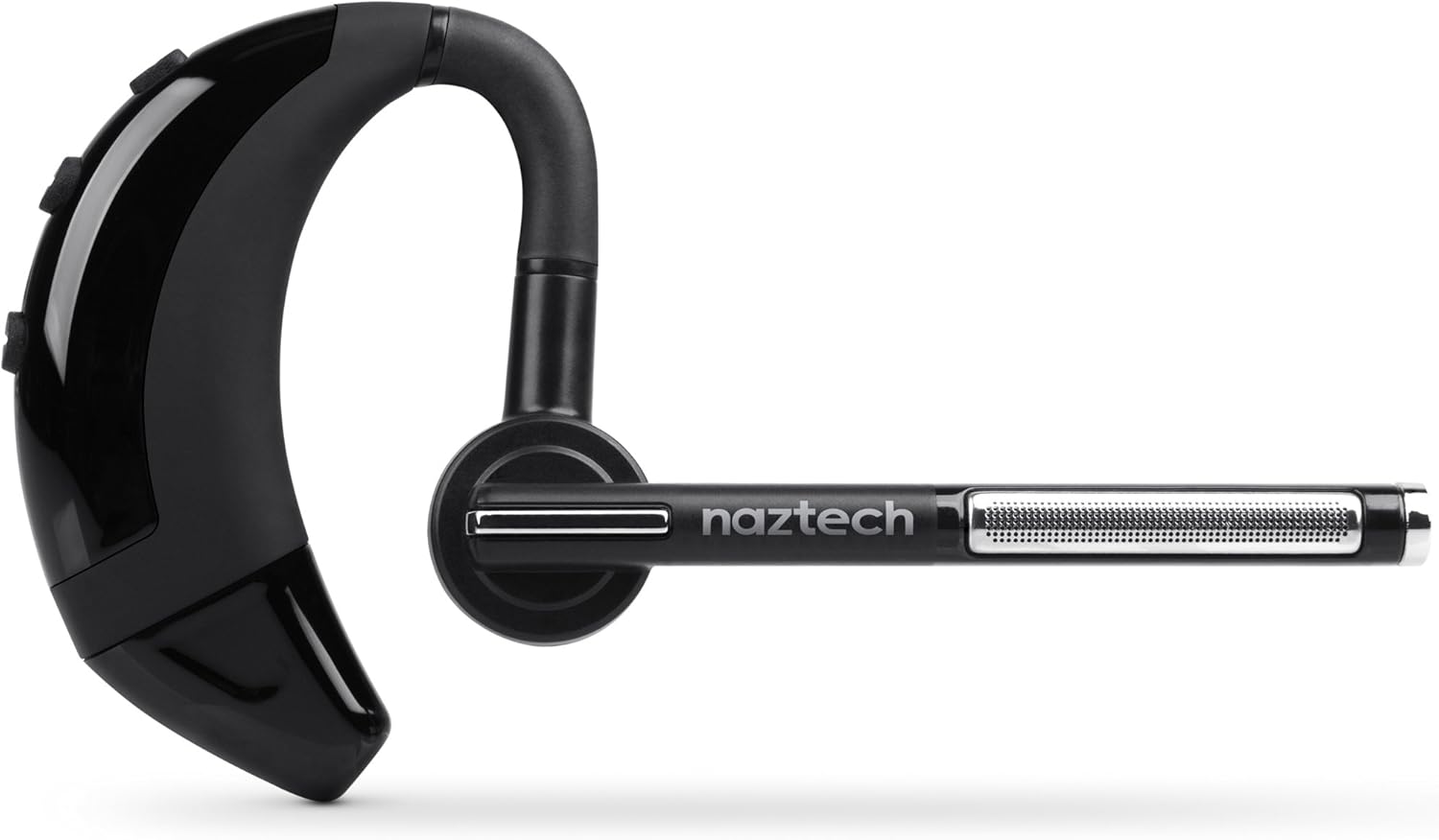
Image: The Naztech N750 Emerge Wireless Bluetooth Headset.
The Naztech N750 Emerge features an ergonomic design for comfortable wear and intuitive controls for easy operation. Key components include the ear hook, main body with control buttons, microphone boom, and ear tip.
Opsætning
1. Opladning af headsettet
Before first use, fully charge the N750 Emerge headset. Connect the provided Micro USB cable to the charging port on the headset and the other end to a USB power source (e.g., the included car charger, a computer USB port, or a wall adapter). The LED indicator will show charging status and turn off or change color when fully charged.
2. Parring med en Bluetooth-enhed
- Sørg for, at headsettet er slukket.
- Press and hold the Multi-function Button (MFB) on the headset until the LED indicator flashes blue and red alternately, indicating pairing mode.
- Gå til Bluetooth-indstillingerne på din smartphone eller Bluetooth-aktiverede enhed, og aktiver Bluetooth.
- Søg efter available devices. Select "Naztech N750" from the list.
- Hvis du bliver bedt om en adgangskode, skal du indtaste "0000" (fire nuller).
- Once successfully paired, the LED indicator will flash blue slowly, and you may hear a confirmation tone.
3. Bære headsettet

Image: The Naztech N750 Emerge headset demonstrating its 180-degree swivel for left or right ear use.
The N750 Emerge is designed for comfortable wear on either the left or right ear. The ear hook swivels 180 degrees to accommodate your preference. Adjust the ear hook and select the appropriate ear gel size (S/M/L) for a secure and comfortable fit. The microphone boom should be positioned towards your mouth for optimal voice pickup.
Betjeningsvejledning
Tænd/sluk
- Tænd: Press and hold the MFB for approximately 3 seconds until the LED flashes blue.
- Sluk: Press and hold the MFB for approximately 5 seconds until the LED flashes red and then turns off.
Opkaldsstyring

Image: The headset's advanced call technology automatically pauses music and routes incoming calls.
- Besvar opkald: Tryk én gang på MFB-knappen, når der kommer et opkald.
- Afslut opkald: Tryk én gang på MFB-knappen under et opkald.
- Afvis opkald: Press and hold the MFB for approximately 2 seconds when a call comes in.
- Genopkald sidste nummer: Double-press the MFB when the headset is idle.
- Stemmeopkald: Press the MFB once when the headset is idle to activate your phone's voice assistant (if supported).
Lydstyrkekontrol
Use the Volume Up (+) and Volume Down (-) buttons on the headset to adjust the call or media volume.
GPS & Voice Prompt / Caller ID Announcement

Image: The headset provides GPS voice prompts and announces caller ID for incoming calls.
The N750 Emerge supports voice prompts for GPS navigation and announces the caller ID for incoming calls, allowing for hands-free information and call management.
Musikafspilning
When connected to a device, the headset can play audio. Use your device's controls for play/pause, skip track, etc. Incoming calls will automatically pause music playback.
Multipoint-teknologi

Image: The headset supports Multipoint Technology for connecting to two devices simultaneously.
The N750 Emerge supports multipoint technology, allowing it to be connected to two Bluetooth devices simultaneously. This enables seamless switching between calls or audio from two different paired devices.
Støjreduktion

Image: The headset utilizes Noisehush Technology for crystal clear conversations with noise cancellation.
The integrated Noisehush® Technology provides ultimate HD clarity and noise cancellation, ensuring crystal clear conversations for both you and your callers by reducing distracting ambient sound.
Opretholdelse
- Clean the headset regularly with a soft, dry cloth. Do not use harsh chemicals or abrasive cleaners.
- Undgå at udsætte headsettet for ekstreme temperaturer, fugt eller direkte sollys.
- Opbevar headsettet et køligt og tørt sted, når det ikke er i brug.
- Forsøg ikke at skille headsettet ad eller ændre det, da dette vil ugyldiggøre garantien og kan forårsage skade.
Fejlfinding
| Problem | Mulig årsag | Løsning |
|---|---|---|
| Headsettet tænder ikke. | Batteriet er lavt eller afladet. | Oplad headsettet helt. |
| Kan ikke parres med enheden. | Headsettet er ikke i parringstilstand; Bluetooth er slået fra på enheden; enheden er for langt væk. | Ensure headset is in pairing mode (flashing blue/red). Turn on Bluetooth on your device. Move headset closer to device (within 10 meters). |
| Ingen lyd eller lav lydstyrke. | Lydstyrken er for lav; headsettet er ikke tilsluttet; forkert lydudgang er valgt. | Increase volume on headset and device. Reconnect headset. Ensure audio is routed to the headset on your device. |
| Dårlig opkaldskvalitet / Støj. | Weak signal; environmental interference; microphone not positioned correctly. | Move closer to the paired device. Avoid strong electromagnetic interference. Adjust microphone boom towards your mouth. |
Specifikationer
- Model: N750 Emerge
- Bluetooth version: v4.1
- Trådløs kommunikationsteknologi: Bluetooth
- Forbindelse teknologi: Trådløs
- Støjreduktion: Noisehush® Technology
- Multipunktsteknologi: Ja
- iOS Battery Tracker: Ja
- Taletid: Op til 8 timer
- Standby tid: Op til 140 timer
- Batteri: 1 Lithium Ion batteri påkrævet
- Produktdimensioner: 10.16 x 10.16 x 2.54 cm
- Varens vægt: 22.7 g
- Farve: Sort
Garanti og support
Naztech products are designed and manufactured to the highest quality standards. For warranty information and technical support, please refer to the warranty card included with your product or visit the official Naztech webwebsted. Behold din købskvittering som købsbevis i tilfælde af garantikrav.