
Indledning
The Master & Dynamic MW60 Wireless Bluetooth Foldable Headphones are designed to deliver a high-quality audio experience with effective sound isolation. They feature 45mm neodymium drivers for clear audio reproduction across various music genres. Equipped with Bluetooth 4.1, these headphones offer wireless connectivity and up to 16 hours of battery life. Constructed with lightweight stainless steel and aluminum, and featuring leather ear pads, the MW60 headphones are designed for comfort and durability, with a foldable design for portability.
Hvad er der i æsken
- Master & Dynamic MW60 Wireless Headphones
- Lydkabel (3.5 mm)
- Lydadapter
- Micro USB til USB opladerkabel
- Carry Case for Headphones
- Carry Pouch for Accessories
Produkt overview
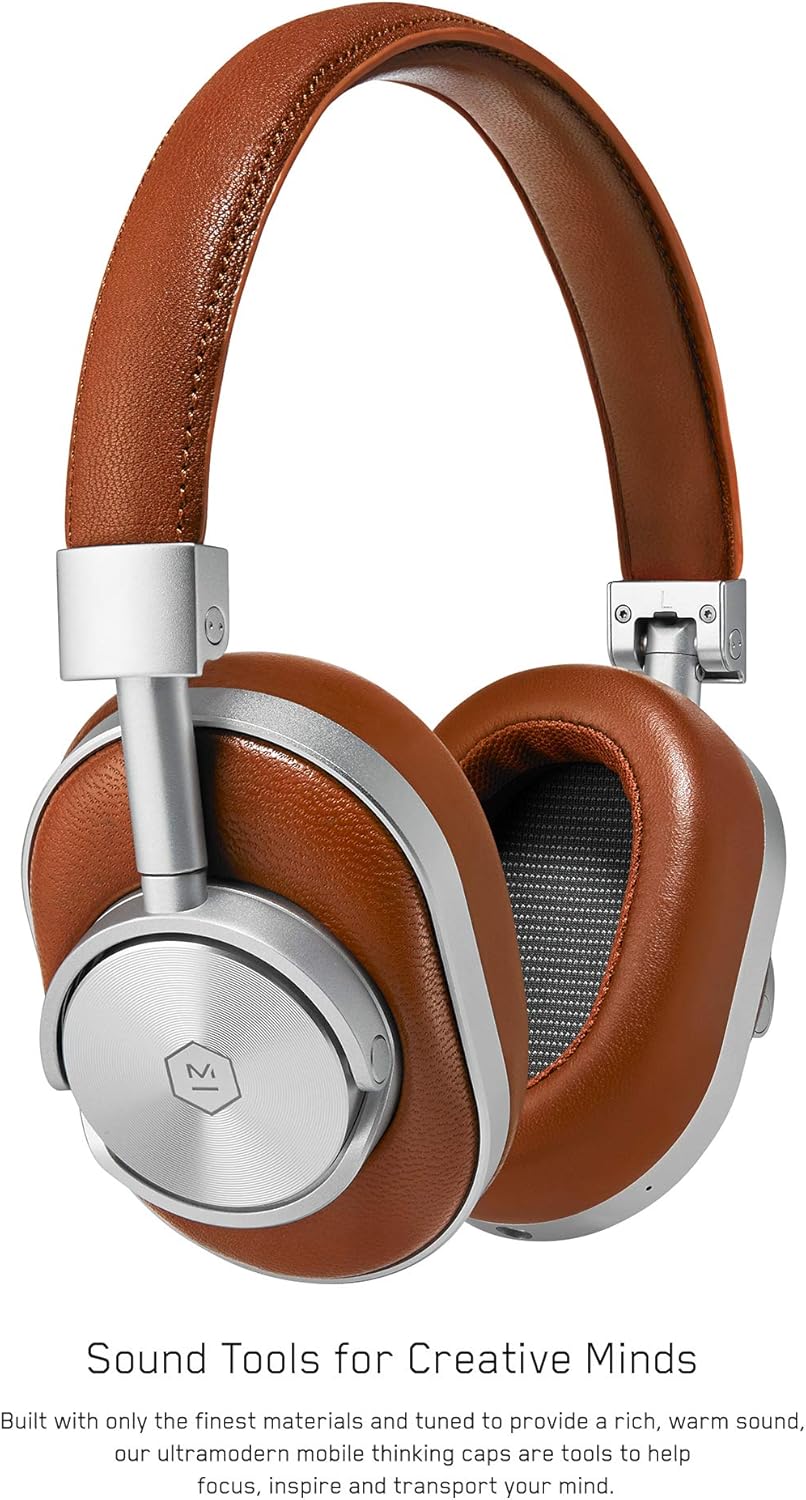
Figur 1: Front view of the Master & Dynamic MW60 Wireless Headphones. This image displays the over-ear design with silver metal accents and brown leather earcups and headband.

Figur 2: Close-up of the right earcup showing the control buttons and ports. Visible controls include volume up/down, a multi-function button, and the power/pairing switch. A 3.5mm audio jack and micro USB charging port are also present.
Kontrol og porte
- Power/Pairing Switch: Located on the earcup, used to turn the headphones on/off and initiate Bluetooth pairing.
- Multifunktionsknap: Controls playback (play/pause), call management, and voice assistant activation.
- Knapper til lydstyrke op / ned: Adjusts audio volume. Can also be used for track skipping (hold for next/previous track).
- 3.5 mm lydstik: Til kabelforbindelse med det medfølgende lydkabel.
- Micro USB -port: Til opladning af det interne batteri.
- Mikrofon: Integreret til håndfri opkald.
Opsætning
Opladning af hovedtelefoner
- Connect the Micro USB end of the charging cable to the Micro USB port on the headphone earcup.
- Connect the USB-A end of the charging cable to a powered USB port (e.g., computer, wall adapter).
- Indikatorlampen viser opladningsstatus. En fuld opladning tager typisk cirka 2 timer.
Bluetooth-parring
- Sørg for, at hovedtelefonerne er fuldt opladede.
- Slide the Power/Pairing switch to the ON position.
- To enter pairing mode, slide and hold the Power/Pairing switch to the far right (pairing icon) until the indicator light begins to flash.
- Aktiver Bluetooth på din enhed (smartphone, tablet, computer) og søg efter tilgængelige enheder.
- Select "MW60" from the list of detected devices.
- Once paired, the indicator light will turn solid blue or white, depending on the model.
Betjeningsvejledning
Grundlæggende funktioner
- Tænd/sluk: Slide the Power/Pairing switch to the ON or OFF position.
- Afspil/pause: Tryk én gang på multifunktionsknappen.
- Lydstyrkekontrol: Tryk på knapperne Lydstyrke op (+) eller Lydstyrke ned (-).
- Næste nummer: Tryk på knappen Lydstyrke op (+), og hold den nede.
- Forrige nummer: Tryk og hold nede på lydstyrke ned-knappen (-).
Opkaldsstyring
- Besvar/afslut opkald: Tryk én gang på multifunktionsknappen.
- Afvis opkald: Tryk og hold multifunktionsknappen nede.
- Aktiver stemmeassistent: Tryk to gange på multifunktionsknappen.
Kablet tilslutning
To use the headphones with a wired connection, plug the included 3.5mm audio cable into the audio jack on the earcup and the other end into your audio source. The headphones will automatically switch to wired mode, conserving battery life.
Opretholdelse
Rensning
- Tør hovedtelefonerne af med en blød, tør klud.
- Brug ikke skrappe kemikalier eller slibende materialer.
- For leather parts, use a specialized leather cleaner if necessary, following product instructions.
Opbevaring

Figur 3: The MW60 headphones folded into a compact form, demonstrating their portability and ease of storage in the included carry case.
- When not in use, fold the headphones and store them in the provided carry case to protect them from dust and damage.
- Undgå opbevaring i ekstreme temperaturer eller høj luftfugtighed.
Fejlfinding
| Problem | Mulig løsning |
|---|---|
| Hovedtelefonerne tændes ikke | Sørg for, at hovedtelefonerne er fuldt opladet. Tilslut til en strømkilde med Micro USB-kablet. |
| Kan ikke parres via Bluetooth | Ensure headphones are in pairing mode (flashing indicator light). Turn off and on Bluetooth on your device. Try forgetting the device on your phone and re-pairing. Ensure no other devices are actively connected. |
| Periodisk lyd- eller forbindelsesafbrydelse | Ensure your device is within the Bluetooth range. Avoid physical obstructions between the headphones and your device. Minimize interference from other wireless devices. |
| Ingen lyd i kablet tilstand | Ensure the 3.5mm audio cable is securely connected to both the headphones and the audio source. Check the volume levels on both the headphones and the audio source. |
| Earcups detach easily | Ensure earcups are properly aligned and securely attached to the magnetic mounts. |
Specifikationer
| Feature | Detalje |
|---|---|
| Modelnavn | MW60S2 |
| Forbindelsesteknologi | Trådløs (Bluetooth 4.1) |
| Audio driver type | 45 mm dynamiske neodym-drivere |
| Batterilevetid | Op til 16 timer |
| Materialer | Aluminum, Stainless Steel, Leather |
| Varens vægt | 3 pund (ca. 1.36 kg) |
| Produktdimensioner | 10 x 3.75 x 8 tommer (25.4 x 9.5 x 20.3 cm) |
| Impedans | 32 Ohm |
| Støjkontrol | Lydisolering (passiv) |
| Hovedtelefonstik | 3.5 mm Jack |
Garanti og support
Warranty information for your Master & Dynamic MW60 Wireless Headphones is typically provided with your purchase. Please refer to the documentation included in your product packaging for specific warranty terms and conditions.
For technical support, service, or further inquiries, please contact Master & Dynamic customer service directly. Contact details can usually be found on the manufacturer's official webwebstedet eller i din produktdokumentation.