
1. Introduktion
This manual provides detailed instructions for the installation, operation, and maintenance of your LSI 12-Inch Full Extension Drawer Slides. These high-quality, steel ball bearing slides are designed for smooth and reliable drawer operation in various applications, including DIY projects and professional installations. Each pack includes 10 pairs of slides and necessary installation screws.

Image 1.1: Close-up of the ball bearing mechanism ensuring smooth drawer movement.
2. Produktfunktioner
The LSI 12-Inch Full Extension Drawer Slides offer the following key features:
- Holdbar stålkonstruktion: Manufactured from robust steel for long-lasting performance and strength.
- Full Extension Design: Allows the drawer to extend completely out of the cabinet, providing full access to the drawer's contents.
- Ball Bearing Sliding System: Ensures smooth, quiet, and effortless drawer operation.
- Built-in Rubber Detent: Features a rubber detent mechanism to securely hold the drawer in the closed position, preventing accidental opening.
- Side Mounted Installation: Designed for easy and secure side-mount installation.
- Includes Installation Screws: Each pack of 10 pairs comes with the necessary screws for convenient installation.
3. Opsætning og installation
Proper installation is crucial for optimal performance of your drawer slides. Follow these steps carefully:
3.1 Nødvendigt værktøj
- Blyant
- Målebånd
- Bor med passende bor
- Skruetrækker (Phillips-skruetrækker anbefales)
- Niveau
- Clamps (optional, for holding slides in place during marking)
3.2 Preparing the Slides
Each drawer slide consists of three parts: the cabinet member (outermost), the intermediate member, and the drawer member (innermost). To install, you will first need to separate the drawer member from the rest of the slide.
- Extend the slide fully.
- Locate the small plastic or metal release lever on the intermediate member. This lever is typically pressed down or pulled up.
- While holding the lever, pull the innermost (drawer) member forward until it detaches from the rest of the slide.
3.3 Installing the Cabinet Members
The cabinet members attach to the inside of your cabinet or furniture frame.
- Determine the desired height for your drawer. Mark a horizontal line on the inside of the cabinet where the bottom edge of the slide will rest. Ensure these lines are level on both sides of the cabinet.
- Align the bottom edge of the cabinet member with your marked line. The front end of the slide should be flush with the front edge of the cabinet opening (or recessed slightly, depending on your drawer front overlay).
- Using the provided screws, attach the cabinet member to the cabinet side through the designated mounting holes. Start with one screw at the front and one at the back to allow for minor adjustments.
- Verify the slide is level and securely fastened, then install the remaining screws. Repeat for the other cabinet member on the opposite side.
3.4 Installing the Drawer Members
The drawer members attach to the sides of your drawer box.
- Place the drawer member on the side of your drawer box. The front end of the slide should be flush with the front edge of the drawer box.
- Ensure the slide is centered vertically on the drawer side or positioned to allow for proper clearance.
- Attach the drawer member to the drawer side using the provided screws. Again, start with one screw at the front and one at the back.
- Verify the slide is straight and securely fastened, then install the remaining screws. Repeat for the other drawer member.

Image 3.1: Included installation screws for mounting the drawer slides.
3.5 Inserting the Drawer
Once both sets of slides are installed, you can insert the drawer into the cabinet.
- Align the drawer members with the intermediate members of the cabinet slides.
- Gently push the drawer into the cabinet. You should feel a slight resistance as the ball bearings engage.
- Push the drawer fully closed. You should hear a soft click as the rubber detent engages, holding the drawer shut.
- Test the drawer by opening and closing it several times to ensure smooth operation and proper alignment.
4. Betjening
Your LSI Full Extension Drawer Slides are designed for simple and reliable operation.
- Åbning: To open the drawer, simply pull the drawer front outwards. The ball bearing system will allow the drawer to glide smoothly and fully extend, providing complete access to the drawer's contents.
- Lukning: To close the drawer, push the drawer front inwards. Continue pushing until the drawer is fully seated and the built-in rubber detent engages, holding the drawer securely in the closed position.
- Vægt kapacitet: Ensure the total weight of the drawer and its contents does not exceed the maximum weight capacity of 100 pounds to maintain optimal performance and longevity.
5. Vedligeholdelse
Regular, simple maintenance will help ensure the longevity and smooth operation of your drawer slides.
- Rensning: Periodically wipe down the slide rails with a clean, dry cloth to remove dust and debris. For stubborn grime, a slightly damp cloth can be used, followed by immediate drying. Avoid harsh chemical cleaners.
- Smøring: The ball bearing system is generally self-lubricating. However, if you notice the slides becoming stiff or noisy over time, a light application of a silicone-based lubricant or dry Teflon spray can be applied to the ball bearings. Avoid oil-based lubricants as they can attract dust and dirt.
- Inspektion: Occasionally inspect the mounting screws to ensure they are tight. Loose screws can affect slide performance and stability.
6. Fejlfinding
Hvis du støder på problemer med dine skuffeskinner, kan du se følgende almindelige problemer og løsninger:
| Problem | Mulig årsag | Løsning |
|---|---|---|
| Drawer does not slide smoothly or sticks. |
|
|
| Skuffen lukker ikke helt. |
|
|
| Drawer feels wobbly or loose. |
|
|
7. Specifikationer
Key technical specifications for the LSI 12-Inch Full Extension Drawer Slides:
- Model: 12-Inch Full Extension Drawer Slides
- Mærke: LSI
- Materiale: Steel (Zinc Plated finish)
- Monteringstype: Sidemontering
- Udvidelsestype: Fuld forlængelse
- Vægt kapacitet: 100 pund (pr. par)
- Længde: 12 tommer (304.8 mm)
- Højde: Cirka 1.42 tommer (36.00 mm)
- Width (Thickness): Cirka 0.50 tommer (12.7 mm)
- Inkluderede komponenter: 10 Pairs of Drawer Slides, Installation Screws
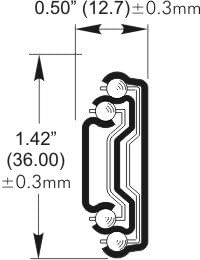
Image 7.1: Dimensional drawing of the drawer slide, showing height and width specifications.
8. Garanti og support
8.1 Garantioplysninger
No specific warranty information is provided in the product details. For details regarding product warranty, please refer to the purchase documentation or contact your retailer.
8.2 Kundesupport
For further assistance, technical questions, or to report any issues, please contact your retailer or the manufacturer, LSI. Please have your product model number (12-Inch Full Extension Drawer Slides) and purchase information available when contacting support.