
1. Introduktion
The Aduro Amplify LED Wireless Speaker, model BSP15, is a portable audio device designed for wireless music playback and hands-free calling. It features integrated LED lighting with multiple settings to enhance the audio experience. This manual provides instructions for the proper setup, operation, and maintenance of your speaker.
Hvad er der i æsken:
- Aduro Amplify LED Wireless Speaker (BSP15)
- Ladekabel
2. Sikkerhedsoplysninger
- Do not expose the speaker to water or moisture. This product is not water-resistant.
- Avoid extreme temperatures. Do not place near heat sources or in direct sunlight for extended periods.
- Forsøg ikke at skille højttaleren ad eller ændre den. Dette kan ugyldiggøre garantien og forårsage skade.
- Brug kun det medfølgende opladningskabel eller et tilsvarende certificeret kabel.
- Opbevares utilgængeligt for børn.
3. Produktfunktioner
- Trådløs forbindelse: Forbinder til smartphones, tablets og andre Bluetooth-aktiverede enheder.
- Easy-Touch Pairing: Simplifies the process of connecting to your device.
- Integreret mikrofon: Allows for hands-free phone calls.
- Højkvalitets lydoutput: Leverer klar og høj lyd.
- Multiple LED Settings: Offers various light modes to complement your audio experience.
4. Kontroller overview
The Aduro Amplify speaker features intuitive controls located on the top panel for easy access to functions.
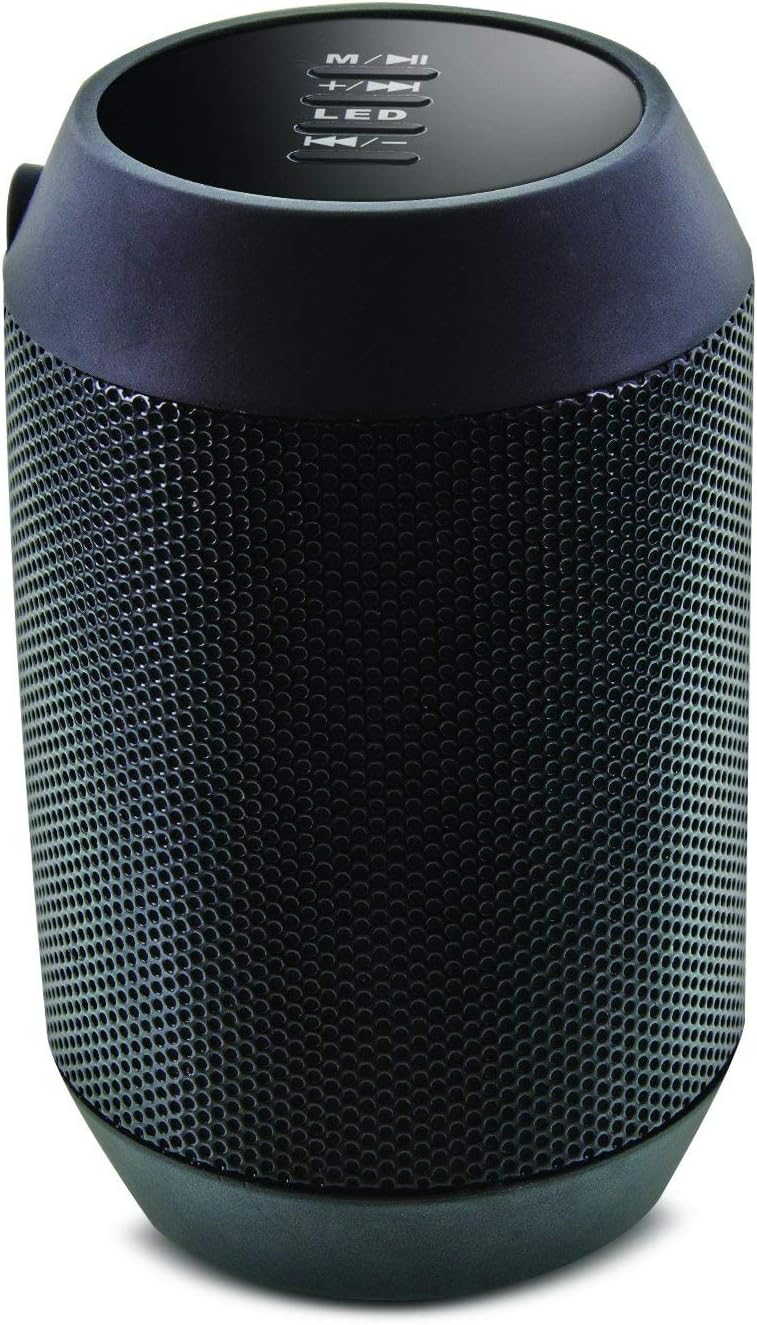
Billede: Top view of the Aduro Amplify speaker, highlighting the control panel. From top to bottom, buttons include: M/▶█ (Mode/Play/Pause), +/▶▶ (Volume Up/Next Track), LED (LED Mode Control), ◀◀/- (Volume Down/Previous Track).
- M/▶█ Button: Press to switch between modes (e.g., Bluetooth, AUX). Press and hold to power on/off. Short press to Play/Pause music.
- +/▶▶ Button: Short press to increase volume. Press and hold to skip to the next track.
- LED knap: Press to cycle through different LED light modes.
- ◀◀/- Button: Short press to decrease volume. Press and hold to go to the previous track.
5. Opsætningsvejledning
5.1 Opladning af højttaleren
Before first use, fully charge the speaker. Connect the provided charging cable to the speaker's charging port and the other end to a USB power source (e.g., computer USB port, USB wall adapter). The LED indicator will show charging status and turn off or change color when fully charged.
5.2 Tænd/sluk
- For at tænde: Tryk og hold på M/▶█ button for approximately 3 seconds until you hear an audible prompt or see the LED indicator light up.
- For at slukke: Tryk og hold på M/▶█ button for approximately 3 seconds until you hear an audible prompt or the LED indicator turns off.
5.3 Bluetooth -parring
Sådan tilslutter du din højttaler til en Bluetooth-aktiveret enhed:
- Ensure the speaker is powered on and in Bluetooth pairing mode. The LED indicator will typically flash rapidly, indicating it is ready to pair.
- On your smartphone, tablet, or other device, navigate to the Bluetooth settings.
- Aktiver Bluetooth og søg efter tilgængelige enheder.
- Select "Aduro BSP15" (or similar name) from the list of found devices.
- Once paired, the speaker will emit an audible confirmation, and the LED indicator will typically stop flashing and remain solid.
- Højttaleren vil automatisk forsøge at genoprette forbindelsen til den sidst parrede enhed, når den tændes.
5.4 Kablet forbindelse (AUX)
For devices without Bluetooth, you can use a 3.5mm audio cable (not included) to connect to the speaker's AUX input port. Once connected, the speaker should automatically switch to AUX mode. If not, press the M/▶█ knappen for at skifte til AUX-tilstand.
6. Betjeningsvejledning
6.1 Afspilning af lyd
- Afspil/pause: Tryk kort på M/▶█ knap.
- Lydstyrke op: Tryk kort på +/▶▶ knap.
- Skrue ned for lyden: Tryk kort på ◀◀/- knap.
- Næste nummer: Tryk og hold på +/▶▶ knap.
- Forrige nummer: Tryk og hold på ◀◀/- knap.
6.2 Håndfri opkald
When connected via Bluetooth, the speaker's built-in microphone allows for hands-free calling.
- Besvar opkald: Tryk kort på M/▶█ knappen, når et indgående opkald ringer.
- Afslut opkald: Tryk kort på M/▶█ knappen under et opkald.
- Afvis opkald: Tryk og hold på M/▶█ knappen, når et indgående opkald ringer.
6.3 LED Light Settings
Tryk på LED button to cycle through the available light modes. The speaker offers various visual effects, including pulsating lights that react to music.
7. Vedligeholdelse
7.1 Rengøring
Tør højttaleren af med en blød, tør klud. Brug ikke slibende rengøringsmidler, alkohol eller andre kemiske opløsningsmidler, da disse kan beskadige overfladen.
7.2 Opbevaring
Når højttaleren ikke er i brug i længere perioder, skal den opbevares køligt og tørt, væk fra direkte sollys og ekstreme temperaturer. Det anbefales at oplade batteriet med jævne mellemrum for at forlænge dens levetid.
8. Fejlfinding
- Højttaleren tændes ikke:
Sørg for, at batteriet er opladet. Tilslut opladningskablet, og prøv igen efter et par minutter. - Kan ikke parres med Bluetooth-enhed:
Ensure the speaker is in pairing mode (LED flashing). Make sure Bluetooth is enabled on your device and it is within range (typically 10 meters/30 feet). Turn both devices off and on again, then try pairing. Ensure no other devices are currently connected to the speaker. - Ingen lyd eller lav lydstyrke:
Check the volume levels on both the speaker and your connected device. Ensure the speaker is correctly paired or the AUX cable is fully inserted. If using AUX, ensure the correct mode is selected. - LED-lys virker ikke:
Press the LED button to cycle through modes. If still unresponsive, power cycle the speaker.
9. Specifikationer

Billede: Side view of the Aduro Amplify LED Wireless Speaker, showing its cylindrical design and speaker grille.
| Modelnavn | BSP15 |
| Varemodelnummer | LU4-01-BSP15 |
| Mærke | Aduro |
| Materiale | Plast |
| Højttaler type | Subwoofer |
| Særlige funktioner | Built-in Microphone, Portable |
| Forbindelsesteknologi | Trådløs (Bluetooth) |
| Trådløs kommunikation | Bluetooth |
| Lydudgangstilstand | Stereoanlæg |
| Højttaler Maksimal udgangseffekt | 5 watt |
| Kontrolmetode | Røre |
| Produktdimensioner | 6" D x 3.8" B x 3.5" H |
| Varens vægt | 6.7 ounce |
| Vandmodstandsniveau | Ikke vandafvisende |
| Strømkilde | Ledningsbaseret elektrisk (til opladning) |
10. Garanti og support
10.1 Begrænset garanti
This Aduro product is covered by a limited warranty against defects in materials and workmanship under normal use. The duration and terms of the warranty may vary. Please refer to the warranty card included with your purchase or contact Aduro customer support for specific details.
10.2 Kundesupport
For technical assistance, warranty claims, or product inquiries, please contact Aduro customer support. Contact information can typically be found on the manufacturer's official webwebstedet eller på produktemballagen.
Manufacturer: Aduro