
1. Introduktion og overview
The PXN 6603 is a wireless Bluetooth gamepad designed to enhance your gaming experience on various devices. This MFi (Made for iPhone/iPad/iPod) certified controller offers precise control and broad compatibility, primarily with Apple iOS devices, but also supports Windows and Android TV platforms. This manual provides essential information for setting up, operating, and maintaining your gamepad.

Image 1.1: PXN 6603 Wireless Bluetooth Gamepad, highlighting compatibility with iPod, iPhone, and iPad, supporting iOS 7.0+ devices.
2. Pakkens indhold
Kontroller venligst, at alle nedenstående varer er inkluderet i din pakke:
- PXN 6603 Wireless Bluetooth Gamepad
- USB opladningskabel
- Micro USB Adapter
- Brugermanual
- Thumb Grips (2 pieces)

Image 2.1: Contents of the PXN 6603 package, showing the gamepad, detachable phone clamp, USB charging cable, user manual, and two thumb grips.
3. Produktfunktioner
The PXN 6603 Gamepad incorporates several features for an optimized gaming experience:
- Bluetooth trådløs forbindelse: Provides a stable and responsive connection to your devices.
- MFi-certificeret: Ensures full compatibility and optimal performance with Apple iOS devices.
- Genopladeligt batteri: Equipped with a 500mAh lithium-polymer battery, offering over 30 hours of play time on a 2-3 hour charge.
- Dobbelte analoge joysticks: Features 360-degree rotation for precise control.
- Responsive Trigger Buttons: Includes fast-response R1/R2 and L1/L2 trigger buttons.
- 8-Direction D-Pad: For præcis retningsbestemt input.
- Durable ABXY Buttons: Designed for comfort and longevity.
- Adjustable Phone Clamp: An extendable stand that can hold phones up to 6 inches, with an adjustable angle from 90 to 160 degrees.
- Pressure-Sensitive Buttons: Offers precise control and accurate response in supported games.

Image 3.1: 360-degree rotation joystick.

Image 3.2: Fast response trigger buttons.

Image 3.3: 8-direction D-Pad.

Image 3.4: Comfortable and durable ABXY buttons.

Image 3.5: Adjustable and extendable phone clamp.

Billede 3.6: Batterilevetid og opladningsoplysninger.
4. Opsætning
4.1. Opladning af gamepad'en
Before first use, fully charge the gamepad. Connect the provided USB charging cable to the gamepad's USB interface and plug the other end into a USB power source (e.g., computer USB port, USB wall adapter). The charging indicator light will illuminate during charging and turn off when fully charged. A full charge typically takes 2-3 hours.
4.2. Parring med iOS-enheder
- Ensure your iOS device (iPhone, iPad, iPod Touch, Apple TV) has Bluetooth enabled. You can do this through the device's Settings menu.
- Press and hold the Power Key on the PXN 6603 Gamepad until the Bluetooth indicator light begins to flash, indicating it is in pairing mode.
- On your iOS device, navigate to the Bluetooth settings and search for available devices.
- Select "PXN 6603" from the list of found devices to initiate the pairing process.
- Once successfully paired, the Bluetooth indicator light on the gamepad will become solid.
For Apple TV, ensure the Apple TV is updated to the latest software version for optimal compatibility.
5. Betjeningsvejledning
5.1. Knaplayout og funktioner
Gør dig bekendt med gamepadens knaplayout:
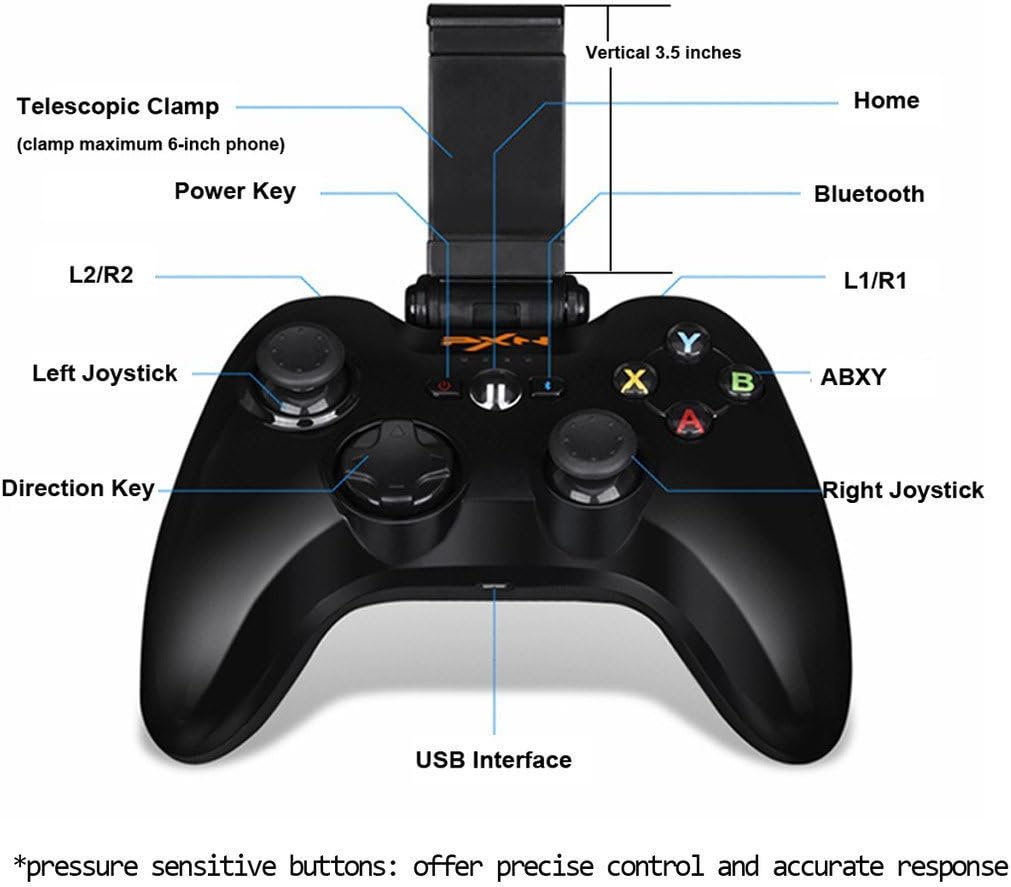
Image 5.1: PXN 6603 Gamepad button layout with labels.
- Power-tast: Tænder/slukker gamepad'en.
- Hjemknappen: Returns to the home screen on connected devices.
- Bluetooth-indikator: Viser forbindelsesstatus.
- L1/R1 knapper: Venstre og højre skulderknapper.
- L2/R2-udløsere: Left and Right analog triggers.
- Venstre joystick: Analog stick for movement and camera control.
- Højre joystick: Analog stick for movement and camera control.
- Retningstast (D-Pad): Digital directional input.
- ABXY knapper: Handlingsknapper, typisk farvekodede.
- USB-grænseflade: For charging the gamepad.
- Teleskopisk Clamp: Holds mobile devices.
5.2. Using the Phone Clamp
The PXN 6603 includes an integrated telescopic clamp to securely hold your smartphone, transforming your device into a portable gaming console. To use:
- Gently pull the top part of the clamp upwards to extend it.
- Placer forsigtigt din smartphone i cl'enamp, og sørg for at den er centreret og sikkert fastholdt.amp can accommodate phones up to 6 inches in size.
- Juster vinklen på clamp for optimalt viewing. Den clamp allows for angle adjustments between 90 and 160 degrees.

Image 5.2: Gamepad with the phone clamp udvidet.
6. Kompatibilitet
The PXN 6603 Gamepad is designed for broad compatibility:
- iOS-enheder: Fully compatible with iPhone, iPad, iPod Touch, and Apple TV running iOS 7.0 or above.
- Windows: Supports Windows XP, Windows 7, and Windows 8.
- Android: Compatible with Android TV boxes and Android TVs.
For optimal performance, ensure your device's operating system is up to date. Game compatibility may vary; check individual game requirements for controller support.

Image 6.1: The PXN 6603 supports all Apple devices running iOS 7.0 and above.
7. Vedligeholdelse
To ensure the longevity and optimal performance of your PXN 6603 Gamepad, follow these maintenance guidelines:
- Rensning: Use a soft, dry cloth to clean the gamepad. Avoid using harsh chemicals, solvents, or abrasive materials.
- Opbevaring: Opbevar gamepad'en et køligt, tørt sted væk fra direkte sollys og ekstreme temperaturer.
- Batteripleje: Charge the battery regularly, even if not in frequent use, to prevent deep discharge. Avoid leaving the battery completely depleted for extended periods.
- Undgå påvirkning: Tab ikke gamepad'en eller udsæt den for kraftige stød, da dette kan beskadige de interne komponenter.
- Væskeeksponering: Keep the gamepad away from water and other liquids to prevent electrical damage.
8. Fejlfinding
If you encounter issues with your PXN 6603 Gamepad, refer to the following common troubleshooting steps:
- Gamepad tænder ikke: Ensure the battery is charged. Connect the gamepad to a power source using the USB cable and try again.
- Kan ikke parres med enhed:
- Bekræft, at Bluetooth er aktiveret på din enhed.
- Ensure the gamepad is in pairing mode (Bluetooth indicator flashing).
- Flyt gamepad'en tættere på din enhed.
- Restart both the gamepad and your device, then attempt pairing again.
- Check if the gamepad is already paired with another device. Disconnect it if necessary.
- Buttons are unresponsive or lag:
- Kontroller batteriniveauet, og genoplad det, hvis det er lavt.
- Ensure the gamepad is within the effective range of your device's Bluetooth connection.
- Re-pair the gamepad with your device.
- Update your device's operating system to the latest version.
- Gamepad disconnects frequently:
- Sørg for, at der ikke er stærke elektromagnetiske forstyrrelser i nærheden.
- Keep the gamepad and device close to each other.
- Recharge the gamepad's battery.
9. Specifikationer
| Mærke | PXN udvidelse |
| Modelnummer | PXN-6603 |
| Forbindelsesteknologi | Bluetooth |
| Kompatible operativsystemer | iOS 7.0+, Windows XP/7/8, Android TV |
| Batteritype | Lithium-polymer |
| Batterikapacitet | 500 mAh |
| Opladningstid | 2-3 timer |
| Spilletid | 30+ timer |
| Antal knapper | 16 |
| Materiale | Plast |
| Varens vægt | 1.09 pund (ca. 494 g) |
10. Garanti og support
Specific warranty information for the PXN 6603 Gamepad is not provided in this manual. For details regarding warranty coverage, returns, or technical support, please refer to the official PXN webwebstedet eller kontakt din forhandler. Gem din købskvittering som købsbevis i tilfælde af garantikrav.