
Protmex PPM-AM001
Protmex MS6252A Portable Digital Anemometer
Brugervejledning
Indledning
Thank you for choosing the Protmex MS6252A Portable Digital Anemometer. This device is designed for accurate measurement of wind speed, air volume, and air velocity. It is a versatile tool suitable for various applications, including HVAC system testing, outdoor sports, environmental monitoring, and industrial use. This manual provides detailed instructions for the safe and effective operation, maintenance, and troubleshooting of your anemometer.

Figur 1: Forside view of the Protmex MS6252A Portable Digital Anemometer.
Sikkerhedsoplysninger
Please read and understand all safety warnings and operating instructions before using this instrument. Failure to do so may result in injury or damage to the device.
- Forsøg ikke at reparere eller ændre enheden. Overlad al service til kvalificeret personale.
- Hold enheden væk fra vand og miljøer med høj luftfugtighed.
- Undgå at udsætte enheden for ekstreme temperaturer eller direkte sollys i længere perioder.
- Handle the fan blades with care to prevent damage.
- Fjern batterierne, hvis enheden ikke bruges i længere tid, for at forhindre lækage.
Produkt overview
Familiarize yourself with the components and controls of your anemometer.

Figure 2: Labeled components of the Protmex MS6252A.
- Ventilator: Rotates to measure wind speed.
- LCD-skærm: Viser måleaflæsninger, enheder og indikatorer.
- Power Switch Button (①): Tænder eller slukker for enheden.
- Funktionsskiftknap (FUNC): Toggles between different measurement modes (e.g., wind speed, air volume).
- Hold Display / Temperature Mode Switch Button (HOLD): Freezes the current reading on the display or switches temperature units.
- Max / Min Button (MAX/MIN): Viser maksimale eller minimale registrerede værdier.
- Unit Switching Button (UNIT): Changes the measurement units (e.g., m/s, km/h, ft/m).
- Backlight Button (☀): Aktiverer eller deaktiverer displayets baggrundsbelysning.
Specifikationer
Key technical specifications of the Protmex MS6252A Anemometer:
| Feature | Specifikation |
|---|---|
| Mærke | Protmex |
| Modelnummer | PPM-AM001 (MS6252A) |
| Materiale | Plast |
| Dimensioner (L x B x H) | 16.5 x 8.5 x 3.8 centimeter |
| Varens vægt | 240 gram |
| Strømkilde | 1 x 9V batteri (inkluderet) |
| Vise | LCD med baggrundsbelysning |
The device supports multiple measurement units for wind speed and air volume:
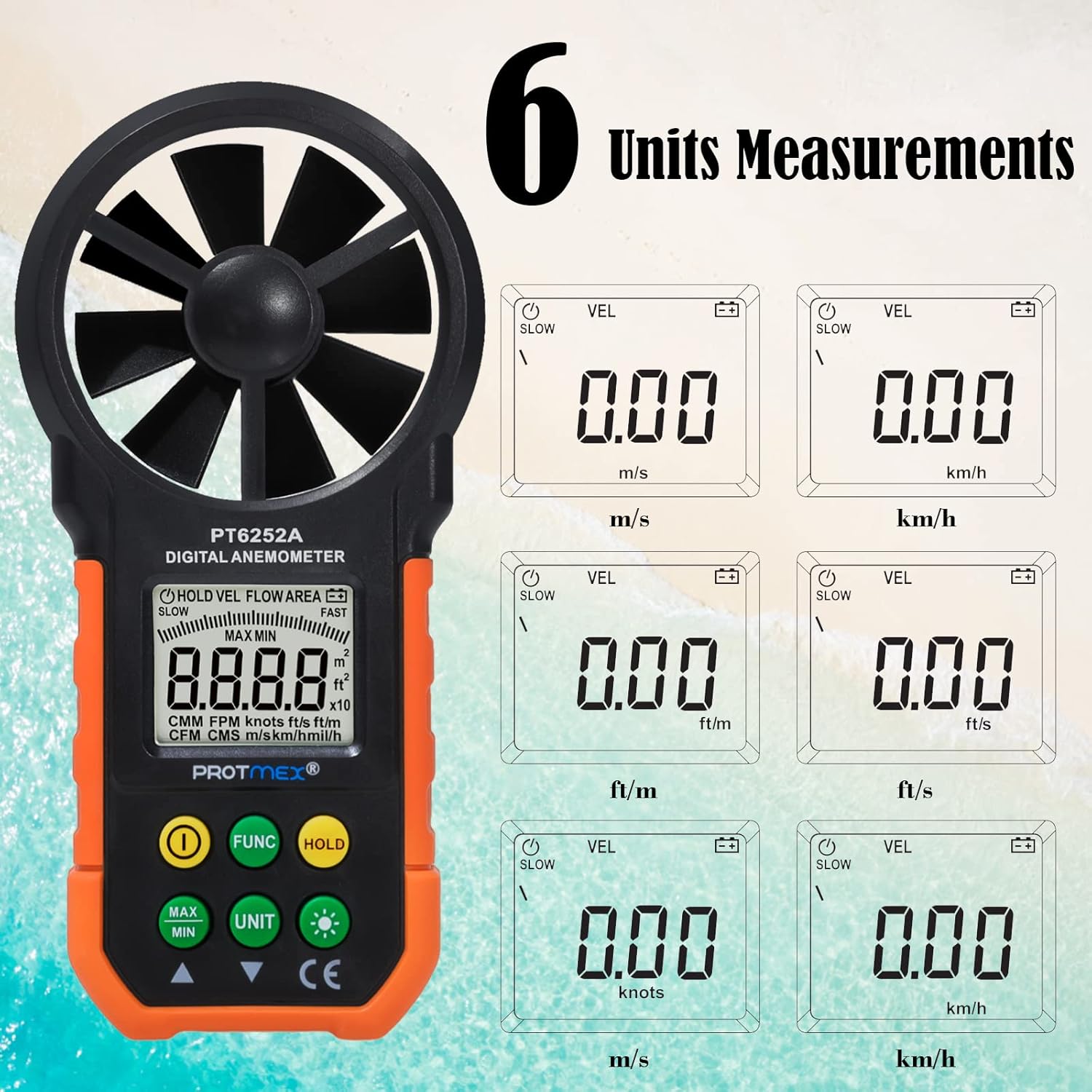
Figure 3: Available measurement units for wind speed and air volume.
- Wind Speed Units: m/s, km/h, ft/m, ft/s, knots, mph
- Air Volume Units: CMM, CFM
Opsætning
Installation af batteri
The Protmex MS6252A requires one 9V battery for operation.
- Find batteridækslet på bagsiden af enheden.
- Skub eller afklips dækslet for at åbne rummet.
- Insert a new 9V battery, ensuring correct polarity (+ and -).
- Luk batterirummets dæksel forsvarligt.
Operation
Tænd/sluk
- To turn on the device, press the ① (Power Switch) button.
- To turn off the device, press and hold the ① (Power Switch) button for a few seconds until the display turns off.
Measurement Modes (FUNC Button)
Tryk på FUNK button to cycle through different measurement modes, such as wind speed (VEL) and air volume (FLOW AREA).
Unit Selection (UNIT Button)
While in a measurement mode, press the ENHED button to change the measurement units. For example, in wind speed mode, you can switch between m/s, km/h, ft/m, ft/s, knots, and mph.
Data Hold (HOLD Button)
- Tryk på HOLDE button once to freeze the current reading on the display. The "HOLD" indicator will appear.
- Tryk på HOLDE button again to release the data hold and resume live measurements.
MAX/MIN Measurement (MAX/MIN Button)
- Tryk på MAX/MIN button once to display the maximum recorded value. "MAX" will appear on the display.
- Tryk på MAX/MIN button again to display the minimum recorded value. "MIN" will appear on the display.
- Tryk på MAX/MIN button a third time to exit MAX/MIN mode and return to live measurement.
Backlight Function (☀ Button)
The device features a bright LCD display with a backlight for visibility in low-light conditions.

Figure 4: The bright LCD display with backlight function.
- Press the ☀ (Backlight) button once to turn on the backlight.
- Press the ☀ (Backlight) button again to turn off the backlight.
Opretholdelse
Rensning
- Tør enheden af med en blød, tør klud.
- Brug ikke slibende rengøringsmidler eller opløsningsmidler.
- Ensure the fan blades are free from dust and debris for accurate readings. Use a soft brush if necessary.
Opbevaring
- Opbevar enheden på et køligt, tørt sted, når det ikke er i brug.
- Remove the battery if storing for an extended period to prevent battery leakage and damage to the device.
Udskiftning af batteri
When the battery indicator appears on the LCD, replace the 9V battery following the steps in the "Battery Installation" section.
Fejlfinding
| Problem | Mulig årsag | Løsning |
|---|---|---|
| Enheden tænder ikke. | Lavt eller dødt batteri; forkert batteriinstallation. | Udskift batteriet; sørg for korrekt polaritet. |
| Upræcise aflæsninger. | Fan blades obstructed or damaged; device not held correctly in airflow. | Clean fan blades; ensure clear path for airflow; hold device perpendicular to airflow. |
| Skærmen er svag eller flimrer. | Lavt batteri. | Udskift batteriet. |
| Knapperne reagerer ikke. | Device frozen; low battery. | Remove and reinsert battery; replace battery. |
Garanti og support
Protmex products are manufactured to high quality standards. For warranty information or technical support, please refer to the warranty card included with your purchase or contact Protmex customer service through their official webwebsted eller autoriserede distributører.
Gem venligst din købskvittering som købsbevis i tilfælde af garantikrav.
Relaterede dokumenterPPM-AM001


Ask a question about this manual
Ask about setup, troubleshooting, compatibility, parts, safety, or missing instructions. Manuals+ will review the question and use this page’s manual context to help answer it.