
1. Introduktion
Tak for købetasing the ipega PG-9057 Wireless Game Controller. This manual provides detailed instructions for setting up, operating, and maintaining your device. Please read this manual carefully before use to ensure optimal performance and longevity of your controller.
2. Produktfunktioner
- Trådløs forbindelse: Enjoy gaming freedom with wireless connection technology.
- Multi-platform kompatibilitet: Supports Android devices (smartphones, tablets, TV boxes) and Windows PCs.
- High Durability Buttons: Equipped with high-quality, durable buttons for extended gaming sessions.
- Præcisionskontrol: Features a D-pad with pressure sensitivity and a 360-degree joystick with no dead zone for accurate input.
- Ergonomisk design: Designed for comfortable grip and prolonged use.
- Integreret telefonholder: Conveniently mount your smartphone for mobile gaming.
3. Pakkens indhold
Kontroller venligst pakkens indhold ved udpakning:
- ipega PG-9057 trådløs spilcontroller
- USB opladningskabel
- User Manual (Japanese version included)
4. Opsætning
4.1. Opladning af controlleren
Before first use, fully charge the controller using the provided USB cable. Connect the small end of the USB cable to the controller's charging port and the other end to a USB power source (e.g., PC, USB wall adapter).
4.2. Device Compatibility Overview
The ipega PG-9057 controller supports various devices and connection methods as shown below:

This image displays the ipega PG-9057 Wireless Game Controller, highlighting its compatibility with various devices including smartphones, tablets, personal computers, and VR headsets.
4.3. Connection Methods and System Environment
The controller offers multiple connection options depending on your device and operating system. Refer to the table below for detailed compatibility.

This table outlines the system requirements and connection methods for the ipega PG-9057 controller, detailing compatibility with Android smartphones, tablets, and TV boxes via Bluetooth 4.0 or USB, and PCs via USB.
4.3.1. Bluetooth Connection (Android Devices)
- Sørg for, at controlleren er opladet.
- Tryk og hold på HJEM knappen og A button simultaneously until the indicator light flashes rapidly. This puts the controller into pairing mode.
- Gå til Bluetooth-indstillingerne på din Android-enhed, og slå Bluetooth til.
- Søg efter available devices and select "ipega PG-9057" (or similar name) from the list.
- Når parringen er aktiveret, lyser indikatorlampen på controlleren konstant.
4.3.2. USB Wired Connection (Windows PC / Android Devices)
- Connect the controller to your Windows PC or Android device using the USB cable.
- The device should automatically recognize the controller. No special drivers are usually required for basic functionality.
5. Betjeningsvejledning
5.1. Grundlæggende kontroller
The ipega PG-9057 features standard gamepad controls for intuitive gaming.

En detaljeret view of the ipega PG-9057 controller's D-pad, joystick, and A/B/X/Y buttons, illustrating their high sensitivity and precise input capabilities.
- D-Pad: For directional input, offering pressure sensitivity.
- Venstre/højre joysticks: 360-degree movement with no dead zone for precise control.
- A/B/X/Y-knapper: Standard action buttons with zero delay response.
- L1/R1, L2/R2 Triggers: Skulderknapper og udløsere til forskellige handlinger i spillet.
- VÆLG/START-knapper: Til menu-navigation og handlinger i spillet.
- HJEM knap: To power on/off the controller or return to the main menu.
5.2. Using with a Smartphone
The controller includes an integrated holder for smartphones, allowing for a portable gaming experience.
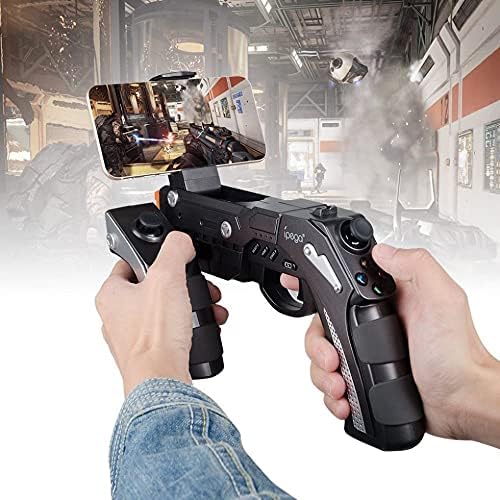
A user is shown holding the ipega PG-9057 Wireless Game Controller with a smartphone securely attached, actively engaged in mobile gaming.
- Extend the phone holder located on the top of the controller.
- Carefully place your smartphone into the holder, ensuring it is securely gripped.
- Connect the controller to your smartphone via Bluetooth as described in Section 4.3.1.
- Launch your desired game and configure controller settings if necessary.
6. Vedligeholdelse
For at sikre din Ipega PG-9057-controllers lange levetid og optimale ydeevne, skal du følge disse vedligeholdelsesretningslinjer:
- Rensning: Use a soft, dry cloth to wipe the surface of the controller. Do not use harsh chemicals or abrasive cleaners.
- Opbevaring: Opbevar controlleren et køligt, tørt sted væk fra direkte sollys og ekstreme temperaturer.
- Undgå dråber: Beskyt controlleren mod fald og stød, da dette kan beskadige interne komponenter.
- Opladning: Overoplade ikke batteriet. Frakobl opladningskablet, når controlleren er fuldt opladet.

The ipega PG-9057 Wireless Game Controller is shown, emphasizing its construction from high-quality, durable ABS material.
7. Fejlfinding
Hvis du støder på problemer med din controller, kan du bruge følgende almindelige løsninger:
- Controlleren forbinder ikke:
- Sørg for, at controlleren er fuldt opladet.
- Verify that Bluetooth is enabled on your device and the controller is in pairing mode.
- Prøv at genstarte både controlleren og din enhed.
- If using USB, ensure the cable is securely connected and try a different USB port.
- Knapper eller joysticks reagerer ikke:
- Kontroller, om controlleren er korrekt tilsluttet din enhed.
- Restart the controller and reconnect.
- Sørg for, at det spil, du spiller, understøtter eksterne controllere.
- Lag eller inputforsinkelse:
- Ensure there are no obstructions or excessive distance between the controller and your device.
- Minimér interferens fra andre trådløse enheder.
- For critical gaming, consider using a wired USB connection if supported by your device.
8. Specifikationer
| Specifikation | Værdi |
|---|---|
| Mærke | ipega |
| Model | PG-9057 |
| Kompatible enheder | Android, Windows |
| Controller type | Game Pad |
| Forbindelsesteknologi | Trådløs |
| Funktioner | Trådløs |
| Kompatible varer | Android, Windows |
| Tilslutningsmetode | Trådløs |
| Særlige funktioner | Trådløs |
| Hardware platform | Set-top boks |
| Strømkilde | Batteridrevet |
| Number of Package Items | 1 |
| UPC | 602747571722 |
| ASIN | B018TSBFE4 |
| GTIN | 602747571722 |
9. Garanti og support
For warranty information and customer support, please refer to the documentation provided with your purchase or visit the official ipega webwebsted. Gem din købsbevis i tilfælde af garantikrav.