
Indledning
The Reflexion PS07BT is a versatile mobile karaoke system designed for portable entertainment. This unit combines powerful audio output with various connectivity options, including Bluetooth, USB, and AUX-in, along with microphone and guitar inputs. It features integrated light effects and a rechargeable battery, making it suitable for both indoor and outdoor use. This manual provides essential information for the safe and effective operation of your PS07BT system.
Sikkerhedsoplysninger
Læs venligst alle sikkerhedsinstruktioner omhyggeligt, inden du bruger enheden. Gem denne manual til senere brug.
- Udsæt ikke enheden for regn, fugt eller ekstreme temperaturer.
- Undgå at placere enheden i nærheden af varmekilder såsom radiatorer, komfurer eller andre varmeproducerende apparater.
- Brug kun den strømadapter, der følger med enheden.
- Åbn ikke c'enasing. Overlad al service til kvalificeret personale.
- Hold enheden væk fra stærke magnetiske felter.
- Sørg for ordentlig ventilation, og bloker ikke ventilationsåbninger.
- Handle the microphone and cables with care to prevent damage.
Pakkens indhold
Bekræft at alle varer er til stede i pakken:
- Reflexion PS07BT Mobile Karaoke System
- Mikrofon
- Brugermanual
- Strømadapter (ikke eksplicit angivet, men underforstået til opladning)
Produkt overview
Familiarize yourself with the components and controls of your Reflexion PS07BT system.

Figur 1: Forside view of the Reflexion PS07BT Mobile Karaoke System, showcasing the speaker grille and blue LED light effects.

Figur 2: Overview of the PS07BT system, highlighting its dimensions (49cm height, 20cm width), LCD display, and karaoke function.
Kontrolpanel
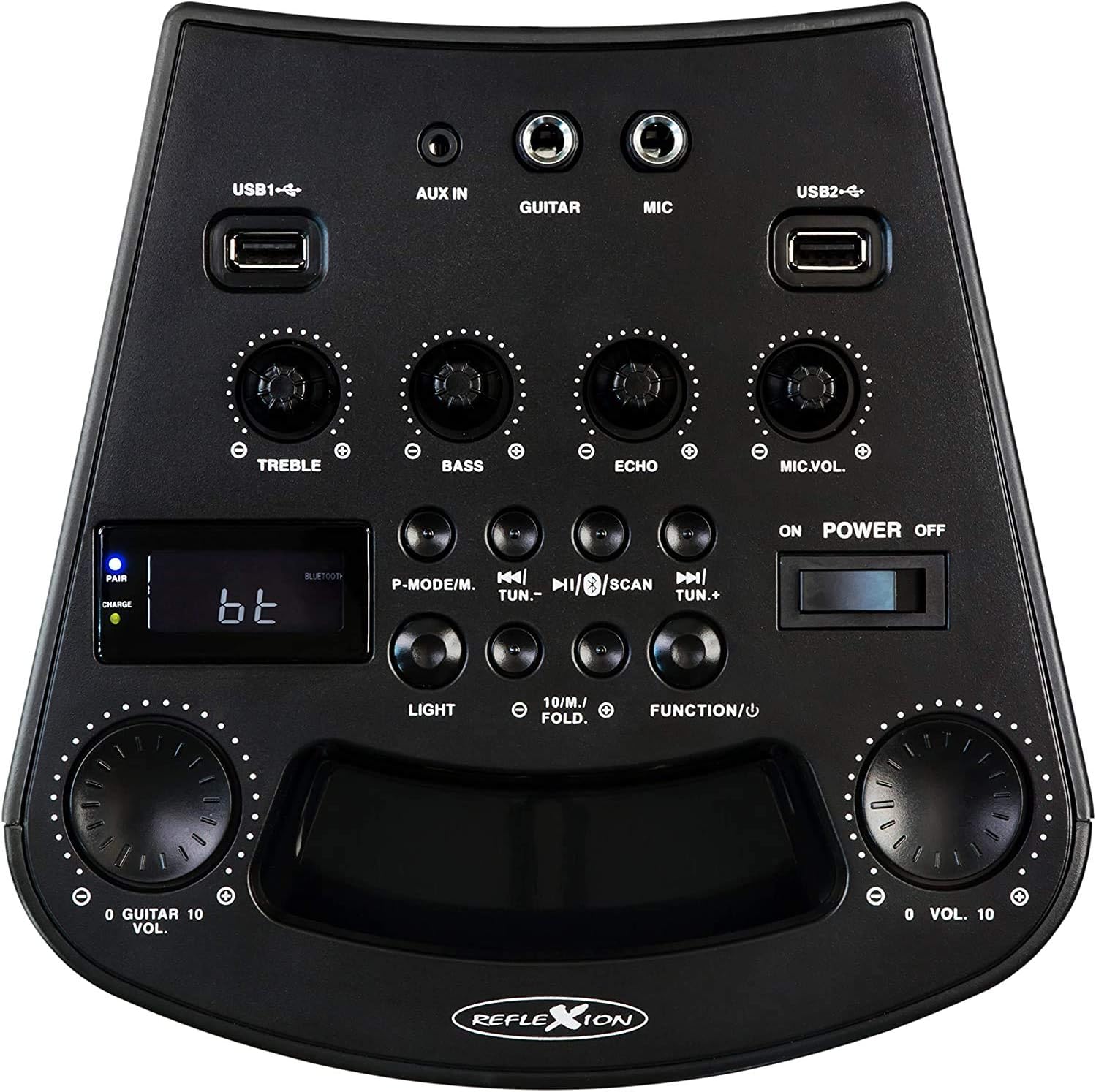
Figur 3: Detaljeret view of the PS07BT control panel, showing input ports, sound adjustment knobs, and function buttons.
- USB1 / USB2 Ports: Til afspilning af lyd fra USB-lagerenheder.
- AUX IN: 3.5 mm indgang til eksterne lydkilder.
- GUITAR: 6.3mm input for connecting a guitar.
- MIC: 6.3mm input for connecting the microphone.
- TREBLE knap: Adjusts high-frequency sound.
- BAS knap: Adjusts low-frequency sound.
- ECHO knap: Justerer ekkoeffekten for mikrofoninput.
- MIC.VOL-knap: Justerer mikrofonens lydstyrke.
- P-MODE/M Button: Program mode / Mode selection.
- TUN.- / TUN.+ Buttons: Tune down / Tune up for FM radio.
- SCAN knap: Scanner efter FM-radiostationer.
- LIGHT -knap: Styrer LED-lyseffekterne.
- FUNCTION/U Button: Switches between input modes (Bluetooth, USB, AUX, FM).
- VOL. Knob: Master volumenkontrol.
- Tænd/sluk-knap: Tænder eller slukker for enheden.
- LCD-skærm: Viser aktuel tilstand, sporinformation eller FM-frekvens.
- PAIR/CHARGE Indicators: Bluetooth pairing status and battery charging status.
Bagpanel

Figure 4: Rear panel of the PS07BT, displaying the AC power input and product information label.
- AC strømindgang: Connect the power adapter here for charging and operation.
- Produktetiket: Contains model number, serial number, and electrical specifications.
Opsætning
Opladning af batteriet
The PS07BT features a built-in rechargeable battery. Before first use, fully charge the unit.
- Connect the supplied power adapter to the AC power input on the rear of the unit.
- Sæt strømadapteren i en stikkontakt.
- The CHARGE indicator light will illuminate during charging.
- A full charge takes approximately 4 hours. The CHARGE indicator may change or turn off once fully charged (refer to specific indicator behavior in the quick start guide if available).
Et fuldt opladet batteri giver op til 4 timers spilletid.
Connecting Microphone and Guitar
To use the karaoke or instrument features:
- Sæt mikrofonkablet i MIC input on the control panel.
- If connecting a guitar, insert its cable into the GUITAR input.
- Juster MIC.VOL og EKKO knobs as desired during operation.
Betjeningsvejledning
Tænd/sluk
Skub til POWER ON/OFF switch to the 'ON' position to turn on the unit. Slide it to 'OFF' to power down.
Valg af inputtilstand
Tryk på FUNCTION/U button repeatedly to cycle through available input modes: Bluetooth (bt), USB, AUX, and FM Radio.
Bluetooth-forbindelse
- Turn on the PS07BT and select 'bt' mode using the FUNCTION/U button. The 'PAIR' indicator will flash, indicating it's ready for pairing.
- Aktiver Bluetooth på din mobile enhed (smartphone, tablet osv.).
- Søg efter available devices and select 'Reflexion PS07BT' from the list.
- Once connected, the 'PAIR' indicator will stop flashing and remain solid. You can now play audio from your device through the PS07BT.
USB-afspilning
- Indsæt en USB-lagerenhed (f.eks. et USB-flashdrev) med lyd files into either the USB1 or USB2 havn.
- Select 'USB' mode using the FUNCTION/U knap.
- Enheden vil automatisk begynde at afspille lyd files from the USB device. Use the track control buttons (usually combined with TUN.-/TUN.+) to navigate tracks.
AUX-In Connection
- Connect an external audio source (e.g., MP3 player, laptop) to the AUX IN porten ved hjælp af et 3.5 mm lydkabel.
- Select 'AUX' mode using the FUNCTION/U knap.
- Play audio from your external device. The volume can be controlled via both the external device and the PS07BT's master volume knob.
Betjening af FM-radio
- Select 'FM' mode using the FUNCTION/U knap.
- Tryk på SCAN button to automatically scan and save available FM radio stations.
- Brug TUN.- og TUN.+ buttons to manually tune to stations or select saved stations.
Karaoke-funktion
Med en mikrofon tilsluttet til MIC input, you can sing along to music playing from any source (Bluetooth, USB, AUX, FM). Adjust the MIC.VOL knob to control your voice volume and the EKKO knob for an echo effect.
Lyseffekter
Tryk på LYS button to activate or change the integrated blue LED light effects, which can synchronize with the music beat.
Lydstyrke og lydjusteringer
- Hovedvolumen: Brug den store BIND. knob to adjust the overall sound output level.
- Diskant / bas: Brug DISKANT og BASS knobs to fine-tune the audio's high and low frequencies.
Opretholdelse
Rensning
Wipe the unit with a soft, dry cloth. Do not use abrasive cleaners, waxes, or solvents as they may damage the finish. Ensure the unit is powered off and unplugged before cleaning.
Opbevaring
When not in use for extended periods, store the unit in a cool, dry place, away from direct sunlight and extreme temperatures. It is recommended to fully charge the battery before storing and to recharge it every few months to maintain battery health.
Fejlfinding
If you encounter issues with your PS07BT, refer to the following common problems and solutions:
| Problem | Mulig løsning |
|---|---|
| Ingen strøm | Ensure the power adapter is securely connected and plugged into a working outlet. Check if the battery is charged. Slide the POWER switch to ON. |
| Ingen lyd | Increase the master VOL. knob. Check the volume on your connected audio source (e.g., phone). Ensure the correct input mode (Bluetooth, USB, AUX, FM) is selected. Check all cable connections. |
| Bluetooth forbinder ikke | Ensure the unit is in 'bt' mode and the 'PAIR' indicator is flashing. Turn off and on Bluetooth on your device. Move your device closer to the PS07BT. Forget the device from your phone's Bluetooth list and try pairing again. |
| Mikrofon virker ikke | Ensure the microphone is securely plugged into the MIC input. Increase the MIC.VOL knob. Check if the microphone has its own ON/OFF switch and is turned on. |
| Problemer med USB-afspilning | Ensure the USB device is formatted correctly (FAT32 recommended) and contains compatible audio files. Prøv en anden USB-enhed. |
Specifikationer
Technical details for the Reflexion PS07BT Mobile Karaoke System:
- Modelnavn: PS07BT
- Dimensioner (L x B x H): 20.2 x 49 x 20.1 cm
- Vægt: 2 kilo
- Maks. højttalerudgangseffekt: 320 watt
- Forbindelse teknologi: Bluetooth
- Lydudgangstilstand: Stereoanlæg
- Materiale: Plast
- Højttalertype: Subwoofer
- Særlige funktioner: Bluetooth, USB-port
- Gennemsnitlig batterilevetid: 4 timer
- Opladningstid: 4 timer
- Kontrolmetode: Touch (referring to buttons/knobs)
- Total USB 2.0 Ports: 2
- Farve: Sort
- Strømkilde: Ledningsbaseret elektrisk / Batteri

Figure 5: The PS07BT's integrated handle allows for easy portability.
Garanti og support
The Reflexion PS07BT comes with a spare parts availability period of 1 year. For technical support or warranty inquiries, please contact your retailer or the manufacturer's customer service. Keep your proof of purchase for warranty claims.