
1. Introduktion
This manual provides essential instructions for the installation, operation, maintenance, and troubleshooting of the APC Smart-UPS SRT3000RMXLT 3kVA 208V Rackmount Uninterruptible Power Supply (UPS). Please read this manual thoroughly before installing or operating the equipment to ensure proper usage and safety.
2. Sikkerhedsoplysninger
Overhold alle advarsler og betjeningsinstruktioner i denne manual. Undladelse af at gøre dette kan medføre personskade eller beskadigelse af udstyret.
- Elektrisk sikkerhed: Denne enhed indeholder farlige voltages. Do not attempt to disassemble the UPS. Servicing should only be performed by qualified personnel.
- Batterisikkerhed: Batteries can present a risk of electrical shock and high short-circuit current. Remove watches, rings, or other metal objects before handling batteries. Use tools with insulated handles.
- Vægt: The UPS is heavy. Use proper lifting techniques and ensure adequate support during installation.
- Miljø: Install the UPS indoors in a controlled environment, free from excessive dust, moisture, and extreme temperatures.
3. Pakkens indhold
Carefully unpack the UPS and inspect for shipping damage. The package should contain the following items:
- APC Smart-UPS SRT3000RMXLT Unit
- Power Supply (Built-In)
- Hardware til rackmontering
- Dokumentations-cd
- USB-kabel
- Seriel kabel
4. Opsætning
4.1 Fysisk installation
The SRT3000RMXLT is designed for rack installation. Ensure the rack is stable and capable of supporting the UPS weight (approximately 69 pounds).
- Mount the UPS into a standard 19-inch rack using the provided rack-mounting hardware.
- Sørg for tilstrækkelig luftgennemstrømning omkring enheden. Bloker ikke ventilationsåbningerne.

Figur 4.1: Forside view of the APC Smart-UPS SRT3000RMXLT. This image shows the front panel with the display and ventilation grille.
4.2 Tilslutning af UPS'en
Connect the UPS to the utility power and your equipment.
- Connect the UPS input power cord to a dedicated 208V AC outlet. The UPS uses a Type B - 3 pin (North American) power plug.
- Connect your equipment to the output receptacles on the rear of the UPS. The unit provides 12 IEC 320 C13/C14 outlets.
- For communication, connect the USB cable or serial cable from the UPS to your computer or network management card.
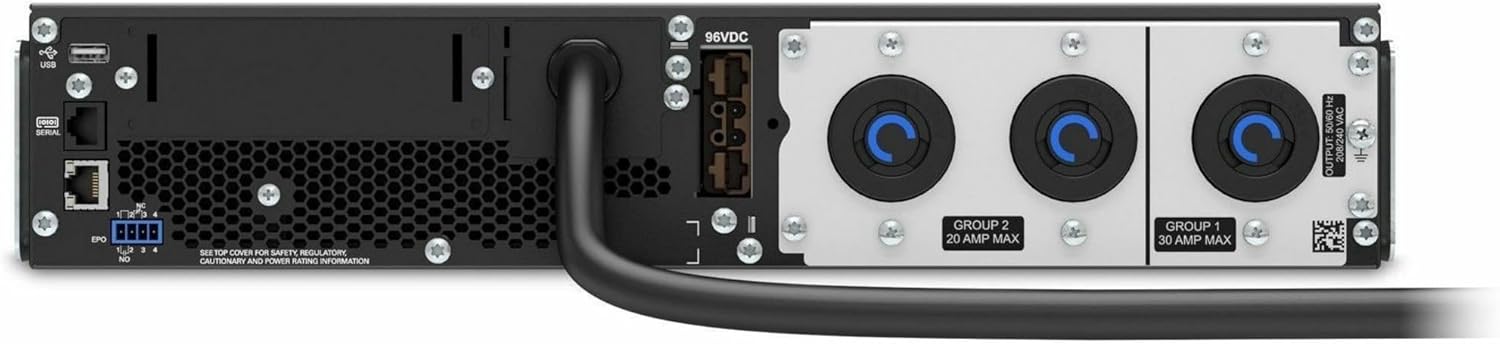
Figur 4.2: Bagside view of the APC Smart-UPS SRT3000RMXLT. This image displays the various input and output ports, including USB, serial, EPO, and the 12 output receptacles, along with the main power input.
4.3 Indledende opstart
Når alle forbindelser er sikre:
- Tryk på tænd/sluk-knappen på frontpanelet for at tænde UPS'en.
- The UPS will perform a self-test and the display will show the current status.
- Allow the batteries to charge for at least 6 hours before relying on them for extended backup time.
5. Betjening af UPS'en
5.1 Front Panel Display and Controls
The front panel features an LCD display and control buttons for monitoring and configuring the UPS.
- LCD-skærm: Shows real-time status, load, battery charge, input/output voltage, and event logs.
- ESC knap: Exits the current menu or cancels an operation.
- OK knap: Bekræfter et valg eller går ind i en menu.
- Pil op/ned: Naviger gennem menupunkter eller juster indstillinger.
5.2 Grundlæggende betjening
- Tænder: Tryk på tænd/sluk-knappen, og hold den nede, indtil displayet lyser.
- Slukker: Press and hold the power button until the UPS powers down. Ensure all connected equipment is safely shut down first.
- Batteritilstand: I tilfælde af en magt outage, the UPS will automatically switch to battery power. The display will indicate 'On Battery'.
- Selv test: Initiate a manual self-test through the front panel menu to verify battery and UPS functionality.
6. Vedligeholdelse
6.1 Udskiftning af batteri
The UPS uses sealed lead-acid batteries. Battery life is typically 3-5 years, depending on environmental conditions and usage. Replace batteries when the UPS indicates a 'Battery Fault' or 'Replace Battery' warning.
- Contact APC support or a certified service technician for battery replacement.
- Brug altid originale APC-batteripatroner (RBC'er) for at sikre kompatibilitet og optimal ydeevne.
- Genbrug gamle batterier ansvarligt.
6.2 Rengøring
Keep the UPS free from dust and debris to ensure proper ventilation.
- Brug en blød, tør klud til at rengøre UPS'ens yderside.
- Brug ikke flydende rengøringsmidler eller opløsningsmidler.
- Sørg for, at ventilationsåbningerne er fri for forhindringer.
7. Fejlfinding
Dette afsnit indeholder løsninger på almindelige problemer. Kontakt teknisk support ved mere komplekse problemer.
| Problem | Mulig årsag | Løsning |
|---|---|---|
| UPS'en tænder ikke | No input power; Battery disconnected or discharged | Check power cord connection; Ensure utility power is present; Allow batteries to charge. |
| UPS'en bipper konstant | På batteristrøm; Overbelastningstilstand | Check utility power; Reduce connected load. |
| Indikator for 'Udskift batteri' | Batteriet er ved at være slut | Bestil og udskift batteripatronen. |
| UPS not providing power to outlets | Output circuit breaker tripped; UPS in fault mode | Reset circuit breaker; Check display for fault codes and consult manual. |
8. Specifikationer
Key technical specifications for the APC Smart-UPS SRT3000RMXLT.
| Feature | Specifikation |
|---|---|
| Modelnummer | SRT3000RMXLT |
| Mærke | APC |
| Udgangseffektkapacitet | 3000 VA / 2700 Watt |
| Nominel Output Voltage | 208V AC |
| Nominel input Voltage | 208V AC / 230V AC |
| Indgangsfrekvens | 60 Hz |
| Udgangsforbindelser | 12 x IEC 320 C13/C14 |
| Batteritype | Blysyre |
| Typisk genopladningstid | 6 timer |
| Typisk backuptid (fuld belastning) | 4 minutter |
| Formfaktor | Rack |
| Dimensioner (H x B x D) | 9 x 23 x 34 tommer |
| Vægt | 69 pund |
| Driftstemperatur | 0 - 40 °C (32 - 104 °F) |
9. Garanti og support
9.1 Garantioplysninger
APC provides a standard warranty for this product. Please refer to the warranty card included with your product or visit the official APC webwebstedet for detaljerede garantivilkår og -betingelser, der er specifikke for din region.
9.2 Teknisk support
For technical assistance, product information, or troubleshooting beyond the scope of this manual, please contact APC customer support. Have your model number (SRT3000RMXLT) and serial number ready when contacting support.
- Besøg den officielle APC webwebsted for supportressourcer, ofte stillede spørgsmål og kontaktoplysninger.
- Online resources often include updated manuals, firmware, and diagnostic tools.