
1. Produktet er slutview
The FSP300-60FAG is an industrial-grade switching power supply designed for reliable performance. It delivers a total power capacity of up to 300 Watts and features a unique active Power Factor Correction (PFC) circuit. This design, combined with high-load electrical components, makes it suitable for industrial environments, servers, workstations, communication systems, and other automation applications. The power supply supports a full range of input and output electrical features and complies with the latest safety and EMC standards globally.
Nøglefunktioner
- 80 PLUS Gold Certified 300W PSU for high energy efficiency.
- Supports AMD/INTEL CPU Systems.
- High quality single, 40mm ball-bearing fan provides controlled airflow.
- Vacuum-impregnated transformer for enhanced durability.
- Heavy-duty protections, including Over Voltage Protection (OVP), Line input fuse protection, and resettable power shut down.
- Global Safety Certifications: CE, FCC, cUL, CCC, TUV, CB.

Image 1.1: The FSP FSP300-60FAG 300W Flex ATX 80 Plus Gold Power Supply. This image shows the overall appearance of the power supply unit.
2. Vigtige sikkerhedsinstruktioner
Please read and follow these safety instructions carefully to prevent injury or damage to the product and other components.
- Åbn ikke strømforsyningsenheden. Høj voltages are present inside, which can cause severe electric shock. There are no user-serviceable parts inside.
- Sørg for, at strømforsyningen er installeret i et godt ventileret område. Bloker ikke ventilationsåbninger.
- Use only the power cord provided or a suitable replacement that meets local electrical standards.
- Tilslut strømforsyningen til en jordet stikkontakt.
- Avoid operating the power supply in environments with high humidity, extreme temperatures, or excessive dust.
- If the power supply is damaged, emits smoke, or makes unusual noises, immediately disconnect it from the power outlet and contact customer support.
- Keep the power supply away from liquids and heat sources.
3. Pakkens indhold
Bekræft at alle varer er til stede i pakken:
- FSP300-60FAG 300W Flex ATX Power Supply
- AC strømledning
- Mounting Screws (typically included with PC cases or PSU)

Image 3.1: Contents of the FSP300-60FAG package, showing the power supply, power cord, and various cables alongside the packaging box.
4. Opsætning og installation
Fysiske dimensioner
The FSP300-60FAG is a Flex ATX form factor power supply. Ensure your computer case supports this form factor and has adequate space for installation.
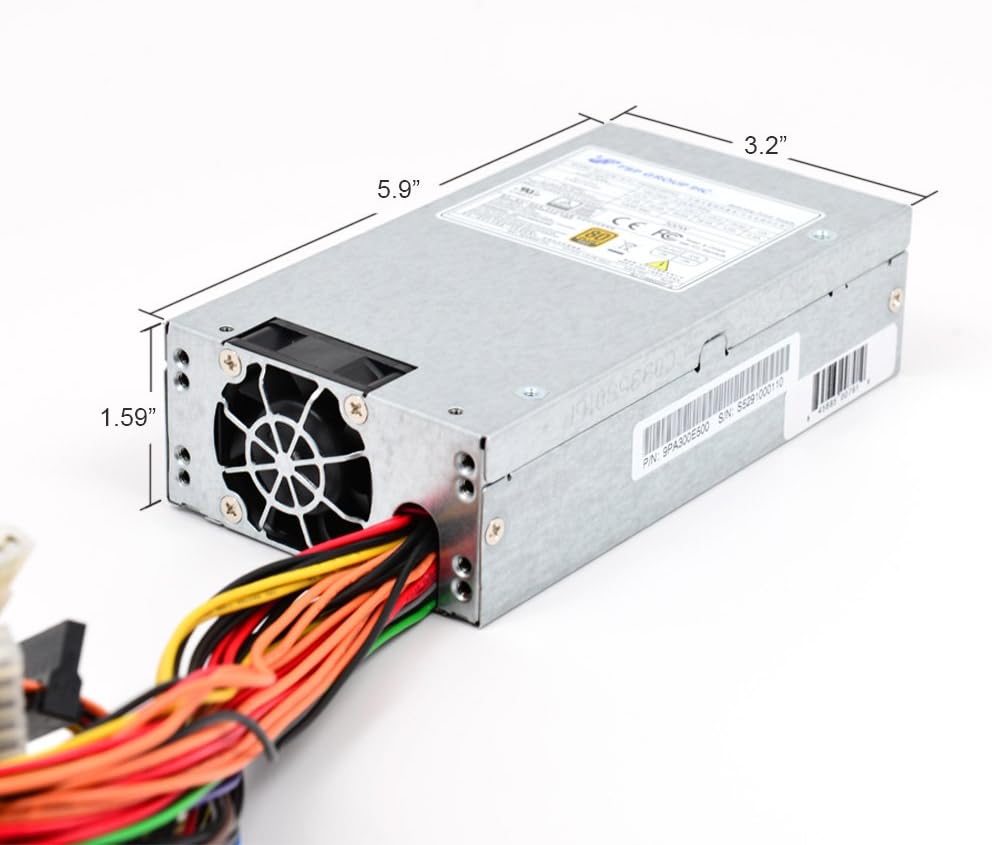
Image 4.1: Dimensions of the FSP300-60FAG power supply, measuring approximately 5.9 inches (L) x 3.2 inches (W) x 1.59 inches (H).
Installationstrin
- Forbered dit system: Turn off your computer and disconnect the AC power cord from the wall outlet. Open your computer case.
- Fjern den gamle strømforsyning (hvis relevant): Disconnect all cables from the old power supply to the motherboard and other components. Unscrew and remove the old PSU from the case.
- Install the FSP300-60FAG: Carefully slide the new FSP300-60FAG power supply into the designated Flex ATX bay in your computer case. Align the screw holes and secure the PSU with the provided mounting screws.
- Tilslut vekselstrømsledningen: Ensure the power supply is securely mounted before connecting the AC power cord to the PSU's input socket.
Tilslutningskabler
Connect the power supply cables to your motherboard and other components. Refer to your motherboard manual for specific connector locations.
- 20+4 Pin ATX Main Power Connector: Connect this to the main power socket on your motherboard. Ensure both sections (20-pin and 4-pin) are securely latched.
- 4-Pin 12V CPU Power Connector: Connect this to the CPU power socket on your motherboard, usually located near the CPU socket.
- SATA strømstik: Use these to power SATA hard drives, SSDs, and optical drives.
- Molex (4-Pin Peripheral) Connectors: Use these for older peripherals or case fans that require Molex power.

Billede 4.2: Overview of the FSP300-60FAG's various power cables and connectors for motherboard and peripheral connections.

Image 4.3: Rear panel of the FSP300-60FAG, featuring the AC power input and exhaust fan grille.
5. Operating Your Power Supply
Once all connections are made and verified, close your computer case. Connect the AC power cord to a wall outlet and turn on your computer. The FSP300-60FAG will automatically provide stable power to your system. Its 80 PLUS Gold certification ensures high energy efficiency, reducing wasted heat and electricity consumption.
6. Vedligeholdelse og pleje
Korrekt vedligeholdelse er med til at sikre strømforsyningens levetid og optimale ydeevne.
- Hold ventilationsåbningerne frie: Ensure that the intake and exhaust vents of the power supply are not obstructed by dust, cables, or other objects. Blocked vents can lead to overheating.
- Støvrensning: Periodically clean the exterior of the power supply and its fan grille using compressed air. Do not open the power supply unit for internal cleaning.
- Miljøforhold: Operate the power supply within recommended temperature and humidity ranges. Avoid direct sunlight or placement near heat sources.
7. Fejlfindingsvejledning
Hvis du støder på problemer med din strømforsyning, kan du se følgende almindelige problemer og løsninger:
| Problem | Mulig årsag | Løsning |
|---|---|---|
| Systemet tænder ikke. | Loose power connections, faulty power cord, PSU switch off, insufficient power. | Check all power cable connections (AC cord, 20+4 pin, 4-pin 12V). Ensure the PSU's main power switch is ON. Verify wall outlet functionality. |
| Systemet tænder, men lukker uventet ned. | Overheating, overloaded PSU, component short circuit. | Ensure proper ventilation and clear PSU fan. Reduce system load if possible. Check for any loose components or short circuits. |
| Usædvanlig støj fra strømforsyningen. | Fan obstruction, faulty fan bearing. | Inspect the fan for any obstructions and carefully remove them if present. If the noise persists, contact customer support. |
| Peripherals (HDD/SSD) not detected. | Loose SATA power cable. | Ensure SATA power cables are securely connected to both the PSU and the peripheral device. |
8. Tekniske specifikationer
Detailed specifications for the FSP300-60FAG power supply:
| Feature | Specifikation |
|---|---|
| Modelnavn | FSP300-60FAG |
| Mærke | FSP |
| Formfaktor | Flex ATX |
| Output Wattage | 300 watt |
| Effektivitet | 80 PLUS guld certificeret |
| AC indgang | 100-240V~, 4-2A, 60-50Hz |
| DC-udgang | +3.3V@14.0A, +5V@16.0A, +12V1@16.0A, +12V2@16.0A, +5Vsb@3.0A, -12V@0.5A |
| Afkølingsmetode | Air (1x 40mm Ball-Bearing Fan) |
| Dimensioner (L x B x H) | 5.9 x 3.2 x 1.6 tommer (150 x 81.5 x 40.5 mm) |
| Varens vægt | 1.8 pund |
| Driftstemperatur | Op til 50 grader Celsius |
| Beskyttelser | OVP (Over Voltage Protection), Line input fuse protection, Resettable power shut down |
| Sikkerhedscertificeringer | CE, FCC, cUL, CCC, TUV, CB |
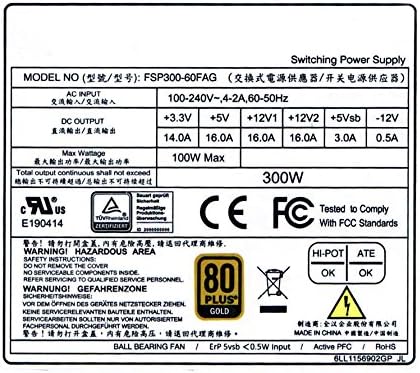
Image 8.1: The FSP300-60FAG specification label, showing detailed electrical ratings and compliance marks.
9. Garanti og kundesupport
Garantioplysninger
The FSP300-60FAG power supply comes with a 3 års garanti fra købsdatoen. Denne garanti dækker materiale- og fabrikationsfejl ved normal brug. Gem venligst din købsbevis i tilfælde af garantikrav.
Kundesupport
For technical assistance, troubleshooting beyond this guide, or warranty inquiries, please contact FSP customer support. You can find more information and contact details on the official FSP webwebsted eller gennem deres Amazon butiksside.
Visit the FSP Store: FSP Group USA Amazon Store