
Indledning
Thank you for choosing the AT&T SEB50 In-Ear Wired Earphones. These earphones are designed to provide high-definition sound with deep bass through dual dynamic drivers. They feature a tangle-free cable, gold-plated jack, and convenient in-line controls with an integrated microphone for hands-free communication.

Billede: Overview of the AT&T SEB50 in-ear wired earphones, showing the earbuds, in-line microphone, and cable.
Hvad er der i æsken
The AT&T SEB50 package includes the following items:
- One (1) AT&T SEB50 Earphone Unit
- Multiple sizes of soft gel earpieces (ear sleeves) for a comfortable fit
Opsætning
- Vælg ørepropper: Choose the ear tips that provide the most comfortable and secure fit for your ears. A proper fit is essential for optimal sound isolation and audio performance. The package includes three sizes of noise-isolating soft gel earpieces.
- Indsæt øretelefoner: Gently insert the earphones into your ears. Ensure the left earbud is in your left ear and the right earbud is in your right ear.
- Opret forbindelse til enhed: Plug the 3.5 mm gold-plated jack into the headphone port of your audio device (e.g., smartphone, tablet, laptop, MP3 player). Ensure the connection is secure.

Image: A person wearing the AT&T SEB50 earphones, demonstrating proper usage.
Betjeningsvejledning
Lydafspilning
- Når du er tilsluttet, kan du begynde at afspille lyd fra din enhed.
- Adjust the volume using your device's volume controls or the in-line remote control on the earphone cable.
In-Line Controls and Microphone
The AT&T SEB50 earphones feature an in-line remote control and microphone for convenient management of calls and music playback.
- Afspil/sæt musik på pause: Tryk én gang på multifunktionsknappen.
- Spring spor over: Tryk hurtigt to gange på multifunktionsknappen for at springe til næste nummer.
- Besvar/afslut opkald: Press the multi-function button once during an incoming call to answer. Press again to end an active call.
- Afvis opkald: Tryk på multifunktionsknappen, og hold den nede i cirka 2 sekunder under et indgående opkald.
- Lydstyrkekontrol: Use the dedicated volume up (+) and volume down (-) buttons on the in-line remote to adjust audio levels.
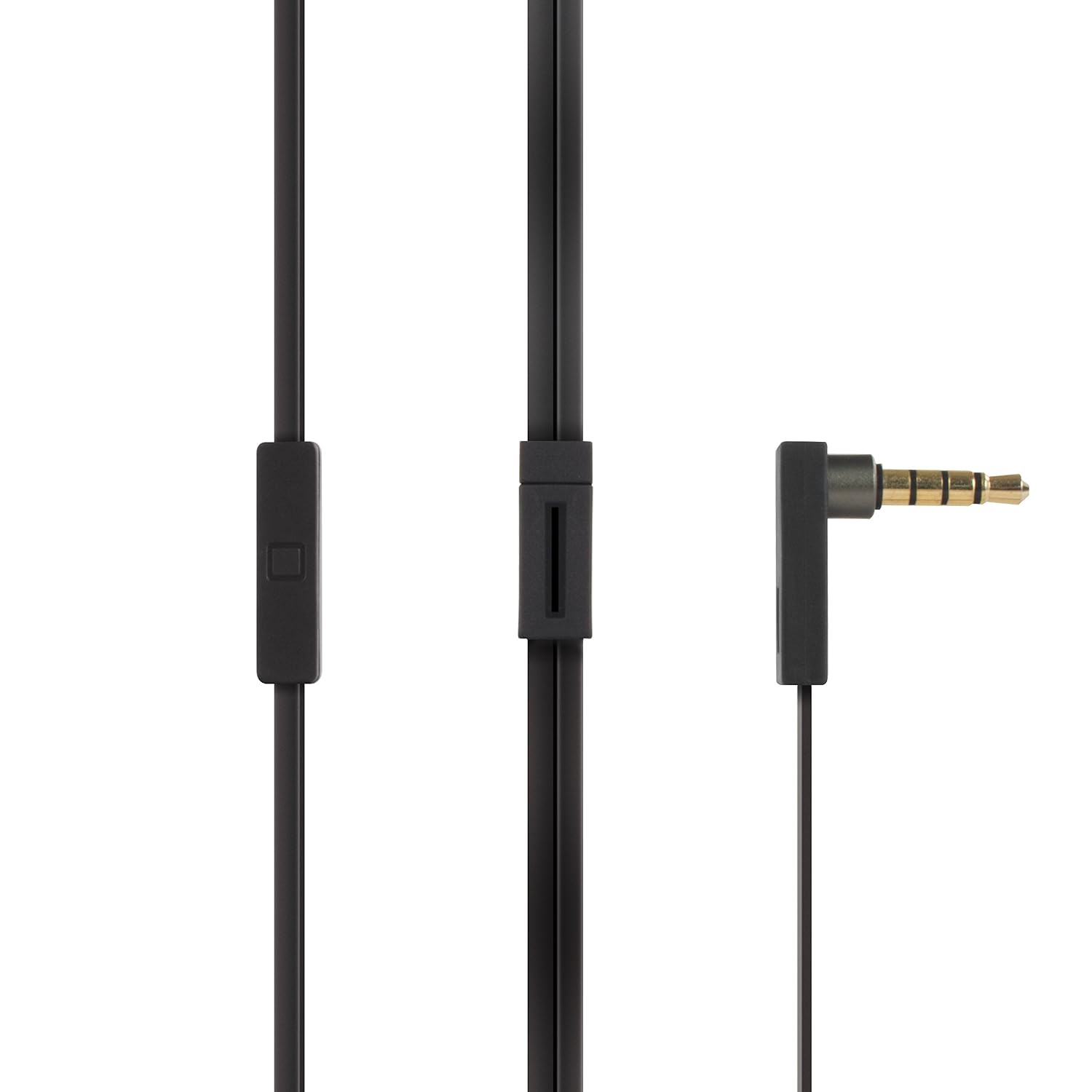
Image: Close-up of the AT&T SEB50's 3.5mm gold-plated jack and the in-line remote control with microphone.
Opretholdelse
- Rensning: Regularly clean the ear tips with a soft, dry cloth. For deeper cleaning, remove the ear tips and wash them with mild soap and water, ensuring they are completely dry before reattaching. Do not use harsh chemicals or abrasive materials on the earphones.
- Kabelpleje: The earphones feature a tangle-free flat cable. To maintain its condition, avoid excessive bending or pulling. When storing, coil the cable loosely.
- Opbevaring: Store the earphones in a clean, dry place away from extreme temperatures and direct sunlight. Avoid placing heavy objects on them.
- Fugtighed: Keep the earphones away from water and moisture. They are not waterproof.

Image: AT&T SEB50 earphones neatly stored inside a bag, demonstrating proper storage.
Fejlfinding
- Ingen lyd eller lav lydstyrke:
- Ensure the 3.5 mm jack is fully inserted into your device's audio port.
- Check the volume levels on both your audio device and the in-line remote.
- Test øretelefonerne med en anden lydenhed for at udelukke enhedsspecifikke problemer.
- Kontroller, at lydkilden afspilles korrekt.
- Poor Sound Quality (Distortion, Muffled Sound):
- Ensure the ear tips are clean and properly seated on the earphones.
- Try different sized ear tips to achieve a better seal in your ear canal.
- Tjek lydkilden for kvalitetsproblemer.
- Ensure the 3.5 mm jack and device port are clean and free of debris.
- Mikrofonen virker ikke:
- Ensure the 3.5 mm jack is fully inserted into your device. Some devices require a TRRS (Tip-Ring-Ring-Sleeve) jack for microphone functionality, which these earphones provide.
- Check your device's settings to ensure the external microphone is selected as the input source.
- Test mikrofonen med en anden applikation eller enhed.
- In-Line Controls Not Responding:
- Sørg for, at øretelefonerne er korrekt tilsluttet din enhed.
- Some older devices or specific operating systems may have limited compatibility with in-line controls.
- Genstart din lydenhed.
Specifikationer
| Mærke | AT&T |
| Modelnummer | SEB50 |
| Øreplacering | In Ear |
| Formfaktor | In Ear |
| Støjkontrol | Lydisolering |
| Forbindelsesteknologi | Kablet (3.5 mm jack) |
| Kabelfunktioner | Tangle Fri |
| Kontroltype | Lydstyrkekontrol, fjernbetjening |
| Kompatible enheder | Laptops, Desktops, Mobiles, Tablets, TV, Audio Players, Gaming Consoles |
| Vægt | 0.1 pund (ca. 45 gram) |
| Oprindelsesland | Kina |
Garanti og support
Garantioplysninger
The AT&T SEB50 In-Ear Wired Earphones come with a 1 års garanti leveret af producenten fra købsdatoen. Gem venligst din købsbevis til garantikrav.
Kundesupport
For technical assistance, warranty claims, or product inquiries, please contact the manufacturer:
Fabrikant: Concept 101 LLCAdresse: 1356 Broadway, New York, NY 10018, USA
Telefon: (646) 856-8650