
esinkin W29
esinkin Bluetooth-lydadapter brugermanual
Model: W29
Mærke: esinkin
Indledning
The esinkin Bluetooth Audio Adapter is designed to bring wireless music streaming capabilities to your existing sound systems. Connect it to computer speakers, home stereo systems, or other speaker systems via 3.5mm or RCA cables, and then pair it with your Bluetooth-enabled devices like smartphones or tablets to stream audio wirelessly. This adapter acts as a Bluetooth receiver, enabling your non-Bluetooth audio equipment to receive wireless signals.
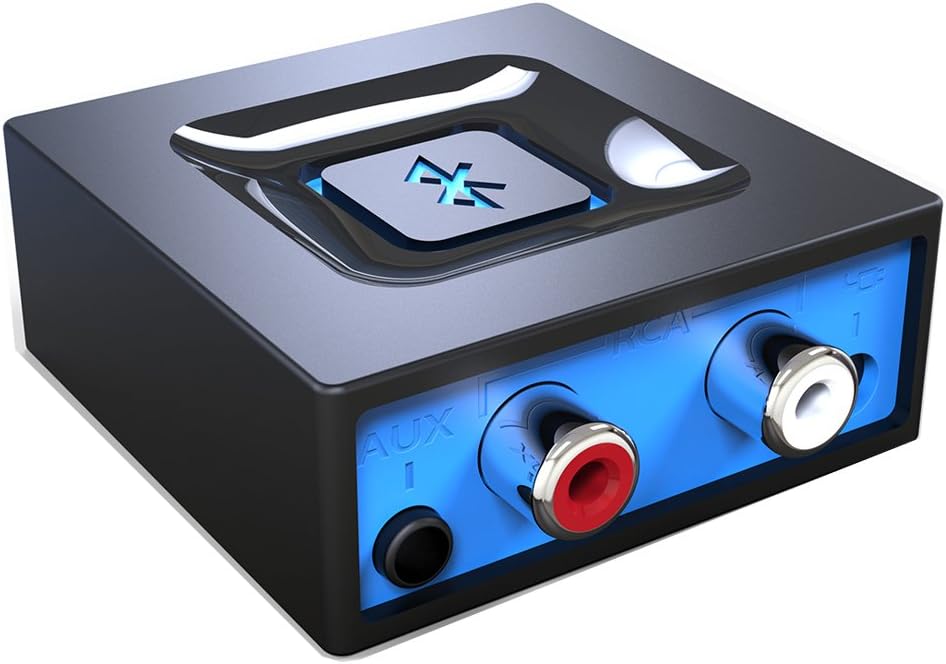
Billede: Forside view of the esinkin Bluetooth Audio Adapter, showing the AUX and RCA input ports.
Hvad er der i æsken
Når du åbner pakken, skal du sørge for, at alle følgende varer er til stede:
- 1 x Bluetooth modtager
- 1 x AC to DC Power adapter
- 1 x 3.5mm to RCA Audio cable
- 1 x USB strømkabel
- 1 x Brugermanual
 Image: All included accessories for the esinkin Bluetooth Audio Adapter.
Opsætning
Follow these steps to set up your esinkin Bluetooth Audio Adapter:
- Tilslut til strøm: Connect the Bluetooth adapter to a power source using either the provided AC to DC power adapter or the USB cable. Note that this adapter does not have a built-in battery and requires continuous power.
- Tilslut til lydsystem: Connect the adapter to your computer speakers, home stereo system, or other speaker system using either the 3.5mm audio cable or the RCA cable. Ensure the connection is secure.
- Tænd: The device will power on when connected to power.
- Parringstilstand: Press and hold the large Bluetooth symbol button in the middle of the adapter for approximately 3 seconds until the blue light starts blinking. This indicates the adapter is in pairing mode.
- Par med din enhed: On your Bluetooth-enabled device (smartphone, tablet, computer), go to the Bluetooth settings and search for available devices. Select the esinkin Bluetooth Audio Adapter from the list to pair. Once paired, the blue light on the adapter will become solid.

Image: Connection diagram for the esinkin Bluetooth Audio Adapter.

Image: Illustrates the function of the main Bluetooth button for power and playback control.
Betjeningsvejledning
Once successfully set up and paired, operating the esinkin Bluetooth Audio Adapter is straightforward:
- Musikstreaming: After pairing, music played on your Bluetooth-enabled device will stream wirelessly to the connected audio system.
- Afspilningskontrol:
- Click the Bluetooth symbol button once to Start/Pause musikafspilning.
- Hold the Bluetooth symbol button for 3 seconds to turn the device ON/OFF.
- Automatisk genforbindelse: The adapter is designed to automatically reconnect with the last paired device when both are within range and Bluetooth is enabled.
- Trådløs rækkevidde: The effective wireless range indoors (without significant obstacles) is approximately 30-40 feet (10-12 meters).

Image: Demonstrates wireless music streaming from mobile devices to a home stereo via the adapter.
Opretholdelse
To ensure the longevity and optimal performance of your esinkin Bluetooth Audio Adapter, please observe the following maintenance guidelines:
- Rensning: Use a soft, dry cloth to clean the surface of the adapter. Avoid using liquid cleaners or abrasive materials.
- Strømbeskyttelse: To protect the adapter from potential damage due to power surges or brown-outs, especially during electrical supply issues or storms, it is recommended to unplug the unit from the wall outlet.
- Opbevaring: Når adapteren ikke er i brug i længere perioder, skal den opbevares køligt og tørt, væk fra direkte sollys og ekstreme temperaturer.
- Kontinuerlig drift: The adapter is designed to remain powered when connected to a power source. To completely turn it off, disconnect it from the power outlet.
Fejlfinding
If you encounter issues with your esinkin Bluetooth Audio Adapter, please refer to the following common solutions:
| Problem | Mulig årsag/løsning |
|---|---|
| Ingen lyd eller lav lydstyrke: |
|
| Kan ikke parres med enhed: |
|
| Intermittent connection or poor range: |
|
| Adapter is always on: |
|
Specifikationer
| Feature | Detalje |
|---|---|
| Mærke | esinkin |
| Modelnummer | W29 |
| Trådløs type | Bluetooth |
| Varens vægt | 3.52 ounce |
| Produktmål (LxBxH) | 1.97 x 1.97 x 0.94 tommer |
| Farve | Sort |
| Kompatible enheder | Smartphone, Tablet, Home Stereo System |
| Connector Type | RCA, Auxiliary (3.5mm) |
| Strømindgang | 5V === 150mA |
Garanti og support
For warranty information or technical support, please refer to the documentation included with your purchase or visit the official esinkin webKontaktoplysninger til kundeservice findes typisk på produktemballagen eller på mærkets online supportside.
For yderligere ressourcer og produktinformation kan du besøge esinkin Store on Amazon.
Ask a question about this manual
Ask about setup, troubleshooting, compatibility, parts, safety, or missing instructions. Manuals+ will review the question and use this page’s manual context to help answer it.