
1. Introduktion
The Sony SBH54 is a versatile Stereo Bluetooth Headset designed for wireless communication and audio playback. It offers both handset and headset functionalities, allowing you to take and make calls, view messages, listen to music, and tune into FM radio directly from its display. Crafted from premium metal with a splash-proof design, it combines elegance with durability.
Key features include Bluetooth Wireless 3.0, NFC technology for easy pairing, an OLED display, and built-in noise cancellation for clear audio during calls. The headset supports A2DP profile and can connect to two devices simultaneously.
2. Produktet er slutview
The SBH54 features a compact design that fits comfortably in your hand. It includes an OLED display for information at a glance and physical controls for media and call management.
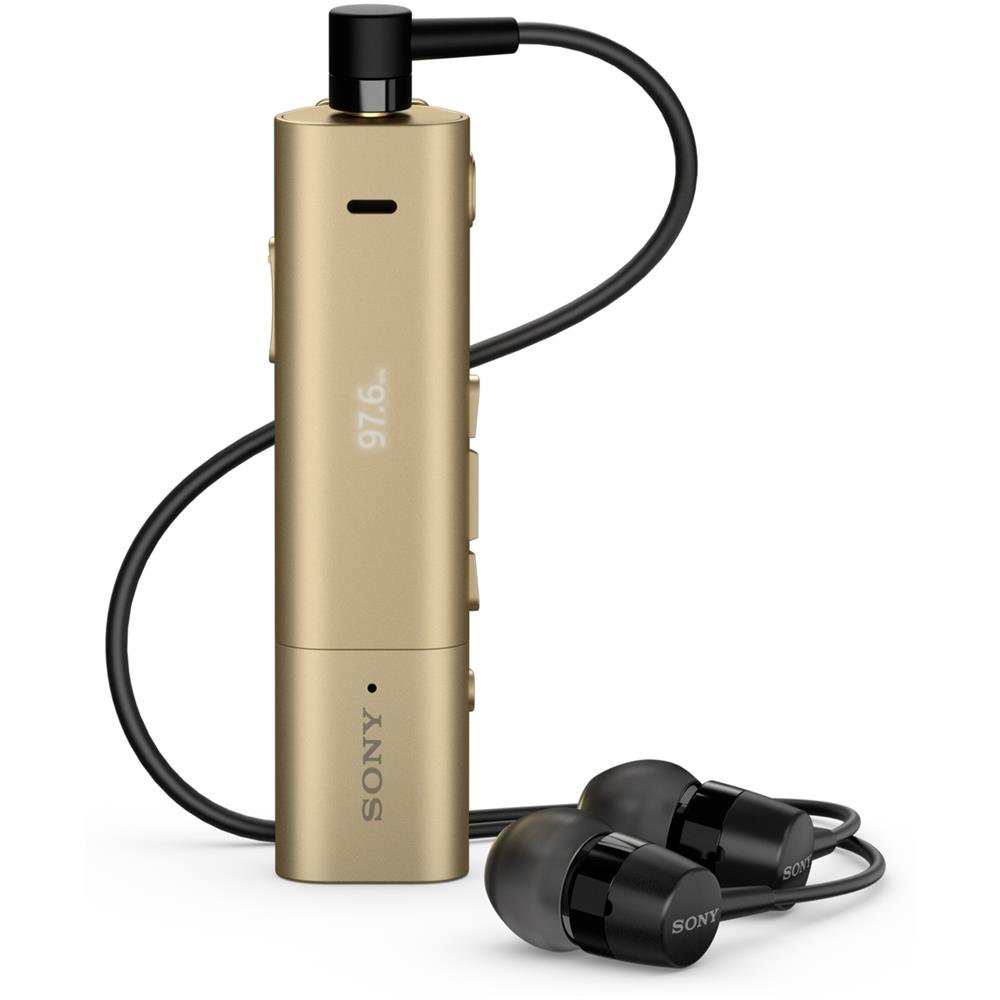
Image: Sony SBH54 Gold Stereo Bluetooth Headset. This image displays the compact, gold-colored headset with its integrated clip and display screen.
Kontroller og indikatorer:
- OLED-skærm: Shows caller ID, messages, music track information, and FM radio frequency.
- Multifunktionsknap: For call answering/ending, play/pause music.
- Lydstyrkeknapper: Juster lydstyrken.
- Navigationsknapper: For menu navigation and track skipping.
- Mikrofon: Integrated for voice calls.
- Hovedtelefonstik: 3.5mm port for connecting the included premium headphones.
- Opladningsport: Micro USB-port til opladning af enheden.
3. Opsætning
3.1 Opladning af headsettet
- Connect the supplied USB cable to the headset's charging port and to a USB power adapter or a computer's USB port.
- Batteriindikatoren på displayet viser opladningsstatus.
- Oplad headsettet helt før første brug.
3.2 Pairing with a Device (Bluetooth)
- Sørg for, at headsettet er opladet og slukket.
- Press and hold the power button until the headset enters pairing mode (indicated by a specific light pattern or message on the display).
- Aktiver Bluetooth på din smartphone eller anden Bluetooth-aktiveret enhed, og søg efter tilgængelige enheder.
- Select "SBH54" from the list of found devices.
- Hvis du bliver bedt om det, skal du indtaste adgangskoden "0000" (fire nuller).
- Once paired, the headset will indicate a successful connection.
3.3 Pairing with a Device (NFC)
For devices with NFC (Near Field Communication):
- Ensure NFC is enabled on your smartphone and the screen is unlocked.
- Touch the NFC detection area of your smartphone to the NFC detection area on the SBH54 headset.
- Følg eventuelle anvisninger på skærmen for at fuldføre parringsprocessen.
4. Betjening af headsettet
4.1 Tænd/sluk
- For at tænde: Tryk og hold tænd/sluk-knappen nede, indtil displayet lyser.
- For at slukke: Tryk på tænd/sluk-knappen, og hold den nede, indtil skærmen slukker.
4.2 Foretage og modtage opkald
- Besvare et opkald: When a call comes in, press the multi-function button.
- Afslutning af et opkald: During a call, press the multi-function button.
- Afvisning af et opkald: Press and hold the multi-function button when a call comes in.
- Foretag et opkald: Dial the number on your phone. The call will automatically route to the headset. You can also use voice commands if supported by your phone.
- Handset Function: The compact SBH54 can be used as an unobtrusive handset for calls.
- Støjreduktion: The headset features echo, wind, and noise cancellation for clear voice transmission.
- HD-stemme: Enhances voice clarity for both parties during a call.
4.3 Musikafspilning
- Afspil/pause: Tryk på multifunktionsknappen.
- Næste nummer: Press the forward navigation button.
- Forrige nummer: Press the backward navigation button.
- Lydstyrkekontrol: Brug knapperne til at op/ned for at øge lydstyrken.
4.4 FM radio
- Aktiver FM-radio: Navigate through the headset menu to select the FM Radio function.
- Indstil stationer: Use the navigation buttons to scan or manually tune to FM frequencies.
- Gem forudindstillinger: The headset may allow saving favorite stations (refer to on-screen prompts).
5. Vedligeholdelse
- Rensning: Tør headsettet af med en blød, tør klud. Undgå at bruge skrappe kemikalier eller slibende materialer.
- Vandtæthed: The SBH54 has a splash-proof design. This means it can withstand light splashes of water but should not be submerged or exposed to heavy rain. Ensure the charging port cover is securely closed.
- Opbevaring: Opbevar headsettet et køligt, tørt sted væk fra direkte sollys og ekstreme temperaturer.
- Batteripleje: For at forlænge batteriets levetid, undgå at aflade batteriet helt ofte. Oplad det regelmæssigt.
6. Fejlfinding
Almindelige problemer og løsninger:
- Headsettet tænder ikke: Sørg for, at batteriet er opladet. Tilslut til en strømkilde, og prøv igen.
- Kan ikke parres med en enhed:
- Sørg for, at headsettet er i parringstilstand.
- Sørg for, at Bluetooth er aktiveret på din enhed.
- Flyt headsettet tættere på din enhed.
- Genstart både headsettet og din enhed.
- Ryd tidligere Bluetooth-forbindelser på din enhed, og prøv at parre igen.
- Ingen lyd eller dårlig lydkvalitet:
- Kontroller lydstyrkeniveauerne på både headsettet og din tilsluttede enhed.
- Sørg for, at headsettet er inden for din enheds rækkevidde.
- Afbryd og tilslut Bluetooth-forbindelsen igen.
- Ensure the headphones are properly plugged into the 3.5mm jack.
- FM-radioen virker ikke: Ensure you are in an area with good FM signal reception.
7. Specifikationer
| Feature | Detalje |
|---|---|
| Mærke | Sony |
| Modelnummer | SBH54GD |
| Farve | Guld |
| Øreplacering | In Ear |
| Formfaktor | In Ear |
| Støjkontrol | Aktiv støjreduktion |
| Varens vægt | 0.1 kilo |
| Audio driver type | Dynamisk Driver |
| Frekvensområde | 20 Hz - 20,000 Hz |
| Indkapslingsmateriale | Metal |
| Kompatible enheder | Smartphones, Laptops, Tablets, Bluetooth-enabled Devices |
| Vandmodstandsniveau | Vandafvisende (stænksikker) |
| Forbindelsesteknologi | Bluetooth, NFC |
| Trådløs teknologi | Bluetooth, NFC |
| Bluetooth version | 3.0 |
| Kontroltype | Mediekontrol |
| Kontrolmetode | Fjern |
8. Garanti og support
For warranty information and customer support, please refer to the documentation included with your purchase or visit the official Sony support webwebsted. Specifikke garantivilkår kan variere afhængigt af region og forhandler.
Online support: www.sony.com/electronics/support