
Indledning
The Cayin Spark N5 is a state-of-the-art portable digital audio player designed to deliver exceptional sound quality. It supports a wide range of high-resolution audio formats, providing a pristine and immersive listening experience for audiophiles.
Nøglefunktioner:
- High-Resolution Audio Playback: Supports DSD128, FLAC, ALAC, WAV, AIFF, and other formats for detailed audio reproduction.
- Dual DACs: Equipped with two high-performance digital-to-analog converters for low distortion and high dynamic range.
- Kraftig output: Capable of driving high-impedance headphones with ease.
Hvad er der i æsken
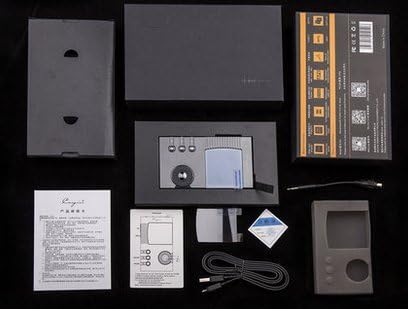
The image above displays the typical contents included with your Cayin N5 player. Please verify all items are present upon unboxing.
- Cayin Spark N5 Portable Music Player
- USB-data-/opladerkabel
- Brugermanual / Quick Start Guide
- Protective Rubber Case
- Garantikort (kan variere fra region til region)
Produkt overview
Front View

The front of the N5 features a display screen at the top, with a set of navigation buttons and a prominent scroll wheel below it for menu navigation and volume control.
Bag View
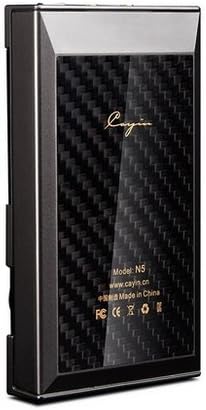
The rear panel of the N5 features a distinctive carbon fiber pattern, along with regulatory marks and basic model information.
Opsætning
Indledende opladning
- Connect the provided USB cable to the N5's USB port.
- Plug the other end of the USB cable into a USB wall adapter (not included) or a computer's USB port.
- Allow the device to charge fully before first use. The charging indicator on the screen will show progress.
Inserting MicroSD Cards
- Locate the MicroSD card slots, typically found at the bottom or side of the device, often protected by a rubber flap.
- Gently insert the MicroSD card(s) into the slot(s) until it clicks into place. Ensure the card is oriented correctly.
- The N5 supports up to two MicroSD cards for expanded storage.
Tilslutning til en computer
- Connect the N5 to your computer using the USB cable.
- On the N5, navigate to 'Settings' and select 'USB Mode'. Choose 'Storage' or 'DAC' mode as required.
- For file transfer, select 'Storage' mode. The N5's storage (and inserted MicroSD cards) will appear as removable drives on your computer.
- For using the N5 as a USB DAC, select 'DAC' mode. You may need to install specific drivers from the CAYIN webwebstedet til dit operativsystem.
Betjeningsvejledning
Tænd/sluk
- For at tænde: Tryk og hold tænd/sluk-knappen nede (normalt på siden), indtil skærmen lyser.
- For at slukke: Press and hold the Power button until a power-off prompt appears, then confirm. A short press will turn the screen on/off.
Grundlæggende afspilning
- Afspil/pause: Press the dedicated Play/Pause button.
- Næste / forrige nummer: Use the forward/backward skip buttons.
- Lydstyrkekontrol: Rotate the scroll wheel or use dedicated volume buttons if present.
Navigation
- Use the scroll wheel to navigate through menus and lists.
- Press the 'Enter' or 'OK' button (often integrated with the scroll wheel) to select an item.
- Use the 'Back' or 'Return' button to go back to the previous screen.
Indstillinger
Access the 'Settings' menu to customize various aspects of the player, including:
- Audio settings (gain, digital filters, DSD mode)
- Display settings (brightness, backlight timer)
- System settings (language, firmware update, factory reset)
- USB mode selection (Storage, DAC)
Opretholdelse
- Rensning: Brug en blød, tør og fnugfri klud til at rengøre enheden. Undgå at bruge slibende rengøringsmidler eller opløsningsmidler.
- Batteripleje: To prolong battery life, avoid fully discharging the battery frequently. If storing the device for an extended period, charge it to approximately 50% before storage.
- Opbevaring: Opbevar afspilleren et køligt, tørt sted væk fra direkte sollys og ekstreme temperaturer.
- Firmwareopdateringer: Periodically check the official CAYIN website for firmware updates. Updates can improve performance, add features, and fix bugs. Follow the instructions provided on the website carefully for the update process.
Fejlfinding
| Problem | Mulig årsag | Løsning |
|---|---|---|
| Enheden tænder ikke. | Lavt batteri; enheden er frosset. | Charge the device for at least 30 minutes. Perform a hard reset (refer to manual for specific button combination, often holding power for 10+ seconds). |
| Kan ikke overføre files til enheden. | Incorrect USB mode; driver issue; cable problem. | Ensure N5 is set to 'Storage' mode in USB settings. Try a different USB port or cable. Install necessary drivers from CAYIN website if using Windows. |
| Ingen lyd fra hovedtelefoner. | Lydstyrken er for lav; hovedtelefonerne er ikke korrekt tilsluttet; ødelagt lyd file. | Increase volume. Ensure headphone jack is fully inserted. Test with different headphones. Try playing a different audio file. |
| Kort batterilevetid. | High screen brightness; background processes; aging battery. | Reduce screen brightness. Close unnecessary applications. If battery life significantly degrades, contact support. |
| Firmwareopdatering mislykkedes. | Ukorrekt file; power interruption during update. | Ensure correct firmware file for N5 is used. Do not disconnect power during update. Re-attempt update carefully following official instructions. |
Specifikationer
| Feature | Detalje |
|---|---|
| Modelnavn | N5 |
| Mærke | CAYIN |
| Forbindelsesteknologi | Aux |
| Hukommelseslagringskapacitet | 16 GB (Internal, expandable via Micro SD) |
| Farve | Sort |
| Skærmstørrelse | 0.96 tommer |
| Kompatible enheder | Bærbar computer (til file transfer/DAC mode) |
| Medietype | Micro SD |
| Displayteknologi | LCD |
| Varens vægt | 15.2 ounces (ca. 431 g) |
| Pakkedimensioner | 7.2 x 4.6 x 2 tommer |
Garanti og support
The Cayin N5 comes with a standard manufacturer's warranty. Please refer to the warranty card included in your product packaging for specific terms, conditions, and duration. For technical support, service, or warranty claims, please visit the official CAYIN webwebstedet eller kontakt deres autoriserede servicecentre. Gem din købsbevis for at validere garantien.
Online ressourcer: For the latest drivers, firmware updates, and detailed FAQs, please visit the official CAYIN webwebsted: www.cayin.cn