
1. Kom godt i gang
1.1 Pakkens indhold
Verify that all items are present in your Ultimate Ears Boom 2 package:
- Ultimate Ears Boom 2 Bluetooth Speaker
- Micro-USB opladningskabel
- Strømadapter (kan variere afhængigt af region)
1.2 Opladning af din højttaler
Before initial use, fully charge your Ultimate Ears Boom 2 speaker. Connect the micro-USB cable to the charging port on the speaker and the other end to the power adapter, then plug into a wall outlet. The LED indicator will show charging status.

The Ultimate Ears Boom 2 speaker, ready for charging.
1.3 Bluetooth -parring
Sådan tilslutter du din højttaler til en Bluetooth-aktiveret enhed:
- Press and hold the Power button on the top of the speaker until you hear a tone and the LED flashes white.
- Gå til Bluetooth-indstillingerne på din mobilenhed.
- Select 'UE Boom 2' from the list of available devices.
- Once connected, you will hear a confirmation tone from the speaker.

Top view of the speaker, highlighting the power and Bluetooth pairing buttons.
1.4 Ultimate Ears App
For enhanced control and additional features, download the Ultimate Ears app from your device's app store (iOS 9.0 or later required for Apple devices, Android compatible). The app allows for remote power control, equalizer adjustments, and PartyUp mode.
2. Speaker Operation
2.1 Tænd/sluk
Press the Power button located on the top of the speaker to turn it on or off. A distinct sound will indicate the power status.
2.2 Lydstyrkekontrol
Adjust the volume using the large '+' and '-' buttons located on the side of the speaker. You can also control the volume from your connected Bluetooth device.
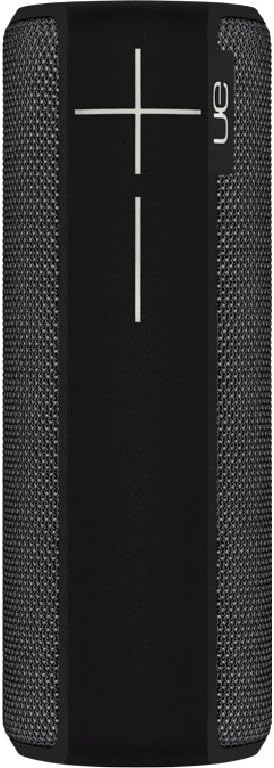
Side view of the speaker, featuring the prominent volume control buttons.
2.3 Music Control (Tap Gestures)
The Boom 2 features tap controls for music playback:
- Enkelt tryk: Tap the top of the speaker once to play or pause the current track.
- Dobbeltklik: Tap the top of the speaker twice to skip to the next track.
2.4 Batteristatus
To check the battery level, press both the '+' and '-' volume buttons simultaneously. The speaker will announce the remaining battery percentage.
2.5 Vandtæthed og holdbarhedsfunktioner
The Ultimate Ears Boom 2 is designed to be waterproof (IPX7 rated) and shockproof. It can be immersed in water up to 1 meter for 30 minutes. Ensure the charging port cover is securely closed before exposing the speaker to water.

The speaker's waterproof design allows for use in various environments.

The Ultimate Ears Boom 2 demonstrating its water resistance.
2.6 PartyUp Mode (Connecting Multiple Speakers)
Use the Ultimate Ears app to connect multiple Boom speakers together for a more expansive sound experience. Follow the instructions within the app to activate PartyUp mode.
3. Pleje og vedligeholdelse
3.1 Rengøringsinstruktioner
For at rengøre din højttaler skal du bruge en blød,amp cloth. Avoid using harsh chemicals or abrasive cleaners, as these can damage the speaker's finish or waterproof seals. Ensure the charging port is dry before charging.
3.2 Batterilevetid
To maximize battery life, avoid fully discharging the speaker frequently. Charge the speaker regularly, and if storing for an extended period, ensure it has at least a 50% charge.
3.3 Opbevaring
Store the speaker in a cool, dry place away from direct sunlight and extreme temperatures. Ensure the charging port cover is closed to prevent dust and debris from entering.
4. Fejlfindingsvejledning
4.1 Ingen strøm
- Ensure the speaker is charged. Connect it to the power adapter and allow it to charge for at least 15 minutes before attempting to power on.
- Press and hold the Power button firmly for a few seconds.
4.2 Problemer med Bluetooth-forbindelse
- Ensure the speaker is in pairing mode (flashing white LED).
- Slå Bluetooth fra og til på din mobilenhed.
- Forget 'UE Boom 2' from your device's Bluetooth list and attempt to re-pair.
- Move the speaker closer to your device; the maximum range is approximately 33 meters (100 feet).
4.3 Ingen lyd eller lav lydstyrke
- Skru op for lydstyrken på både højttaleren og din tilsluttede enhed.
- Sørg for, at højttaleren er korrekt tilsluttet via Bluetooth.
- Check if the audio source on your device is playing correctly.
4.4 Sound Distortion
- Skru ned for lydstyrken på både højttaleren og din tilsluttede enhed.
- Sørg for lyden file eller streamingkvaliteten er ikke lav.
- Gå væk fra potentielle interferenskilder (f.eks. Wi-Fi-routere, andre Bluetooth-enheder).
4.5 Problemer med app-forbindelse
- Ensure your mobile device's operating system meets the app's requirements (iOS 9.0+).
- Genstart appen, eller geninstaller den.
- Ensure the speaker's firmware is up to date via the app.
5. Tekniske specifikationer
| Feature | Specifikation |
|---|---|
| Modelnavn | Bom 2 |
| Modelnummer | 984-000557 |
| ASIN | B0141208EA |
| Forbindelsesteknologi | Bluetooth, USB |
| Trådløs kommunikationsteknologi | Bluetooth |
| Kompatible enheder | Computere, smartphones (Android, iOS) |
| Batterilevetid | Op til 15 timer |
| Vandtæt vurdering | IPX7 (op til 1 meter i 30 minutter) |
| Maksimal rækkevidde | 33 meter (100 fod) |
| Højttaler udgangseffekt | 25 watt |
| Produktdimensioner | 6.7D x 6.7W x 18H cm (approx. 15 x 5 x 5 cm; 0.54 grams) |
| Lydudgangstilstand | Omgive |
| Strømkilde | Batteridrevet (1 Lithium Polymer batteri inkluderet) |
6. Garanti og kundesupport
6.1 Begrænset garanti
The Ultimate Ears Boom 2 comes with a Limited Warranty. For specific details regarding warranty coverage, terms, and conditions, please refer to the warranty documentation included with your product or visit the official Ultimate Ears webwebsted.
6.2 Kundesupport
If you encounter any issues not covered in this manual or require further assistance, please contact Ultimate Ears customer support through their official website. For return policies or issues related to your purchase, consult the retailer's (e.g., Amazon.it) help pages.