
1. Introduktion
The Edifier P180 is a stereo earbud headset designed for clear audio and convenient communication. Featuring an inline microphone and control, it offers a comfortable listening experience for various devices.

Figure 1: Edifier P180 Wired Earbud Headset
2. Hvad er der i æsken
- Edifier P180 Earbud Headset
- Kabel
3. Nøglefunktioner
- Classic Comfort: Ergonomic design for comfortable wear without irritating the ear canal.
- Fantastisk lydkvalitet: Equipped with 16mm neodymium magnetic monomers for high-fidelity audio playback.
- Integrated Microphone and Control: 3.5mm stereo earphones with a built-in microphone and remote button for mobile phone communication.
- Funktionalitet: Single button control for picking up/hanging up calls and skipping songs (device dependent for iOS/Android).
- Holdbart design: Constructed with quality materials for longevity.

Figure 2: Ergonomic design for comfortable fit.
4. Opsætning
- Pakker ud: Carefully remove the Edifier P180 headset from its packaging.
- Inspicere: Check the earbuds and cable for any visible damage.
- Forbinde: Insert the 3.5mm audio jack into the headphone port of your compatible device (smartphone, tablet, computer, etc.). Ensure the jack is fully inserted for proper audio and microphone function.
- Position: Place the earbuds comfortably in your ears. The ergonomic design is intended to rest well without causing irritation.
5. Betjeningsvejledning
The Edifier P180 features an inline control button for easy management of calls and music playback.
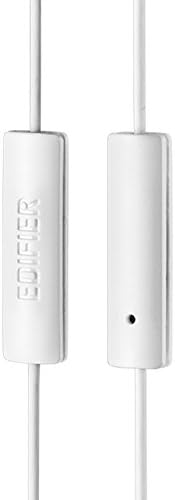
Figure 3: Inline microphone and control button.
- Besvarelse / afslutning af opkald: Press the control button once to answer an incoming call. Press it again to end an active call.
- Afspilning/pause af musik: Press the control button once to play or pause audio playback.
- Spring over spor: Double-press the control button to skip to the next track. Triple-press to go to the previous track (functionality may vary by device and operating system).
- Stemmeassistent: Long-press the control button to activate your device's voice assistant (e.g., Siri, Google Assistant).
Video 1: Officielt produkt slutview of the Edifier P180 Classic Earbud Headsets, demonstrating features and usage.
6. Vedligeholdelse
- Rensning: Tør forsigtigt ørepropperne og kablet af med en blød, tør klud. Undgå at bruge skrappe kemikalier eller slibende materialer.
- Opbevaring: Når headsettet ikke er i brug, skal det opbevares et rent og tørt sted, væk fra ekstreme temperaturer og direkte sollys. Undgå at kablet filtres sammen.
- Undgå fugt: Do not expose the headset to water or excessive moisture, as this can damage the internal components.
7. Fejlfinding
- Ingen lyd:
- Sørg for, at 3.5 mm-stikket er sat helt i enhedens lydport.
- Tjek din enheds lydstyrkeindstillinger.
- Test ørepropperne med en anden enhed for at udelukke et enhedsspecifikt problem.
- Mikrofonen virker ikke:
- Sørg for, at 3.5 mm-stikket er sat helt i.
- Tjek din enheds mikrofonindgangsindstillinger.
- Test mikrofonen med en anden enhed eller et andet program.
- Intermitterende lyd:
- Check the cable for any kinks or damage.
- Sørg for, at lydstikket er rent og fri for snavs.
8. Specifikationer
| Feature | Specifikation |
|---|---|
| Modelnummer | P180 |
| Frekvensrespons | 20 Hz - 20,000 Hz |
| Hovedtelefonstik | 3.5 mm Jack |
| Forbindelsesteknologi | Kablet |
| Varens vægt | 1.76 ounces (50 gram) |
| Produktdimensioner | 2.01 x 5.59 x 0.91 tommer |
| Materiale | Neodym |
| Kontroltype | Inline Control Button |
| Impedans | 32 Ohm |
| Støjkontrol | Lydisolering |
9. Garanti og support
The Edifier P180 headset is backed by a 1 års garanti. For any support inquiries or warranty claims, please refer to the contact information provided with your purchase or visit the official Edifier webwebsted.