
Supersonic IQ3710DJBT
Supersonic IQ Sound IQ-3710DJBT Portable DJ Speaker User Manual
Model: IQ-3710DJBT
Vigtige sikkerhedsinstruktioner
Læs venligst alle instruktioner omhyggeligt, inden du bruger denne enhed. Gem denne manual til senere brug.
- Udsæt ikke dette apparat for regn eller fugt.
- Bloker ikke nogen ventilationsåbninger.
- Må ikke installeres i nærheden af varmekilder såsom radiatorer, varmeapparater, komfurer eller andre apparater (inklusive ampløftere), der producerer varme.
- Beskyt netledningen mod at blive gået på eller klemt, især ved stik, stikkontakter og det punkt, hvor de kommer ud af apparatet.
- Brug kun tilbehør/tilbehør specificeret af producenten.
- Træk stikket ud af dette apparat under tordenvejr, eller når det ikke skal bruges i længere perioder.
- Overlad al service til kvalificeret servicepersonale. Service er påkrævet, når apparatet er blevet beskadiget på nogen måde.
Produkt overview
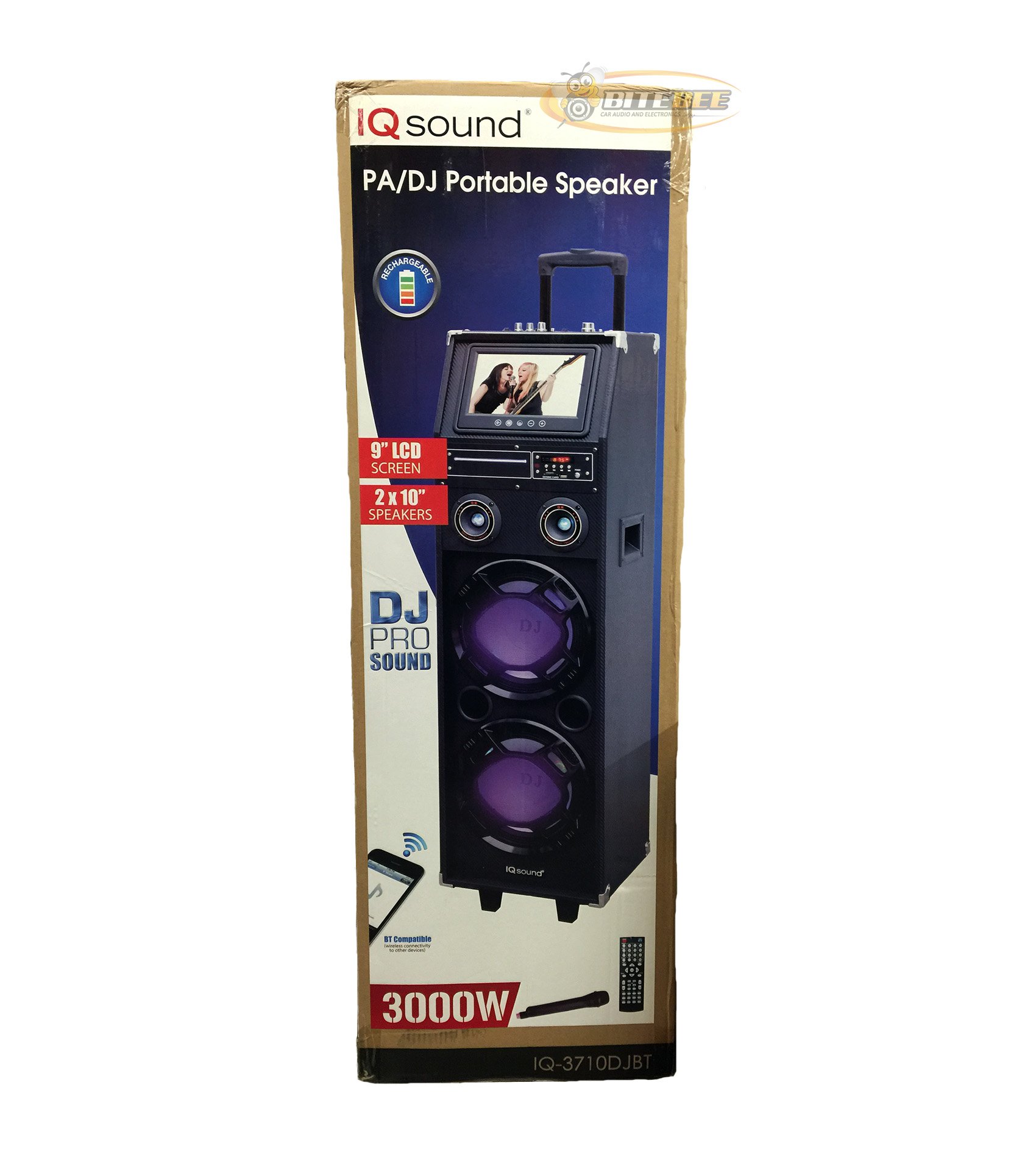
Billede: Forside view of the Supersonic IQ Sound IQ-3710DJBT Portable DJ Speaker, showcasing its dual speakers, 9-inch LCD screen, and control panel.
Funktioner
- Dual 10-inch Full Range Speakers
- Built-in Bluetooth for wireless audio streaming
- FM Radio tuner
- 5-Band Equalizer for audio customization
- 9-inch LCD Display for video and menu navigation
- Built-in Rechargeable Battery for portability
- Integrated LED Lights for visual effects
- Multimedia Compatible (supports various video and music formats)
- USB Input for external audio devices
- SD Card Slot for media playback
- 1 Guitarindgang
- 1 Microphone Jack (includes 1 microphone)
- Fjernbetjening medfølger
- Built-in Handle and Wheels for easy transport
Pakkens indhold
- IQ-3710DJBT Portable DJ Speaker
- Strømadapter
- Mikrofon
- Fjernbetjening
- Brugervejledning (dette dokument)
Controls and Connections (General)
The main control panel is located on the top or rear of the speaker, featuring buttons for power, mode selection, playback controls (play/pause, skip), volume adjustment, EQ settings, and light controls. Input ports for USB, SD card, microphone, and guitar are also present. The 9-inch LCD display provides visual feedback for media playback, FM radio tuning, and menu navigation.
Opsætning
1. Opladning af batteriet
- Connect the included power adapter to the speaker's DC input port.
- Plug the power adapter into a standard wall outlet (AC 100-240V, 50/60Hz).
- The charging indicator light (if present) will illuminate. Allow approximately 6-8 hours for a full charge before first use.
- Højttaleren kan bruges under opladning.
2. Første opstart
- Ensure the speaker is fully charged or connected to a power source.
- Locate the Power button (usually on the control panel) and press it to turn on the speaker.
- The LCD display will illuminate, and the speaker will enter the default mode.
3. Tilslutning af eksterne enheder
Mikrofon: Insert the included microphone's cable into the Microphone Jack.
Guitarer: Insert your guitar's cable into the Guitar Input.
Betjeningsvejledning
Valg af tilstand
Tryk på MODE button on the control panel or remote control to switch between available modes: Bluetooth, FM Radio, USB, SD, and AUX (if applicable). The current mode will be displayed on the LCD screen.
Bluetooth-betjening
- Turn on the speaker and switch to Bluetooth-tilstand using the MODE button. The LCD will display "Bluetooth" or a similar indicator.
- Aktiver Bluetooth på din Bluetooth-aktiverede enhed (f.eks. smartphone, tablet) og søg efter tilgængelige enheder.
- Vælg "IQ-3710DJBT" fra listen over enheder.
- Once paired, the speaker will emit a confirmation sound, and you can now play audio wirelessly from your device.
- Use your device or the speaker's controls for playback (play/pause, skip tracks, volume).
Betjening af FM-radio
- Skift til FM-radiotilstand ved at bruge MODE-knappen.
- Tryk på AFSPIL/PAUSE button (or a dedicated scan button) to automatically scan and save available FM stations.
- Brug FORRIGE NÆSTE knapperne til at navigere gennem de gemte stationer.
- Adjust the volume using the main volume knob or remote control.
USB/SD-kortafspilning
- Indsæt et USB-flashdrev i USB-port eller et SD-kort i SD-kortslot.
- The speaker should automatically switch to USB or SD mode and begin playing media. If not, press the MODE knappen for at vælge den korrekte indgang.
- Use the playback controls (play/pause, previous/next) on the speaker or remote to manage your media.
- The 9-inch LCD display will show file information and video playback (if applicable).
Equalizer (EQ) Justering
The 5-band EQ allows you to fine-tune the audio output. Locate the EQ controls on the speaker's panel. Adjust the sliders or knobs for different frequency bands (e.g., bass, mid-range, treble) to achieve your desired sound profile.
Microphone and Guitar Use
Once connected, adjust the individual volume controls for the microphone and guitar (if available) on the speaker's control panel. The main volume knob controls the overall output.
LED lysstyring
Tryk på LYS button (or similar) on the control panel or remote to cycle through different light modes or to turn the lights on/off.
LCD Display
The 9-inch LCD display shows current mode, track information, FM frequency, and can play video files from USB or SD card. Navigate menus using the dedicated navigation buttons or remote control.
Opretholdelse
- Rensning: Use a soft, dry cloth to clean the exterior of the speaker. Do not use abrasive cleaners or solvents. For the LCD screen, use a screen-specific cleaning solution and a microfiber cloth.
- Batteripleje: To prolong battery life, fully charge the speaker before first use and recharge it regularly, even if not in frequent use. Avoid completely draining the battery. Store in a cool, dry place.
- Opbevaring: When not in use for extended periods, store the speaker in a cool, dry environment, away from direct sunlight and extreme temperatures.
- Transportere: Utilize the built-in handle and wheels for easy and safe transport of the speaker.
Fejlfinding
| Problem | Mulig årsag | Løsning |
|---|---|---|
| Højttaleren tænder ikke. | Battery is drained or power adapter is not connected. | Connect the power adapter and charge the speaker. Ensure the power outlet is functional. |
| Ingen lydudgang. | Volume is too low, incorrect mode selected, or device not properly connected. | Increase volume. Verify correct mode (Bluetooth, USB, FM). Reconnect Bluetooth device or reinsert USB/SD card. Check microphone/guitar connections. |
| Bluetooth-parring mislykkes. | Speaker not in Bluetooth mode, device too far, or interference. | Ensure speaker is in Bluetooth mode. Move device closer to speaker. Turn off and on Bluetooth on your device. Try pairing again. |
| FM-radiomodtagelsen er dårlig. | Svagt signal eller interferens. | Relocate the speaker to an area with better reception. Perform an auto-scan again. |
| USB/SD media not playing. | Ikke understøttet file format, corrupted media, or improper insertion. | Ensure media is inserted correctly. Check file formats (refer to specifications for supported types). Try a different USB drive or SD card. |
Specifikationer
- Model: IQ-3710DJBT
- Mærke: Supersonisk
- Højttalertype: Bærbar DJ højttaler
- Højttalere: 2 x 10-inch Full Range
- Vise: 9 tommer LCD
- Forbindelse: Bluetooth, USB
- Indgange: USB, SD Card, Microphone (1), Guitar (1)
- Radio: FM-tuner
- Equalizer: 5-bånds EQ
- Strømkilde: Built-in Rechargeable Battery, AC Power Adapter
- Dimensioner (L x B x H): 15 x 14 x 45 tommer (ca.)
- Vægt: 54 pund (ca.)
- Inkluderet tilbehør: Microphone, Remote Control, Power Adapter
Garanti og support
This product comes with a standard manufacturer's warranty. For specific warranty terms and conditions, please refer to the warranty card included in your package or visit the official Supersonic webwebsted.
For technical support, service inquiries, or to purchase replacement parts, please contact Supersonic customer service. Contact information can typically be found on the product packaging or the official brand webwebsted.
Online support: www.supersonicinc.com (Dette er et midlertidigt link, bekræft venligst den faktiske support) URL.)
Ask a question about this manual
Ask about setup, troubleshooting, compatibility, parts, safety, or missing instructions. Manuals+ will review the question and use this page’s manual context to help answer it.