
Indledning
This manual provides essential information for the installation, operation, and maintenance of your Intel Core i5-6400 processor. The Intel Core i5-6400 is a 6th generation desktop processor designed for reliable performance in various computing tasks.
Opsætning og installation
Tjekliste før installation
- Kompatibelt bundkort: Ensure your motherboard supports the LGA 1151 socket and is compatible with 6th generation Intel Core processors.
- Hukommelse (RAM): DDR4 RAM is required for this processor generation.
- Strømforsyning: A stable power supply unit (PSU) with sufficient wattage for your entire system.
- Køleløsning: An appropriate CPU cooler (a fan and heat sink are typically included with boxed processors).
- Termisk pasta: If your cooler does not have pre-applied thermal paste, ensure you have a tube available.
Processorinstallationstrin
- Forbered bundkortet: Place your motherboard on a non-conductive surface. Locate the CPU socket, typically covered by a protective plastic cap.
- Åbn soklen: Gently push down and away on the small lever next to the CPU socket to release it. Lift the load plate.
- Juster processoren: Carefully remove the processor from its packaging. Identify the gold triangle or notch on one corner of the processor and align it with the corresponding mark on the CPU socket. Do not force the processor into the socket.
- Indsæt processoren: Gently lower the processor straight down into the socket. It should sit flush without resistance.
- Sikr processoren: Close the load plate over the processor, then push the lever back down and under the retention tab until it clicks into place.
- Påfør termisk pasta (hvis nødvendigt): Hvis din CPU-køler ikke har forudpåført termisk pasta, skal du påføre en lille mængde på størrelse med en ært i midten af processorens integrerede varmefordeler (IHS).
- Installer CPU-køleren: Place the CPU cooler onto the processor, ensuring proper contact. Follow the cooler's specific instructions for securing it to the motherboard. Connect the CPU fan cable to the designated CPU_FAN header on the motherboard.

Image: Intel Core i5 processor, showing the top view with the Intel logo and Core i5 branding.
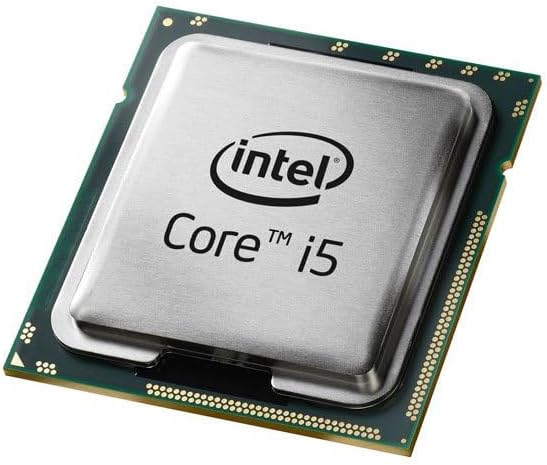
Image: Close-up of an Intel Core i5 processor, highlighting its integrated heat spreader and the underlying substrate.
Betjeningsvejledning
Once correctly installed and your computer system is assembled, the Intel Core i5-6400 processor operates automatically. Its base clock speed is 2.7 GHz, with Intel Turbo Boost Technology dynamically increasing frequency when needed for demanding tasks. The processor manages its power and performance states based on system load and thermal conditions.
- Systemet tændes: Ensure all components are connected, then power on your computer.
- Operativsystem: Install a compatible operating system (e.g., Windows 10, Linux) and necessary drivers for your motherboard and other components.
- Præstation: The processor will adjust its performance based on the applications running, providing efficient power usage for everyday tasks and increased speed for intensive applications like gaming or content creation.
Opretholdelse
Proper maintenance ensures the longevity and optimal performance of your Intel Core i5-6400 processor.
- Fjernelse af støv: Regularly clean dust from your computer case, especially around the CPU cooler's fan and heatsink fins. Dust accumulation can impede airflow and lead to higher operating temperatures.
- Temperaturovervågning: Use system monitoring software to periodically check your CPU temperatures. Ensure they remain within safe operating limits, especially under heavy load.
- Luftstrøm: Maintain good airflow within your PC case by ensuring cables are neatly managed and case fans are functioning correctly.
- Termisk pasta: If you notice consistently high temperatures, consider reapplying thermal paste after several years of use, following proper cleaning procedures.
Fejlfinding
Hvis du støder på problemer, kan du overveje følgende grundlæggende fejlfindingstrin:
- Ingen skærm/Systemet starter ikke:
- Kontroller, at alle strømkabler (24-bens ATX, 8-bens CPU) er korrekt tilsluttet til bundkortet.
- Sørg for, at CPU'en er korrekt placeret i sin sokkel, og at håndtaget er låst.
- Kontroller, at RAM-modulerne er korrekt placeret i deres slots.
- Confirm your monitor is connected to the correct display output (either motherboard integrated graphics or dedicated graphics card).
- Systemustabilitet/nedbrud:
- Monitor CPU temperatures to rule out overheating.
- Sørg for, at dit operativsystem og dine drivere (især chipset- og grafikdrivere) er opdaterede.
- Kør hukommelsesdiagnosticeringsværktøjer for at kontrollere for RAM-problemer.
- Overophedning:
- Confirm the CPU cooler is properly installed and making good contact with the processor.
- Check that the CPU fan is spinning and connected to the correct header.
- Rengør kølepladen og ventilatoren for støv.
- Bekræft påføring af termopasta.
For more advanced troubleshooting, consult your motherboard's manual or the Intel support webwebsted.
Specifikationer
| Feature | Specifikation |
|---|---|
| Processormodel | Intel Core i5-6400 |
| Varemodelnummer | BX80662I56400 |
| CPU socket | LGA 1151 |
| CPU hastighed | 2.7 GHz (basis) |
| Antal kerner | 4 |
| Processor cache | 6 MB SmartCache |
| Understøttelse af hukommelsestyper | DDR4 SDRAM |
| Integreret grafik | Intel HD Graphics 530 |
| Varens vægt | 10.4 ounce |
| Produktdimensioner | 4.6 x 4.2 x 3.3 tommer |
| Inkluderede komponenter | Fan and Heat Sink (with boxed version) |
Garantioplysninger
Intel processors typically come with a limited manufacturer's warranty. For specific details regarding the warranty period and terms for your Intel Core i5-6400 processor, please refer to the documentation included with your product or visit the official Intel webwebsted. Købsbevis kan være påkrævet i forbindelse med garantikrav.
Support og ressourcer
For further assistance, technical support, driver downloads, and additional product information, please visit the official Intel support webwebsted:
Intel Support Webwebsted: www.intel.com/support
You can also find community forums and knowledge bases on the Intel website for peer-to-peer support and solutions to common issues.