
1. Introduktion
Thank you for choosing the Moxie KX1 Bluetooth Handsfree Car Kit. This device is designed to provide a safe and convenient way to manage calls and enjoy music wirelessly while driving. Please read this manual carefully before using the device to ensure proper operation and to maximize its performance and lifespan.
2. Produktet er slutview
2.1 Komponenter
- Moxie KX1 Bluetooth Handsfree Car Kit
- USB opladningskabel
- Bilopladeradapter
- Brugermanual
2.2 Enhedslayout og kontroller
Familiarize yourself with the buttons and indicators on your KX1 device:
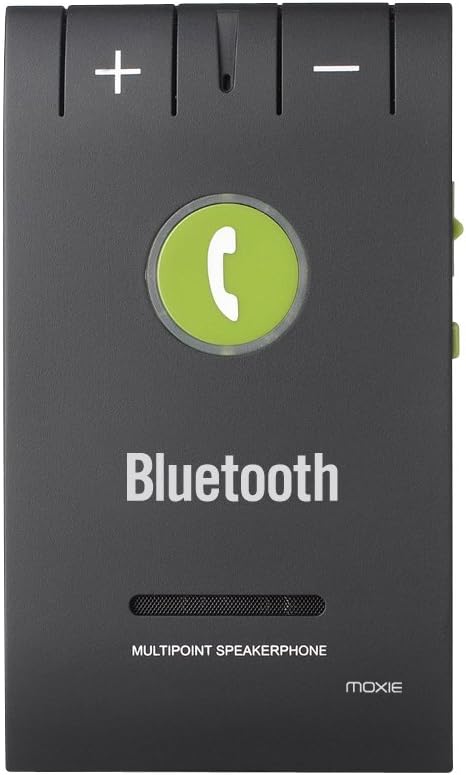
Billede 1: Front panel of the Moxie KX1, highlighting the volume controls (+ and -), the central call button, and the 'Bluetooth' indicator.
| Kontrollere | Fungere |
|---|---|
| + knap | Increase Volume / Next Track (during music playback) |
| - Knap | Decrease Volume / Previous Track (during music playback) |
| Call Button (Center) | Answer/End Call, Redial, Voice Assistant Activation, Play/Pause Music |
| Power Switch (Side) | Tænd/sluk |
| Charging Port (Side) | Connect USB charging cable |
3. Specifikationer
| Feature | Detalje |
|---|---|
| Bluetooth version | V4.0 + EDR |
| Driftsfrekvens | ISM (Ralink 3070) |
| Bluetooth rækkevidde | Op til 10 meter (33 fod) |
| Understøttet Profiles | HFP (Hands-Free Profile), HSP (Headset Profile), AVRCP (Audio/Video Remote Control Profile) |
| Multipoint-forbindelse | Connects to 2 phones simultaneously |
| Enhedshistorik | Stores pairing history for up to 8 devices |
| Taletid | Cirka 15 timer |
| Standby tid | Cirka 1000 timer |
| Opladningstid | Cirka 2 timer |
| Støjreduktion | DSP (Digital Signal Processing) for noise and echo cancellation |
| Batteritype | 3.7V, 750mAh lithiumbatteri |
| Dimensioner | 98 x 57 x 45 mm |
| Vægt | 64 g |
| Kompatible enheder | Acer Liquid M320, M330, Z320, Z330, Blackberry Priv, HTC One A9, Huawei G8, Lenovo IdeaTab A10-70, Microsoft Lumia 550, Sony Xperia C5 Ultra (and other Bluetooth-enabled devices) |
4. Opsætning
4.1 Opladning af enheden
Before first use, fully charge your Moxie KX1. Connect the provided USB charging cable to the device's charging port and the other end to a USB power source (e.g., car charger adapter, computer USB port). The indicator light will show charging status (e.g., red for charging, off or blue for fully charged).

Billede 2: Side view of the Moxie KX1, illustrating the location of the charging port and the ON/OFF power switch.
En fuld opladning tager typisk omkring 2 timer.
4.2 Parring med en Bluetooth-enhed
- Ensure the KX1 is fully charged and powered off.
- Slide the power switch to the 'ON' position. The device will automatically enter pairing mode, indicated by a flashing blue/red light.
- Aktiver Bluetooth på din mobiltelefon, og søg efter tilgængelige enheder.
- Select "Moxie KX1" from the list of found devices.
- Hvis du bliver bedt om en adgangskode, skal du indtaste "0000".
- Once paired, the indicator light will turn solid blue, and you may hear a confirmation tone.
The KX1 will automatically attempt to reconnect to the last paired device when powered on.
4.3 Montering af enheden
The Moxie KX1 comes with a magnetic clip for easy attachment to your car's sun visor.

Billede 3: Bag view of the Moxie KX1, displaying the integrated magnetic clip designed for secure attachment to a car's sun visor.
- Attach the magnetic clip securely to the back of the KX1.
- Slide the clip onto your car's sun visor, ensuring it is firmly in place and does not obstruct your view.
5. Betjeningsvejledning
5.1 Tænd/sluk

Billede 4: Top view of the Moxie KX1, clearly showing the ON/OFF slide switch for device power control.
- For at tænde: Slide the power switch to the 'ON' position. The device will announce "Power On" and attempt to connect to the last paired device.
- For at slukke: Slide the power switch to the 'OFF' position. The device will announce "Power Off".
5.2 Foretage og modtage opkald
- Besvare et opkald: When a call comes in, the device will announce the incoming number. Press the Opkaldsknap én gang for at svare.
- Afslutning af et opkald: Under et opkald skal du trykke på Opkaldsknap once to end the call.
- Afvisning af et opkald: When a call comes in, press and hold the Opkaldsknap for approximately 2 seconds to reject the call.
- Genopkald af sidste nummer: In standby mode, double-press the Opkaldsknap for at genopkalde det sidst kaldte nummer.
- Aktivering af stemmeassistent: I standbytilstand skal du trykke på og holde nede Opkaldsknap for approximately 2 seconds to activate your phone's voice assistant (e.g., Siri, Google Assistant).
5.3 Musikafspilning
Once paired, you can stream music from your phone through the KX1 speaker.
- Afspil/pause: Tryk på Opkaldsknap én gang for at afspille eller sætte musik på pause.
- Næste nummer: Tryk på + knap engang.
- Forrige nummer: Tryk på - Knap engang.
- Lydstyrkekontrol: Tryk og hold på + or - Knap for at justere lydstyrken.
5.4 Multipunktforbindelse
The Moxie KX1 supports connecting to two Bluetooth devices simultaneously.
- Pair the first phone as described in Section 4.2.
- After the first phone is paired, disable Bluetooth on the first phone.
- The KX1 will re-enter pairing mode (flashing blue/red light).
- Pair the second phone as described in Section 4.2.
- Once the second phone is paired, re-enable Bluetooth on the first phone. Both phones should now be connected to the KX1.
When two phones are connected, the KX1 will manage calls from both devices. Music playback will typically come from the last connected or active device.
6. Vedligeholdelse
- Rengør enheden med en blød, tør klud. Brug ikke slibende rengøringsmidler eller opløsningsmidler.
- Undgå at udsætte enheden for ekstreme temperaturer, fugt eller direkte sollys.
- Opbevar enheden et køligt og tørt sted, når den ikke er i brug i længere perioder.
- Forsøg ikke at skille enheden ad eller reparere den selv, da dette vil ugyldiggøre garantien.
7. Fejlfinding
| Problem | Mulig løsning |
|---|---|
| Enheden tænder ikke. | Ensure the device is charged. Connect to a power source and allow it to charge for at least 30 minutes before attempting to power on again. |
| Kan ikke parres med telefonen. |
|
| Ingen lyd eller dårlig lydkvalitet. |
|
| Calls are not clear (echo/noise). | Ensure the microphone is not obstructed. Try adjusting the position of the KX1 on the sun visor. The DSP technology should minimize most background noise. |
| Multipoint connection issues. | Ensure both phones have Bluetooth enabled and are within range. Re-follow the multipoint pairing instructions in Section 5.4. |
8. Sikkerhedsoplysninger
- Brug ikke enheden under kørsel, hvis den distraherer dig. Prioritér altid trafiksikkerhed.
- Hold enheden væk fra vand, fugt og ekstreme temperaturer.
- Tab ikke, punkter ikke eller adskil ikke enheden.
- Opbevares utilgængeligt for børn.
- Bortskaf batteriet og enheden i henhold til lokale regler.
9. Garanti og support
Moxie products are designed for reliability and performance. For warranty information or technical support, please refer to the contact details provided with your purchase or visit the official Moxie webwebsted. Gem venligst din købsbevis til garantikrav.