
1. Introduktion
Welcome to the Dash Clear View Toaster instruction manual. This appliance is designed to provide a precise toasting experience with its unique clear-view window and versatile functions. Please read this manual thoroughly before use to ensure safe and efficient operation.
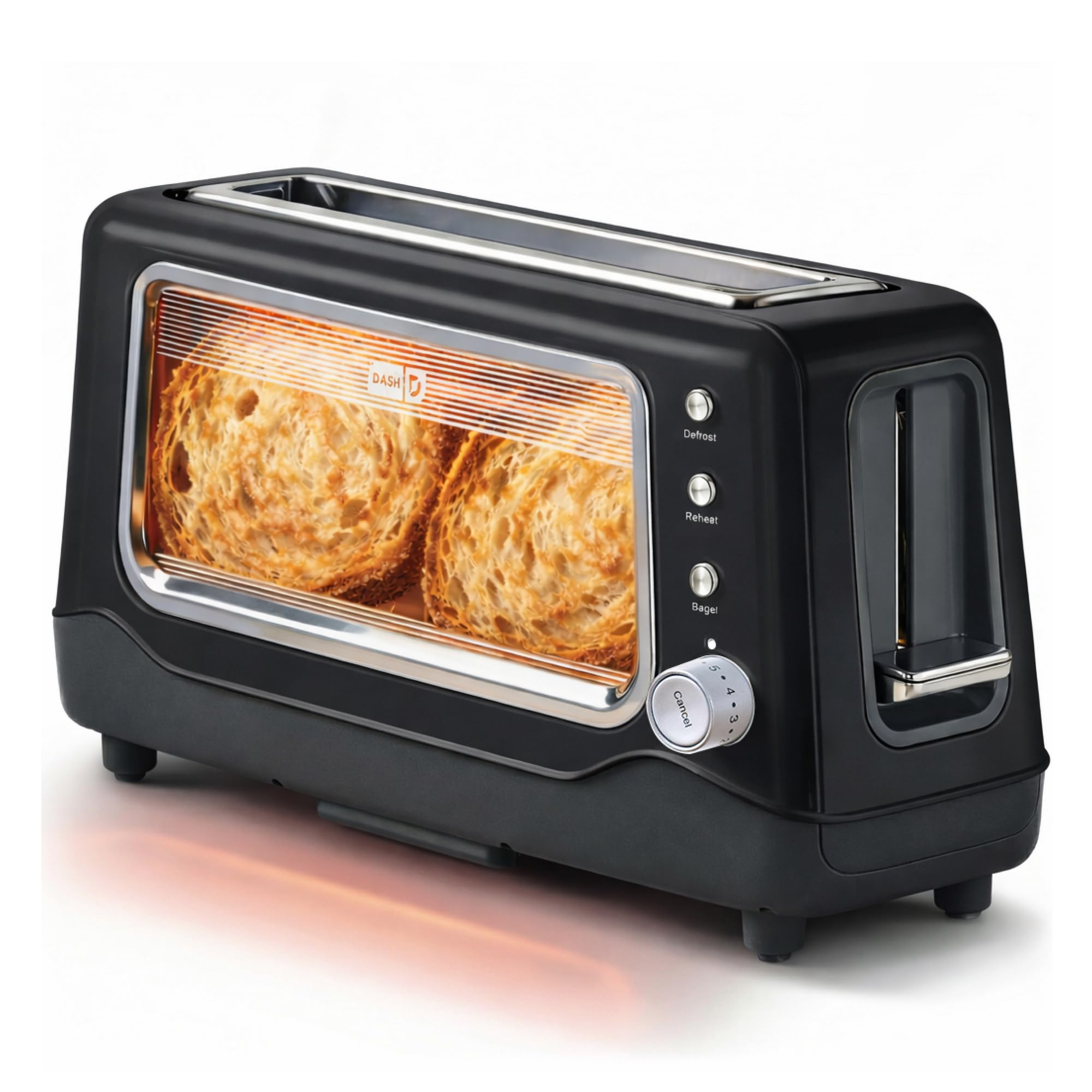
Image 1: The Dash Clear View Toaster in Black, showcasing its sleek design and prominent clear viewvindue.
2. Vigtige sikkerhedsforanstaltninger
Ved brug af elektriske apparater skal grundlæggende sikkerhedsforanstaltninger altid følges, herunder:
- Læs alle instruktioner, før du bruger brødristeren.
- Rør ikke ved varme overflader. Brug håndtag eller knopper.
- For at beskytte mod elektrisk stød må ledning, stik eller apparat ikke nedsænkes i vand eller anden væske.
- Tæt opsyn er nødvendigt, når et apparat bruges af eller i nærheden af børn.
- Træk stikket ud af stikkontakten, når det ikke er i brug, og før rengøring. Lad det køle af, før du sætter dele på eller af.
- Betjen ikke noget apparat med en beskadiget ledning eller stik, eller efter at apparatet ikke fungerer korrekt eller er blevet beskadiget på nogen måde.
- Må ikke bruges udendørs.
- Lad ikke ledningen hænge ud over kanten af bordet eller bordpladen eller røre ved varme overflader.
- Må ikke placeres på eller i nærheden af en varm gas- eller elektrisk brænder eller i en opvarmet ovn.
- Brug ikke apparatet til andet end tilsigtet brug.
- For store fødevarer, metalfolieemballager eller bestik må ikke lægges i en brødrister, da de kan forårsage brand eller risiko for elektrisk stød.
- Der kan opstå brand, hvis brødristere er dækket eller rører brandbart materiale, herunder gardiner, gardiner, vægge og lignende, når de er i drift.
- Forsøg ikke at skubbe mad ud, når brødristeren er tilsluttet.
- Betjen ikke uden opsyn.
3. Produktfunktioner
The Dash Clear View Toaster is equipped with several features designed for convenience and optimal toasting results:
- Klar-View Vindue: Allows you to monitor the toasting process to achieve your desired browning level.
- Seven-Browning Levels: Adjustable dial for precise control over toast shade, from light to dark.
- Ekstra brede slots: Accommodates various bread types, including bagels, artisan bread, and Texas toast.
- 1-Touch Defrost Function: Ideal for toasting frozen items directly from the freezer.
- 1-Touch Reheat Function: Varmer tidligere ristede madvarer uden yderligere bruning.
- 1-Touch Bagel Function: Rister den skårne side af bagels, mens den forsigtigt varmer ydersiden op.
- Auto-Shut Off Feature: Automatically turns off the toaster when the cycle is complete, preventing over-toasting.
- Slide-Out Crumbs Tray: Easily removable for quick and convenient cleaning.
- Removable Glass Panel: Det klare viewing window can be removed for thorough cleaning.

Image 2: The Dash Clear View Toaster, highlighting its compact dimensions (15.5" W x 8" H x 6.5" D) and space-saving design on a kitchen countertop.

Image 3: A visual representation of the seven browning levels available on the Dash Clear View Toaster, ranging from very light to very dark toast.
4. Opsætning
- Pakker ud: Carefully remove the toaster and all packaging materials from the box. Retain packaging for future storage or returns.
- Placering: Place the toaster on a stable, heat-resistant, and dry surface away from flammable materials. Ensure adequate ventilation around the appliance.
- Første brug: Before first use, operate the toaster without bread on the highest setting to burn off any manufacturing residues. A slight odor or smoke may be present; this is normal.
- Strømtilslutning: Plug the power cord into a standard 110V electrical outlet. The toaster lever will only stay down when the unit is plugged in.
5. Betjeningsvejledning
Follow these steps for optimal toasting:
- Indsæt mad: Place slices of bread, bagels, or other items into the extra-wide toasting slots.
- Vælg bruningsgrad: Turn the browning control dial to your desired setting (1 for lightest, 7 for darkest).
- Choose Function (Optional):
- Tryk på Optøning button for frozen items.
- Tryk på Genopvarm button to warm already toasted items.
- Tryk på Bagel button for bagels (toasts cut side, warms outer side).
- Start med at riste: Push the toast lever down until it locks into place. The heating elements will activate, and you can observe the browning through the clear-view vindue.
- Cancel Toasting: For at stoppe ristningscyklussen når som helst, tryk på Ophæve button. The toast will automatically pop up.
- Hent toast: Once the toasting cycle is complete, the toast will automatically pop up. Carefully remove the toasted items.

Image 4: The Dash Clear View Toaster with two bagel halves placed in its extra-wide slots, ready for toasting using the dedicated bagel function.
Video 1: A seller-provided video demonstrating the Dash Clear View Toaster's features, including the clear window and various settings. The video shows a person using the toaster with a large slice of sourdough bread, highlighting the extra-wide slot and the ability to monitor browning.
6. Vedligeholdelse og rengøring
Regular cleaning ensures the longevity and performance of your toaster:
- Tag stikket ud og køl ned: Tag altid stikket ud af stikkontakten, og lad brødristeren køle helt af, inden den rengøres.
- Tøm krummebakke: Slide out the crumb tray located at the bottom of the toaster. Discard crumbs and wipe the tray clean with a damp cloth. Reinsert the tray securely.
- Rengør glaspanel: The clear-view glass panel can be removed for thorough cleaning. Locate the release mechanism (often a lever or clip) at the bottom or side of the glass panel, slide it out, wash with warm soapy water, rinse, and dry completely before reinserting.
- Udvendig rengøring: Tør brødristerens ydre af med adamp klæde. Brug ikke slibende rengøringsmidler eller nedsænk brødristeren i vand.
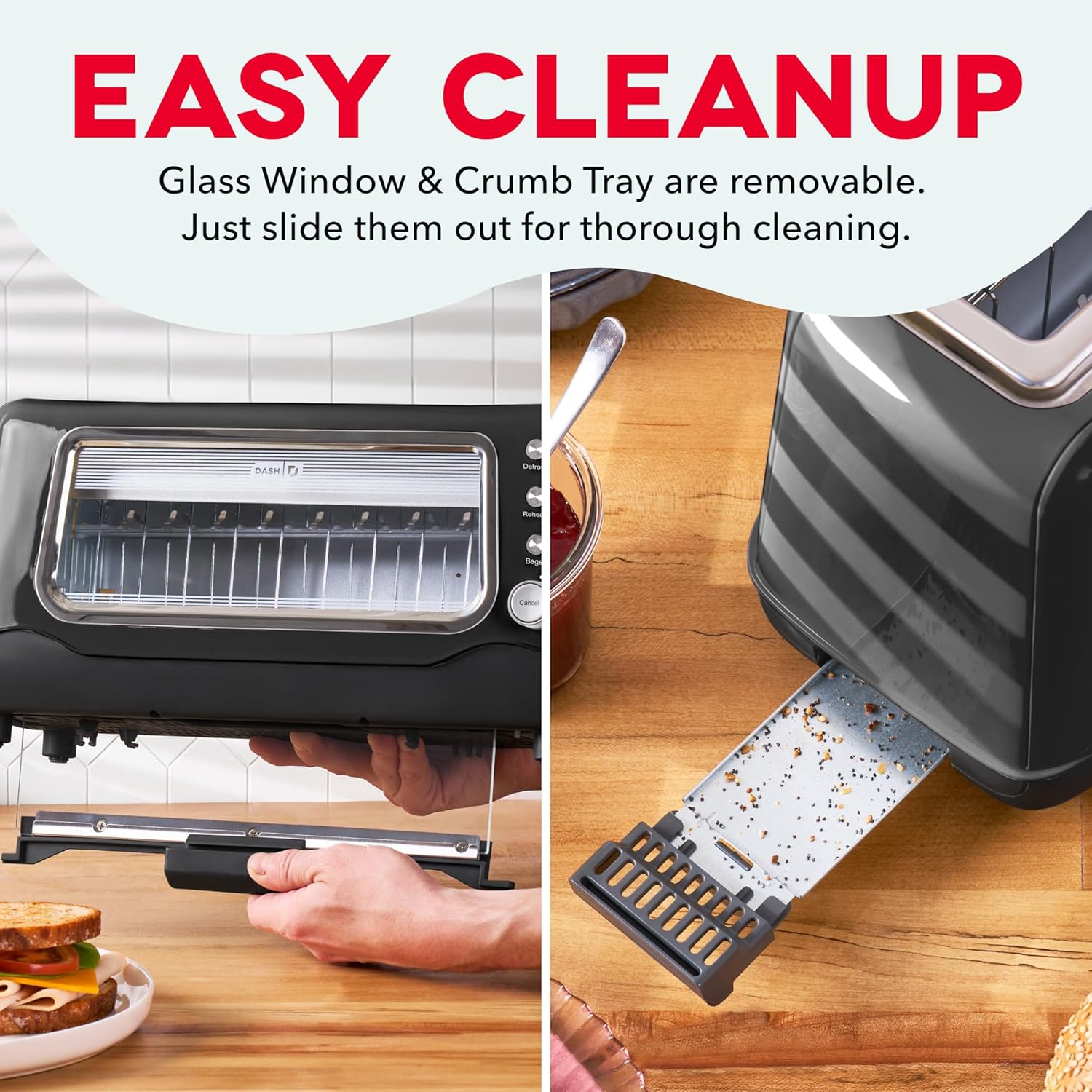
Image 5: The Dash Clear View Toaster demonstrating its easy cleaning features, including the removable slide-out crumb tray and the detachable glass panel for thorough maintenance.
Video 2: En video fra sælgerasing the Dash Clear View Toaster's unboxing and features, including a demonstration of how to remove and clean the crumb tray and glass panel.
7. Fejlfinding
- Toast Lever Does Not Stay Down: Ensure the toaster is properly plugged into a functioning electrical outlet. The lever is designed to only engage when power is supplied.
- Ujævn ristning: Different types of bread toast differently. Adjust the browning level as needed. For very thick or dense items, a slightly higher setting or a second cycle might be required (monitor closely through the clear window).
- Smoke from Toaster: A small amount of smoke during first use is normal. If smoke persists, unplug the toaster immediately. Check for any lodged food particles or excessive crumbs in the crumb tray or heating elements.
- Food Stuck: Unplug the toaster and allow it to cool. Carefully remove the stuck food using non-metallic utensils. Never use metal objects.
8. Specifikationer
| Attribut | Værdi |
|---|---|
| Mærke | DASH |
| Modelnummer | DVTS501BK |
| Farve | Sort |
| Materiale | Glass, Polypropylene (PP), Stainless Steel |
| Produktdimensioner | 6.6" D x 15.7" B x 7.8" H |
| Wattage | 1100 watt |
| Voltage | 110 volt |
| Slot Count | 2 (extra-wide) |
| Number of Browning Settings | 7 |
| Særlige funktioner | Automatic Shut-Off, Defrost Mode, Reheat Mode, Removable Crumb Tray, Variable Browning Control |
9. Garanti og support
The Dash Clear View Toaster DVTS501BK comes with a 1 års begrænset garanti. For warranty claims, troubleshooting assistance, or product support, please refer to the contact information provided in your product packaging or visit the official DASH webwebsted.
Included Components: Toaster, Recipe Guide, Instruction Manual, Warranty.