
ZEBRONICS ZEB-250JP
Zebronic ZEB-250JP USB Vibration Game Pad Remote Joystick User Manual
Model: ZEB-250JP
Indledning
This manual provides detailed instructions for the setup, operation, and maintenance of your Zebronic ZEB-250JP USB Vibration Game Pad. Please read this manual carefully before using the product to ensure proper functionality and longevity.
Produktegenskaber
- Dual vibration and shock function for immersive gaming.
- Ergonomic slip-proof handle design for comfortable grip.
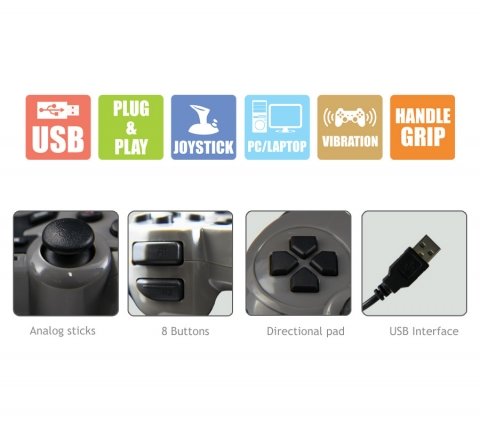
- Equipped with a directional pad, 8 fire buttons, and 2 analog sticks.
- Compatible with Windows XP, Vista, and Windows 7 operating systems.
- Supports both digital and analog modes.
Pakkens indhold
- Zebronic ZEB-250JP Game Pad
- Installation CD (for drivers, if required)
Opsætningsinstruktioner
- Connect the Game Pad: Locate an available USB port on your computer (Desktop or Laptop). Insert the USB connector of the ZEB-250JP Game Pad into the USB port. The device is designed for plug-and-play functionality.
- Driver installation: For optimal performance, especially on older operating systems like Windows XP or Vista, it is recommended to install the drivers from the provided installation CD. Insert the CD into your computer's optical drive and follow the on-screen instructions. For Windows 7 and newer, drivers may install automatically.
- Systemkompatibilitet: Ensure your computer is running a compatible operating system (Windows XP, Vista, Windows 7).
Betjeningsvejledning
Kontrol overview
- Retningstastatur (D-pad): Used for directional movement or menu navigation.
- Analoge pinde: To analoge pinde giver 360-graders bevægelse for finere kontrol i spil.
- Fire Buttons (8 buttons): Handlingsknapper til kommandoer i spillet.
- Vibrationsfunktion: The game pad features dual vibration motors that provide tactile feedback during gameplay, enhancing immersion. This function is automatically activated by compatible games.
Valg af tilstand
The game pad supports both digital and analog modes. The mode can typically be switched using a dedicated button on the game pad (often labeled 'Mode' or 'Analog') or is automatically detected by the game. Refer to your game's settings for specific controller configurations.
Opretholdelse
- Keep the game pad clean by wiping it with a soft, dry cloth.
- Undgå at udsætte enheden for ekstreme temperaturer, direkte sollys eller fugt.
- Brug ikke hårde kemikalier eller slibende rengøringsmidler.
- Store the game pad in a safe place when not in use to prevent damage to the cable or buttons.
Fejlfinding
- Game Pad Not Detected:
- Ensure the USB cable is securely connected to both the game pad and the computer.
- Try connecting the game pad to a different USB port.
- Genstart din computer.
- Verify that the necessary drivers are installed from the provided CD or through Windows Update.
- Vibrationsfunktionen virker ikke:
- Bekræft, at det spil, du spiller, understøtter vibrationsfeedback.
- Check the game's settings to ensure vibration is enabled.
- Sørg for, at driverne er korrekt installeret.
- Buttons or Analog Sticks Unresponsive:
- Test the game pad on another computer or in a different game to isolate the issue.
- Ensure the game pad is in the correct mode (digital/analog) for the game.
- Reinstall the device drivers.
Specifikationer
| Mærke | ZEBRONIK |
| Model | ZEB-250JP |
| Forbindelsesteknologi | USB |
| Controller type | Gamepad |
| Kompatible enheder | Windows (stationær computer, bærbar computer) |
| Operativsystemsupport | Windows XP, Vista, Windows 7 |
| Særlige funktioner | Handle Grip, Joystick, Plug and Play, Vibration |
| Produktdimensioner | 24.1 x 18.3 x 6.4 cm |
| Varens vægt | 290 g |
Garantioplysninger
This product is covered by a standard manufacturer's warranty. Please refer to the warranty card included in your package or contact Zebronic's customer support for specific warranty terms and conditions. Keep your purchase receipt as proof of purchase.
Støtte
For further assistance, technical support, or service inquiries, please visit the official Zebronics webwebstedet eller kontakt deres kundeserviceafdeling. Du kan finde flere oplysninger og kontaktoplysninger på Zebronics Store on Amazon.
Ask a question about this manual
Ask about setup, troubleshooting, compatibility, parts, safety, or missing instructions. Manuals+ will review the question and use this page’s manual context to help answer it.