
Dorman 90132
Dorman 90132 Front Driver Side Interior Door Handle Bezel Instruction Manual
Model: 90132
Produkt overview
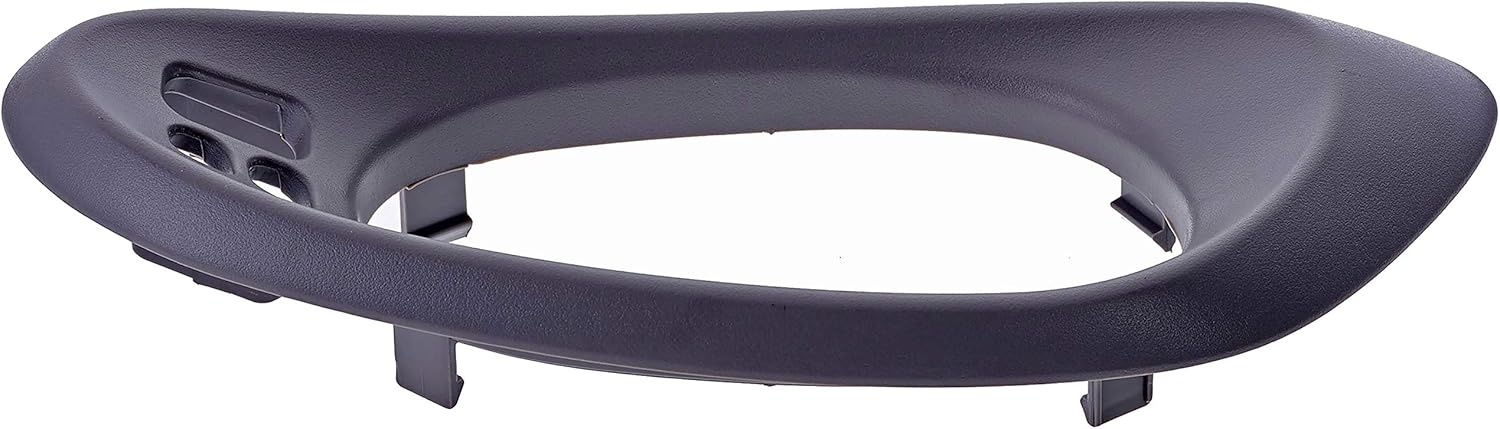
This Dorman 90132 interior door handle bezel is engineered as a direct replacement part, designed to match the fit, appearance, and function of the original bezel on specified Chevrolet vehicles. It is manufactured from quality materials to ensure reliable performance and a long service life, restoring the aesthetic and functional integrity of your vehicle's interior door handle assembly.
This part is compatible with Chevrolet Trailblazer (2002-2009) and Chevrolet Trailblazer EXT (2002-2006) models.
Pakkens indhold
- One (1) Dorman 90132 Interior Door Handle Bezel - Front Driver Side, Textured Gray
Installationsvejledning (opsætning)
The Dorman 90132 door handle bezel is designed for direct replacement. Basic hand tools may be required for removal of the old part and installation of the new one. Always refer to your vehicle's specific service manual for detailed instructions and safety precautions.
- Forberedelse: Ensure the vehicle is parked on a level surface with the engine off. Gather necessary tools, which may include a flat-head screwdriver, Phillips-head screwdriver, or trim removal tools.
- Remove Old Bezel: Carefully pry off the existing door handle bezel. This may involve gently prying around the edges with a trim removal tool to release retaining clips. Be cautious not to damage the surrounding door panel.
- Inspicer monteringsområde: Once the old bezel is removed, inspect the mounting area for any broken clips, debris, or damage that might prevent proper seating of the new bezel. Clean the area if necessary.
- Install New Bezel: Align the new Dorman 90132 bezel with the opening on the door panel. Press firmly around the edges until the retaining clips snap securely into place. Ensure the bezel is flush with the door panel and does not wobble.
- Test funktionalitet: Verify that the door handle operates smoothly and without obstruction after the new bezel is installed.


Operating the Bezel
The door handle bezel serves as a decorative and functional frame for the interior door handle and associated controls (such as window switches, if applicable to your vehicle's configuration). Once installed, it requires no specific operation beyond its passive role in securing and presenting the door handle assembly. Ensure that the door handle and any integrated switches move freely within the bezel's opening.
Opretholdelse
To maintain the appearance and integrity of your Dorman 90132 door handle bezel, follow these simple maintenance guidelines:
- Rensning: Wipe the bezel regularly with a soft, damp cloth to remove dust and grime. For more stubborn dirt, use a mild automotive interior cleaner applied to the cloth, not directly to the bezel. Avoid abrasive cleaners or solvents, as these can damage the textured finish.
- Inspektion: Periodically check the bezel for any signs of looseness, cracks, or damage. Address any issues promptly to prevent further deterioration or potential safety hazards.
Fejlfinding
| Problem | Mulig årsag | Løsning |
|---|---|---|
| Bezel does not fit flush or is loose. |
|
|
| Door handle or switches are obstructed. |
|
|
| Color mismatch (if applicable). |
|
|
Produktspecifikationer
| Attribut | Detalje |
|---|---|
| Mærke | Dorman |
| Modelnummer | 90132 |
| Del Type | Interior Door Handle Bezel |
| Side | Front Driver Side |
| Farve/finish | Tekstureret grå |
| Varens vægt | 2.61 ounce |
| Produktdimensioner | 3.7 x 3.7 x 11.8 tommer |
| Producentens varenummer | 90132 |
| OEM varenummer | 25894592 |
| Særlige funktioner | Holdbar, nem at installere |
| Første ledige dato | 8. juni 2015 |
Garanti og support
For detailed warranty information regarding your Dorman product, please refer to the official warranty document available from the manufacturer.
Garantidokument: Download PDF
For additional product support, technical assistance, or to explore other Dorman products, please visit the official Dorman store:
Dorman Store: Visit Dorman Store on Amazon
Ask a question about this manual
Ask about setup, troubleshooting, compatibility, parts, safety, or missing instructions. Manuals+ will review the question and use this page’s manual context to help answer it.