
1. Introduktion
The Novastar CVT310 is a high-performance multi-mode fiber converter designed to facilitate the conversion of Gigabit Ethernet signals to optical signals. This device enables reliable data transmission over extended distances using fiber optic cables, making it suitable for various industrial and professional applications. This manual provides essential information for the proper installation, operation, and maintenance of your CVT310 unit.
2. Produktet er slutview
The CVT310 unit features a robust design for stable performance. Key components include:
- One (1) Gigabit Ethernet port for standard network connections.
- One (1) Multi-mode twin-core LC optical port, pre-installed with an optical module.
- Power input for 100-240V AC.
- LED indicators for power and link/activity status.

Figur 1: Top-down view of the Novastar CVT310 Multi-Mode Fiber Converter, displaying the product label with model and power information.
3. Opsætning og installation
Follow these steps to properly set up your Novastar CVT310 fiber converter:
- Montering: The CVT310 is designed for DIN Rail mounting. Secure the unit to a standard DIN rail in a suitable enclosure or rack. Ensure adequate space for ventilation and cable connections.
- Strømtilslutning: Connect the provided AC power cable to the power input port on the rear of the CVT310. Connect the other end to a standard 100-240V AC power outlet. Ensure the power switch is in the OFF position before connecting.
- Ethernet-forbindelse: Connect a standard RJ45 Ethernet cable from your network device (e.g., switch, computer) to the Gigabit Ethernet port on the CVT310.
- Fiberoptisk forbindelse: Connect a multi-mode twin-core LC fiber optic cable to the optical port (LC connector) on the CVT310. Ensure the fiber cable is securely seated. The pre-installed optical module supports 850 nm wavelength.
- Tænd: Flip the power switch to the ON position. The POWER indicator LED should illuminate.
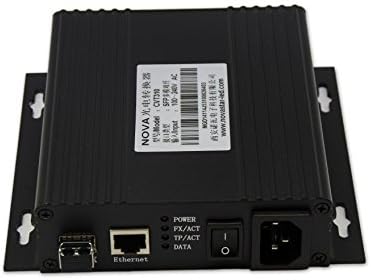
Figure 2: Rear panel of the CVT310, illustrating the Ethernet port, LC fiber optic ports (TX/RX), power switch, and AC power input.
4. Betjeningsvejledning
Once the CVT310 is powered on and cables are connected, observe the LED indicators for operational status:
- STRØM-LED: Lyser, når enheden modtager strøm.
- FX/ACT LED: Indicates activity on the fiber optic port. A solid light typically means a link is established, and blinking indicates data transmission.
- TP/ACT LED: Indicates activity on the Ethernet (Twisted Pair) port. A solid light typically means a link is established, and blinking indicates data transmission.
- DATA-LED: A general data activity indicator, often mirroring FX/ACT or TP/ACT.
Ensure both FX/ACT and TP/ACT LEDs are lit or blinking to confirm proper link establishment and data flow between the Ethernet and fiber optic networks.
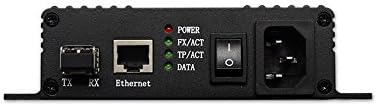
Figur 3: Nærbillede view of the CVT310's rear panel, highlighting the LED indicators (POWER, FX/ACT, TP/ACT, DATA) and port labels for easy identification.
5. Specifikationer
| Feature | Specifikation |
|---|---|
| Model | CVT310 |
| Ethernet-port | 1x Gigabit Ethernet (RJ45) |
| Optisk port | 1x Multi-mode twin-core LC |
| Optisk modul | Pre-installed, hot-pluggable |
| Optical Rate | 1.25 Gb/s |
| Bølgelængde | 850 nm |
| Transmissionsafstand | Op til 550 meter |
| Forsyning Voltage | 100-240V AC |
| Monteringstype | DIN-skinne |
| Øverste temperaturvurdering | 70°C (158°F) |
| Varens vægt | Cirka 2 pund (0.91 kg) |
| Pakkedimensioner | 13.2 x 7.5 x 2.6 tommer (33.5 x 19.1 x 6.6 cm) |
6. Vedligeholdelse
To ensure the longevity and optimal performance of your CVT310, follow these maintenance guidelines:
- Rensning: Regularly clean the exterior of the device with a soft, dry cloth. Do not use liquid or aerosol cleaners.
- Ventilation: Ensure that the ventilation openings are not obstructed. Proper airflow is crucial to prevent overheating.
- Kabelstyring: Keep all connected cables neatly organized and free from kinks or excessive tension to prevent damage to ports or cables.
- Miljøforhold: Operate the device within its specified temperature and humidity ranges. Avoid exposure to direct sunlight, extreme temperatures, or high moisture environments.
7. Fejlfinding
If you encounter issues with your CVT310, refer to the following common troubleshooting steps:
| Problem | Mulig årsag | Løsning |
|---|---|---|
| No Power (POWER LED off) | Power cable disconnected; Power outlet faulty; Device power switch off. | Check power cable connection; Try a different power outlet; Ensure power switch is ON. |
| No Fiber Link (FX/ACT LED off) | Fiber cable disconnected or damaged; Incorrect fiber type (e.g., single-mode instead of multi-mode); Optical module issue; Remote device not powered or faulty. | Verify fiber cable connections at both ends; Ensure correct multi-mode LC fiber is used; Check the remote fiber device status; Contact support if optical module is suspected faulty. |
| No Ethernet Link (TP/ACT LED off) | Ethernet cable disconnected or damaged; Network device port faulty; Incorrect cable type. | Verify Ethernet cable connection; Try a different Ethernet port on the network device; Ensure a standard RJ45 Ethernet cable is used. |
| Data Transmission Issues | Network configuration error; Excessive fiber cable length; Interference. | Check network settings on connected devices; Ensure fiber cable length does not exceed 550m; Minimize electromagnetic interference. |
If the problem persists after attempting these solutions, please contact Novastar technical support or your product vendor for further assistance.
8. Garanti og support
For detailed information regarding the product warranty, including terms, conditions, and duration, please refer to the warranty card included with your product or visit the official Novastar website. For technical support, service, or inquiries, please contact your authorized Novastar dealer or Novastar customer service directly. Please have your product model (CVT310) and serial number ready when contacting support.