
REXING REX-V1
REXING V1 - 4K Ultra HD bil dashcam brugermanual
Model: REX-V1 | Mærke: REXING
Indledning
REXING V1 er et topmoderne 4K Ultra HD bil-dashcam, der er designet til at give pålidelig videooptagelse i høj kvalitet af dine ture. Med et diskret design, Wi-Fi-forbindelse og avancerede funktioner som G-sensor og parkeringsovervågning sikrer V1 omfattende overvågning og ro i sindet på vejen. Denne manual indeholder detaljerede instruktioner til opsætning, betjening og vedligeholdelse af dit REXING V1 dashcam.
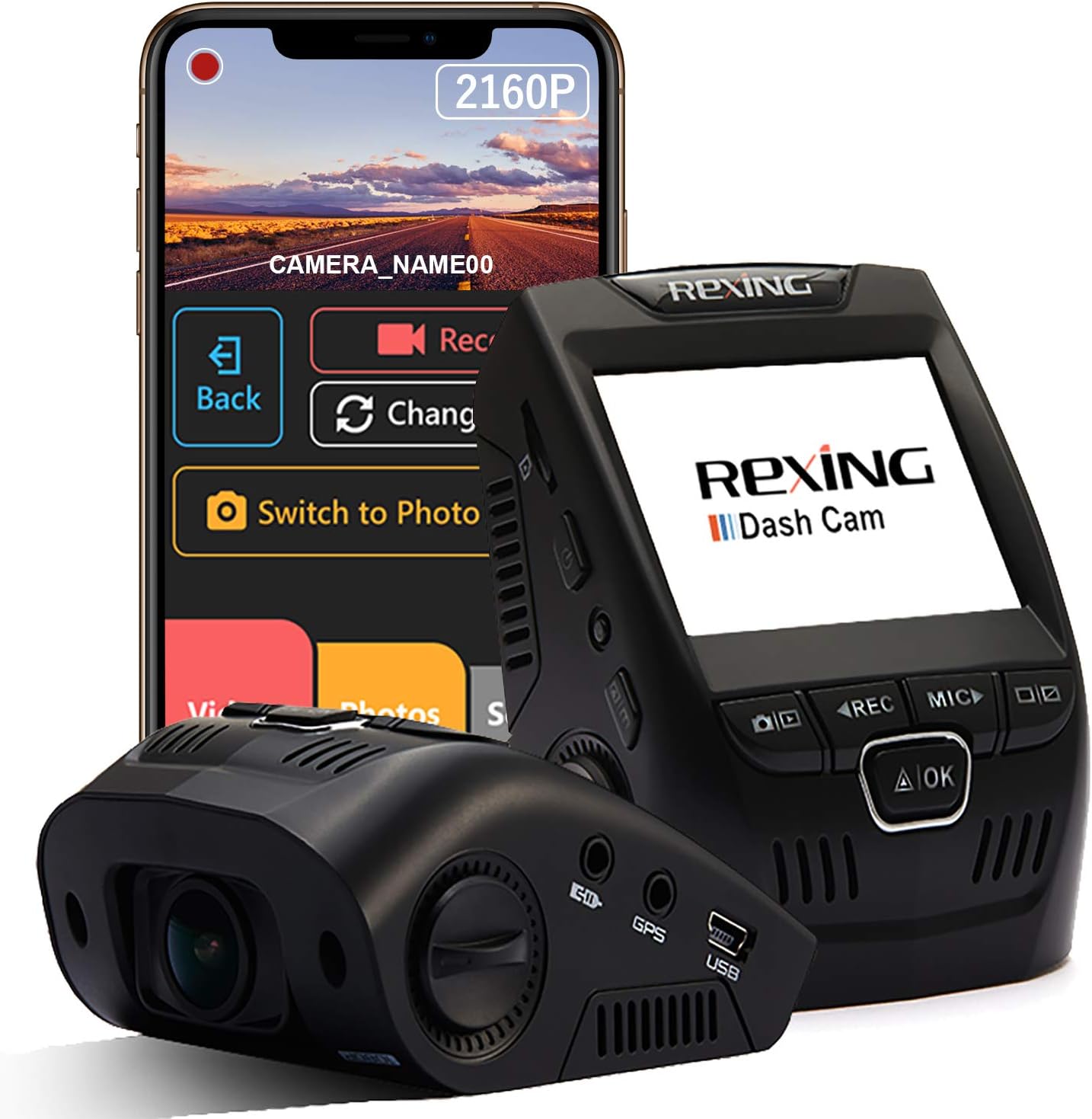
Billede: REXING V1 Dash Cam, vistasing sit kompakte design sammen med en smartphone, der viser den tilhørende mobilapplikation til trådløs kontrol og videostyring.
Hvad er der i æsken
Når du pakker dit REXING V1 Dash Cam ud, skal du kontrollere, at alle følgende komponenter er inkluderet:
- Rexing V1 Dash-kamera
- 3M selvklæbende montering
- Strømkabel til bilen (12 fod)
- USB-computerkabel
- Manual (dette dokument)
Nøglefunktioner
4K Ultra HD-videooptagelse
REXING V1 optager fantastisk 2160p videokvalitet, hvilket sikrer klare og detaljerede billeder.tagselv ved høje hastigheder. Denne høje opløsning giver fire gange så mange detaljer som standard 1080p-optagelser, hvilket er afgørende for at optage nummerplader og andre vigtige detaljer.

Billede: Visuel repræsentation, der fremhæver den overlegne klarhed ved 4K (2160p) videoopløsning sammenlignet med 1080p, som det ses på dashcam-skærmen.
170-graders ultravidvinkelobjektiv og WDR
Udstyret med en 7-lags glaslinse tilbyder V1 en 170-graders vidvinkel view, der indfanger et bredt perspektiv af dine omgivelser. Wide Dynamic Range (WDR)-teknologi optimerer eksponeringen og sikrer afbalanceret og klar billedkvalitet.tagunder forskellige lysforhold, fra klart dagslys til omgivelser med svagt lys.

Billede: Et ikon, der illustrerer den omfattende 170-graders vidvinkeldækning af dashcam-linsen.
Superkondensator og parkeringsmonitor
V1 bruger en superkondensator, der giver forbedret holdbarhed og modstandsdygtighed over for ekstreme temperaturer (-20°F til 176°F), hvilket reducerer risikoen for overophedning og forlænger enhedens levetid. Parkeringsovervågningsfunktionen optager automatisk en 20-sekunders video, når den registrerer vibrationer, eller den kan optage timelapse-billeder døgnet rundt.tage. Et smart fast ledningsføringskit (sælges separat) er nødvendigt for at aktivere parkeringstilstanden.

Billede: Ikoner, der angiver dashcam'ets temperaturmodstand og tilstedeværelsen af en superkondensator for pålidelig ydeevne.
Wi-Fi-forbindelse
Tilslut din mobilenhed trådløst til dashcam'et ved hjælp af den dedikerede app. Dette giver dig mulighed for at view, gem og del dine optagelser nemt uden at skulle fjerne hukommelseskortet.

Billede: Et Wi-Fi-ikon, der demonstrerer trådløs forbindelse, med logoer for sociale medier, der antyder nem deling af madtage.
Loop-optagelse og G-sensor
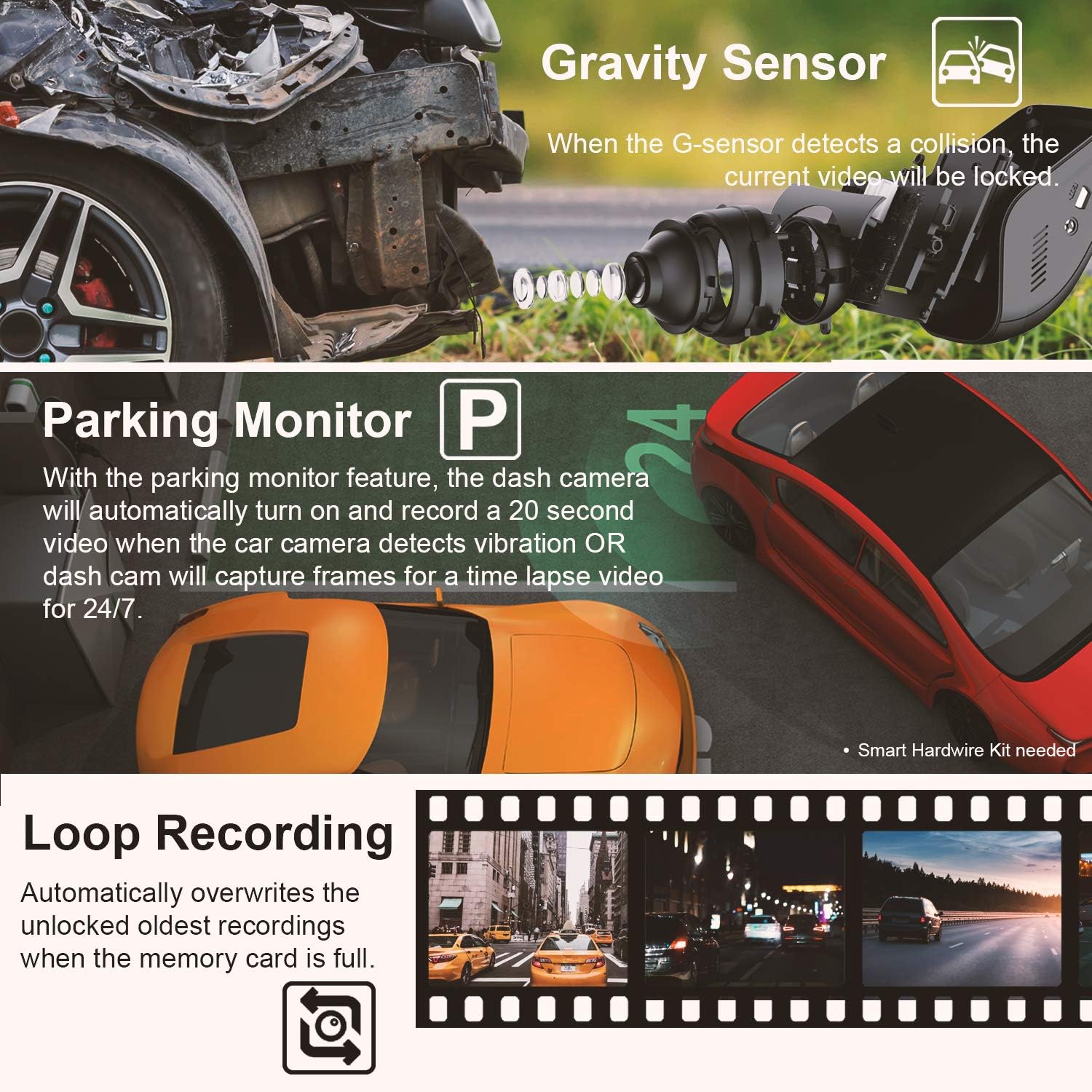
Loop-optagelse sikrer kontinuerlig drift ved automatisk at overskrive de ældste ulåste videoer, når hukommelseskortet er fuldt. Den indbyggede G-sensor registrerer kollisioner og låser automatisk den aktuelle videooptagelse.tage for at forhindre, at den bliver overskrevet, og dermed bevare kritisk bevismateriale.

Billede: Ikoner, der repræsenterer 24/7-parkeringstilstand, bevægelsesdetektion, G-sensor og loopoptagelsesfunktioner på dashcam'et.
Opsætningsvejledning
1. Klargør Micro SD-kortet
Før første brug skal du indsætte et robust microSD-kort (op til 256 GB, klasse 10 eller højere anbefales) i dashcam'ets SD-kortslot. Det anbefales at formatere SD-kortet i dashcam'ets indstillinger før første brug for at sikre optimal ydeevne.
2. Monter dashcam'et
Rengør det ønskede monteringsområde på din forrude. Fastgør 3M-klæbebeslaget til dashcam'et, og tryk derefter fast på beslaget på forruden, helst bag din bagende.view spejlet for en diskret opsætning. Sørg for, at linsen har en klar view af vejen.

Billede: REXING V1 dashcam installeret diskret bag en bils bagendeview spejl, der demonstrerer dets lavprofitfile design.
3. Tilslut strøm
Tilslut strømkablet (12 meter) til dashcam'et, og sæt den anden ende i bilens 12V-strømstik (cigarettænder). Før kablet pænt langs forrudens kant og instrumentbrættet for at undgå blokeringer.
4. Første opstart og indstillinger
Når dashcam'et er tilsluttet strøm, tændes det typisk automatisk, når køretøjet starter. Følg vejledningen på skærmen for at indstille dato, klokkeslæt og foretrukne optageindstillinger. Juster objektivvinklen for optimal vejdækning.
5. Wi-Fi-appforbindelse
Download REXING Connect-appen fra din mobilenheds appbutik. Aktiver Wi-Fi på dit dashcam, og tilslut din telefon til dashcam'ets Wi-Fi-netværk. Dette muliggør trådløs viewservering, opbevaring og deling af madtage.
Billede: En hånd, der holder en smartphone, viser REXING Connect-appen med muligheder for at optage og ændre view, skift til fototilstand, og få adgang til videoer/fotos/indstillinger.
Betjeningsvejledning
Automatisk optagelse
REXING V1 begynder automatisk at optage, når den tændes.tage gemmes i intervaller på 1, 2 eller 3 minutter, afhængigt af dine indstillinger. Når hukommelseskortet er fuldt, gemmes den ældste ulåste fileoverskrives automatisk af nye optagelser (loop-optagelse).
G-sensor (optagelse i nødstilfælde)
I tilfælde af et pludseligt sammenstød eller en kollision registrerer den indbyggede G-sensor hændelsen og låser automatisk den aktuelle video. fileDette forhindrer madentage mod at blive overskrevet af loopoptagelse, hvilket sikrer, at kritiske hændelsesdata bevares.
Parkeringsmonitor
Når den er korrekt installeret med et smart fast ledningssæt (sælges separat), aktiveres parkeringsovervågningsfunktionen, når dit køretøj er parkeret. Den tænder automatisk og optager en 20-sekunders video, hvis den registrerer vibrationer. Alternativt kan den optage timelapse-video døgnet rundt til kontinuerlig overvågning.
Brug af Wi-Fi-app
Brug REXING Connect-appen til at få adgang til live view, afspilning af optagede videoer, download files til din telefon og juster indstillingerne. Dette giver en bekvem måde at administrere dit dashcam uden at skulle interagere direkte med enhedens lille skærm.
Video: En officiel produktvideo, der demonstrerer REXING V1 dashcam'ets funktioner og brugervenlighed, herunder dets diskrete design og videokvalitet.
Valgfri GPS-logger
Hvis du har den valgfrie GPS-logger, kan du afspille din video ved hjælp af den omfattende GPS Logger-softwaregrænseflade på en computer. Denne software viser oplysninger i realtid om din hastighed, placering (via Google Maps) og kørerute sammen med din video.tage.

Billede: Et ikon, der illustrerer GPS-sporingsfunktionen og viser et kort med positionsnåle og en hastighedsindikator.
Opretholdelse
- SD-kortadministration: Formatér dit micro SD-kort regelmæssigt (mindst én gang om måneden) for at opretholde optimal optageydelse og forhindre datakorruption. Sikkerhedskopier alle vigtige filertage før formatering.
- Rensning: Brug en blød, tør klud til at rengøre dashcam-kameraets linse og skærm. Undgå slibende rengøringsmidler eller opløsningsmidler.
- Temperatureksponering: Selvom superkondensatoren giver fremragende temperaturbestandighed, kan langvarig udsættelse for ekstremt direkte sollys eller frostgrader under parkering stadig påvirke enhedens levetid. Fjern om muligt dashcam'et fra forruden under længerevarende parkering under barske forhold.
- Firmwareopdateringer: Tjek den officielle REXING webBesøg webstedet regelmæssigt for firmwareopdateringer. At holde dit dashcams firmware opdateret kan forbedre ydeevnen og tilføje nye funktioner.
Fejlfinding
| Problem | Mulig løsning |
|---|---|
| Dashcam tænder ikke. |
|
| Optagelse stopper eller footage er korrupt. |
|
| Problemer med Wi-Fi-forbindelse. |
|
| Selvklæbende montering holder ikke. |
|
| Dårlig videokvalitet om natten. |
|
For mere detaljeret fejlfinding henvises til den officielle brugermanual, der kan downloades her.
Specifikationer
| Feature | Detalje |
|---|---|
| Produktdimensioner | 2 x 2.5 x 3 tommer |
| Varens vægt | 5 ounce |
| Modelnummer | REX-V1 |
| Batterier | 1 Lithium Polymer batteri påkrævet |
| Videooptagelsesopløsning | 2160p (4K Ultra HD) |
| Linsevinkel | 170 grader |
| Support til opbevaring | Op til 256 GB Micro SD (anbefales til højtydende enheder) |
| Driftstemperatur | -20°F til 176°F (superkondensator) |
| Forbindelse | Wi-Fi |
| Særlige funktioner | Loop-optagelse, G-sensor, parkeringsovervågning (kræver fast ledningssæt) |
| Monteringstype | 3M selvklæbende montering |
Garanti og support
REXING-produkter er designet til kvalitet og pålidelighed. For specifikke garantioplysninger henvises til den dokumentation, der følger med dit produkt, eller besøg den officielle REXING-side. webwebsted. REXING tilbyder kundesupport til produktforespørgsler og teknisk assistance.
Beskyttelsesplaner kan købes separat for at udvide dækningen ud over standardgarantien. Disse omfatter 2-årige, 3-årige og komplette beskyttelsesplaner.
For yderligere assistance, kontakt venligst REXING kundesupport eller se den omfattende brugervejledning, der er tilgængelig på deres hjemmeside. webwebsted.
Ask a question about this manual
Ask about setup, troubleshooting, compatibility, parts, safety, or missing instructions. Manuals+ will review the question and use this page’s manual context to help answer it.