
1. Introduktion
This manual provides detailed instructions for the installation, operation, and maintenance of your Antec P50 Window R Mid-Tower PC Case. The Antec P50 Window R is designed for silent computing with optimized airflow and support for Micro ATX and Mini-ITX motherboards. It features a dual-chamber structure, liquid cooling support, and multiple drive bays for a versatile build.
Please read this manual thoroughly before beginning installation to ensure proper setup and to maximize the performance and longevity of your system.
2. Opsætning og installation
2.1 Udpakning og inspektion
Carefully remove the PC case from its packaging. Inspect the case for any signs of damage that may have occurred during shipping. Retain the packaging for future transport or warranty claims.
2.2 Afmontering af sidepaneler
Locate and unscrew the thumbscrews on the rear of the case. Slide the side panels backward and lift them off to access the interior.

Billede: Vinklet view of the Antec P50 Window R PC Case, showing its compact mid-tower design and front panel.
2.3 Installation af bundkort
- Installer I/O-skjoldet i den bageste åbning af kabinettet.
- Ensure the motherboard standoffs are correctly aligned for your Micro ATX or Mini-ITX motherboard.
- Placer forsigtigt bundkortet på afstandsstykkerne, og juster skruehullerne.
- Fastgør bundkortet med de medfølgende skruer.

Billede: Interiør view of the Antec P50 Window R PC Case, highlighting the motherboard tray and cable routing options.
2.4 Installation af strømforsyning
The P50 Window R supports bottom-mount power supplies. Install your power supply into the designated compartment at the bottom rear of the case and secure it with screws.
2.5 Installation af drev
The case features 6 drive bays:
- One 5.25" external drive bay (for optical drives).
- Three 3.5" HDD drive bays.
- Two 2.5" SSD drive bays.
Follow the case's internal guides for tool-less or screw-based installation of your storage devices.

Billede: Interiør view of the Antec P50 Window R PC Case, showing the rear of the motherboard tray with cable management space and drive bay locations.
2.6 Installation af udvidelseskort
The case provides 4 expansion slots. Remove the slot covers as needed and install your graphics card or other expansion cards, securing them with screws.
2.7 Installation af ventilator og radiator
The P50 Window R comes with pre-installed fans: two 120mm fans and one 80mm fan at the front, and one 80mm fan at the rear. It supports additional 80mm/120mm fan mounts and a 240mm radiator in the front or top for liquid cooling.
- For liquid cooling, install the 240mm radiator in the designated front or top mounting points.
- Ensure fans are oriented correctly for optimal airflow (intake at front, exhaust at rear/top).
2.8 Kabelstyring
Brug kabelføringsudskæringerne og fastgørelsespunkterne bag bundkortbakken til at håndtere kabler. Dette forbedrer luftgennemstrømningen og æstetikken.
2.9 Tilslutning af frontpanelets I/O
Tilslut frontpanelkablerne (USB 3.0, USB 2.0, HD Audio, tænd/sluk-knap, nulstillingsknap, strøm-LED, harddisk-LED) til de tilsvarende headere på dit bundkort. Se bundkortets manual for placering af headerne.
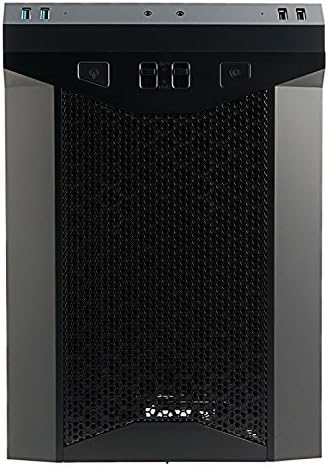
Billede: Forside view of the Antec P50 Window R PC Case, showing the mesh intake and front panel controls.
3. Betjening
3.1 Kontrolelementer og porte på frontpanelet
Frontpanelet giver nem adgang til:
- Power knap: For at tænde eller slukke systemet.
- Nulstil knap: For at genstarte systemet.
- USB 3.0-porte (x2): Til højhastigheds dataoverførsel.
- USB 2.0-porte (x2): Til standard USB-enheder.
- Lydstik: Til hovedtelefoner og mikrofon.
- Ventilatorstyring: Two fan control switches are available to adjust fan speeds for optimal balance between cooling and noise.
3.2 Luftstrøm og køling
The P50 Window R features a dual-chamber structure designed for direct airflow, separating heat-generating components. The pre-installed fans and additional mounting options ensure efficient cooling for your system.
4. Vedligeholdelse
4.1 Rengøring af støvfiltre
Regularly clean the dust filters to maintain optimal airflow and prevent dust buildup inside the case. Dust filters are typically located at the front, top, and bottom (for the power supply intake). Gently remove them and clean with compressed air or rinse with water (ensure they are completely dry before reinstallation).
4.2 Generel rengøring
Brug en blød, damp cloth to clean the exterior surfaces of the case. Avoid abrasive cleaners. For interior cleaning, use compressed air to remove dust from components and internal surfaces.
5. Fejlfinding
5.1 Systemet tænder ikke
- Sørg for, at alle strømkabler (24-bens ATX, 8-bens CPU, GPU-strøm) er korrekt tilsluttet til bundkortet og komponenterne.
- Kontroller, at strømforsyningsafbryderen er i 'ON'-positionen.
- Kontroller, at kablet til strømafbryderen på frontpanelet er korrekt tilsluttet bundkortets header.
5.2 Overdreven støj
- Kontroller, om der er kabler, der blokerer ventilatorbladene.
- Sørg for, at alle ventilatorer er monteret forsvarligt.
- Utilize the front panel fan controls to adjust fan speeds.
5.3 Dårlig køleydelse
- Clean all dust filters to ensure unrestricted airflow.
- Verify that fans are oriented correctly (intake/exhaust).
- Ensure proper cable management to avoid blocking airflow.
5.4 Front Panel USB/Audio Ports Not Working
- Confirm that the front panel USB and audio cables are correctly connected to the corresponding headers on your motherboard.
6. Specifikationer
| Feature | Detalje |
|---|---|
| Modelnavn | P50 WINDOW R |
| Sagstype | Mid Tower |
| Bundkort kompatibilitet | Micro ATX, Mini-ITX |
| Mål (D x B x H) | 355mm x 260mm x 355mm (13.98"D x 355"H) |
| Materiale | Polycarbonat (PC) |
| Drive Bays | 1 x 5.25" (external), 3 x 3.5" HDD, 2 x 2.5" SSD |
| Udvidelsesslots | 4 |
| Front I / O-porte | 2 x USB 3.0, 2 x USB 2.0, Audio In/Out, 2 x Fan Controls |
| Forudinstallerede ventilatorer | Front: 2 x 120mm, 1 x 80mm; Rear: 1 x 80mm |
| Væskekøling Support | 240mm radiator (front/top) |
| Max Video Card Size | 300 mm |
| Max CPU kølerhøjde | 130 mm |
| Strømforsyning Montering | Bundmontering |
| Varens vægt | 11.7 pund |
7. Garantioplysninger
The Antec P50 Window R PC Case comes with a Limited Warranty period (parts): 1 year. Please retain your proof of purchase for warranty claims. For specific terms and conditions, refer to the official Antec webwebsted eller kontakt kundesupport.
8. Support
For further assistance, technical support, or to inquire about replacement parts, please visit the official Antec website or contact their customer service department. You can often find FAQs, driver downloads, and additional resources on the manufacturer's support pages.
Antec Officiel Webwebsted: www.antec.com