
1. Introduktion
Tak for købetasing the iBall UFO Bluetooth Portable Speaker. This manual provides essential information for the safe and efficient operation of your device. Please read it thoroughly before use and retain it for future reference.
2. Sikkerhedsoplysninger
- Udsæt ikke højttaleren for ekstreme temperaturer, fugtighed eller direkte sollys.
- Undgå at tabe eller udsætte højttaleren for kraftige stød.
- Du må ikke selv adskille, reparere eller ændre højttaleren. Kontakt kvalificeret servicepersonale.
- Keep the speaker away from water and other liquids. While the product is indicated as waterproof, prolonged submersion or exposure to high-pressure water jets should be avoided.
- Brug kun det medfølgende eller anbefalede opladningskabel.
- Do not operate the speaker at excessively high volumes for extended periods to prevent hearing damage.
3. Pakkens indhold
Markér venligst feltet for følgende elementer:
- iBall UFO Bluetooth Portable Speaker
- USB opladningskabel
- 3.5 mm lydkabel
- Bær pose
- Brugermanual
4. Produktet er slutview
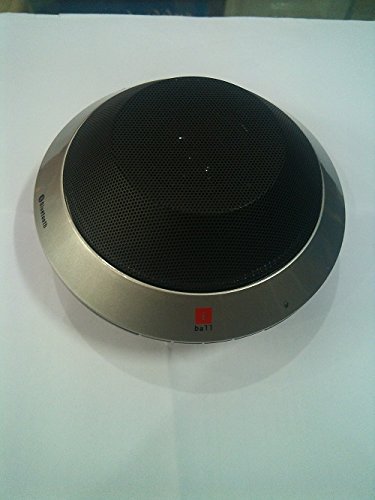
Image: The iBall UFO Bluetooth Portable Speaker, showcasing its distinctive silver UFO-shaped design and black speaker grille. The iBall logo is visible on the front edge.
The iBall UFO is a compact and stylish portable Bluetooth speaker designed for hands-free audio playback and calls. It features a unique UFO-inspired design and delivers clear sound through its 2-inch full-range driver.
Nøglefunktioner:
- Bluetooth-forbindelse til trådløs lydstreaming.
- Hands-free conversation support with built-in microphone.
- Attractive UFO design.
- Rechargeable Lithium Battery (1050mAH).
- Aux-indgang til kabelbaserede forbindelser.
5. Opsætning
5.1 Opladning af højttaleren
- Tilslut den lille ende af USB-opladerkablet til opladningsporten på højttaleren.
- Tilslut den store ende af USB-opladerkablet til en USB-strømadapter (medfølger ikke) eller en computers USB-port.
- Opladningsindikatorlampen lyser.
- En fuld opladning tager cirka 4 timer. Indikatorlampen skifter eller slukker, når opladningen er færdig.
5.2 Bluetooth -parring
- Sørg for, at højttaleren er fuldt opladet.
- Tryk på tænd/sluk-knappen og hold den nede for at tænde højttaleren. Den vil automatisk gå i Bluetooth-parringstilstand, hvilket indikeres af et blinkende LED-lys.
- On your Bluetooth-enabled device (smartphone, tablet, PC), go to the Bluetooth settings and enable Bluetooth.
- Søg efter available devices. You should see "iBall UFO" or a similar name in the list.
- Select "iBall UFO" to connect. Once paired, the speaker will emit a confirmation sound, and the LED light will stop flashing and remain solid.
- Hvis du bliver bedt om en adgangskode, skal du indtaste "0000".
6. Betjeningsvejledning
6.1 Tænd/sluk
- To Power On: Press and hold the Power button until the indicator light illuminates.
- To Power Off: Press and hold the Power button until the indicator light turns off.
6.2 Musikafspilning
- Once paired via Bluetooth, you can play music from your connected device.
- Use the controls on your connected device to play, pause, skip tracks, and adjust volume.
- Alternatively, connect your device using the 3.5mm audio cable to the AUX input for wired playback.
6.3 Håndfri opkald
The iBall UFO speaker supports hands-free calls when connected to a Bluetooth-enabled mobile phone.
- To Answer a Call: Press the Multi-function button (usually the Play/Pause button).
- To End a Call: Press the Multi-function button again.
- To Reject a Call: Press and hold the Multi-function button.
- To Redial Last Number: Double-press the Multi-function button.
7. Vedligeholdelse
- Rengør højttaleren med en blød, tør klud. Brug ikke slibende rengøringsmidler eller opløsningsmidler.
- Opbevar højttaleren på et køligt, tørt sted, når den ikke er i brug.
- Avoid exposing the speaker to dust or dirt, which can affect performance.
8. Fejlfinding
| Problem | Mulig årsag | Løsning |
|---|---|---|
| Højttaleren tænder ikke. | Batteriet er lavt eller afladet. | Oplad højttaleren helt. |
| Kan ikke parre med Bluetooth-enhed. | Højttaleren er ikke i parringstilstand; enhedens Bluetooth er slået fra; for langt fra højttaleren. | Ensure speaker is in pairing mode (flashing LED). Turn on Bluetooth on your device. Move device closer to speaker (within 10 meters). Forget previous pairings on your device and try again. |
| Ingen lyd. | Lydstyrken er for lav; højttaleren er ikke tilsluttet; forkert lydkilde. | Increase volume on both speaker and connected device. Ensure successful Bluetooth connection or AUX cable is properly inserted. Check if the correct audio output is selected on your device. |
| Dårlig lydkvalitet. | Interferens; lavt batteri; enhed for langt væk. | Move speaker away from other electronic devices. Charge the speaker. Move device closer to speaker. |
9. Specifikationer
- Model: UFO
- Mærke: iBall
- Forbindelse teknologi: Bluetooth, ekstraudstyr
- Højttalertype: Bogreol (bærbar)
- Strømkilde: Batteridrevet
- Batterilevetid: Op til 4 timer
- Opladningstid: Cirka 4 timer
- Driver størrelse: 2-tommer fuldtoneområde
- Batterikapacitet: 1050mAH Lithium Rechargeable Battery
- Speciel funktion: Indbygget mikrofon til håndfri opkald
- Farve: Sølv
- Varens vægt: 500 g
- Pakkedimensioner: 16.6 x 16.4 x 7.4 cm
10. Garanti og support
The iBall UFO Bluetooth Portable Speaker comes with a standard manufacturer's warranty. Please refer to the warranty card included in your package for specific terms and conditions, including the warranty period and coverage details.
For technical support, service, or warranty claims, please contact iBall customer service through their official webwebstedet eller kontaktoplysningerne i din produktdokumentation. Hav din købskvittering og produktets serienummer klar, når du kontakter support.
Juridisk ansvarsfraskrivelse: Tjek venligst dine lokale love før købasing og brug af dette produkt.