
Pronomic PT-6 MKII
Pronomic PT-6 MKII Projector and Beamer Cart User Manual
Model: PT-6 MKII (00037291)
Mærke: Pronomic
1. Introduktion
Welcome to the user manual for the Pronomic PT-6 MKII Projector and Beamer Cart. This manual provides essential information for the safe and efficient assembly, operation, and maintenance of your new cart. Please read this manual thoroughly before use and retain it for future reference.
2. Sikkerhedsinstruktioner
- Sørg for, at alle komponenter er forsvarligt fastgjort før brug.
- Do not exceed the maximum load capacity of 10 kg (22 lbs) per shelf.
- Use caution when adjusting height and tilt to prevent pinching.
- Engage wheel brakes when the cart needs to remain stationary.
- Keep away from children and pets during assembly and operation.
- Do not use the cart on uneven or unstable surfaces.
3. Pakkens indhold
Kontroller, at alle dele er til stede, før monteringen påbegyndes.
- Main vertical pole
- Base with 4 casters (2 with brakes)
- Upper shelf (approx. 30 x 35 cm)
- Lower shelf (approx. 35 x 40 cm)
- Mounting hardware (screws, knobs, etc.)
- Monteringsvejledning

Image: All components of the Pronomic PT-6 MKII Projector Cart laid out, showing the main pole, base with wheels, and two adjustable shelves.
4. Opsætning og montering
Follow these steps for proper assembly. It is recommended to have a clear, flat workspace.
Fastgør basen: Connect the main vertical pole to the base with the four casters. Ensure the locking mechanism is secure.
Image: The base of the cart with four wheels attached to the main vertical pole.
Installer hylder: Attach the two shelves to the main pole using the provided mounting hardware. The shelves are independently adjustable for height and tilt.

Image: The two shelves mounted on the main pole, showing their relative positions.
Secure Adjustments: Tighten all knobs and fasteners to ensure stability. The smaller shelf can rotate 360 degrees, and both shelves can tilt +/- 35 degrees.

Billede: Et nærbillede view of the black adjustment knob used to secure the shelf's tilt and height.
Tjek stabilitet: Before placing any equipment, gently test the cart's stability and ensure all wheels roll freely and brakes engage correctly.

Billede: Forside view of the assembled Pronomic PT-6 MKII cart, showing both shelves and the base with wheels.
5. Betjeningsvejledning
The Pronomic PT-6 MKII is designed for versatile use with projectors, laptops, and other equipment.
Højdejustering
The cart's height can be adjusted steplessly from 70 cm to 110 cm (27.5 to 43.3 inches). Loosen the height adjustment knob on the main pole, set to the desired height, and re-tighten securely.
Shelf Tilt Adjustment
Both shelves can be tilted +/- 35 degrees. Loosen the tilt adjustment knobs located beneath each shelf, adjust the angle, and then firmly re-tighten the knobs.
Shelf Rotation
The smaller upper shelf can be rotated 360 degrees independently. This allows for optimal positioning of a projector or laptop.
Mobility and Braking
The cart is equipped with four smooth-rolling casters. Two of these casters have brakes. To move the cart, ensure brakes are disengaged. To secure the cart in place, press down on the brake levers on the two braked casters until they click into position.
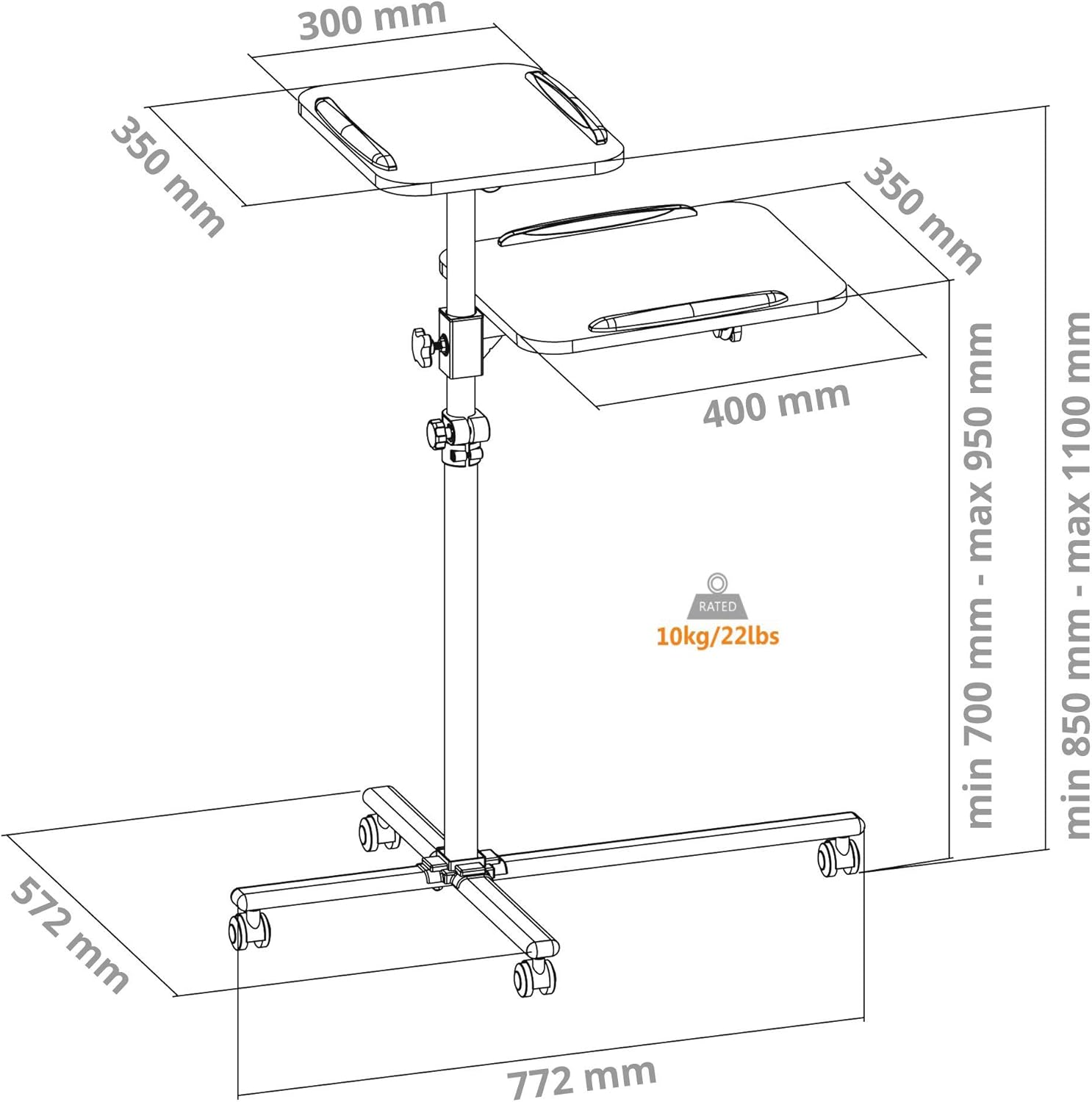
Image: Technical drawing of the Pronomic PT-6 MKII showing key dimensions including height range (min 700mm - max 1100mm), shelf sizes (300x350mm and 350x400mm), and overall base dimensions (772mm x 572mm). It also indicates a 10kg/22lbs load capacity.
6. Vedligeholdelse
To ensure the longevity and optimal performance of your Pronomic PT-6 MKII cart, follow these simple maintenance guidelines:
- Rensning: Tør overfladerne af med en blød,amp klud. Undgå slibende rengøringsmidler eller opløsningsmidler, der kan beskadige overfladen.
- Fastgørelsesmidler: Periodically check all screws, knobs, and fasteners to ensure they are tight. Re-tighten as necessary to maintain stability.
- Hjul: Keep the casters free of dust, hair, and debris to ensure smooth movement. Lubricate if necessary.
- Opbevaring: Store the cart in a dry, temperate environment when not in use.
7. Fejlfinding
This section addresses common issues you might encounter with your Pronomic PT-6 MKII cart.
| Problem | Mulig årsag | Løsning |
|---|---|---|
| Cart is wobbly/unstable. | Løse fastgørelseselementer; ujævn overflade; overbelastet. | Check and tighten all screws and knobs. Move cart to a flat, stable surface. Reduce load to within specifications. |
| Hjulene ruller ikke jævnt. | Affald i hjulene; bremserne er aktiveret. | Clear any debris from casters. Ensure brakes are fully disengaged. |
| Shelf does not hold position after adjustment. | Justeringsknappen er ikke strammet tilstrækkeligt. | Sørg for, at justeringsknappen er strammet godt efter indstilling af den ønskede højde eller hældning. |
If you encounter issues not listed here, please contact Pronomic customer support.
8. Specifikationer
Detailed technical specifications for the Pronomic PT-6 MKII Projector and Beamer Cart.
- Model: PT-6 MKII (00037291)
- Mærke: Pronomisk
- Materiale: Metal, Plast
- Farve: Hvid
- Upper Shelf Dimensions: Ca. 30 x 35 cm (11.8 x 13.8 tommer)
- Lower Shelf Dimensions: Ca. 35 x 40 cm (13.8 x 15.7 tommer)
- Belastningskapacitet pr. hylde: 10 kg (22 lbs)
- Justerbar højde: 70 cm til 110 cm (27.5 til 43.3 tommer)
- Shelf Tilt Adjustment: +/- 35 grader
- Small Shelf Rotation: 360 grader
- Hjul: 4 swivel casters (2 with brakes)
- Base Dimensions (assembled): Approx. 77.2 cm x 57.2 cm (30.4 x 22.5 inches)
- Vægt: 7.31 kg (16.1 lbs)
9. Garanti og support
For warranty information and customer support, please refer to the documentation provided at the time of purchase or visit the official Pronomic webwebsted.
Fabrikant: Pronomisk
Første tilgængelige dato: 15. januar 2020
Ask a question about this manual
Ask about setup, troubleshooting, compatibility, parts, safety, or missing instructions. Manuals+ will review the question and use this page’s manual context to help answer it.